
1. Introduzione
This manual provides detailed instructions for the operation and maintenance of your Boytone BT-101WT Bluetooth Turntable Briefcase Record Player. Please read this manual thoroughly before using the device to ensure proper function and to prevent damage.
The Boytone BT-101WT is a portable briefcase-style record player featuring Bluetooth connectivity, a built-in rechargeable battery, and dual stereo speakers. It supports 3-speed vinyl playback (33/45/78 RPM), FM radio, and includes an LCD display. The unit offers USB/SD card slots for MP3 playback and direct encoding of vinyl records, FM radio, or AUX input to MP3 files without requiring a computer. It also includes RCA line-out, AUX input, and a headphone jack. The device operates on AC-DC power (110V & 220V compatible).
2. Istruzzioni di sicurità
- Leghjite tutte l'istruzzioni prima di operare l'unità.
- Mantene u manuale per riferimentu futuru.
- Ùn espone micca l'unità à a pioggia o l'umidità.
- Ùn bluccate micca l'aperture di ventilazione.
- Assicuratevi chì l'adattatore di alimentazione abbia un vulumetage currisponde à a vostra alimentazione lucale.
- Prutegge u cordone di alimentazione da esse camminatu o pizzicatu.
- Scollegate l'unità durante e tempeste di fulmini o quandu ùn hè micca utilizatu per longu periodi.
- Riferite tutte l'assistenza à u persunale di serviziu qualificatu.
- Do not open the unit casing.
- Evitate di mette l'unità vicinu à fonti di calore o in luce diretta di u sole.
3. Cuntenutu di u pacchettu
Verificate chì tutti l'articuli elencati quì sottu sò inclusi in u vostru pacchettu:
- Boytone BT-101WT Turntable Unit
- Adattatore di alimentazione AC/DC
- Cavu USB
- Manuale d'istruzzioni
- Adattatore 45 RPM
- Anti-Static Flat Mat (may be pre-installed)
4. Produttu Finituview
Familiarize yourself with the components of your BT-101WT unit.

Figure 4.1: Boytone BT-101WT Turntable in open position, showcasing the record player, speakers, and control panel.
4.1 Pannelli di fronte è di daretu

Figura 4.2: Top view showing the control panel with USB, SD, and AUX IN ports. Bottom view showing the power input, RCA line out, and AUX OUT ports.
- Piattu Turntable: Area where records are placed for playback.
- Bracciu di tonu: Tene u stylus è traccia i solchi di u discu.
- Stilu (Agulla): Reads the audio information from the record grooves.
- Selettore di velocità: Switch to select playback speed (33, 45, or 78 RPM).
- Interruttore di stop automaticu: Enables or disables automatic stopping of the platter at the end of a record.
- Manetta di potenza/volume: Turns the unit on/off and adjusts the audio output volume.
- Function/Mode Button: Cycles through input sources (Phono, Bluetooth, FM, USB/SD, AUX).
- Display LCD: Shows current mode, track information, and FM frequency.
- Port USB: For connecting a USB flash drive for playback or MP3 encoding.
- Slot per carta SD: For inserting an SD card for playback or MP3 encoding.
- Jack AUX IN: Ingressu di 3.5 mm per cunnette dispositivi audio esterni.
- Jack per cuffie: 3.5mm output for private listening with headphones.
- RCA Line Out Jacks: Stereo output for connecting to external amplifiers o altoparlanti alimentati.
- Jack IN DC: Connection point for the AC/DC power adapter.
- Altoparlanti integrati: Altoparlanti stereo integrati per l'uscita audio.
4.2 Control Panel Details

Figure 4.3: Close-up of the control panel, highlighting the LCD display, function buttons, USB port, SD card slot, and AUX IN jack.
The control panel features buttons for playback control (Play/Pause, Skip Forward/Backward), recording (REC), deleting files (DEL), and mode selection. The LCD display provides visual feedback on the selected function and media status.
5. Setup
5.1 Cunnessione di putenza
- Assicuratevi chì l'unità sia posta nantu à una superficia stabile è piana.
- Connect the AC/DC power adapter to the DC IN jack on the rear of the unit.
- Inserite l'adattatore in una presa murale.
- Alternatively, the unit has a built-in rechargeable battery for portable use. Ensure it is charged before first use.
5.2 Configurazione iniziale
- Open the briefcase lid.
- Eliminate u capu protettivu da u stylus.
- If not already in place, position the anti-static flat mat on the turntable platter.
- Turn the Power/Volume knob clockwise to power on the unit. The LCD display will illuminate.
6. Operating Instructions
6.1 Riproduzione di dischi

Figure 6.1: Illustration of the 3-speed control (33, 45, 78 RPM) for different record sizes (7", 10", 12").
- Mettite un discu nantu à u platu di u turntable.
- Select the appropriate speed (33, 45, or 78 RPM) using the speed selector switch, matching the record's speed.
- If playing a 45 RPM single, place the included 45 RPM adapter on the center spindle.
- Alzate u bracciu di u sonu aduprendu a leva di cue è pusiziunatelu sopra a traccia desiderata nantu à u discu.
- Gently lower the tone arm onto the record using the cue lever. Playback will begin.
- Ajustate u vulume cù u buttone Power/Volume.
- At the end of the record, if the Auto Stop switch is ON, the turntable will stop spinning automatically. If OFF, it will continue to spin.
- To stop playback manually, lift the tone arm and return it to its rest.
6.2 Funzionamentu Bluetooth
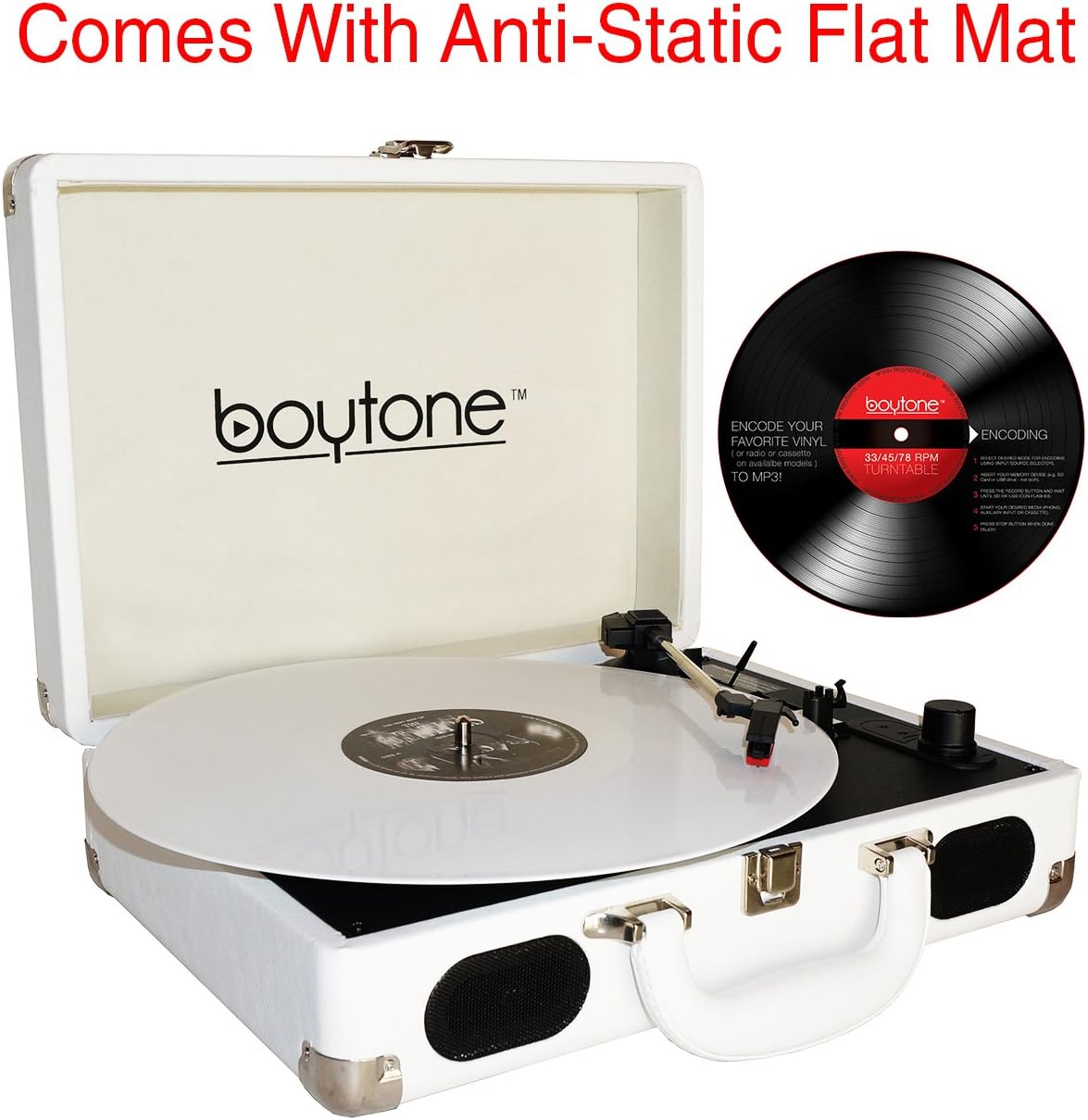
Figure 6.2: Visual representation of a smartphone wirelessly connecting to the BT-101WT via Bluetooth.
- Accende l'unità.
- Press the Mode button repeatedly until "BT" appears on the LCD display. The unit will enter Bluetooth pairing mode, indicated by a flashing "BT".
- Attivate Bluetooth nant'à u vostru smartphone o altru dispositivu cumpatibile cù Bluetooth.
- Cerca "Boytone BT-101WT" in your device's Bluetooth settings and select it to pair.
- Once paired, "BT" will stop flashing and remain solid. You can now stream audio from your device to the turntable.
- Control playback (play/pause, skip) from your connected device. Adjust volume using the turntable's volume knob or your device's volume controls.
6.3 Funziunamentu di a Radio FM
- Accende l'unità.
- Press the Mode button repeatedly until "FM" appears on the LCD display.
- To auto-scan and save stations, press and hold the Play/Pause button. The unit will scan for available FM stations and store them.
- Use the Skip Forward/Backward buttons to navigate through saved stations.
- Ajustate u vulume cù u buttone Power/Volume.
6.4 Riproduzione USB/SD
- Inserite una unità flash USB in u portu USB o una carta SD in u slot di a carta SD.
- Press the Mode button repeatedly until "USB" or "SD" appears on the LCD display. The unit will automatically begin playing MP3/WMA files da i media inseriti.
- Use the Play/Pause, Skip Forward/Backward buttons to control playback.
- Ajustate u vulume cù u buttone Power/Volume.
6.5 MP3 Encoding (Recording)
The BT-101WT can convert audio from Vinyl, FM Radio, or AUX input directly to MP3 files su una unità USB o una carta SD.
- Insert a USB flash drive or SD card into the corresponding slot. Ensure it has sufficient free space.
- Select the desired source for recording (Phono, FM, or AUX IN) using the Mode button.
- Start playback on the source (e.g., begin playing a record, tune to an FM station, or play audio from an AUX-connected device).
- Press the "REC" button on the control panel. The recording indicator will illuminate, and the unit will begin converting the audio to MP3.
- To stop recording, press the "REC" button again. The recording will be saved as an MP3 file on your USB drive or SD card.
- Per sguassà un arregistratu file, navigate à u file in USB/SD playback mode and press the "DEL" button.
6.6 AUX Input and Output
- AUX IN: Connect an external audio device (e.g., smartphone, MP3 player) to the AUX IN jack using a 3.5mm audio cable. Press the Mode button until "AUX" appears on the display. Audio from the external device will play through the turntable's speakers.
- RCA Line Out: Connect the RCA Line Out jacks on the rear of the unit to an external amplifier or powered speakers using RCA cables for enhanced audio output.
- Jack per cuffie: Plug standard 3.5mm headphones into the headphone jack for private listening. This will mute the built-in speakers.
7. Mantenimentu
7.1 Pulizia di l'unità
- Asciugate l'esternu di l'unità cù un pannu dolce è asciuttu.
- Ùn aduprate micca detergenti abrasivi, cere o solventi.
7.2 Cura di u Stilu
- Handle the stylus with care. Avoid touching the tip.
- Pulite u stilu periodicamente cù una spazzola dolce, spazzolendu da daretu à davanti.
- A worn stylus can damage records and degrade sound quality. Replace the stylus when sound quality deteriorates.
7.3 Cura di i registri
- Keep records clean and free of dust. Use an anti-static brush before each play.
- Conservate i dischi verticalmente in e so maniche per impedisce a deformazione.
8. Risoluzione di prublemi
| Prublemu | Causa Possibile | Soluzione |
|---|---|---|
| Nisun putere | Power adapter not connected; Unit not turned on; Battery drained. | Check power connection; Turn Power/Volume knob clockwise; Charge the battery. |
| Nisun sonu da i diffusori | Vulume troppu bassu; Cuffie cunnesse; Modu incorrectu sceltu. | Increase volume; Disconnect headphones; Select correct mode (Phono, BT, FM, USB/SD, AUX). |
| Turntable ùn gira micca | Unit not powered on; Tone arm not lifted; Auto Stop engaged at end of record. | Ensure power is on; Lift tone arm from rest; Check Auto Stop switch. |
| Bluetooth ùn hè micca accoppiatu | Unit not in pairing mode; Device too far; Bluetooth already connected to another device. | Ensure "BT" is flashing; Move device closer; Disconnect from other devices. |
| Poor sound quality / Skipping records | Dirty stylus; Worn stylus; Dirty record; Unit not on a stable surface. | Clean stylus; Replace stylus; Clean record; Place unit on a stable, level surface. |
9. Specificazioni
- Mudellu: BT-101WT
- Fonte di energia: AC/DC Adapter (110V/220V), Built-in Rechargeable Lithium-Ion Battery
- Velocità di turntable: 33 1/3, 45, 78 RPM
- Oratori: 2 x altoparlanti stereo integrati
- Connettività: Bluetooth, USB, SD Card, AUX IN (3.5mm), RCA Line Out (Stereo)
- Radio: FM Stereo
- Codificazione: Direct MP3 encoding from Vinyl, FM, AUX to USB/SD
- Jack per cuffie: 3.5 mm
- Dimensioni (pacchettu): 16 x 13.1 x 6 inch
- Pesu: 7 liri
- Materiale: Plastica
10. Garanzia è Support
Stu pruduttu hè sustinutu da un 1 Year direct Boytone USA warranty. For warranty claims or technical support, please contact Boytone customer service. Refer to the official Boytone websitu o a vostra ducumentazione d'acquistu per i dettagli di cuntattu.
Boytone Customer Service: Per piacè visitate the Boytone Store on Amazon or the official Boytone websitu per infurmazioni di supportu.