
iLuv bbgtwsairbl
iLuv Bubble Gum True Wireless Earbuds (Blue) - User Manual
Model: bbgtwsairbl
Introduzione
This manual provides essential information for the proper use and maintenance of your iLuv Bubble Gum True Wireless Earbuds. Please read this manual thoroughly before using the product to ensure optimal performance and longevity.
The iLuv Bubble Gum True Wireless Earbuds are designed for a seamless audio experience, featuring true wireless connectivity, simple controls, and a waterproof design for versatile use.
Cuntenutu di u pacchettu
- iLuv Bubble Gum True Wireless Earbuds (Left and Right)
- Casu di carica
- Cavu di carica USB
- Manuale d'uso (stu documentu)
- Changeable Eartips (various sizes)
Product Overview
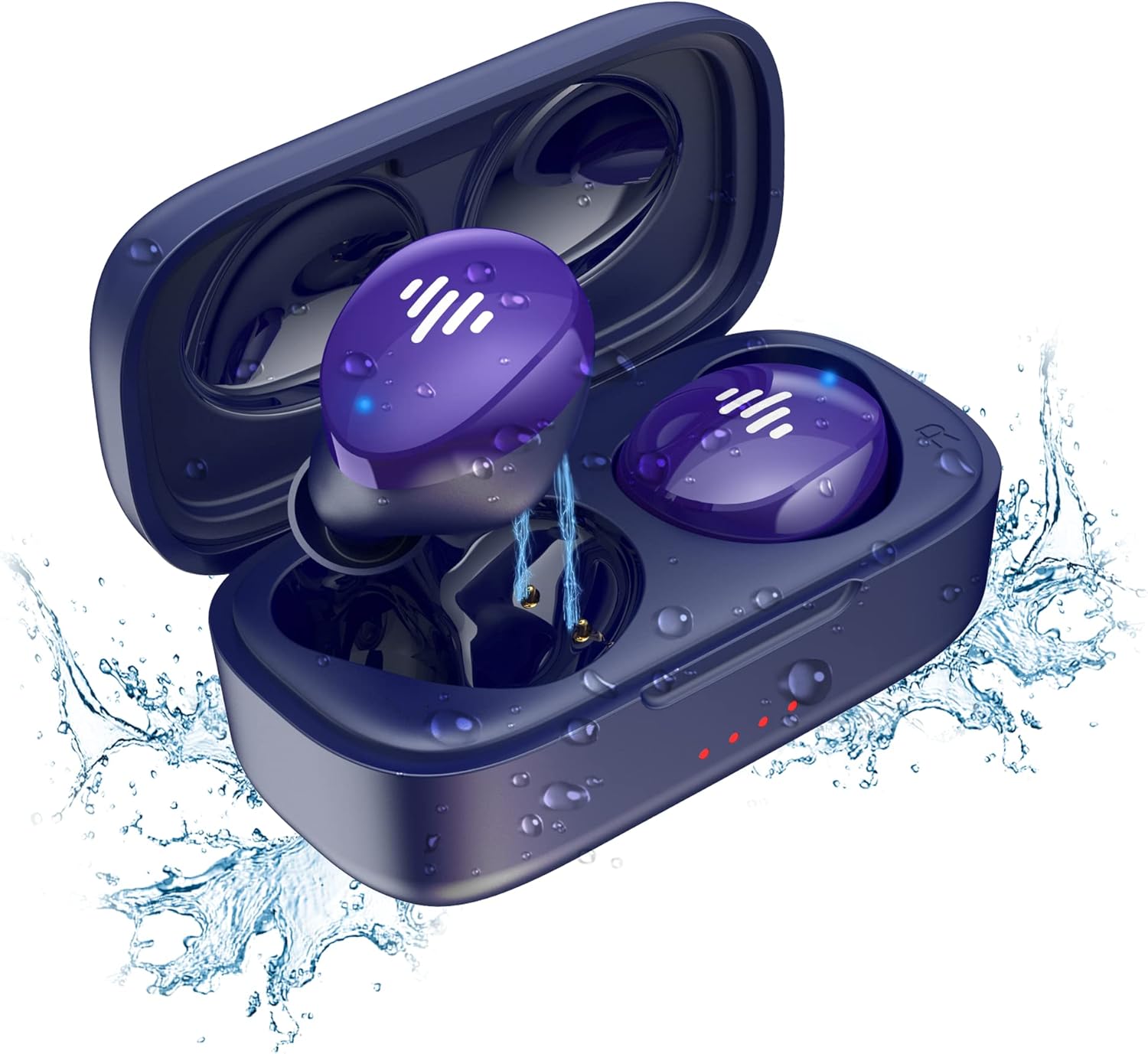
Figure 1: iLuv Bubble Gum True Wireless Earbuds and Charging Case. The image displays the blue earbuds inside their open charging case, surrounded by water droplets, highlighting their waterproof feature. The earbuds are a vibrant purple-blue with white indicator lights, and the case has small red indicator lights on the front.
The iLuv Bubble Gum True Wireless Earbuds consist of two independent earbuds (left and right) and a portable charging case. The earbuds are designed to fit comfortably in the ear and provide high-quality audio. The charging case not only protects the earbuds but also recharges them on the go.
Funzioni chjave:
- Tecnulugia True Wireless Stereo (TWS).
- Bluetooth 5.0 for stable connectivity
- Up to 20 hours of total listening time (with charging case)
- Simple, intuitive touch controls
- Disegnu impermeabile
- Accoppiamentu in un passu
Istituisci
1. Caricamentu di l'auricolari è di a custodia
Prima di u primu usu, caricate cumpletamente sia l'auricolari sia a custodia di ricarica.
- Place the earbuds into the charging case, ensuring they are correctly seated in their respective slots (L for left, R for right).
- Connect the USB charging cable to the charging port on the case and the other end to a USB power source (e.g., wall adapter, computer USB port).
- L'indicatori luminosi nantu à a custodia di carica s'illuminanu per mustrà u statu di carica. Una volta cumpletamente carica, i luci ponu diventà fissi o spegnersi, secondu u mudellu.
- The earbuds will also show an indicator light while charging inside the case, which will turn off or change color when fully charged.
2. Accoppiamentu cù u vostru dispositivu
L'auricolari sò dotati di accoppiamentu in un solu passu per a comodità.
- Aprite a custodia di carica. L'auricolari entreranu automaticamente in modalità di accoppiamentu.
- Nant'à u vostru apparechju (smartphone, tableta, urdinatore), andate à i paràmetri Bluetooth.
- Assicuratevi chì Bluetooth sia attivatu.
- Cerca available devices. You should see "iLuv Bubble Gum TWS" or a similar name.
- Select the earbuds from the list to connect. Once connected, you will hear an audible confirmation, and the earbud indicator lights may turn off or flash slowly.
- Sè l'accoppiamentu fiasca, rimettite l'auricolari in a custodia, chjude u coperchio, aspettate uni pochi di secondi, è poi ripetite i passi.
Nota: L'auricolari si ricunnetteranu automaticamente à l'ultimu dispositivu accoppiatu quandu sò estratti da a custodia, se u Bluetooth hè attivatu nantu à u dispositivu.
Istruzzioni di funziunamentu
Cuntrolli Touch:
The iLuv Bubble Gum True Wireless Earbuds feature intuitive touch controls on each earbud. The specific functions may vary slightly, but common controls include:
| Azzione | Funzione |
|---|---|
| Toccu unicu (sinistra/destra) | Riproduce/Mette in pausa a musica, Rispondi/Fine chjama |
| Doppiu toccu (cuffia diritta) | Next Track |
| Doppiu toccu (cuffia sinistra) | Pista Precedente |
| Triplu Toccu (Sinistra/Destra) | Attivà Voice Assistant (Siri, Google Assistant) |
| Pressione Longa (2 secondi) | Reject Call |
Please refer to the specific control scheme provided in your product's quick start guide if it differs.
Portà l'auriculare:
For optimal sound quality and comfort, choose the correct size eartips. Gently insert each earbud into your ear canal and twist slightly to secure a snug fit. The "L" and "R" markings indicate the left and right earbuds, respectively.
Mantenimentu
Pulizia:
Una pulizia regulare aiuta à mantene a qualità di u sonu è l'igiene.
- Aduprate un pannu dolce, asciuttu è senza pelu per asciugà l'auricolari è a custodia di ricarica.
- Per a sporcizia ostinata, d ligeramenteampSciacquate u pannu cù acqua. Ùn aduprate micca prudutti chimichi aggressivi o materiali abrasivi.
- Gently clean the earbud mesh and charging contacts with a dry cotton swab or a soft brush.
- Ensure the earbuds and charging case are completely dry before placing them back in the case or charging.
Conservazione:
Quandu ùn sò micca in usu, conservate l'auricolari in a so custodia di ricarica per prutegeli è manteneli carichi. Conservate a custodia in un locu frescu è asciuttu, luntanu da a luce diretta di u sole è da temperature estreme.
Resistenza à l'acqua:
The earbuds are waterproof. However, this does not mean they are suitable for swimming or prolonged submersion. They are designed to withstand sweat, splashes, and light rain. Always ensure the charging port on the case is dry before charging.
Risoluzione di prublemi
| Prublemu | Soluzione Possibile |
|---|---|
| Earbuds ùn sò micca accoppiati |
|
| Solu un auricular funziona |
|
| Vulume bassu o qualità di sonu scarsa |
|
| Casu di carica ùn hè micca carica |
|
Specificazioni
| Feature | Detail |
|---|---|
| Nome di mudellu | bbgtwsairbl |
| Marca | iLuv |
| Connettività | Bluetooth 5.0 |
| Posizionamentu di l'arechja | In l'arechja |
| Fattore di forma | In l'arechja |
| Culore | Turchinu |
| Resistenza à l'acqua | Impermeabile |
| Autonomia di a batteria (Totale) | Finu à 20 ore (cun casu di ricarica) |
| Batterie | 2 batterie Lithium Ion (incluse) |
| Pesu di l'articulu | 3.52 once |
| Dimensioni di u produttu | 1.39 x 3.18 x 7.15 inch |
| U fabricatore | JWIN Electronics |
| UPC | 639247142220 |
Garanzia è Supportu
For warranty information and customer support, please visit the official iLuv websitu o cuntattate direttamente u so serviziu clienti. Conservate a vostra prova d'acquistu per e richieste di garanzia.
Official iLuv Websitu: www.iluv.com