
1. Introduzione
Thank you for choosing the EINCAR 7-inch Android 10.0 Car Stereo. This advanced multimedia system is designed to enhance your driving experience with features like GPS navigation, Bluetooth connectivity, Wi-Fi, and smartphone mirroring. This manual provides detailed instructions for installation, operation, and maintenance to ensure optimal performance and longevity of your device.

Image 1.1: The EINCAR 7-inch Android 10.0 Car Stereo unit, displaying the Android 10 interface, along with included accessories like the rear camera, GPS antenna, and wiring harnesses.
2. Informazioni di sicurezza
Please read all safety instructions carefully before installation and operation. Failure to follow these guidelines may result in injury or damage to the device or vehicle.
- Do not operate the device or watch videos while driving. Distracted driving can lead to serious accidents.
- Ensure proper wiring and insulation to prevent short circuits and electrical hazards.
- Cunsultate un prufessiunale per l'installazione sè ùn site micca sicuru di qualchì passu.
- Mantene u dispusitivu luntanu da l'acqua, l'umidità è e temperature estreme.
- Ùn pruvate micca di smuntà o mudificà l'unità. Questu annullerà a garanzia.
3. Cuntenutu di u pacchettu è pruduttu sopraview
3.1. Cuntenutu di u pacchettu
Verificate chì tutti l'articuli sò presenti in u pacchettu:

Imagine 3.1: Dettagliata view of the car stereo's dimensions, along with a clear display of all included accessories and the back panel connections.
- 1 x EINCAR 7-inch Android Car Stereo Unit
- 1 x Cavu d'alimentazione
- 2 x AV Cables
- 1 x Antenna GPS
- 2 x Cavi USB
- 2 x Install Brackets (with 4 x Screws)
- 1 x posteriore View Camera
- 1 x User Manual (Built-in)
3.2. Dimensioni di u produttu
The unit features a standard double DIN size for compatibility with most vehicles. Refer to the image below for precise measurements:
| Dimensione | Misurazione |
|---|---|
| Larghezza | 178 mm (7.01 inch) |
| Altezza | 100 mm (3.94 inch) |
| Depth (Main Unit) | 104 mm (4.09 inch) |
| Depth (Rear Section) | 45 mm (1.77 inch) |
3.3. Back Display Connections
The rear panel of the unit provides various ports for power, audio/video output, and external accessories.
- Power Cable Diagram connection point
- Locu Fuse
- RCA Output Sockets
- GPS Antenna connection point
4. Installazione
Installation of the car stereo requires careful attention to wiring and mounting. A wire diagram is provided with the unit to assist you. If you are not confident with the installation process, it is highly recommended to seek professional assistance.
- Muntamentu: Use the provided install brackets and screws to secure the unit in your vehicle's double DIN slot.
- Cunnessione di putenza: Connect the power cable according to the provided wiring diagram. Ensure correct positive, negative, and accessory wire connections.
- Cunnessioni di parlante: Connect your vehicle's speaker wires to the corresponding outputs on the stereo's wiring harness.
- Antenna GPS: Muntate l'antenna GPS in un locu cù una vista chjara view di u celu, tipicamente nantu à u cruscottu o sottu à u parabrisa.
- daretu View Camera: Installa a parte posteriore view camera at the back of your vehicle and connect its video output to the dedicated input on the stereo. Ensure the reverse trigger wire is connected for automatic display when reversing.
- Cunnessioni USB: Route the USB cables to an accessible location, such as the glove compartment or center console.
- Testu: Before fully reassembling your dashboard, perform a quick test to ensure all functions (power, audio, touch screen, GPS, camera) are working correctly.
5. Setup iniziale
After successful installation, power on the unit and follow these steps for initial configuration:
- Scelta di lingua: Upon first boot, you may be prompted to select your preferred language. The unit supports multiple OSD languages including German, French, Russian, Portuguese, Spanish, and English.
- Ora è Data: Set the correct time zone, date, and time. This can often be synchronized automatically via GPS or network time if connected to Wi-Fi.
- Cunnessione Wi-Fi:
- Andà à Settings > Rete è Internet > Wi-Fi.
- Attivà u Wi-Fi On.
- Select your desired Wi-Fi network from the list and enter the password.
- Once connected, you can browse the internet, download apps, and use online navigation.
- Configurazione GPS: The unit comes with pre-installed navigation. Ensure the GPS antenna is properly connected and positioned for optimal signal reception. You can also download and use other online map applications via Wi-Fi.
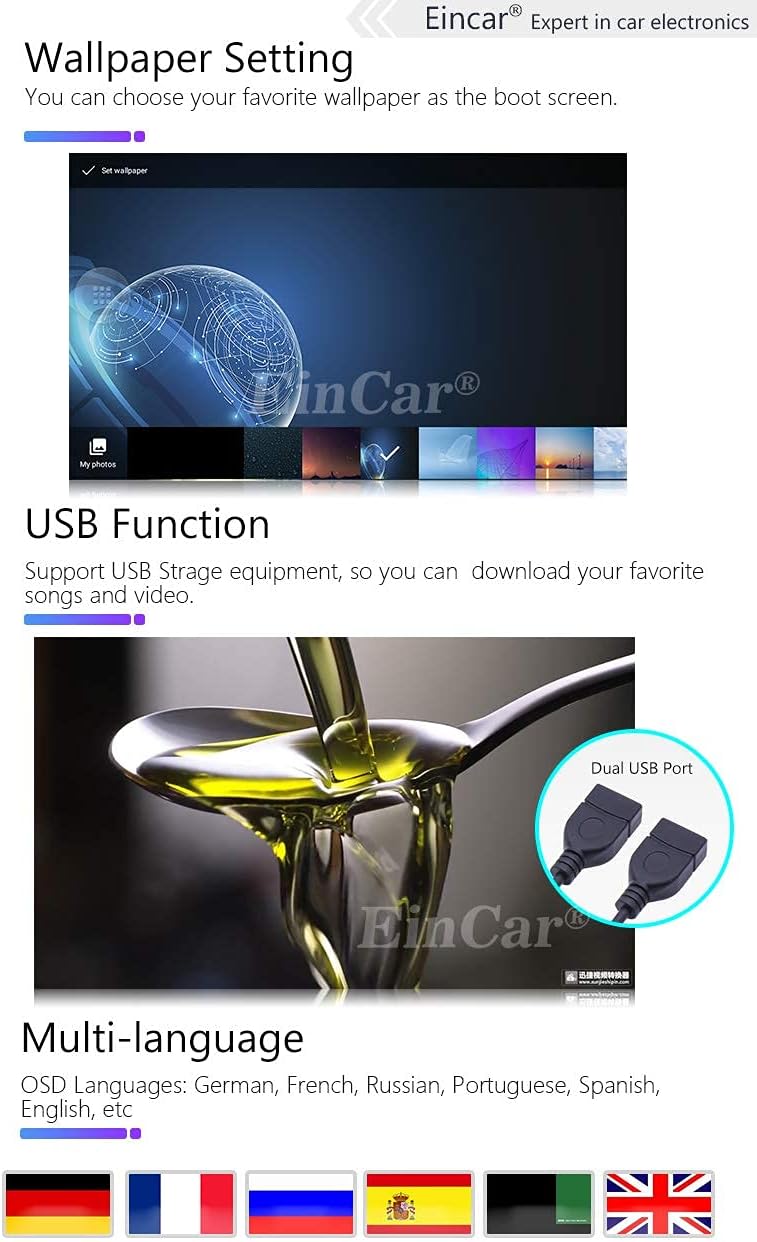
Image 5.1: Demonstrates the wallpaper setting feature, the dual USB port for storage, and the multi-language support of the system.
6. Operating Instructions
6.1. Main Interface Overview
The main interface provides quick access to key functions. Icons represent different applications or settings:

Image 6.1: Highlights the 7-inch capacitive HD touch screen with 1024*600 resolution and illustrates the main interface icons and their functions.
- Press to go to Google Map (or default navigation app).
- Press to go to Radio.
- Press to go to Music Play.
- Press to go to Bluetooth.
- Press to go to Video Play.
- Press to go to Settings.
6.2. Funzione Bluetooth
U modulu Bluetooth integratu permette di fà chjamate mani libere è di trasmette musica in streaming.
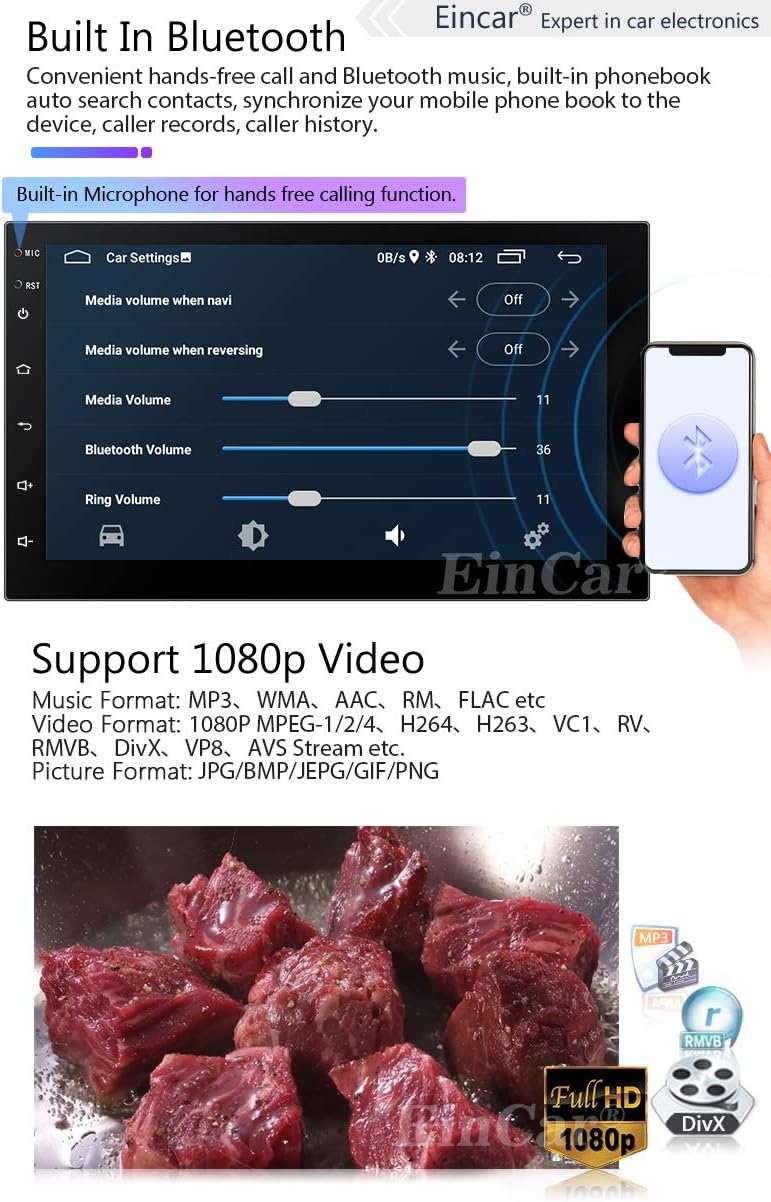
Image 6.2: Shows the Bluetooth interface for hands-free calling and confirms support for 1080p video playback with various media formats.
- Accoppiamentu: Enable Bluetooth on your mobile phone and search for the device (usually named "EINCAR" or similar). Select it and confirm pairing.
- Chjama senza mani: Once paired, you can make and receive calls directly from the stereo. The built-in microphone ensures clear communication.
- Rubrica: Download your phone's contacts to the stereo for easy access.
- Bluetooth Music (A2DP): Stream audio from your phone to the car stereo wirelessly.
6.3. Phone Link (Mirror Link)
Mirror Link allows you to display your smartphone's screen on the car stereo's display.

Image 6.3: Illustrates the Phone Link (Mirror Link) functionality for both Android and iPhone, along with Wi-Fi/3G/4G connectivity and access to Google Play.
- Per iPhone: Connect your iPhone to the stereo via Wi-Fi. The iPhone's display, including main menu, photos, videos, and online navigation, can be mirrored.
- Per Android: Connect your Android phone using a USB charging cable to the stereo's USB port. The Android smartphone's display will be mirrored.
6.4. Navigazione GPS
The unit supports both pre-installed offline maps and online navigation applications.

Image 6.4: Displays the GPS navigation interface showing a route, and explains the steering wheel control function for convenient operation.
- Carte fora di linea: Use the pre-loaded maps for navigation without an internet connection.
- Carte in linea: Connect to Wi-Fi (via hotspot from your phone or a dongle) to use online mapping services like Google Maps, Waze, etc., which provide real-time traffic updates.
6.5. Riproduzione multimediale
The stereo supports various audio and video formats for playback from USB drives or internal storage.
- Formati Video Supportati: 1080P MPEG-1/2/4, H264, H263, VC1, RV, RMVB, DivX, VP8, AVS Stream, etc.
- Formati di musica supportati: MP3, WMA, AAC, RM, FLAC, etc.
- Formati di stampa supportati: JPG/BMP/JEPG/GIF/PNG.
- Riproduzione USB: Insert a USB drive into one of the USB ports to access your media files.
6.6. Cuntrollu di u volante
The unit supports resistance-based analog signal input steering wheel controls, allowing you to manage basic functions without taking your hands off the wheel.
- Istituisci: Access the Steering Wheel Control settings in the system menu. Follow the on-screen instructions to map your vehicle's steering wheel buttons to the stereo's functions (e.g., volume up/down, track skip, answer call).
- Funzioni: Typically includes volume control, track/station change, mode switching, and call answer/end.
6.7. In daretu View Camera
A parte posteriore inclusa view a camera mostra automaticamente a parte posteriore view on the screen when the vehicle is put into reverse gear, aiding in parking and maneuvering.
- Ensure the camera is properly installed and connected to the dedicated camera input and reverse trigger wire.
7. Mantenimentu
- Pulizia: Aduprate un pannu dolce è asciuttu per pulisce u schermu è l'unità. Ùn aduprate micca detergenti abrasivi o solventi.
- Actualizazioni di u software: Verificate periodicamente u fabbricante website or contact support for available software updates to ensure optimal performance and access to new features.
- Temperature : Evitate d'espone l'unità à temperature estreme, sia calde sia fredde, postu chì questu pò influenzà e so prestazioni è a so durata di vita.
8. Risoluzione di prublemi
If you encounter issues with your EINCAR car stereo, refer to the following common problems and solutions:
| Prublemu | Possibile Causa / Soluzione |
|---|---|
| Nisun putere | Check power cable connections, fuse, and vehicle's power supply. Ensure the ignition is on. |
| Nisun sonu | Check speaker wiring, volume level, and audio source selection. Ensure mute is not activated. |
| Touch Screen Unresponsive | Restart the unit. If the problem persists, a factory reset might be needed (backup data first). |
| Segnale GPS persu / imprecisu | Assicuratevi chì l'antenna GPS sia cunnessa currettamente è chì abbia una visione chjara. view di u celu. Move si in una zona aperta. |
| Bluetooth ùn hè micca cunnessu | Ensure Bluetooth is enabled on both devices. Delete previous pairings and try re-pairing. Restart both devices. |
| A camera posteriore ùn si vede micca | Check camera video input connection and reverse trigger wire connection. Ensure camera is powered. |
For further assistance, please refer to the official help page via the card delivered with the package or contact EINCAR customer support.
9. Specificazioni
| Feature | Detail |
|---|---|
| Sistema upirativu | Android 10.0 |
| Size Screen | 7 inch |
| Tipu di visualizazione | Capacitive HD Touch Screen LCD |
| Risoluzione di u screnu | 1024 x 600 pixel |
| Processore | Quad Core |
| RAM | 1 GB |
| Storage internu | 16 GB |
| Connettività | Bluetooth, Wi-Fi, USB |
| GPS | Built-in GPS Module, supports online/offline maps |
| Input di l'interfaccia umana | Microfonu, Schermu tattile |
| Dispositivi compatibles | Smartphone |
| Tipu di Serviziu di Veiculu | Car |
| Dimensioni (L x H) | 178mm x 100mm (Double Din Standard) |
10. Garanzia è Support
EINCAR is committed to providing high-quality products and customer satisfaction. While specific warranty details are not provided in this manual, please retain your purchase receipt as proof of purchase.
For any issues, questions, or technical support, please contact EINCAR customer service. You can find contact information on the official help page via the card delivered with your package. Our support team aims to respond within 24 hours.
For the latest information, software updates, and additional resources, please visit the official EINCAR websitu.