1. Introduzione
This manual provides essential information for the safe operation, maintenance, and troubleshooting of your Coredy R580 Robot Vacuum Cleaner. Please read this manual thoroughly before using the product and retain it for future reference.
The Coredy R580 is a versatile robotic vacuum cleaner designed to simplify your cleaning routine. It features powerful 2000Pa suction, Wi-Fi connectivity for app control, and compatibility with voice assistants like Amazon Alexa and Google Assistant. It supports both sweeping and mopping functions (water tank and mop cloth sold separately) and can transition seamlessly from hard floors to carpets, automatically boosting suction when needed. Its slim design allows it to clean under furniture, and it supports virtual boundaries (strips sold separately) to define cleaning areas.
2. Istruzzioni di sicurità
- Leghjite tutte l'istruzzioni prima di aduprà l'apparechju.
- Do not allow children to play with the robot. Supervise children and pets when the robot is operating.
- Aduprate solu l'adattatore di alimentazione originale furnitu da u fabricatore.
- Ùn aduprate micca u robot in ambienti cù fiamme libere o oggetti fragili.
- Ensure the robot is turned off and unplugged before cleaning or performing maintenance.
- Do not immerse the robot or its charging dock in water.
- Avoid using the robot on wet surfaces or in areas with standing water.
- Remove power cords, small objects, and loose rugs from the floor before operation to prevent entanglement.
3. Cuntenutu di u pacchettu
À l'apertura di u pacchettu, verificate chì tutti l'articuli elencati quì sottu sò inclusi è in bonu statu:
- Aspiratore robot Coredy R580
- Dock di carica
- Adattatore di putenza
- Spazzole laterali (4x)
- High Efficiency Filter (1x extra)
- Control remoto
- Spazzola di pulizia
Note: The 300ML water tank, cleaning mop cloth, and boundary strips are sold separately and are not included in the standard package.
4. Produttu Finituview

Figura 4.1: Top view of the Coredy R580 Robot Vacuum Cleaner with an accompanying smartphone displaying the control application. The robot is black with bronze accents and features a central power button and home button.
Cumpunenti di u robot
- Top Panel: Power/Clean button, Home/Recharge button, Wi-Fi indicator.
- Pare-chocs avant : Collision sensors.
- Spazzole laterali: Two rotating brushes for edge and corner cleaning.
- Dustbin: Collects debris.
- Spazzola principale: Central brush for deep cleaning.
- Rote motrici: For movement across various surfaces.
- Cuntatti di carica: For automatic charging with the dock.
- Sensori di scogliera: Rileva e cadute per impedisce di cascà da e scale.
5. Setup
5.1 Caricà u Robot
Before first use, fully charge the robot. Place the charging dock against a wall in an open, uncluttered area. Ensure there is at least 1 meter (3 feet) of clear space to the front and 0.5 meters (1.5 feet) to each side of the charging dock. Connect the power adapter to the charging dock and plug it into a wall outlet. Place the robot on the charging dock, ensuring the charging contacts align. The indicator light on the robot will show charging status.
5.2 Installazione di e spazzole laterali
Attach the side brushes by pressing them onto the square posts at the bottom of the robot until they click into place. Ensure the brushes are securely fastened.
5.3 Cunnessione à u Wi-Fi è cunfigurazione di l'app
To utilize smart features, download the Coredy app from your smartphone's app store. Follow the in-app instructions to connect your R580 to your home Wi-Fi network. Note that the robot supports 2.4 GHz Wi-Fi networks only.

Figure 5.1: The Coredy smartphone application allows users to control cleaning, monitor status, schedule cleaning, and access support.
6. Funziunamentu di l'aspiratore robot
6.1 Avvio/Fermazione di a pulizia
- Start manuale: Press the Power/Clean button on the robot or the remote control.
- Inizio di l'applicazione: Use the Coredy app to initiate cleaning.
- Cumandamentu di voce: If connected to Alexa or Google Assistant, use voice commands like "Alexa, ask Coredy to start cleaning."
- To pause cleaning, press the Power/Clean button again. To send the robot back to the charging dock, press the Home/Recharge button.
6.2 Modi di pulizia
- Pulizia automatica: The robot automatically cleans in a systematic pattern.
- Pulizia spot: The robot cleans a specific area in a spiral pattern.
- Pulizia di i bordi: U robot pulisce longu i muri è i bordi di i mobili.
6.3 Using Voice Control
The Coredy R580 is compatible with Amazon Alexa and Google Assistant. Once connected through the Coredy app, you can use simple voice commands to start or stop cleaning.

Figure 6.1: The Coredy R580 can be controlled via voice commands through Amazon Alexa or Google Assistant for hands-free operation.
6.4 Virtual Boundary (Sold Separately)
The R580 supports virtual boundary strips to restrict the robot from entering certain areas. Place the boundary strips on the floor to create invisible barriers. The robot's specialized sensors will detect these strips and avoid crossing them.

Figure 6.2: Virtual boundary strips (sold separately) allow you to define specific areas where the robot vacuum should not clean.
6.5 Sweep and Mop Function (Accessories Sold Separately)
The R580 can perform wet-dry mopping when equipped with the optional 300ML water tank and cleaning mop cloth. Attach the water tank with the mop cloth to the robot for comprehensive cleaning on hard surface floors.
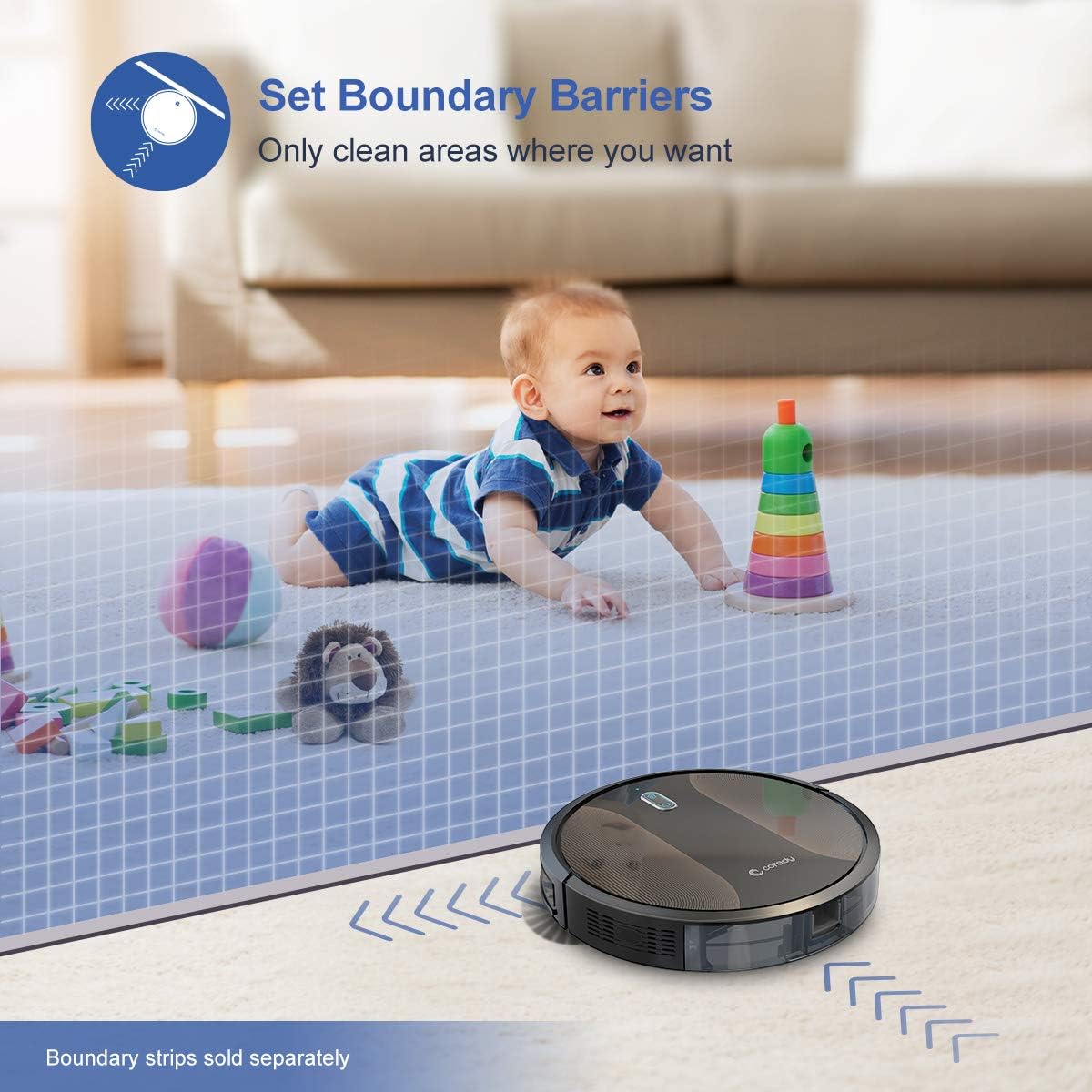
Figure 6.3: The Coredy R580 can be converted for mopping by attaching the optional water tank and mop cloth.
6.6 Boost-Intellect Technology
The robot is equipped with Boost-Intellect Technology, which automatically increases suction power when it detects carpeted surfaces, ensuring a deeper clean across different floor types.

Figure 6.4: Boost-Intellect Technology automatically adjusts suction power when the robot moves from hard floors to carpets.

Figure 6.5: The Coredy R580 provides strong suction power to effectively clean various types of debris from hard floors.
7. Mantenimentu
Regular maintenance is crucial for optimal performance and longevity of your robot vacuum. Perform the following cleaning procedures regularly:
7.1 Svuotà u bidone di a spazzatura
Press the dustbin release button and pull out the dustbin. Open the dustbin cover and empty its contents into a trash can. It is recommended to empty the dustbin after each cleaning cycle.
7.2 Pulizia di a spazzola principale
Remove the main brush cover and lift out the main brush. Use the provided cleaning tool or a pair of scissors to remove any hair or debris tangled around the brush. Reinstall the main brush and cover.
7.3 Pulizia di e spazzole laterali
Periodically check the side brushes for tangled hair or debris. Gently pull them off their posts to clean. If they are worn or damaged, replace them with new ones. Push them back onto the posts until they click.
7.4 Pulizia di u filtru
Remove the filter from the dustbin. Tap the filter against a trash can to remove dust. Do not wash the filter with water, as this can damage it. Replace the filter every 2-3 months, or more frequently depending on usage.
7.5 Pulizia di i sensori è di i cuntatti di carica
Wipe the cliff sensors (located on the bottom of the robot) and the charging contacts (on the robot and charging dock) with a clean, dry cloth. Keeping these clean ensures proper navigation and charging.
8. Risoluzione di prublemi
If your Coredy R580 encounters issues, refer to the following table for common problems and solutions:
| Prublemu | Causa Possibile | Soluzione |
|---|---|---|
| U robot ùn si accende | Batteria bassa; Interruttore spento | Caricate u robot; Accendete l'interruttore principale. |
| U robot ùn carica micca | Cuntatti di carica sporchi; A stazione di carica ùn hè micca alimentata | Pulite i cuntatti di carica nantu à u robot è a stazione di carica; Assicuratevi chì a stazione di carica sia cunnessa. |
| U robot si blocca spessu | Obstacles (cables, rugs); Cliff sensors dirty | Sguassate l'ostaculi da u percorsu di pulizia; Pulite i sensori di scogliera. |
| Scarsa prestazione di pulizia | Cestellu di a spazzatura pienu; Spazzole aggrovigliate; Filtru intasatu | Empty dustbin; Clean main and side brushes; Clean or replace filter. |
| Problemi di cunnessione Wi-Fi | Password Wi-Fi sbagliata; Router troppu luntanu; Rete 5GHz | Inserite di novu a password; Avvicinate u robot à u router; Assicuratevi chì a rete 2.4 GHz sia aduprata. |
If the problem persists after trying the above solutions, please contact Coredy customer support for further assistance.
9. Specificazioni
| Feature | Detail |
|---|---|
| Marca | Coredy |
| Mudellu | R580 |
| Funzione speciale | HEPA Filtration, Pet Tools, Vacuums |
| Culore | Neru |
| Tipu di filtru | Cartuccia |
| Capacità dustbin | 0.3 litri |
| Fonte d'energia | Alimentatu à batteria (1 batteria Lithium Ion inclusa) |
| Metudu di cuntrollu | Remote, Voice (Alexa, Google Home), App |
| Fattore di forma | Robotica |
| Dimensioni (L x W x H) | 16.89 x 13.66 x 4.57 inch |
| Pesu di l'articulu | 8.91 liri |
| Forza di aspirazione | Finu à 2000Pa |
| Livellu di rumore | Sottu à 65dB |
10. Garanzia è Support
10.1 Garanzia infurmazione
Coredy products are manufactured to the highest quality standards. For specific warranty details regarding your R580 Robot Vacuum Cleaner, please refer to the warranty card included in your product packaging or visit the official Coredy websitu. A garanzia copre tipicamente i difetti di materiali è di fabricazione in cundizioni d'usu nurmale.
10.2 Assistenza Clienti
If you have any questions, require technical assistance, or need to report an issue with your Coredy R580, please contact Coredy customer support. Contact information can usually be found on the official Coredy website or on the product packaging. Please have your model number (R580) and purchase information ready when contacting support.