
1. Introduzione
Thank you for choosing the AUKEY Sprint Wireless Power Bank PB-Y32. This device is designed to provide portable power for your mobile devices, featuring both wired and wireless fast charging capabilities. Please read this manual carefully before use to ensure optimal performance and safety.
2. Caratteristiche di u produttu
- Capacità 10000 mAh: High-capacity battery to charge your devices multiple times.
- Supportu di carica rapida: Supports Quick Charge 3.0 and Power Delivery for rapid charging of compatible devices.
- Ricarica wireless: Conveniently charge Qi-compatible devices at up to 10W.
- Porti di output multipli: Equipped with USB-C and USB-A ports for versatile charging.
- Disegnu compactu è portatile: Facile da purtà per una putenza in viaghju.
- Funzioni di sicurezza: Built-in protections against overcharge, over-discharge, overcurrent, and short circuits.
3. Cuntenutu di u pacchettu
- AUKEY Sprint Wireless Power Bank PB-Y32
- Cavu USB-A à C
- Manuale d'usu
4. Cunfigurazione è Primu Usu
4.1 Caricamentu di a batteria esterna
Before first use, fully charge the power bank. It takes approximately 7 hours to fully charge the power bank using a compatible USB-C power adapter.
- Connect the included USB-A to C cable to the power bank's USB-C input port.
- Cunnette l'altra estremità di u cavu à un caricatore murale USB (micca inclusu).
- The LED indicators will light up to show the charging status. All four LEDs will be solid when fully charged.
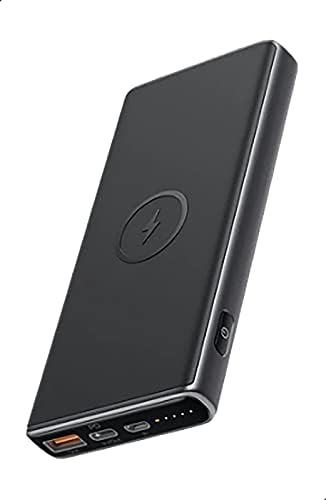
Image: The AUKEY Sprint Wireless Power Bank PB-Y32, showcasing its sleek black design and port layout.
5. Operating Instructions
5.1 Caricamentu cù filu
To charge your device using a cable:
- Connect your device's charging cable to either the USB-A output port or the USB-C output port on the power bank.
- Cunnette l'altra parte di u cavu à u vostru dispositivu.
- A batteria esterna cumincerà automaticamente à caricà u vostru dispositivu.
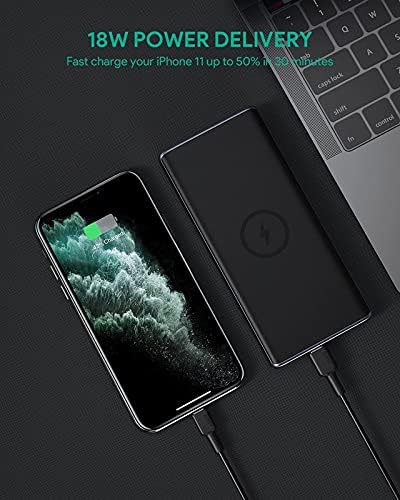
Image: The power bank connected via cable to a smartphone, demonstrating 18W Power Delivery fast charging.

Image: A smartphone connected to the power bank, illustrating Qualcomm Quick Charge 3.0 capabilities for rapid charging.
5.2 Carica wireless
To charge your Qi-compatible device wirelessly:
- Place your Qi-compatible device directly onto the wireless charging pad located on the top surface of the power bank. Ensure the device is centered on the charging symbol.
- The power bank will automatically detect your device and begin wireless charging.

Image: A smartphone placed on the power bank's surface, demonstrating the wireless charging feature.

Imagine: Un primu pianu view of the power bank showing the silicone ring designed to keep the phone stable during wireless charging.
5.3 Modu di carica à bassa corrente
This mode is ideal for charging low-power devices like wireless earbuds or smartwatches.
- Press and hold the power button for 2 seconds to enter low-current charging mode. The first LED indicator will blink green.
- Connect your low-power device or place it on the wireless charging pad.
- To exit low-current charging mode, press the power button once, or it will automatically exit after 2 hours.
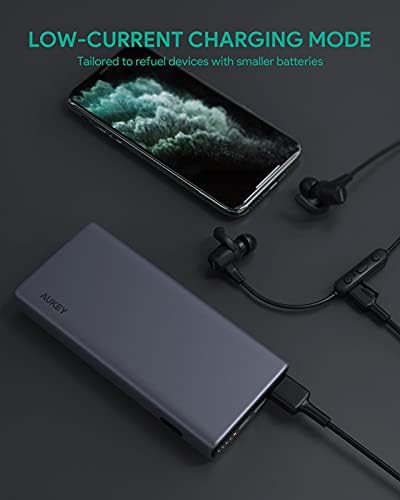
Image: The power bank connected to a smartphone and wireless earbuds, demonstrating its low-current charging mode for smaller devices.

Image: An illustration showing the power bank's broad compatibility with various devices, including smartphones, tablets, and gaming consoles.
6. Mantenimentu
- Keep the power bank away from liquids, extreme heat, and strong magnetic fields.
- Ùn lasciate micca cascà è ùn sottumette micca a batteria esterna à forti impatti.
- Pulite a batteria esterna cù un pannu asciuttu è dolce. Ùn aduprate micca detergenti corrosivi.
- Mantene u power bank in un locu frescu è seccu quandu ùn hè micca in usu.
- Ricaricate a batteria esterna almenu una volta ogni 3 mesi per mantene a salute di a batteria.
7. Risoluzione di prublemi
7.1 A batteria esterna ùn si carica micca
- Assicuratevi chì u cavu di carica sia cunnessu currettamente à u bancu di putenza è à u caricatore murale.
- Pruvate un altru cavu USB-C o caricatore murale.
- Verify the wall charger's output meets the power bank's input requirements (DC 5V-3A / 9V-2A).
7.2 U dispusitivu ùn si carica micca da a batteria esterna
- Assicuratevi chì a batteria esterna abbia una carica sufficiente.
- Pruvate un altru cavu di carica per u vostru dispositivu.
- For wireless charging, ensure your device is Qi-compatible and properly aligned on the charging pad. Remove any thick cases that might interfere.
- If charging a low-power device, ensure low-current charging mode is activated.
7.3 Surriscaldamentu di a batteria esterna
- Hè nurmale chì a batteria esterna si riscaldi ligeramente durante a carica o a scarica.
- If it becomes excessively hot, disconnect all devices and the charging cable immediately. Allow it to cool down before resuming use.
- Ensure proper ventilation and avoid covering the power bank during use.
8. Specificazioni
| Feature | Detail |
|---|---|
| Nome di mudellu | Sprint |
| Numero di mudellu | PB-Y32 |
| Capacità batterie | 10000 mAh |
| Input USB Type-C | DC 5V-3A / 9V-2A |
| Uscita USB Type-C | DC 5V-3A / 9V-2A / 12V-1.5A |
| Uscita USB Type-A | 18 W |
| Max putenza di output | 18 W |
| Uscita di Carica Wireless | 5W, 7.5W, 10W |
| Dimensioni | 144 x 67 x 17 mm |
| Pesu | 210 grammi |
| A cumpusizioni di a batteria | Lithium Polymer |
| Funzioni spiciali | Short Circuit Protection, Wireless Charging |
| Culore | Neru |
| Tempu di carica di a batteria | 7 ore |
9. Garanzia è Support
According to the product specifications, this product comes with Nisuna Garanzia. For any product-related inquiries or support, please refer to the retailer or manufacturer's official websitu per l'infurmazioni di cuntattu.