
Baseus Bowie WM02
Baseus Bowie WM02 TWS Bluetooth Earbuds
Manuale d'usu
Introduzione
Thank you for choosing the Baseus Bowie WM02 TWS Bluetooth Earbuds. These ultra-compact and lightweight earbuds are designed for comfortable, long-term wear, offering a seamless audio experience with advanced Bluetooth 5.3 technology and an impressive 25-hour battery life (with charging case). This manual will guide you through the setup, operation, and maintenance of your new earbuds.

Image: Baseus Bowie WM02 TWS Bluetooth Earbuds in white, with their charging case.
Istituisci
1. Disimballaggio è cumpunenti
Before first use, please ensure all components are present in the package:
- Baseus Bowie WM02 TWS Earbuds
- Casu di carica
- Cavu di carica USB-C
- Diverse dimensioni di punte auricolari (S, M, L)
- Manuale d'usu
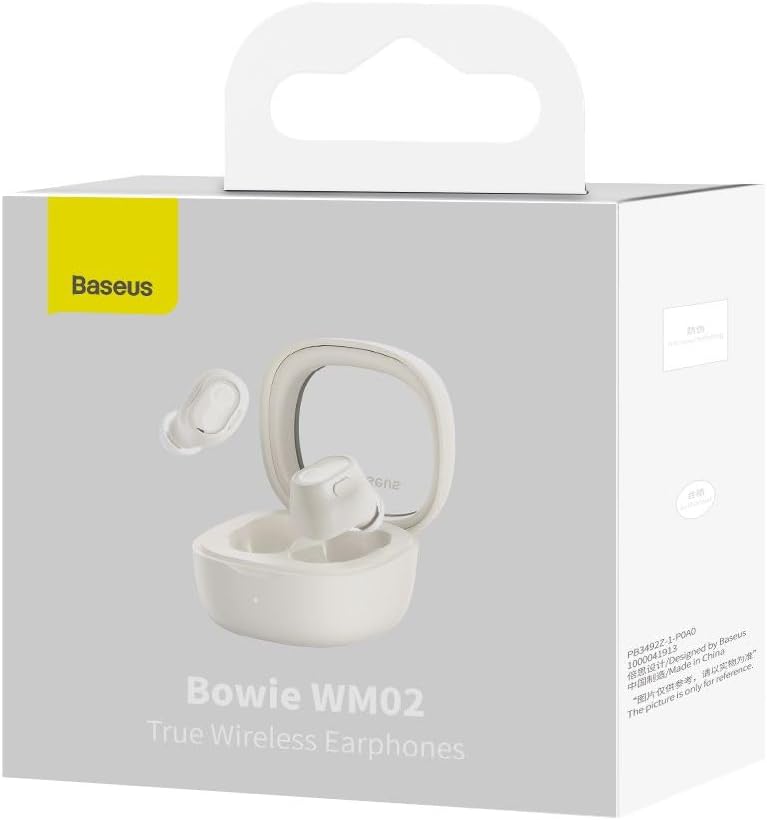
Image: The Baseus Bowie WM02 earbuds, charging case, USB-C cable, and ear tips laid out with the product packaging.
2. Caricamentu di l'auricolari è di a custodia
Per una prestazione ottimale, caricate cumpletamente l'auricolari è a custodia di ricarica prima di u primu usu.
- Pone l'auricolari in a custodia di carica. Assicuratevi ch'elli sianu inseriti currettamente in i so rispettivi slot.
- Cunnette u cavu di carica USB-C à u portu di carica di a custodia è l'altra estremità à una fonte di alimentazione USB (per esempiu, urdinatore, adattatore murale).
- The indicator light on the charging case will show the charging status. Once fully charged, the light will typically turn solid or turn off.
A 10-minute quick charge provides approximately 2 hours of listening time, and a full charge offers up to 5 hours of continuous use, extending to 25 hours with the charging case.

Image: Graphic illustrating the 25-hour battery life of the Baseus Bowie WM02 earbuds and charging case.
3. Abbinamentu Bluetooth
Follow these steps to pair your earbuds with a Bluetooth-enabled device:
- Aprite a custodia di carica. L'auricolari entreranu automaticamente in modalità di accoppiamentu (e luci indicatrici lampeggeranu).
- Nant'à u vostru dispusitivu (smartphone, tableta, laptop), andate à i paràmetri Bluetooth è attivate Bluetooth.
- Cerca available devices and select "Baseus Bowie WM02" from the list.
- Once connected, the earbud indicator lights will typically turn off or show a steady light.
The earbuds feature Bluetooth 5.3 for stable and efficient connection.

Image: A visual representation of the Wireless 5.3 chip, highlighting fast and smooth connection.
4. Baseus App Integration
Enhance your experience by downloading the official Baseus app. The app allows you to:
- Truvate i vostri auricolari.
- Check real-time battery levels.
- Persunalizà i cuntrolli tattili.
- Accede à funzioni è aghjurnamenti supplementari.

Image: Screenshot of the Baseus app interface, demonstrating features like earbud location and battery status.
Istruzzioni di funziunamentu
1. Purtà l'auricolari
The Baseus Bowie WM02 earbuds are designed for a comfortable and secure fit, even for smaller ears. They weigh only 3.8g per earbud and have a 108-degree elevation angle for ergonomic wear.
- Select the ear tips that provide the best seal and comfort for your ears.
- Inserite delicatamente ogni auricolare in u vostru canale auriculare è girate ligeramente per fissalli.

Image: A woman demonstrating the comfortable and seamless fit of the Baseus Bowie WM02 earbuds.
2. Touch Controls
The earbuds feature intuitive touch controls. You can customize these controls via the Baseus app.
| Azzione | Cuntrolla |
|---|---|
| Play / Pausa | Tap unicu nant'à ogni cuffie |
| Next Track | Toccate duie volte l'auriculare drittu |
| Pista Precedente | Toccate duie volte l'auricolare sinistra |
| Rispondi / Fine Call | Tap unicu nant'à ogni cuffie |
| Reject Call | Premete longu nantu à l'auriculare |
| Attivà l'Assistente Vocale | Toccate trè volte nantu à unu di i dui auriculari |
| Toggle Low Latency Mode (Gaming Mode) | Long press on either earbud (check app for specific gesture) |
3. Power On / Off
- Power On: Aprite a custodia di carica, è l'auricolari si accenderanu automaticamente è si cunnetteranu à l'ultimu dispositivu accoppiatu.
- Spegnimentu: Rimettite l'auricolari in a custodia di carica è chjude u coperchio. Si disconnetteranu automaticamente è si spegneranu.
4. Gaming Mode (Low Latency)
The Bowie WM02 features a 60ms low-latency mode, ideal for gaming, ensuring instant response and synchronized audio. Activate this mode via the touch controls or the Baseus app for an immersive gaming experience.
Mantenimentu
1. Pulizia
Una pulizia regulare aiuta à mantene a qualità di u sonu è l'igiene.
- Aduprate un pannu dolce, asciuttu è senza pelu per asciugà l'auricolari è a custodia di ricarica.
- For ear tips, remove them and clean with mild soap and water, then dry thoroughly before reattaching.
- Pulite delicatamente i cuntatti di carica sia di l'auricolari sia di a custodia cù un tampone di cuttone asciuttu.
- Avoid using abrasive cleaners, alcohol, or solvents.
2. Storage
Quandu ùn sò micca in usu, conservate l'auricolari in a so custodia di ricarica per prutegeli da a polvere è i danni.
3. Cura di batterie
- Evitate d'espone l'auricolari è a custodia à temperature estreme (calde o fredde).
- Do not leave the battery completely drained for extended periods. Charge them regularly.
Risoluzione di prublemi
If you encounter any issues with your Baseus Bowie WM02 earbuds, please refer to the following common solutions:
| Prublemu | Soluzione Possibile |
|---|---|
| Earbuds ùn sò micca accoppiati | Assicuratevi chì l'auricolari sianu carichi. Disattivate è attivate u Bluetooth di u vostru dispositivu. Dimenticate u dispositivu in i paràmetri Bluetooth è riaccoppiate. |
| Nisun sonu da un auricular | Check battery level of both earbuds. Place both earbuds back in the case, close the lid, then open again. Re-pair if necessary. |
| Problemi di carica | Ensure charging cable is securely connected. Try a different USB port or charger. Clean charging contacts on earbuds and case. |
| Vulume bassu o qualità di sonu scarsa | Adjust volume on your device. Ensure ear tips provide a good seal. Clean earbud mesh to remove debris. |
| I cuntrolli touch ùn rispundenu | Ensure your fingers are clean and dry. Try resetting the earbuds (refer to Baseus app or online support for specific reset instructions). |
If the problem persists, please contact Baseus customer support.
Specificazioni
| Feature | Detail |
|---|---|
| Nome di mudellu | Bowie WM02 |
| Numero di mudellu di u fabricatore | NGTW180002 |
| Tecnulugia di cunnessione | Wireless (Bluetooth) |
| Tecnulugia di cumunicazione wireless | Bluetooth 5.3 |
| Earbud Form Factor | In-Ear |
| Controlu di u rumore | Nimu |
| Pesu di u produttu | 60 grammi |
| Gamma di Frequency | 20 Hz - 20,000 Hz |
| Impedenza | 140 Ohm |
| Durata media di a batteria (auricolari) | 5 Ore |
| Autonomia tutale di a batteria (cù a custodia) | Finu à 25 ore |
| Tempu di carica | Circa 1.5 ore (per una carica cumpleta) |
| Portu di carica | USB Type-C |
| Funzioni spiciali | Fast Charging, Low Latency Mode (60ms) |
| Dispositivi compatibles | Bluetooth-enabled devices such as smartphones, tablets, laptops, and desktop computers. |
Garanzia è Supportu
Infurmazioni di Garanzia
The Baseus Bowie WM02 TWS Bluetooth Earbuds come with a 12-month manufacturer's warranty from the official Baseus Brazil store. Please retain your proof of purchase for warranty claims.
Assistenza Clienti
For further assistance, technical support, or warranty inquiries, please contact Baseus customer support through the official Baseus website or the Baseus app. You can also visit the Negoziu Baseus nant'à Amazon per più infurmazione.
Ask a question about this manual
Ask about setup, troubleshooting, compatibility, parts, safety, or missing instructions. Manuals+ will review the question and use this page’s manual context to help answer it.