
1. Introduzione
The Walfront MPPT Solar Charge Controller is designed to efficiently manage power flow from your solar panels to your battery bank, optimizing charging performance for off-grid solar systems. This manual provides essential information for the safe and effective installation, operation, and maintenance of your 50A MPPT solar charge controller.

Image 1.1: Walfront MPPT Solar Charge Controller 50A. This image shows the front view of the orange and black controller, featuring an LCD screen displaying PV, Battery, and Load information, along with 'ESC' and 'SET' buttons.
2. Funzioni chjave
- High Efficiency MPPT Tracking: Features MPPT tracking efficiency greater than 99% and a maximum conversion efficiency of up to 98%, maximizing energy harvest from solar panels.
- Wide 180V PV Input and Auto Voltage Recognition: Supports a maximum solar input voltage of 180V (at 25℃) and automatically recognizes 12V, 24V, 36V, and 48V battery systems. Compatible with battery voltaghè da 9V à 64V.
- Clear LCD Display and Smart Protection: Built-in LCD provides real-time system data (voltage, current, operating status). Includes temperature compensation and multiple protection features for safe operation.
- Low No-Load Loss and Reliable Performance: No-load loss of ≤0.4W conserves energy. Designed for reliable operation in temperatures from -10℃ to 65℃ and altitudes up to 3000 meters.
- Facile à installà è aduprà: Auto-recognition feature simplifies setup. Compact design allows for straightforward mounting.

Image 2.1: Automatic Voltage Identification. This image highlights the controller's ability to automatically identify 12V, 24V, 36V, and 48V systems, shown with various solar panel application examples.
3. Informazioni di sicurezza
Please read all instructions carefully before installation and operation. Failure to follow these safety guidelines may result in personal injury, damage to the controller, or other equipment.
- Ensure all wiring is correctly polarized and securely connected. Loose connections can cause overheating and damage.
- Cunnette sempre prima a batteria, dopu u pannellu solare, è infine u carica. Scollegate in ordine inversu.
- Do not connect the solar panel array to the controller without a battery connected.
- Assicurà u sistemu voltage of the solar panel and battery are compatible with the controller's specifications.
- Installate u controller in un locu ben ventilatu, luntanu da materiali inflammabili è da a luce diretta di u sole.
- Avoid touching live terminals. Use insulated tools during installation.
- This device is not waterproof. Protect it from moisture and water exposure.
4. Cuntenutu di u pacchettu
Verificate chì tutti l'articuli elencati quì sottu sò inclusi in u vostru pacchettu:
- 1 x Walfront MPPT Solar Charge Controller (50A)
- 4 x viti
- 4 x Viti d'espansione
- 1 x Manuale d'usu (stu documentu)
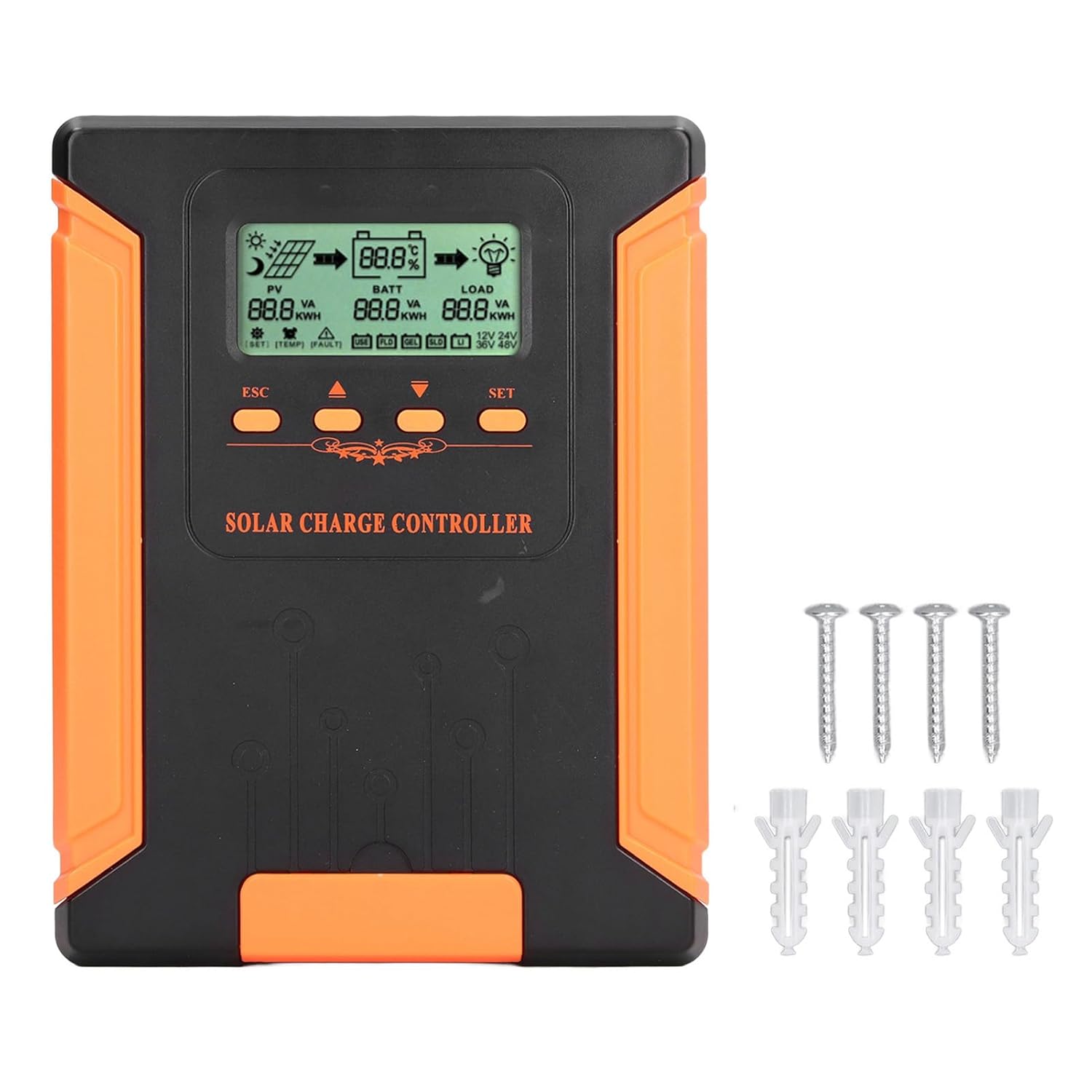
Image 4.1: Package Contents. This image displays the solar charge controller alongside the mounting screws and expansion screws provided in the package.
5. Setup è Installazione
Follow these steps for proper installation of your solar charge controller.
5.1 Muntà u Controller
- Sceglite un locu asciuttu è ben ventilatu, prutettu da a luce diretta di u sole, da e temperature elevate è da l'umidità.
- Ensure there is sufficient space around the controller for heat dissipation, especially around the cooling fins.
- Mount the controller vertically on a solid surface using the provided screws.
5.2 Connessioni Wiring
Refer to the wiring diagrams below for correct connection sequence. Always connect in the following order:
- Cunnette a batteria: Connect the battery to the controller's battery terminals. Ensure correct polarity (+ to + and - to -). The controller will automatically detect the battery voltage.
- Cunnette u Panel Solar: Connect the solar panel array to the controller's PV terminals. Ensure correct polarity.
- Cunnette u caricu DC (opzionale): Connect the DC load to the controller's load terminals. Ensure correct polarity.
To disconnect the system, follow the reverse order: disconnect load, then solar panel, then battery.

Image 5.1: Basic System Connection Diagram. This diagram illustrates the connection order: 1. Battery Assembly, 2. Solar Panel Assembly, 3. DC Load. It also shows an AC Load and Inverter connected to the Battery Assembly.

Image 5.2: Detailed System Wiring Diagram. This diagram provides a more comprehensive view of a solar power system, including solar panels, battery, inverter (AC Output/Input), and various AC loads like laptops, lights, air conditioners, televisions, and fans.
6. Operating Instructions
The controller features an LCD display and control buttons for monitoring and configuration.
6.1 Pantalla LCD
The LCD screen provides real-time information about your solar system, including:
- PV (Photovoltaic) Status: Input voltage, current, and power from solar panels.
- BATT (Battery) Status: Batteria voltage, charging current, and state of charge.
- LOAD Status: Output current and power to the DC load.
- Sistema Voltage: Automatically detected battery system voltage (12V/24V/36V/48V).
- Indicatori d'errore: Displays fault codes or warnings if issues occur.
6.2 Pulsanti di cuntrollu
The controller has three buttons: ESC, Up/Down arrows, and SET.
- Button ESC: Used to exit current menu or cancel an operation.
- Pulsanti Up / Down: Used to navigate through menu options or adjust parameter values.
- Pulsante SET: Used to enter a menu, confirm a selection, or save changes to parameters.

Image 6.1: Control Buttons. This close-up image shows the 'ESC', 'Up arrow', 'Down arrow', and 'SET' buttons on the controller's front panel.
7. Mantenimentu
Una manutenzione regulare assicura prestazioni ottimali è longevità di u vostru regulatore di carica solare.
- Pulizia: Periodically clean the controller's exterior with a dry cloth. Ensure the cooling fins are free from dust and debris to maintain proper heat dissipation.
- Cunnessioni: Check all wiring connections regularly to ensure they are tight and free from corrosion.
- Ispezione: Inspect the controller for any signs of physical damage, overheating, or unusual odors.
- Ambiente: Assicuratevi chì l'ambiente d'installazione resti asciuttu è ben ventilatu.

Image 7.1: Cooling Fins. This close-up shows the cooling fins on the top of the controller, which are crucial for heat dissipation and require regular cleaning.
8. Risoluzione di prublemi
Sè avete prublemi cù u vostru controller, riferitevi à i seguenti prublemi è suluzioni cumuni:
| Prublemu | Causa Possibile | Soluzione |
|---|---|---|
| U display di u controller hè spento | No battery connected or battery voltagè troppu bassu. | Ensure battery is connected correctly and has sufficient charge (above 9V). |
| Nisuna corrente di carica da u fotovoltaicu | Solar panels not connected, insufficient sunlight, or PV polarity reversed. | Verificate e cunnessione è a polarità di i pannelli fotovoltaici. Assicuratevi una quantità sufficiente di luce solare. Verificate u vulume di i pannelli fotovoltaici.tage hè in u range. |
| Caricamentu micca funzionante | Load disconnected, load current too high, or load polarity reversed. | Check load connections and polarity. Ensure load current does not exceed controller's rating. |
| Batteria micca cumpletamente caricata | Insufficient solar input, undersized solar array, or battery issues. | Increase solar panel capacity or check for shading. Inspect battery health. |
9. Specifiche tecniche
Below are the technical specifications for the Walfront MPPT Solar Charge Controller 50A.
| Parametru | Specificazione |
|---|---|
| Sistema Voltage | 12V / 24V / 36V / 48V Auto |
| Corrente di carica nominale | 50A |
| No Load Loss | ≤0.4W |
| Solar Maximum Input Voltage | 180V (at 25℃), 150V (at -25℃) |
| Batteria Voltage Gamma | 9-64 V |
| Maximum Power Point Voltage Gamma | Batteria Voltage +2V à 150V |
| Efficienza di cunversione | ≤98% |
| Efficienza di Tracking MPPT | > 99% |
| Coefficient di compensazione di temperatura | -2mv/℃/2V (default value) |
| Temperature di travagliu | -10 ℃ à 65 ℃ |
| Gradu di prutezzione | IP21 |
| Altitudine | ≤3000 Meter / 9842.5ft |

Image 9.1: Model Comparison Table. This table provides a comparison of rated charging current and solar panel maximum input power for CM-50 (50A) and CM-60 (60A) models across different system voltages.
10. Garanzia è Support
Per infurmazioni nantu à a garanzia è l'assistenza tecnica, vi pregu di cunsultà a ducumentazione furnita à u mumentu di l'acquistu o cuntattate u vostru rivenditore. Cunservate a vostra ricevuta d'acquistu cum'è prova d'acquistu.