
Introduzione
Benvenuti
Thank you for choosing the Renimer BK11 Bluetooth 5.3 Wireless Earbuds. This manual provides detailed instructions for the proper setup, operation, and maintenance of your new earbuds. Please read this guide thoroughly before use to ensure optimal performance and longevity of your device.
Cuntenutu di u pacchettu
- Renimer BK11 Wireless Earbuds
- Casu di carica
- Cavu di carica USB-C
- Manuale d'usu
- Auricolari S/M/L
Product Overview
Earbud and Charging Case Diagram
Familiarize yourself with the components of your Renimer BK11 earbuds and charging case.

This image displays the Renimer BK11 wireless earbuds placed inside their charging case. The case features an LED display showing "100" and battery indicators, suggesting a full charge. The earbuds themselves have a sleek, dark design with a blue indicator light and a fingerprint-like icon on the touch control area. Model number BK11 and FCC ID are visible on the inside of the case.
Touch Controls
The earbuds feature touch-sensitive controls for various functions. The exact touch areas are indicated by the fingerprint icon on each earbud.
- Tap unicu: Riproduce/Mette in pausa a musica, Rispondi/Fine una telefonata.
- Double tap (Right earbud): Prussima pista.
- Double tap (Left earbud): Traccia precedente.
- Triple tap (Right earbud): Volume su.
- Triple tap (Left earbud): Volume falatu.
- Pressu longu (circa 2 seconde): Activate voice assistant, Reject an incoming call.
Istituisci
Carica l'auriculare è u casu
Before first use, fully charge the earbuds and charging case to ensure maximum battery life.

This image illustrates the Renimer BK11 charging case being charged via a USB-C cable. The case's LED display shows the battery level, indicating the charging status.
- Connect the provided USB-C cable to the charging port on the case and to a standard USB power adapter (not included).
- The LED display on the case will indicate the charging status and current battery percentage.
- Una carica cumpleta per a custodia di carica dura circa 1.5 ore.
- The earbuds provide 6-8 hours of playtime on a single charge.
- The 350 mAh charging case provides multiple recharges, extending total playtime up to 40 hours.
Abbinamentu Bluetooth
Follow these steps to pair your Renimer BK11 earbuds with your device.
This image illustrates the Bluetooth pairing process, showing a smartphone's Bluetooth settings with "BK11" listed as an available device to connect to. The Renimer BK11 charging case and earbuds are also visible.
Accoppiamentu iniziale
- Assicuratevi chì e duie cuffie sò caricate.
- Aprite a custodia di carica. L'auricolari s'accenderanu automaticamente è entreranu in modalità di accoppiamentu.
- Nant'à u vostru apparechju (smartphone, tableta, urdinatore, ecc.), attivate Bluetooth.
- Cerca "BK11" in the list of available Bluetooth devices and select it to connect.
- Una volta cunnessu, un prompt vocale cunfirmerà l'accoppiamentu riesciutu.
Ricunnettà
Once paired, the earbuds will automatically reconnect to the last paired device when taken out of the charging case, provided Bluetooth is enabled on the device and it is within range.
Ripristinendu i Earbuds
If you experience pairing issues or only one earbud is connecting, you can reset the earbuds:
- Rimette i dui cuffie in u casu di carica.
- Close the case lid and wait for approximately 5 seconds.
- Open the case lid again. The earbuds should re-synchronize and enter pairing mode.
- If issues persist, try forgetting "BK11" from your device's Bluetooth list and repeat the initial pairing process.
Istruzzioni di funziunamentu
Purtendu l'auriculare
For optimal sound quality, comfort, and secure fit, choose the correct eartip size.

This image highlights the ergonomic design of the Renimer BK11 earbuds, showing how they fit securely in the ear. It also displays three sizes of soft silicone eartips (S/M/L) to ensure a comfortable and secure fit for different users.
- Select the eartips (S/M/L) that provide the best seal and comfort for your ears.
- Gently insert the earbuds into your ear canal and twist slightly to secure them in place.
Funzioni di chjama
The earbuds feature CVC8.0 noise reduction and 4 microphones (ENC Mic, Talk Mic) for clear phone calls, minimizing background noise.

This image details the noise-cancelling capabilities, showing the placement of ENC (Environmental Noise Cancellation) and Talk microphones on the earbuds. A graph demonstrates the reduction of noise frequencies "Before" and "After" processing, indicating clearer phone calls.
- Rispondi / Finisce a chjama: Toccate una volta unu di l'auricolari.
- Reject Call: Appughjà longu unu di l'auricolari per circa 2 secondi.
Riproduzione musicale
Control your music directly from the earbuds.
- Play/Pause: Toccate una volta unu di l'auricolari.
- Prussima pista: Toccate duie volte l'auriculare dirittu.
- Pista Precedente: Toccate duie volte l'auriculare manca.
- Aument du volume : Tocca trè volte l'auriculare drittu.
- Volume Imbruglia: Tocca trè volte l'auriculare di manca.
Qualità di u sonu
The Renimer BK11 earbuds feature 14.2mm drivers for excellent HiFi sound reproduction.
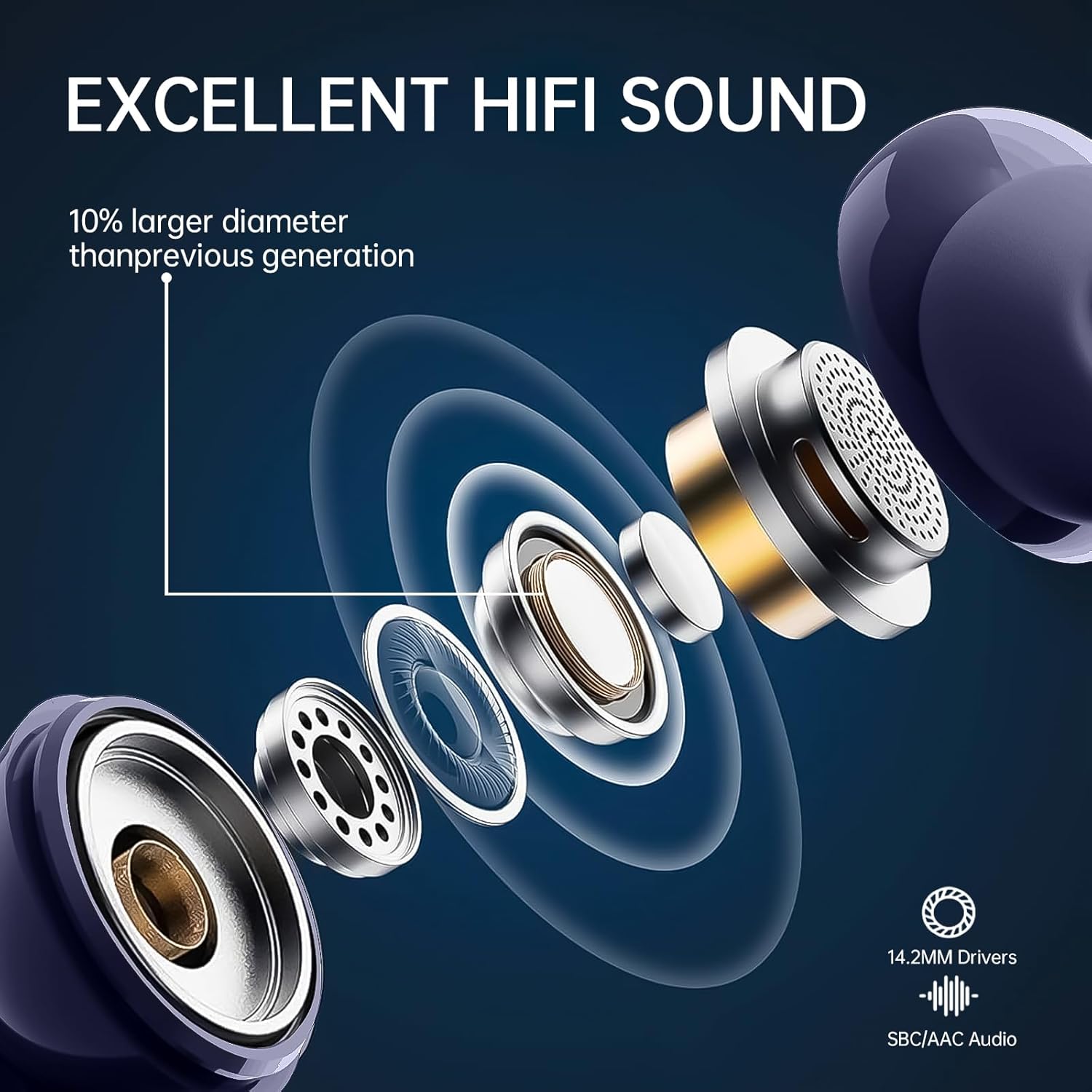
Questa imagine furnisce un internu view of the earbud's driver, highlighting its 14.2mm size and various components, indicating a focus on high-fidelity sound reproduction.
Mantenimentu
Pulizia
- Pulite regularmente l'auricolari è a custodia di ricarica cù un pannu morbidu, asciuttu è senza pelu.
- Do not use harsh chemicals, abrasive materials, or liquids directly on the earbuds or case.
- Eliminate delicatamente ogni cerume o detriti da i tappi delle orecchie e dalla rete dell'altoparlante con una spazzola piccola e morbida o un tampone di cotone.
Storage
- Quandu ùn sò micca in usu, conservate sempre l'auricolari in a so custodia di ricarica per prutegeli da danni è manteneli carichi.
- Store the device in a cool, dry place, away from extreme temperatures, direct sunlight, and humidity.
Risoluzione di prublemi
Problemi cumuni è Soluzioni
- Auricolari chì ùn si accoppianu micca:
- Assicuratevi chì i dui auricolari sianu sufficientemente carichi.
- Place them back in the case, close the lid, then reopen to re-initiate pairing mode.
- Spegne è poi attiva u Bluetooth di u vostru dispositivu.
- Forget "BK11" from your device's Bluetooth list and attempt to re-pair.
- Solu un auricolare funziona:
- Assicuratevi chì e duie cuffie sò caricate.
- Place both earbuds back in the charging case, close the lid, wait a few seconds, then open the lid again. This often resynchronizes them.
- If the issue persists, try resetting the earbuds as described in the "Resetting Earbuds" section.
- Qualità di sonu scarsa:
- Ensure the eartips are properly sealed in your ear canal. Try different eartip sizes.
- Pulite ogni detritu da a maglia di l'altoparlante.
- Ensure the earbuds are within Bluetooth range (typically 10 meters) of your device and there are no significant obstructions.
- Check your device's audio settings and volume levels.
- Problemi di carica:
- Assicuratevi chì u cavu USB-C sia cunnessu currettamente à a custodia di carica è à a fonte di alimentazione.
- Try a different USB-C cable or power adapter to rule out cable/adapter issues.
- Pulite i cuntatti di carica nantu à l'auricolari è in l'internu di a custodia cù un tampone di cuttone asciuttu.
Sè i prublemi persistenu dopu avè pruvatu ste suluzioni, cuntattate l'assistenza clienti per più assistenza.
Specificazioni
Specificazioni tecniche
| Feature | Specificazione |
|---|---|
| Mudellu | BK11 |
| Versione Bluetooth | 5.3 |
| Size Driver | 14.2 mm |
| Riduzzione di u rumore | CVC8.0, ENC |
| Microfoni | 4 (ENC Mic, Talk Mic) |
| Valutazione di resistenza à l'acqua | IP7 |
| Earbud Playtime | 6-8 Ore (una sola carica) |
| Capacità di u casu di carica | 350 mAh |
| Tempu di ghjocu tutale (cù a custodia) | Finu à 40 ore |
| Tempu di carica (casu) | Circa. 1.5 Ore |
| Portu di carica | USB-C |
| Pesu Earbud | Circa 3.9 g (ciascunu) |
| Gamma di Frequency | 20 Hz - 20,000 Hz |
| Composizione Batteria | Lithium-polimeru |
| Dispositivi compatibles | Mobile phones, Computers, Smart speakers |
Garanzia è Supportu
Infurmazioni di Garanzia
Renimer products are designed for reliability and performance. For detailed warranty information, please refer to the warranty card included in your product packaging or visit the official Renimer website for the most up-to-date policy.
Assistenza Clienti
If you have any questions, require technical assistance, or encounter any issues with your Renimer BK11 earbuds, please do not hesitate to contact our dedicated customer support team. Contact information can typically be found on the product packaging, the warranty card, or our official websitu.