1. Introduzione
Thank you for choosing the Vortex T10M Pro+ Tablet. This manual will guide you through the features and functions of your new device, ensuring a smooth and enjoyable user experience. Please read this manual carefully before using your tablet.
Chì ci hè in u Box
Upon unboxing your Vortex T10M Pro+ Tablet, please verify that all the following items are present:
- Vortex T10M Pro+ Tablet
- Caricatore
- Prutezzione di u screnu
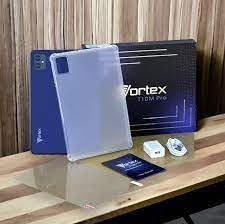
Image: Contents of the Vortex T10M Pro+ Tablet box. This includes the tablet, a clear protective case, the power adapter, and a screen protector, all neatly arranged on a wooden surface.
2. Produttu Finituview
Familiarize yourself with the physical components and key features of your Vortex T10M Pro+ Tablet.
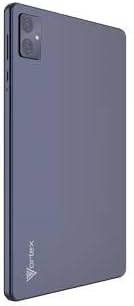
Imagine: Daretu view of the Vortex T10M Pro+ Tablet. The tablet has a sleek, dark finish with the 'Vortex' logo subtly placed at the bottom. The camera module is visible in the upper left corner.

Imagine: Dettagliata view of the back of the Vortex T10M Pro+ Tablet, highlighting its specifications. Printed details include '10.1-inch Brilliant Display', '5MP Front Camera', '8MP Rear Camera', 'MTK6766 Processor', 'Quad-Core, 4GB+64GB', '5000mAh Mega Battery', and 'Android 12'.
3. Setup
3.1. Charging u dispusitivu
Before first use, fully charge your tablet. Connect the provided charger to the tablet's charging port and plug it into a power outlet. The battery indicator on the screen will show charging progress.
3.2. Inserting SIM/MicroSD Card
The Vortex T10M Pro+ supports 4G LTE connectivity and expandable storage. To insert a SIM card (for mobile data) or a microSD card (for additional storage):
- Truvate u cassettu di a carta SIM/microSD nant'à u latu di a tableta.
- Aduprate u strumentu d'espulsione di a SIM furnitu per apre u cassettu.
- Carefully place the SIM card(s) and/or microSD card into the designated slots, ensuring correct orientation.
- Spinghje delicatamente u vassoio in a tableta finu à chì si sente un clic in u so postu.
3.3. Accensione iniziale
Press and hold the Power button located on the side of the tablet until the Vortex logo appears. Follow the on-screen prompts to complete the initial setup, including language selection, Wi-Fi connection, and Google account setup.
4. Operating Instructions
4.1. Navigazione basica
Your tablet runs on Android 13.0. Use touch gestures for navigation:
- Tap: Selezziunate un articulu o aprite una applicazione.
- Swipe: Scorri trà schermi o liste.
- Pizzicà per zoomà: Zoom avanti o indietro nantu à e foto è web pagine.
- Pressu longu: Accede à i menu cuntestuali o move l'icone.
4.2. Connecting à Wi-Fi
Per cunnette à una rete Wi-Fi:
- Andà à Settings > Rete è Internet > Internet.
- Accende u Wi-Fi.
- Selezziunate a rete desiderata da a lista è inserite a password se richiesta.
4.3. Using Mobile Data (4G LTE)
If you have inserted a valid SIM card with an active data plan:
- Andà à Settings > Rete è Internet > SIM.
- Ensure Mobile data is enabled for your SIM.
4.4. Operazione Camera
The tablet features an 8MP rear camera and a 5MP front camera.
- Aprite l'app Camera.
- Toccate u buttone di l'otturatore per piglià una foto.
- Cambiate trà e camere anteriori è posteriori aduprendu l'icona di attivazione/disattivazione di a camera.
4.5. Gestione di u almacenamentu
Your tablet comes with 64GB of internal storage. You can expand this using a microSD card up to 128GB. To view storage usage, go to Settings > Storage.
5. Mantenimentu
5.1. Pulizia
Aduprate un pannu dolce è senza pelu per pulisce u schermu è u corpu di a tableta. Evitate l'usu di prudutti chimichi aggressivi o materiali abrasivi.
5.2. Updates Software
Periodically check for software updates to ensure your tablet has the latest features and security patches. Go to Settings > Sistema > Actualizazione di u sistema.
5.3. Cura di batterie
Per prolongà a vita di a bateria:
- Evite temperature estreme.
- Ùn lasciate micca chì a batteria si scarichi cumpletamente spessu.
- Scollegate u caricatore una volta chì a batteria hè piena.
6. Risoluzione di prublemi
Questa sezione tratta di prublemi cumuni chì pudete scuntrà cù a vostra tableta.
| Issue | Soluzione Possibile |
|---|---|
| A tableta ùn s'accende micca | Assicuratevi chì a batteria sia carica. Appughjà è tene premutu u buttone d'accensione per almenu 10-15 secondi per furzà un riavviu. |
| Problemi di cunnessione Wi-Fi | Riavviate a tableta è u vostru router Wi-Fi. Dimenticate a rete in i paràmetri è ricunnettetevi. |
| L'applicazioni sò lente o si bloccanu | Close background apps. Clear app cache (Settings > Apps > [App Name] > Storage > Clear cache). Restart the tablet. |
| Storage full message | Sguassà micca necessariu files or apps. Move media to a microSD card. |
7. Specificazioni
Detailed technical specifications for the Vortex T10M Pro+ Tablet.
| Feature | Specificazione |
|---|---|
| Nome di mudellu | T10M Pro+ Tablet (Unlocked) Blue 10.1" 64GB 4GB GSM 4G LTE + Wifi 8MP |
| Size Display | 10.1 inch |
| Risoluzione massima di u schermu | 1280 x 800 Pixel |
| Frequenza di rinfrescante | 120 Hz |
| Processore | MediaTek, 2 GHz |
| RAM | 4 GB |
| Storage internu | 64 GB |
| Storage espansibile | MicroSD (finu à 128 GB) |
| Sistema upirativu | Android 13.0 |
| Camera posteriore | 8 MP |
| Camera frontale | 5 MP |
| Connettività | 4G LTE, Wi-Fi, Bluetooth, GPS |
| Tipu di batterie | Lithium-Ion |
| A vita media di a bateria | 18 Ore |
| Dimensioni di u produttu | 10.1 x 5 x 3 inch |
| Culore | Neru |
8. Garanzia infurmazione
This product is covered by a manufacturer's warranty. Please refer to the warranty card included with your purchase or visit the manufacturer's official websitu per i termini è e cundizioni dettagliate riguardanti a copertura di a garanzia, a durata è u prucessu di reclamu.
9. Supportu
For further assistance, technical support, or service inquiries, please contact the manufacturer's customer support. Contact information can typically be found on the product packaging, the manufacturer's websitu, o a ducumentazione di garanzia.


