
VGN N75BLUE
VGN N75 Gaming Keyboard User Manual
Model: N75BLUE | Brand: VGN
1. Introduzione
Welcome to the user manual for your VGN N75 Gaming Keyboard. This manual provides essential information on setting up, operating, maintaining, and troubleshooting your new keyboard. The VGN N75 is a compact, numeric keyless mechanical keyboard designed for an optimal gaming and typing experience.

Figure 1.1: VGN N75 Gaming Keyboard with RGB lighting enabled.

Figura 1.2: Angulata view of the VGN N75 keyboard, highlighting its compact form factor.
2. Informazioni di sicurezza
Please read the following safety guidelines carefully before using your VGN N75 keyboard:
- Mantene a tastiera luntanu da liquidi è umidità eccessiva per impedisce danni.
- Evitate d'espone a tastiera à temperature estreme (calda o fredda).
- Do not attempt to disassemble or modify the keyboard. This may void your warranty and cause damage.
- Use only the provided USB-C cable for connection.
- Handle with care to prevent physical damage from drops or impacts.
3. Caratteristiche di u produttu
The VGN N75 keyboard is engineered with several features to enhance your typing and gaming experience:
- Disposizione compatta di 75%: The US82 key numeric keyless design offers a space-saving solution compared to full-size keyboards, providing more desk space for mouse movement.
- Advanced Internal Construction: Features multiple buffer layers and specially tuned stabilizers for a smooth, quiet, and consistent typing experience.
- VGN "Dynamic Silver" Mechanical Switches: Equipped with VGN's original linear mechanical switches, offering a responsive feel and vibrant RGB illumination.
- Disegnu distintivu: The "Caribbean Blue" model features striking keycap colors, adding a unique aesthetic to your setup.
- Integrated Metal Volume Knob: A conveniently located metal rotary knob allows for quick and precise volume adjustments, useful for both work and gaming.
- Illuminazione RGB persunalizabile: Enjoy dynamic and customizable RGB backlight options to personalize your keyboard's appearance.

Figure 3.1: The compact 75% layout of the VGN N75, demonstrating its space-saving advantage over a traditional full-size keyboard.

Figure 3.2: Detail of the VGN N75's unique "Dynamic Silver" mechanical switches, known for their linear feel and RGB compatibility.

Figure 3.3: An exploded diagram illustrating the multiple buffer layers and components within the VGN N75 keyboard, contributing to its smooth and quiet operation.

Figure 3.4: Close-up of the metal volume knob, providing convenient audio control.
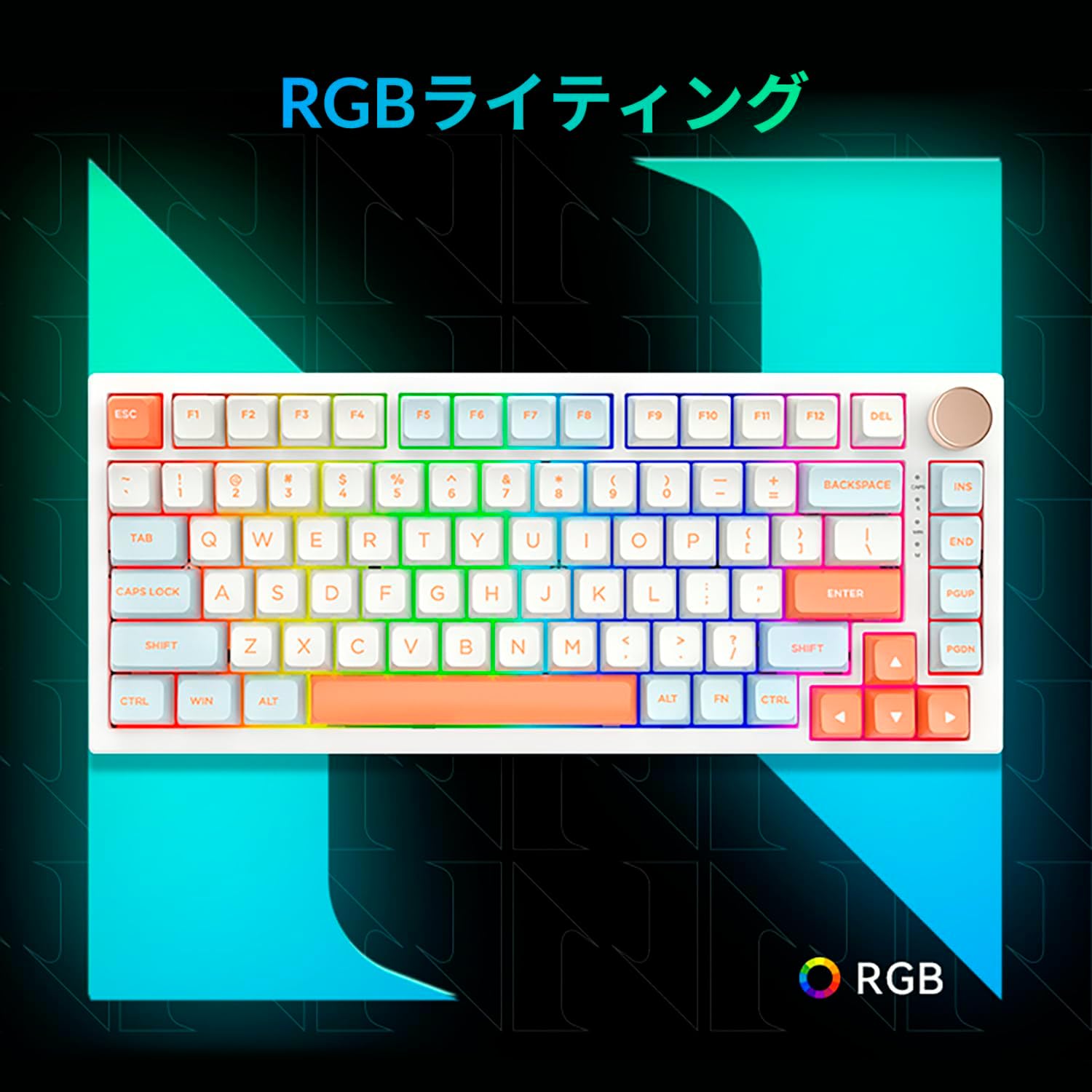
Figure 3.5: The VGN N75 keyboard displaying its customizable RGB lighting, enhancing the visual appeal.
4. Setup Guide
Follow these steps to set up your VGN N75 keyboard:
- Unpack the Keyboard: Carefully remove the keyboard and all included accessories (USB cable, keycap puller, replacement key) from the packaging.
- Cunnette u cavu USB-C: Insert one end of the provided USB-C cable into the USB-C port on the keyboard.
- Cunnette vi à u vostru Dispositivu: Plug the other end of the USB-C cable into an available USB port on your computer or laptop.
- Installazione di u Driver (Automatica): A tastiera hè plug-and-play. U vostru sistema operativu duveria rilevà è installà automaticamente i driver necessarii. Di solitu ùn hè necessaria alcuna installazione manuale di driver.
- Testu iniziale: Open a text editor or any application to test the keys and ensure all functions are working correctly.
5. Operating Instructions
This section details the basic operation of your VGN N75 keyboard:
5.1. Funzioni chjave basiche
The VGN N75 features a standard US82 key layout. All keys function as labeled. For specific key combinations or software-defined macros, refer to any accompanying software documentation (if applicable, not included in this manual).
5.2. Using the Rotary Knob
- Controlu di u voluminu: Girate a manopola in sensu orariu per aumentà u vulume è in sensu antiorariu per diminuisce u vulume.
- Silenziu / Unmute: Appughjà u buttone per disattivà o attivà l'audio.
5.3. Cuntrollu di l'illuminazione RGB
The VGN N75 supports RGB lighting. While specific key combinations for lighting modes are not provided in the product description, most RGB keyboards allow cycling through effects using function key combinations (e.g., Fn + F-keys or dedicated lighting keys). Experiment with the 'Fn' key in combination with other keys (like arrow keys or Ins/Del/Home/End/PgUp/PgDn) to discover lighting controls.
6. Mantenimentu
Una manutenzione adatta prolungherà a durata di vita di a vostra tastiera:
- Pulizia:
- Scollegate a tastiera da u vostru urdinatore prima di pulisce.
- Aduprate un panno morbido e senza pelucchi leggermente dampened with water or a mild cleaning solution to wipe the keycaps and frame.
- Per a polvera è i detriti trà i tasti, aduprate aria compressa.
- Ùn spruzzate micca liquidu direttamente nantu à a tastiera.
- Sustituzione di u cappucciu di i tasti è di l'interruttore:
- The keyboard comes with a keycap puller and a replacement key.
- To remove a keycap, gently use the keycap puller to grip the keycap and pull upwards.
- Per rimpiazzà un cappucciu di chjave, allineallu cù u gambu di l'interruttore è appughjà fermamente finu à chì si mette in pusizione.
- Nota: The VGN N75 features hot-swappable switches, allowing for easy replacement without soldering. To remove a switch, use a switch puller (not explicitly listed as included, but implied by "hot-swappable") to gently pry it out. Align the new switch's pins with the sockets and press firmly until it seats correctly.
7. Risoluzione di prublemi
If you encounter issues with your VGN N75 keyboard, try the following solutions:
- A tastiera ùn risponde micca:
- Assicuratevi chì u cavu USB-C sia cunnessu currettamente à a tastiera è à u vostru urdinatore.
- Pruvate à cunnette a tastiera à un altru portu USB di u vostru urdinatore.
- Restart u vostru urdinatore.
- Pruvate a tastiera nantu à un altru urdinatore per escludere un prublema specificu di u sistema.
- Chjavi chì ùn si registranu micca:
- Verificate s'ellu ci hè qualchì ostaculu fisicu sottu à u keycap.
- If a specific key is not working, consider replacing its switch if you have a switch puller and replacement switches.
- Prublemi d'illuminazione RGB:
- Assicuratevi chì a tastiera sia alimentata currettamente.
- Try cycling through lighting modes using the keyboard's function key combinations.
- Rotary Knob Not Working:
- Check for any physical obstructions around the knob.
- Assicuratevi chì a tastiera sia cunnessa currettamente.
8. Specificazioni
| Attributu | Detail |
|---|---|
| Marca | VGN |
| Numero di mudellu | N75BLUE |
| Serie | N75 |
| Culore | Turchinu |
| Descrizzione di tastiera | Mecànicu |
| Numero di Chjavi | 82 |
| Tecnulugia di cunnessione | USB-C |
| Tipu di fonte di energia | putenza USB |
| Dispositivi compatibles | Laptop |
| Usi di u pruduttu cunsigliati | Lusinghi |
| Keyboard Backlight Colour Support | RGB |
| Materiale | Plastica |
| Cumpunenti inclusi | Keycap Puller, Replacement Key, USB Cable |
| Dimensioni di u pacchettu | 42.1 x 18.8 x 6.5 cm; 1.1 kg |
| Data Prima Disponibile | 22 di marzu di u 2024 |
9. Garanzia è Support
The VGN N75 Gaming Keyboard comes with a 1-year warranty from the date of purchase, as indicated in the product listing. This warranty covers manufacturing defects under normal use.
For warranty claims, technical support, or further inquiries, please contact your point of purchase or the official VGN support channels. Keep your proof of purchase for warranty validation.
Nota: U smontaggio o a mudificazione micca autorizata di u pruduttu pò annullà a garanzia.
Ask a question about this manual
Ask about setup, troubleshooting, compatibility, parts, safety, or missing instructions. Manuals+ will review the question and use this page’s manual context to help answer it.