
1. Introduzione
This manual provides detailed instructions for the setup, operation, and maintenance of your nuphy Field75 HE Magnetic Switch Gaming Keyboard. Please read this manual thoroughly to ensure proper use and to maximize your keyboard's performance.
2. Cuntenutu di u pacchettu
Verificate chì tutti l'articuli sò presenti in u vostru pacchettu:
- 1 x Field75 HE Magnetic Switch Gaming Keyboard
- 1 x USB Cable (1.5m / 59 inches)
- 1 x Keycap/Switch Puller
- 4 x Extra Keycaps
- 1 x Quick Guide/Poster
3. Produttu Finituview
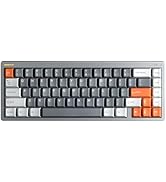
The nuphy Field75 HE is an 83-key wired gaming keyboard featuring magnetic switches and Hall Effect Sensors for enhanced performance. It includes a volume control knob, customizable buttons, and RGB backlighting.

Funzioni chjave:
- Magnetic Switches & Hall Effect Sensors: Provides faster response times and adjustable actuation points.
- Trigger rapidu: Allows for quick key resets and re-triggers, enhancing gaming performance.
- Frequenza di sondaggio di 8000 Hz: Ensures minimal input latency for a responsive experience.
- Attuazione regulabile: Customize key travel from 0.1mm to 3.3mm (Magnetic Jade switches).
- NuPhyIO Customization Software: Web-based tool for comprehensive key binding, trigger settings, and lighting adjustments.
- Dynamic Keystroke: Assign up to four functions to a single key press and release.
- Trè modi: Easily switch between different configurations for various operating systems or applications using the 'shifter' switch.
- Retroilluminazione RGB: Customizable per-key RGB lighting for visual customization.
- Manopola di Cuntrollu di Volume: Dedicated knob for convenient audio adjustment.
- 8 Buttoni persunalizabili: Additional G-keys for macros and custom functions.


4. Setup
Follow these steps to set up your nuphy Field75 HE keyboard:
- Unpack the Keyboard: Eliminate cù cura a tastiera è tutti l'accessori da l'imballu.
- Cunnette u cable USB: Insert the USB-C end of the provided cable into the port on the keyboard. Connect the other end (USB-A) to an available USB port on your computer.
- Riconoscimentu di u Sistema: Your computer should automatically detect and install the necessary drivers for the keyboard. This may take a few moments.
- Testu iniziale: Aprite un editore di testu o un navigatore è pruvate a scrittura per assicurà chì tutte e chjave funzionanu currettamente.
5. Operating Instructions
5.1. Funzioni basi
- Scrizzione: Aduprate u layout QWERTY standard per l'input di testu.
- Tasti di funzione (F1-F12): Access multimedia controls or system functions by pressing the Fn key in combination with the F-keys.
- Manopola di Cuntrollu di Volume: Rotate the knob on the top left to adjust system volume. Press the knob to mute/unmute.
5.2. Selezzione di Modu
The Field75 HE features a 'shifter' switch (M1, M2, M3) to select between three customizable modes. Each mode can store different key bindings, lighting settings, and trigger parameters.

5.3. Customization with NuPhyIO
The NuPhyIO Console is a web-based tool that allows for extensive customization of your keyboard. Access it via nuphy.io.

Within NuPhyIO, you can:
- Attuazione regulabile: Set the actuation point for each key within the 0.1-3.3mm range.
- Trigger rapidu: Configure the trigger and re-trigger points for keys, allowing for faster, more responsive inputs. The shortest re-trigger distance is 0.02mm.
- Dynamic Keystroke: Assign up to four different functions to a single key based on its press and release stages.
- Key Bindings: Remap any key to a different function or macro.
- Effetti di luce: Customize RGB backlighting patterns, colors, and brightness.
- Save Layers: Store global configurations as layers, which can be activated via the mode switch.
5.4. G-Keys
The Field75 HE includes four dedicated G-keys (G1-G4) on the left side of the keyboard. These keys are fully programmable via the NuPhyIO Console to execute macros or specific functions.
6. Mantenimentu
Una manutenzione adatta assicura a longevità è e prestazioni di a vostra tastiera:
- Pulizia: Pulite regularmente a tastiera cù un pannu dolce è asciuttu. Per una pulizia più profonda, aduprate una bomboletta d'aria compressa per rimuovere a polvere è i detriti trà i tasti.
- Rimozione di u cappucciu di i tasti: Use the provided keycap puller to carefully remove keycaps for cleaning or replacement. Avoid using excessive force.
- Cura di u Cambiamentu: The magnetic switches are designed for durability. Avoid exposing them to liquids or extreme temperatures.
- Gestione di Cable: Ensure the USB cable is not kinked or strained to prevent damage.
7. Risoluzione di prublemi
If you encounter issues with your nuphy Field75 HE keyboard, refer to the following common problems and solutions:
| Prublemu | Causa Possibile | Soluzione |
|---|---|---|
| Tastiera ùn risponde micca | Cunnessione USB allentata, cavu difettuosu, prublema di driver. | Check USB cable connection. Try a different USB port. Restart your computer. Try a different USB cable. |
| Keys not registering inputs | Dust/debris under keycap, software conflict, incorrect actuation setting. | Remove keycap and clean switch area. Check NuPhyIO for actuation settings. Test on another computer. |
| A retroilluminazione ùn funziona micca | Lighting disabled, software setting, power issue. | Check lighting settings in NuPhyIO. Ensure keyboard is properly powered. |
| Custom settings not applied | Settings not saved, incorrect mode selected. | Ensure settings are saved in NuPhyIO. Verify the correct mode (M1, M2, or M3) is selected on the keyboard. |
If the problem persists after attempting these solutions, please contact nuphy customer support for further assistance.
8. Specificazioni
Detailed specifications for the nuphy Field75 HE Magnetic Switch Gaming Keyboard:
- Mudellu: Campu 75 HE
- Connettività: Cablatu (USB-C)
- Interruttori: Magnetic Jade (Linear)
- Actuation Range: 0.1 - 3.3 mm
- Initial Force: 30 ± 7 gf
- End Force: 50 ± 7 gf
- Bottom-out Magnetic Flux: 700 ± 80 Gs
- Durata di vita: 100 milioni di clicchi
- Tasso di votazione: 8000 Hz
- Retroilluminazione: RGB
- Dimensioni: 14.66 x 5.62 x 1.59 inch (372.3 x 142.8 x 40.4 mm)
- Pesu di l'articulu: 2.65 liri
- Dispositivi cumpatibili: Laptop, PC, Tablet
- Sistemi Operativi: Windows, macOS, Linux

9. Garanzia è Support
The nuphy Field75 HE Magnetic Switch Gaming Keyboard comes with a standard manufacturer's warranty. For specific warranty terms and conditions, please refer to the warranty card included in your package or visit the official nuphy websitu.
For technical support, troubleshooting assistance, or any inquiries regarding your product, please contact nuphy customer support through their official website or designated support channels. Keep your purchase receipt and product serial number handy when contacting support.
Official nuphy websitu: nuphy.com