
1. Introduzione
This manual provides detailed instructions for the installation, operation, and maintenance of your Surakey 10-inch Android 13 Car Stereo. Please read this manual thoroughly before using the product to ensure proper function and safety. This car stereo is designed for Nissan Versa Sedan models from 2015 to 2019, offering advanced features such as Wireless Carplay, Android Auto, GPS Navigation, and a high-resolution IPS touch screen.
2. Ciò chì hè in a scatula
Disimballate cù cura a scatula è assicuratevi chì tutti l'articuli elencati quì sottu sianu presenti è in bonu statu. Sè qualchì articulu manca o hè dannighjatu, cuntattate l'assistenza clienti.
- 1 x Car Stereo Unit
- 1 x Cavu d'alimentazione
- 1 x RCA Input/Output Cable
- 2 x Cavi USB
- 1 x Cavu d'entrata di a camera
- 1 x Antenna GPS
- 1 x Manuale d'istruzzioni (stu documentu)

Image: Contents of the package, showing the car stereo unit and all included accessories for installation.
3. Setup è Installazione
Professional installation is recommended for this car stereo. Ensure the vehicle's power is disconnected before beginning installation. Refer to your vehicle's specific wiring diagrams if necessary.
3.1 Connessioni Wiring
- Connect the main power cable to the vehicle's power harness.
- Attach the RCA input/output cables for external audio/video devices.
- Connect the USB cables for media playback and device charging.
- Installate l'antenna GPS in un locu cù una vista chjara. view di u celu per una ricezione ottimale di u signale.
- If using a backup camera (optional, not included), connect the camera input cable.

Image: Rear connections of the car stereo, illustrating where various cables like power, RCA, USB, and GPS antenna connect.
3.2 Muntà l'unità
The car stereo is designed to fit the dashboard of Nissan Versa Sedan models from 2015-2019. Carefully remove the original stereo and install the new unit, ensuring all connections are secure and the unit is properly seated in the dashboard.

Imagine: Prima è dopu l'installazione view of the car stereo in a Nissan Versa Sedan dashboard, showing the seamless integration.
4. Operating Instructions
The Surakey car stereo features an intuitive Android 13 interface. Navigate through menus using the touch screen. Key functions are detailed below.
4.1 Carplay senza filu è Android Auto
Connect your smartphone wirelessly via Bluetooth to access Apple CarPlay or Android Auto. This allows you to use your phone's navigation, music, messages, and other compatible apps directly on the car stereo's display.

Image: Display showing both Apple CarPlay and Android Auto interfaces, highlighting app integration.
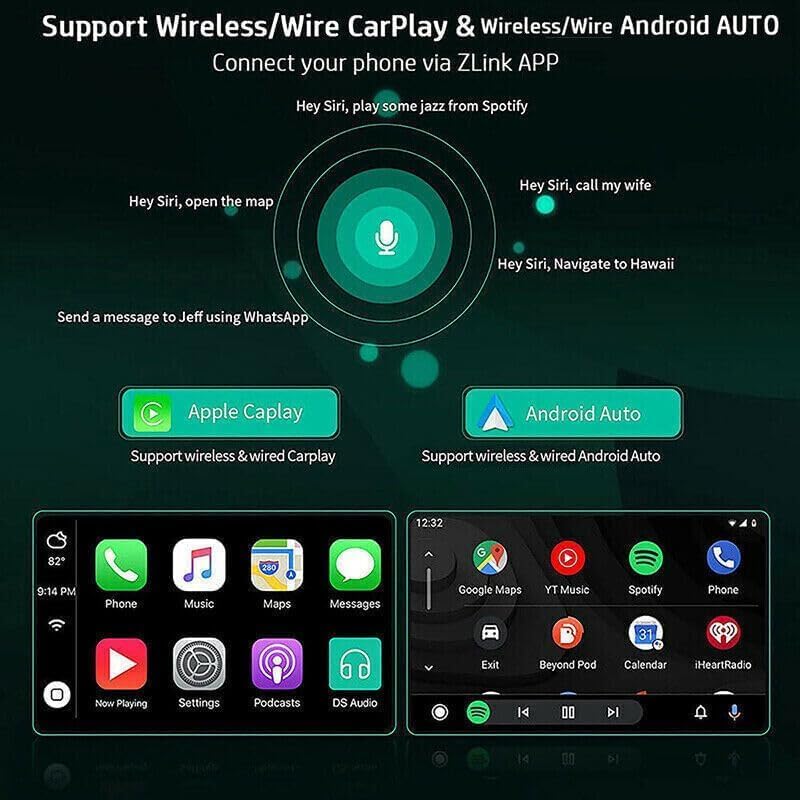
Image: Voice command functionality for CarPlay and Android Auto, demonstrating hands-free operation.
4.2 GPS Navigation and WiFi Connectivity
The unit supports both online and offline GPS navigation. Download offline maps for use without an internet connection, or connect to a mobile hotspot via WiFi for real-time map updates and access to online services.

Image: GPS navigation interface and WiFi connection feature, showing how to access maps and internet.
Radio 4.3 FM/RDS
Access FM radio stations with RDS (Radio Data System) support. Tune into your favorite stations for news, music, and traffic updates. The unit allows for easy station scanning and saving presets.

Image: FM/RDS radio interface on the car stereo screen, displaying current frequency and controls.
4.4 Funzionalità Bluetooth
Connect your phone via Bluetooth 5.0 for hands-free calling, music streaming (A2DP), and automatic phonebook loading. This enhances safety and convenience while driving.
4.5 Schermu divisu
The split-screen feature allows you to run two applications simultaneously on the display, such as navigation and music playback, or a video and another app. Long-press an app icon to activate split-screen mode.
4.6 Ajustamentu di l'equalizazione
Customize your audio experience with the built-in Equalizer (EQ) adjustment. Select from various preset sound modes (e.g., Jazz, Pop, Rock) or manually adjust frequency bands to suit your preferences.
4.7 Impostazioni di u Sistema
Access the system settings menu to configure various aspects of the stereo, including Wi-Fi, device settings, general preferences (like default volume, boot volume, lantern settings), and user profiles. The factory setting keyword is 8888, 3368, or 1234.
Video: Demonstration of key operating features including media playback, FM radio, EQ adjustment, system settings, map navigation selection, and split-screen display.
5. Specificazioni
| Feature | Specificazione |
|---|---|
| Sistema | Android 13 |
| Size Screen | 10 inch |
| Memoria (RAM + ROM) | 2GB RAM + 32GB ROM |
| Risoluzione di u screnu | 1024x600 |
| Tipu di schermu | IPS 2.5D HD Capacitive Touch Screen |
| Banda Radio | FM/RDS |
| Forza di putenza | 4 x 45 W |
| Versione Bluetooth | 5.0 |
| Connettività | Bluetooth, USB, WiFi |
| Navigazione | GPS (Offline maps supported) |
| Temperature di funziunamentu | -40 ℃ à 80 ℃ |
| Controlu di u volante | Supportatu |
| Output Video | Supportatu |
| Formati Audio | APE/FLAC/WAV/MP3/WMA, ecc. |
| Formati Video | MKV/RMVB/AVI/MP4/MDV, ecc. |
| Formati di Picture | PNG/JPEG/JPG/GIF/WBMP/BNP, ecc. |
| Lingue | Supportu multilingue (cinese, inglese, francese, talianu, coreanu, giapponese, arabu, spagnolu, portoghese, russu, turcu, vietnamita, ebraicu, polaccu, tedescu) |
| Veiculu cumpatibile | Nissan Versa Sedan 2015-2019 |

Image: Screen comparison highlighting color gamut and resolution differences between standard IPS and QLED displays.
6. Risoluzione di prublemi
Sè avete prublemi cù u vostru stereo di vittura, per piacè riferitevi à i seguenti passi cumuni di risoluzione di i prublemi:
- Nisun putere: Check all power connections and ensure the vehicle's ignition is on. Verify the fuse is intact.
- Nisun sonu: Check speaker connections and volume settings. Ensure the mute function is not active.
- Prublemi di signale GPS: Assicuratevi chì l'antenna GPS sia installata in un locu cù una vista chjara. view di u celu. Verificate a cunnessione di l'antenna.
- Problemi di cunnessione Bluetooth: Assicuratevi chì u Bluetooth sia attivatu sia nant'à u stereo sia nant'à u vostru smartphone. Pruvate à disaccoppià è à riaccoppià i dispusitivi.
- Touch Screen Unresponsive: Try restarting the unit. If the issue persists, a factory reset may be necessary (refer to System Settings).
- Sistema lentu/Bloccu: Close unnecessary applications. If the problem continues, consider a factory reset.
For persistent issues not resolved by these steps, please contact Surakey customer support.
7. Garanzia è Support
Your Surakey car stereo comes with a standard manufacturer's warranty. Please retain your proof of purchase for warranty claims. For technical support, warranty inquiries, or service, please refer to the contact information provided with your purchase or visit the official Surakey websitu.