
GUSGU Transparent Case with Wireless Keyboard
GUSGU Transparent Case with Wireless Keyboard User Manual
For iPad Air 13-inch (M3/M2) and iPad Pro 12.9-inch (6th/5th/4th/3rd Gen)
Introduzione
This manual provides comprehensive instructions for the setup, operation, and maintenance of your GUSGU Transparent Case with Wireless Keyboard. Please read this manual thoroughly to ensure proper use and to maximize the functionality of your device.
Cumpatibilità
This keyboard case is designed for specific iPad models:
- iPad Air 13-inch (M3, 2025)
- iPad Air 13-inch (M2, 2024)
- iPad Pro 12.9 pollici (6a generazione, 2022)
- iPad Pro 12.9 pollici (5a generazione, 2021)
- iPad Pro 12.9 pollici (4a generazione, 2020)
- iPad Pro 12.9 pollici (3a generazione, 2018)
To verify your iPad model, check the back of your device for the model number (e.g., A2898).
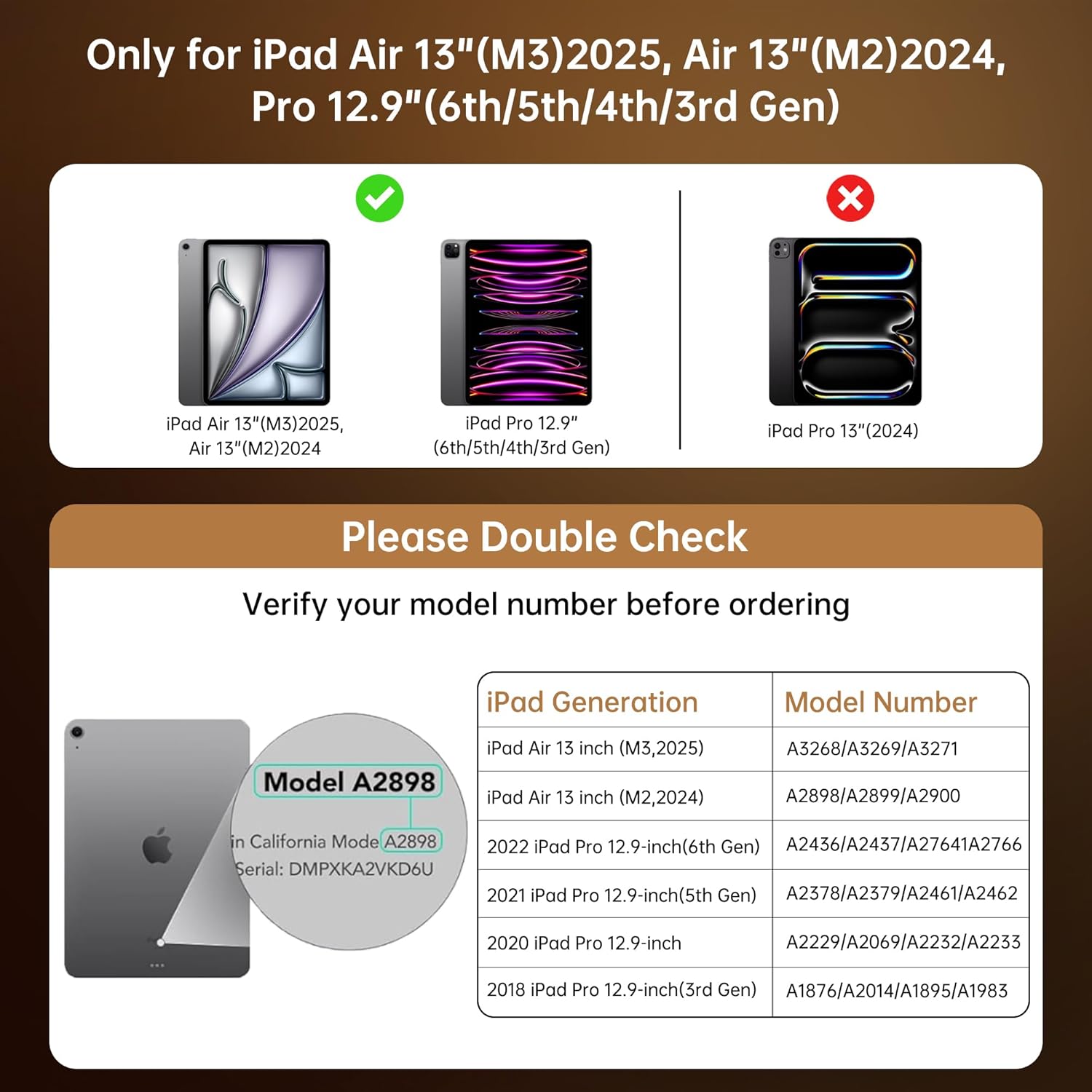
This chart provides essential compatibility information, detailing the specific iPad Air 13-inch (M3/M2) and iPad Pro 12.9-inch (6th/5th/4th/3rd Gen) models that are compatible with this keyboard case. It includes a visual guide on where to find your iPad's model number for verification.
Istruzzioni di stallazione
- Insert Your iPad: Gently align your iPad with the case and press it into the protective frame until it is securely seated. Ensure all ports and buttons are accessible. The case provides secure, form-fit protection.
- Caricà a tastiera: Before first use, fully charge the keyboard. Connect the provided USB-C cable to the keyboard's charging port and to a power source. A full charge takes approximately 2 hours and provides up to 30 days of power.
- Pair the Keyboard via Bluetooth:
- Turn on the keyboard by sliding the power switch. The indicator light will flash, indicating it's in pairing mode.
- Nant'à u vostru iPad, andate à Settings > Bluetooth.
- Accende u Bluetooth.
- Select "GUSGU Keyboard" (or similar name) from the list of available devices.
- Follow any on-screen prompts to complete the pairing process. The indicator light will turn solid when successfully paired.

This graphic illustrates the efficient power management of the keyboard, showing that a 2-hour charge provides up to 30 days of usage, ensuring extended productivity.
Istruzzioni di funziunamentu
360° Rotating Stand & Multi-Angle Viewing
The case features a 360° swivel stand and offers 5 adjustable viewing angles. This allows for seamless transitions between typing, sketching, and media viewmodi di ing.

This image displays the GUSGU Transparent Keyboard Case with an iPad, illustrating its versatile design. The main view shows the iPad attached to the keyboard, with smaller insets demonstrating how the case can rotate 360 degrees and be adjusted to multiple viewing angles for typing, drawing, or media consumption.
- Modu di scrittura: Position the iPad upright for a laptop-like experience.
- Modu di schizzu: Lay the iPad flat or at a low angle for comfortable drawing or writing.
- ViewModu di ing: Adjust the iPad to various angles for watching videos or presentations.

This image illustrates three practical ways to use the keyboard case: 'Sketch' mode, where the iPad is laid flat for drawing; 'Watch Videos' mode, with the iPad angled for comfortable viewing; and 'Video Call' mode, positioning the iPad upright for communication.
Retroilluminazione di a tastiera
The keyboard features 7 colors of backlight and 3 brightness levels for comfortable typing in various lighting conditions.
- Press u Ampolla elettrica key to cycle through backlight colors.
- Press u Fn + Light Bulb keys to adjust backlight brightness (3 levels).

A visual representation of the keyboard's customizable backlight feature, showcasing the seven distinct colors and three adjustable brightness levels available to personalize the typing experience.

Un primu pianu view of hands typing on the keyboard, emphasizing the comfortable and responsive typing experience provided by the backlit keys and scissor-switch mechanism with 1mm key travel.
Trackpad di precisione
The integrated trackpad supports multi-touch gestures for intuitive navigation, similar to a laptop. Familiar gestures include:
- Swipe: Move your finger across the trackpad to navigate.
- Scroll: Aduprate dui dite per scorrere in su o in giù.
- Pizzicà: Aduprate dui dite per zoomà in o in zoomà.
- Doppiu toccu: Selezziunate elementi o aprite applicazioni.
- Cambià l'applicazioni: Use three or four fingers to swipe between open applications (iPadOS dependent).

This image shows a hand interacting with the precision multi-touch trackpad, illustrating its responsiveness and support for various gestures, enhancing navigation and control.
Apple Pencil Holder
The case includes a dedicated magnetic holder for your Apple Pencil, ensuring it is securely stored and readily accessible without needing to remove the case.

This image highlights two key features: the robust, form-fitting protection provided by the case, particularly around the iPad's edges, and the convenient, integrated holder designed to securely store an Apple Pencil.
Funzione Auto Sleep/Wake
The case supports the iPad's auto sleep/wake function. Closing the case will put your iPad to sleep, and opening it will wake it up, conserving battery life.
Mantenimentu
- Pulizia di u casu: Aduprà un soft, damp cloth to wipe the exterior of the case. Avoid harsh chemicals or abrasive materials.
- Pulizia di a tastiera: Use a soft, dry cloth or a can of compressed air to clean between the keys. Do not spray liquid directly onto the keyboard.
- Conservazione: When not in use for extended periods, ensure the keyboard is turned off to conserve battery. Store the case in a cool, dry place.
Risoluzione di prublemi
- Tastiera micca cunnessa:
- Assicuratevi chì a tastiera sia accesa è cumpletamente carica.
- Check your iPad's Bluetooth settings to confirm Bluetooth is enabled and the keyboard is paired. If not, try re-pairing.
- Riavviate u vostru iPad è a tastiera.
- I chjavi ùn rispondenu micca:
- Assicuratevi chì a tastiera sia cunnessa via Bluetooth.
- Verificate u livellu di batteria di a tastiera.
- Pulite ogni detritu intornu à i tasti.
- Trackpad Not Working:
- Assicuratevi chì a tastiera sia cunnessa.
- Check iPadOS settings for trackpad functionality.
- Ripigliate u vostru iPad.
- Backlight Not Working/Changing:
- Assicuratevi chì u teclatu hè alimentatu.
- Press the Light Bulb key or Fn + Light Bulb keys to cycle through options.
- Check battery level, as low battery might disable backlighting.
Specificazioni
| Marca | GUSGU |
| Dispositivi compatibles | iPad Air 13-inch (M2/M3), iPad Pro 12.9-inch (6th/5th/4th/3rd Gen) |
| Descrizzione di tastiera | Ergonomic Backlit Keyboard (7 colors, 3 brightness levels, scissor-switch, 1mm travel) |
| Trackpad | Precision Multi-Touch Trackpad |
| Fonte d'energia | Battery Powered (2-hour charge for 30-day power) |
| Disposizione di tastiera | QWERTY |
| Orientazione di a manu | Ambidextru |
| Pesu di l'articulu | 2.86 liri |
| Dimensioni di u pacchettu | 12.13 x 10.24 x 1.18 inch |
Garanzia è Supportu
GUSGU provides lifetime customer support for this product. If you encounter any issues or have questions, please contact GUSGU customer service for assistance.
Per più assistenza, visitate u Negoziu GUSGU nant'à Amazon.
Ask a question about this manual
Ask about setup, troubleshooting, compatibility, parts, safety, or missing instructions. Manuals+ will review the question and use this page’s manual context to help answer it.