1. Introduzione
This instruction manual provides essential information for the safe and efficient use of your ApoloSign 32-inch UHD 4K Smart Portable TV Gen2. Please read this manual thoroughly before operating the device and retain it for future reference. This portable smart TV combines a high-resolution display with smart features, offering versatile entertainment and productivity options throughout your home.

Image: The ApoloSign 32-inch Portable TV Gen2 positioned in a modern living room, showcasing u so design elegante è a so purtabilità.
2. Informazioni di sicurezza
Precauzioni Generali di Sicurezza
- Ùn espone micca l'apparechju à a pioggia o à l'umidità per impedisce u focu o a scossa elettrica.
- Assicurà una ventilazione adatta. Ùn bluccà micca l'aperture di ventilazione.
- Aduprate solu l'adattatore di corrente furnitu cù u dispusitivu.
- Evitate di mette u dispusitivu nantu à superfici instabili.
- Ùn pruvate micca di smuntà o riparà l'apparechju da per voi. Affidate tutta a manutenzione à persunale qualificatu.
Sicurezza di a batteria
- The device contains a built-in 15000mAh lithium-ion battery. Do not expose it to excessive heat, direct sunlight, or fire.
- Caricate a batteria cumpletamente prima di u primu usu.
- If the battery shows signs of swelling, leakage, or damage, discontinue use immediately and contact support.
- Eliminate e batterie secondu a regulazione lucali.
3. Cuntenutu di u pacchettu
Verificate chì tutti l'articuli sò presenti in u pacchettu:
- ApoloSign 32-inch UHD 4K Smart Portable TV Gen2 Display
- Rolling Stand Base
- Stand Pole (multiple sections)
- Adattatore di putenza
- Voice Control Remote
- 8MP Camera Module
- Assembly Screws and Tools
- Manuale d'uso (stu documentu)

Image: The voice remote control, a key accessory for navigating the ApoloSign TV.

Image: The detachable 8MP camera module, designed for video calls and other interactive features.
4. Produttu Finituview
The ApoloSign 32-inch UHD 4K Smart Portable TV Gen2 is a versatile device designed for flexible use across various environments. Its main components include:
- 32-inch UHD 4K Touchscreen: A large, high-resolution display with touch functionality for intuitive interaction.
- Rolling Stand: A sturdy base with smooth wheels for easy movement between rooms.
- Adjustable Screen Mount: Allows for height adjustment, left/right swivel, and tilt for optimal viewanguli d'inquadratura sia in orientazione verticale sia in orizzontale.
- Integrated 8MP Camera: For video conferencing and other camera-enabled applications.
- Voice Remote Control: Enables hands-free operation and navigation.
- Batteria integrata di 15000 mAh: Provides up to 8 hours of portable use.
- Porti di Connettività: Includes HDMI, USB 2.0, USB 3.0, Bluetooth 5.3, and Wi-Fi for various connections.
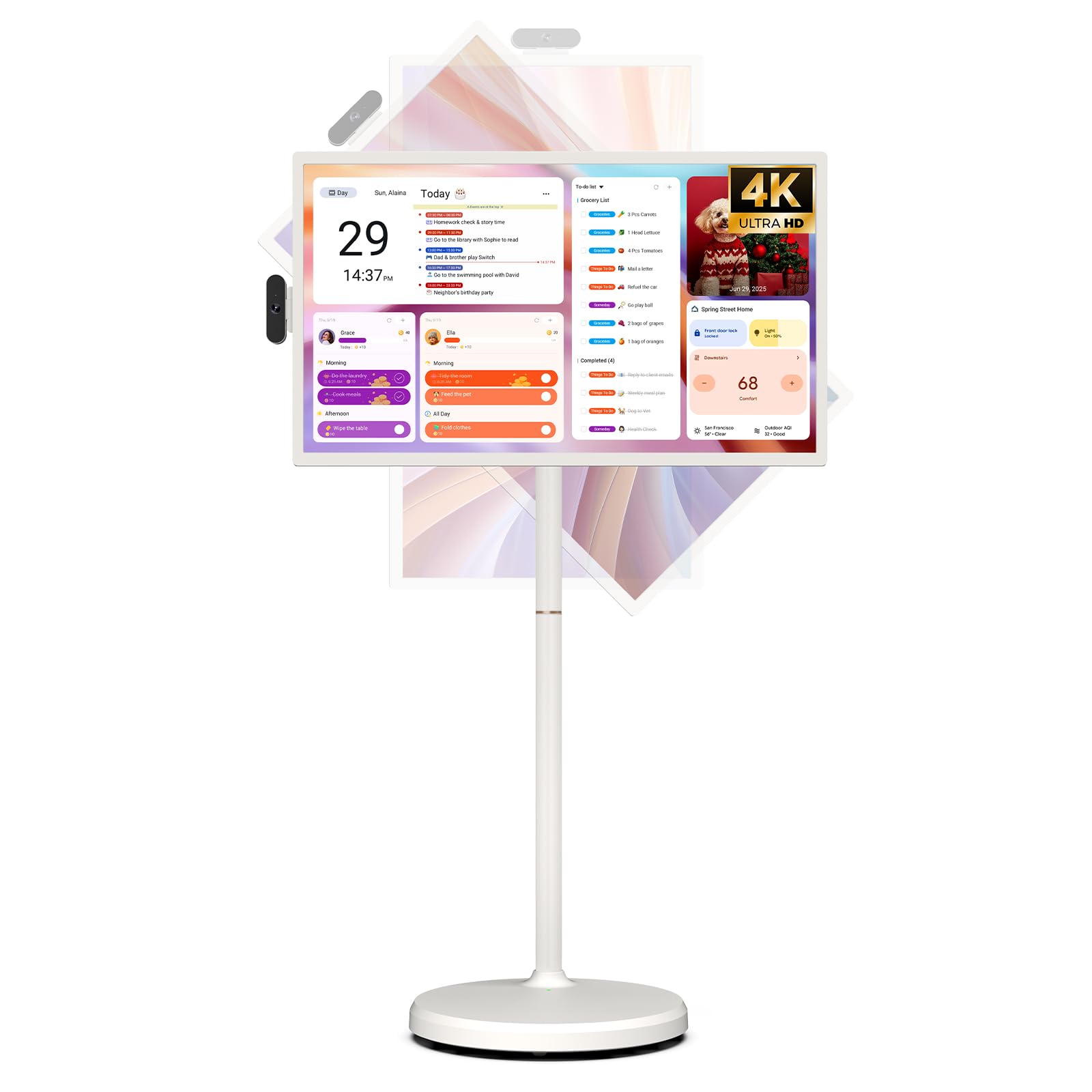
Image: The ApoloSign 32-inch UHD 4K Smart Portable TV Gen2, highlighting its large screen and mobile stand.
5. Setup
Assemblea
- Unpack tutti i cumpunenti da a scatula.
- Attach the stand pole sections to the rolling base using the provided screws.
- Carefully mount the TV display onto the top of the assembled stand pole, ensuring it clicks securely into place.
- Connect the internal power cable from the stand to the display.
- Attach the 8MP camera module to the designated slot on top of the display.
Accensione iniziale è cunnessione di rete
- Connect the power adapter to the TV and a power outlet. The device will begin charging.
- Press the power button located on the back of the display to turn on the TV.
- Segui l'istruzzioni nantu à u screnu per selezziunà a vostra lingua è a regione.
- Cunnette vi à a vostra rete Wi-Fi selezziunendula da a lista è inserendu a password.
- Sign in with your Google account to access the Google Play Store and other services.
Accoppiamentu di cuntrollu remoto
- Insert batteries into the voice remote control.
- On the TV screen, navigate to Settings > Remotes & Accessories > Add Accessory.
- Press and hold the specified pairing buttons on the remote (refer to remote's mini-guide) until the indicator light blinks.
- Select the remote control from the list on the TV screen to complete pairing.
6. Operating Instructions
Navigazione basica
- Touchscreen: Tap, swipe, and pinch to navigate menus, open apps, and interact with content.
- Voice Remote: Use the directional pad and selection buttons for menu navigation. Press the voice button to activate voice commands for searching or launching apps.
Screen Rotation and Adjustment
The screen can be rotated 90 degrees between landscape and portrait modes. It also allows for height adjustment, left/right swivel, and tilting to achieve the desired viewing angulu.

Image: Illustrations demonstrating the various ways the ApoloSign TV screen can be adjusted: height, tilt, and rotation.
Apps and Google Play Store
Running on a customized Android 15 OS and Google certified, you can download and install any app available on the Google Play Store. Access streaming services, social media, productivity tools, and games.

Image: The ApoloSign TV screen showing the Android 15 interface with icons for popular apps like Netflix, YouTube, Spotify, and TikTok.
Wireless and Wired Casting
Share content from your mobile phone, tablet, or laptop to the TV screen.
- Casting wireless: Use the built-in MixCast feature or other compatible casting protocols. Ensure your device and the TV are on the same Wi-Fi network.
- Wired Casting: Connect external devices like gaming consoles or laptops via the HDMI port. The TV supports 4K HDMI output.
Video: A demonstration of how to screen mirror a mobile phone, tablet, or laptop to the ApoloSign Smart Portable TV.
Calendar Widget and Screensavers
The interactive desktop calendar widget syncs with Google Calendar, Outlook, and Google Tasks to help manage your schedule. Utilize dynamic screensavers to transform the TV into a digital clock, photo frame, or market billboard.

Image: The ApoloSign TV screen showcasing its digital calendar feature, displaying daily schedules and events.

Image: The ApoloSign TV screen demonstrating different digital screensaver options, including a photo display and a music player interface.
Uso di Camera
The integrated 8MP camera is ideal for video calls and conferences. Ensure the camera is correctly installed and facing the desired direction.
7. Mantenimentu
Pulizia
- Scollega sempre u dispusitivu prima di pulisce.
- Aduprate un panno morbido e senza pelucchi leggermente dampLavate cù acqua o un detergente per schermu per pulisce u display. Evitate i prudutti chimichi aggressivi.
- Wipe the body of the TV and stand with a dry, soft cloth.
Cura di a batteria
- Per una durata ottimale di a batteria, evitate di scaricà cumpletamente a batteria spessu.
- Conservate u dispusitivu in un locu frescu è asciuttu quandu ùn hè micca adupratu per periodi prolungati.
- Charge the battery periodically if stored for a long time to prevent deep discharge.
L'aghjurnamenti di u software
Regularly check for and install software updates to ensure optimal performance and access to the latest features. Updates can usually be found in the device's settings menu.
8. Risoluzione di prublemi
- Device not powering on or shutting off abruptly:
Ensure the power adapter is securely connected and the battery is charged. If the issue persists, perform a soft reset by holding the power button for 10-15 seconds. If problems continue, contact customer support. - Remote control not responding or selective functionality:
Check the remote's batteries and replace if necessary. Ensure the remote is paired correctly (refer to Section 5). If the remote is still unresponsive, try re-pairing it. - Prublemi di cunnessione Wi-Fi:
Verify that your Wi-Fi router is working correctly. Restart the TV and your router. Ensure the TV is within range of your Wi-Fi signal. - Screen mirroring not working:
Confirm that both the TV and the source device (phone, tablet, laptop) are connected to the same Wi-Fi network. Ensure the casting feature is activated on both devices. - Poor picture or sound quality:
For streaming content, check your internet connection speed. For wired connections (HDMI), ensure cables are securely connected and undamaged. Adjust display settings (resolution, brightness) as needed.
9. Specificazioni
| Feature | Detail |
|---|---|
| Nome di mudellu | SW3299T-4K |
| Size Screen | 32 inch |
| Risoluzione | 4K UHD 2160p (3840x2160 Pixels) |
| Tecnulugia di visualizazione | LCD |
| Frequenza di rinfrescante | 60 Hz |
| Sistema upirativu | Android 15 |
| RAM | 16 GB (8+8 GB) |
| Storage internu | 256 GB |
| Capacità batterie | 15000mAh (up to 8 hours runtime) |
| Camera | 8 MP |
| Connettività | Bluetooth 5.3, Wi-Fi |
| Porti | 1x HDMI, 1x USB 2.0, 1x USB 3.0 |
| Descrizzione di u parlante | Altoparlanti 2.1 canali |
| Metudu di cuntrollu | Touch, Voice Remote |
| Dimensioni di u produttu | 16.14 "D x 28.87" W x 60.26 "H |
10. Garanzia è Support
Garanzia di u fabricatore
This ApoloSign product is covered by a 1 Anni di Garanzia di u Fabbricante da a data di compra. Questa garanzia copre i difetti di materiali è di fabricazione in cundizioni d'usu nurmale. Per piacè cunservate a vostra prova d'acquistu per e richieste di garanzia.
Assistenza Clienti
For technical assistance, troubleshooting, or warranty inquiries, please contact ApoloSign Official customer support. They offer 24/7 fast support to address any issues you may encounter.
Per più infurmazione, visitate u ApoloSign Store on Amazon.