1. Introduzione
This manual provides detailed instructions for the installation, operation, and maintenance of the QUASAR X99 H5 Motherboard. The X99 H5 is a robust solution designed for workstations and servers, supporting LGA 2011-3 socket processors, including Intel Xeon V3/V4 series. It features DDR4 REG ECC memory support in a Dual Channel configuration, ensuring reliable stability and high performance for demanding applications such as rendering, virtualization, and intensive data processing.
Key features include PCIe 16X slots for expansion, an M.2 NVMe slot for high-speed storage, and multiple SATA 3.0 ports for additional drives. High-speed USB 3.0 ports are also integrated for rapid data transfer and peripheral connectivity. Its well-planned layout simplifies system assembly and maintenance, while quality components contribute to operational longevity and stability.
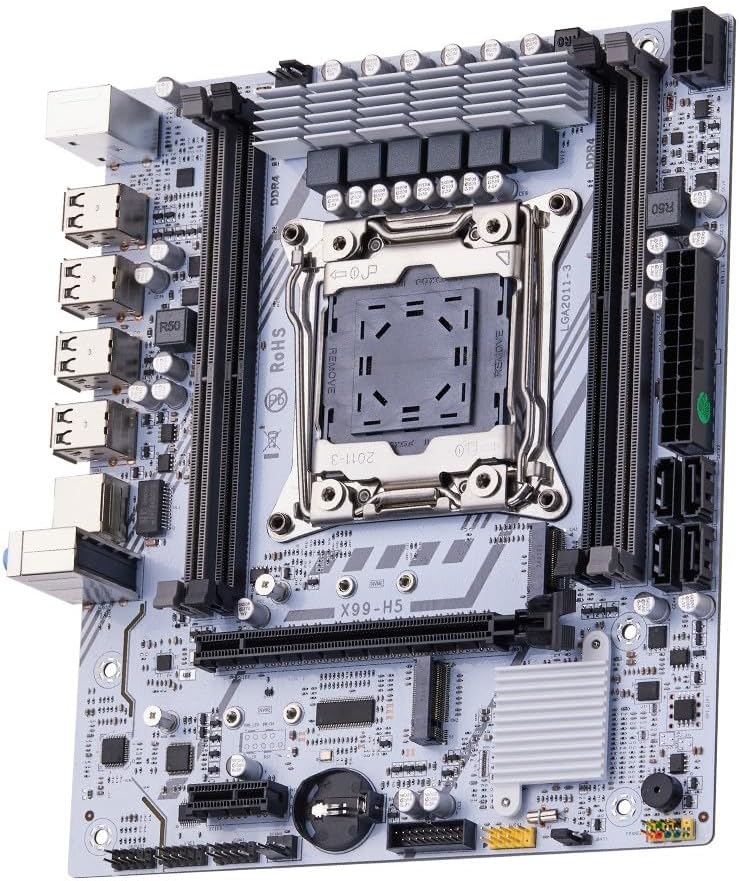
Figura 1.1: Overview of the QUASAR X99 H5 Motherboard. This image displays the full motherboard, highlighting its compact and efficient design, including the CPU socket, memory slots, and various expansion ports.
2. Informazioni di sicurezza
Please read all safety instructions carefully before installing or operating the motherboard. Failure to follow these guidelines may result in personal injury, damage to the product, or damage to other components.
- Scollegate sempre l'alimentatore da a presa murale prima di installà o rimuovere qualsiasi cumpunente.
- Portate un braccialettu antistaticu o toccate spessu un oggettu metallicu messo à terra per scaricà l'elettricità statica prima di manipulà a scheda madre o altri cumpunenti.
- Maneghjà a scheda madre per i so bordi per evità di toccà i cumpunenti sensibili.
- Ensure proper ventilation within the computer case to prevent overheating.
- Ùn espone micca a scheda madre à l'umidità o à temperature estreme.
- Mantene fora di a portata di i zitelli.
3. Setup è Installazione
3.1. Identificazione di cumpunenti
Familiarizatevi cù i diversi cumpunenti è connettori di a scheda madre prima di inizià l'installazione.

Figure 3.1: Labeled diagram of the QUASAR X99 H5 Motherboard. This image indicates the location of key components such as the CPU socket, DDR4 memory slots, PCIe slots, M.2 NVMe slot, SATA ports, USB ports, and power connectors.
- LGA 2011-3 CPU Socket: For Intel Xeon V3/V4 processors.
- DDR4 Memory Slots (4x): Supports DDR4 REG ECC memory up to 128GB.
- PCIe 16X Slots: Per e carte grafiche è altre carte d'espansione.
- M.2 NVMe Slot: For high-speed solid-state drives.
- SATA 3.0 Ports: For connecting traditional hard drives and SSDs.
- Connettore di alimentazione ATX à 24 pin: Ingressu di alimentazione principale.
- Connettore di alimentazione CPU à 8 pin: Additional power for the CPU.
- Porte USB 3.0/2.0: For peripheral connectivity.
- Portu Gigabit Ethernet: Per a cunnessione di rete.
- Prese audio: Per l'entrata/uscita audio.
- Porte PS/2: Per tastiera è mouse legacy.
3.2. Lista di cuntrollu di pre-installazione
- Compatible CPU (Intel Xeon V3/V4 series, LGA 2011-3 socket).
- Compatible DDR4 REG ECC memory modules.
- ATX power supply unit.
- Computer case with ATX form factor support.
- Storage devices (M.2 NVMe SSD, SATA SSD/HDD).
- Graphics card (if CPU does not have integrated graphics or for dedicated performance).
- Screwdriver set, anti-static wrist strap.
3.3. Passi di stallazione
- Preparate u casu: Installate u schermu I/O in l'apertura posteriore di u vostru chassis di l'urdinatore.
- Installate a CPU:
- Open the CPU socket retention mechanism.
- Allineate cù cura a CPU cù u socket, assicurendu chì a marca triangulare nantu à a CPU currisponde à a marca nantu à u socket.
- Pone delicatamente a CPU in u socket senza furzà la.
- Close the retention mechanism to secure the CPU.
- Installate u raffreddatore di CPU: Applicate a pasta termica (s'ella ùn hè micca pre-applicata) è installate u raffreddatore di a CPU secondu l'istruzzioni di u fabricatore. Cunnette u cavu di a ventola di a CPU à u connettore CPU_FAN di a scheda madre.
- Installate i moduli di memoria:
- Open the clips on the DDR4 memory slots.
- Allineate a tacca di u modulu di memoria cù a chjave in u slot.
- Press down firmly on both ends of the module until the clips snap into place. For Dual Channel configuration, refer to the motherboard's silkscreen for recommended slot pairing (e.g., A1 and B1).
- Muntà a scheda madre: Carefully place the motherboard into the computer case, aligning it with the standoffs. Secure the motherboard with screws.
- Installà i dispositivi di almacenamiento:
- For M.2 NVMe SSDs: Insert the M.2 SSD into the M.2 slot and secure it with the provided screw.
- For SATA drives: Connect SATA data cables from the motherboard's SATA ports to your drives. Connect power cables from the PSU to your drives.
- Installate e carte d'espansione: Inserite e carte grafiche o altre carte d'espansione PCIe in l'slot PCIe apprupriati è fissatele cù u mecanismu di ritenzione di u chassis.
- Cunnette l'alimentazione elettrica:
- Connect the 24-pin ATX power cable from the PSU to the motherboard.
- Connect the 8-pin CPU power cable from the PSU to the motherboard.
- Cunnette i cavi di u pannellu frontale: Connect the power button, reset button, HDD LED, power LED, and front panel USB/audio cables to their respective headers on the motherboard. Refer to the motherboard's silkscreen or a detailed diagram for correct pin assignments.
- Cunnette i periferichi: Cunnette u vostru monitor, tastiera, mouse è altri periferichi à i porti I/O posteriori.

Figura 3.2: Primu pianu view of the rear I/O panel of the QUASAR X99 H5 Motherboard. This image shows the PS/2 ports for keyboard and mouse, multiple USB ports, the Ethernet port, and the audio jacks.
4. Operating Instructions
4.1. Primu avviu è cunfigurazione di u BIOS
- After connecting all components and power, press the power button on your computer case.
- Durante u prucessu d'avvio, appughjà ripetutamente u buttone DEL or F2 key (common BIOS entry keys) to enter the BIOS/UEFI setup utility. The exact key may vary; check your screen for prompts.
- In the BIOS, verify that all installed components (CPU, RAM, storage drives) are detected correctly.
- Cunfigurà l'ordine d'avvio per dà priorità à i supporti d'installazione di u vostru sistema operativu (unità USB o DVD).
- Salvate i cambiamenti è surtite da u BIOS. U sistema si riavvierà.
4.2. Installazione di u Sistema Operativu
Follow the instructions provided with your operating system (e.g., Windows, Linux) to complete the installation process. Ensure you install all necessary drivers for the motherboard's chipsets, network adapter, audio, and any other integrated components. Drivers are typically available on the manufacturer's websitu o inclusu in un discu di driver.
4.3. Installazione Driver
For optimal performance and stability, install the latest drivers for your motherboard. These typically include:
- Driver di chipset
- Driver LAN (Ethernet)
- Drivers audio
- USB Drivers (if specific ones are required)
- SATA/NVMe Storage Drivers
Visit the manufacturer's support website for the X99 H5 motherboard to download the most current drivers.
5. Mantenimentu
A manutenzione regulare aiuta à assicurà a longevità è e prestazioni ottimali di a vostra scheda madre è di u vostru sistema.
- Rimozione di polvere: Periodically clean dust from inside your computer case, especially from fans, heatsinks, and the motherboard surface. Use compressed air or a soft brush. Ensure the system is powered off and unplugged before cleaning.
- Aghjurnamenti di u BIOS/UEFI: Verificate u fabricatore website for BIOS/UEFI updates. Updates can improve compatibility, stability, and performance. Follow the update instructions carefully to avoid damaging the motherboard.
- Actualizazioni di i driver: Keep your system drivers updated to the latest versions.
- Gestione di Cable: Assicuratevi chì i cavi interni sianu ben instradati per migliurà u flussu d'aria è impedisce interferenze.
- Cuntrolu ambientale: Operate the system in a clean, dry, and well-ventilated environment. Avoid extreme temperatures and humidity.
6. Risoluzione di prublemi
Questa sezione furnisce suluzioni à i prublemi cumuni chì pudete scuntrà.
| Prublemu | Causa Possibile | Soluzione |
|---|---|---|
| U sistema ùn accende micca. | No power, loose connections, faulty PSU. | Check power cable, 24-pin and 8-pin power connectors. Ensure PSU switch is ON. Test PSU if possible. |
| Nisuna visualizazione nant'à u monitor. | Loose graphics card, faulty RAM, incorrect monitor input. | Reseat graphics card and RAM modules. Check monitor cable and input source. Test with one RAM stick. |
| U sistema si riavvia inaspettatamente. | Surriscaldamentu, putenza instabile, cumpunenti difettosi. | Check CPU cooler installation. Ensure adequate case ventilation. Verify PSU stability. Run memory diagnostic. |
| Sistema operativu micca trovu. | Incorrect boot order, unformatted drive, faulty drive. | Check BIOS boot order. Ensure storage drive is properly connected and formatted with an OS. |
| Dispositivi USB micca ricunnisciuti. | Missing drivers, faulty port, device issue. | Install/update USB drivers. Try different USB ports. Test device on another system. |
Se i prublemi persistenu, cunsultate e risorse di supportu di u fabricatore o un tecnicu qualificatu.
7. Specificazioni
| Feature | Detail |
|---|---|
| Marca | Generic (Manufactured by Machinist) |
| Serie Model | X99 H5 |
| Socket CPU | LGA 2011-3 |
| Processori cumpatibili | Intel Xeon V3/V4 series |
| Tecnulugia di memoria | DDR4 REG ECC |
| Slot di Memoria | 4 slot DIMM DDR4 (Doppiu Canale) |
| Max Memory Supported | 128 GB |
| Velocità di l'orologio di memoria | Up to 3200 MHz (actual speed depends on CPU and memory modules) |
| Interfacce di almacenamiento | 1 x M.2 NVMe slot, Multiple SATA 3.0 ports |
| Slots di espansione | PCIe 16X slots (number not specified, but typically at least one) |
| Networking | 1 x Port Ethernet Gigabit |
| Porti USB | USB 3.0 and USB 2.0 ports (number not specified, but typically multiple) |
| Audio | Integrated Audio Jacks |
| Fattore di forma | ATX (Dimensions: 30.5 x 24.4 cm) |
| Pesu di u produttu | 1 chilògrammu |
8. Garanzia è Support
For warranty information and technical support, please refer to the documentation provided with your purchase or visit the manufacturer's official websitu. Conservate a vostra prova d'acquistu per e richieste di garanzia.
Typical support resources include:
- Online FAQs and Knowledge Base
- Driver and BIOS Download Section
- Customer Service Contact Information (Email/Phone)
When contacting support, please have your motherboard model (X99 H5) and any relevant error messages or system configurations ready.


