
MZYMI GT100
MZYMI GT100 2.4GHz Wireless Gaming Headset User Manual
Modelu: GT100
Introduzione
Welcome to the MZYMI GT100 Wireless Gaming Headset user manual. This guide provides detailed instructions for setting up, operating, and maintaining your new headset. Please read this manual thoroughly before use to ensure optimal performance and longevity of your device.
Cuntenutu di u pacchettu
The MZYMI GT100 Wireless Gaming Headset package includes:
- MZYMI GT100 Wireless Gaming Headset
- Pillar USB 2.4GHz
- Cavo audio da Type-C à 3.5 mm
- Cavo di ricarica da Type-C à USB
- Manuale d'usu

Image: The MZYMI GT100 headset and all included accessories: headset, 2.4GHz receiver, Type-C to 3.5mm audio cable, Type-C to USB charging cable, and user manual.
Product Overview
Familiarizatevi cù i cumpunenti è i cuntrolli di l'auriculare.
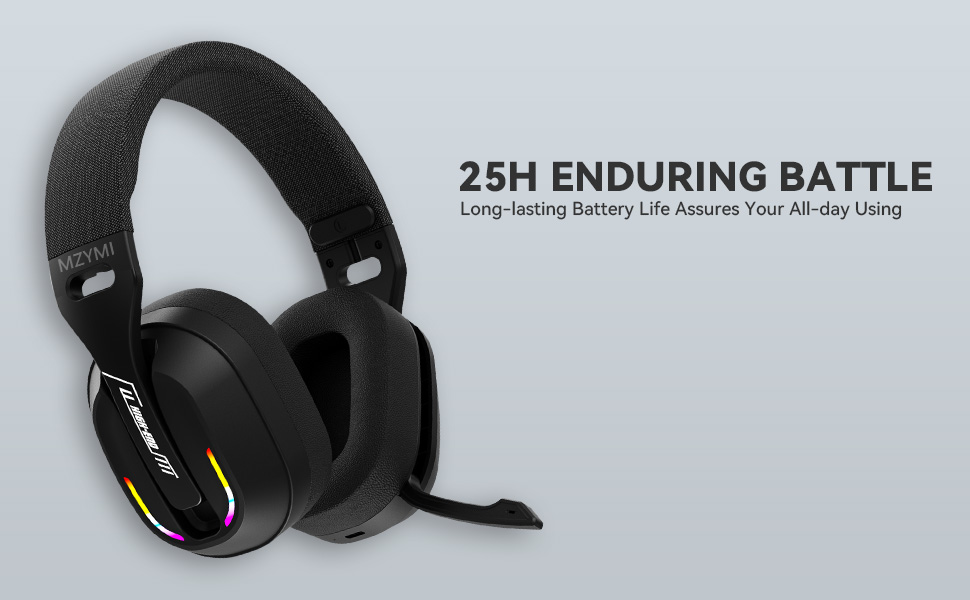
Image: Diagram illustrating the MZYMI GT100 headset with labels for buttons, ports, and the detachable 2.4GHz receiver.
L'auriculare hà caratteristiche:
- U buttone Volume Up / Next Track
- Volume Down / buttone traccia precedente
- U buttone Mode (M). (for switching between 2.4GHz and Bluetooth modes)
- Pulsante di putenza
- Indicatore luminoso
- Type-C Charging port / 3.5mm audio output
- Micru retractable

Image: Close-up of the MZYMI GT100 headset showing the control buttons on the earcup.
The microphone is designed to be retractable, allowing it to be folded up when not in use.

Image: The MZYMI GT100 headset with its microphone extended, ready for use. The microphone can be folded away when not needed.
Configurazione è Cunnessione
1. 2.4GHz Wireless Connection (for PC, PS5, PS4)
The 2.4GHz USB receiver provides a stable, low-latency wireless connection.

Image: The MZYMI GT100 headset with the 2.4GHz USB receiver and Type-C adapter.
- Insert the 2.4GHz USB receiver into an available USB port on your PC, PS5, or PS4. If your device uses a Type-C port, attach the Type-C adapter to the USB receiver first.
- Power on the headset by pressing and holding the Power button.
- Press the 'M' button twice to switch to 2.4GHz mode. The indicator light will confirm the connection.
2. Bluetooth 5.4 Connection (for mobile devices, laptops)
For Bluetooth connection, ensure your device has Bluetooth 5.4 or higher for optimal performance.
- Alimentazione di l'auriculare.
- Press the 'M' button to switch to Bluetooth mode. The indicator light will blink, indicating pairing mode.
- On your device, search for "MZYMI GT100" in the Bluetooth settings and select to pair.
3. Cunnessione cablata (cavu audio 3.5 mm)
For devices like Xbox Series consoles or when wireless is not preferred, use the included 3.5mm audio cable.
- Connect one end of the Type-C to 3.5mm audio cable to the headset's Type-C port.
- Connect the 3.5mm jack to your device's audio output (e.g., Xbox controller).
- Note: The microphone may not be available when connected to Nintendo Switch via wired mode.

Image: The MZYMI GT100 headset connected to various devices, including a PC, laptop, Xbox One controller, mobile devices, PS4/PS5, and Nintendo Switch, highlighting its multi-platform compatibility.
Istruzzioni di funziunamentu
Cuntrolli
The headset features intuitive on-ear controls:
- Volume Up (+): Appughjà per aumentà u vulume. Mantene premutu per saltà à a traccia dopu.
- Volume giù (-) : Appughjà per diminuisce u vulume. Mantene premutu per andà à a traccia precedente.
- Pulsante di Modu (M): Double-press to switch between 2.4GHz and Bluetooth modes.
- Pulsante di putenza: Press and hold to power on/off. Single press to answer/hang up calls or play/pause music.

Imagine: Dettagliata view of the control buttons on the headset's earcup, including volume controls, mode switch, power button, and indicator light.
L'usu di u microfonu
The Environmental Noise Canceling (ENC) microphone ensures clear communication.
To use the microphone, simply pull it down from the earcup. Push it back up to retract it when not in use.
Illuminazione RGB dinamica
The headset features dynamic RGB lighting on the earcups.
To adjust or turn off the lighting, use the multi-functional button controls as indicated in the product diagram.

Image: The MZYMI GT100 headset with its vibrant RGB lighting activated on the earcups, adding a visual element to the gaming experience.
Carica è vita di a batteria
The headset is equipped with a long-lasting battery.
- Tempu di carica: Circa 2.5 ore per una carica completa.
- Durata di a batteria: Up to 25 hours of use (actual time may vary based on volume and lighting usage).
- Use the included Type-C to USB charging cable to charge the headset.
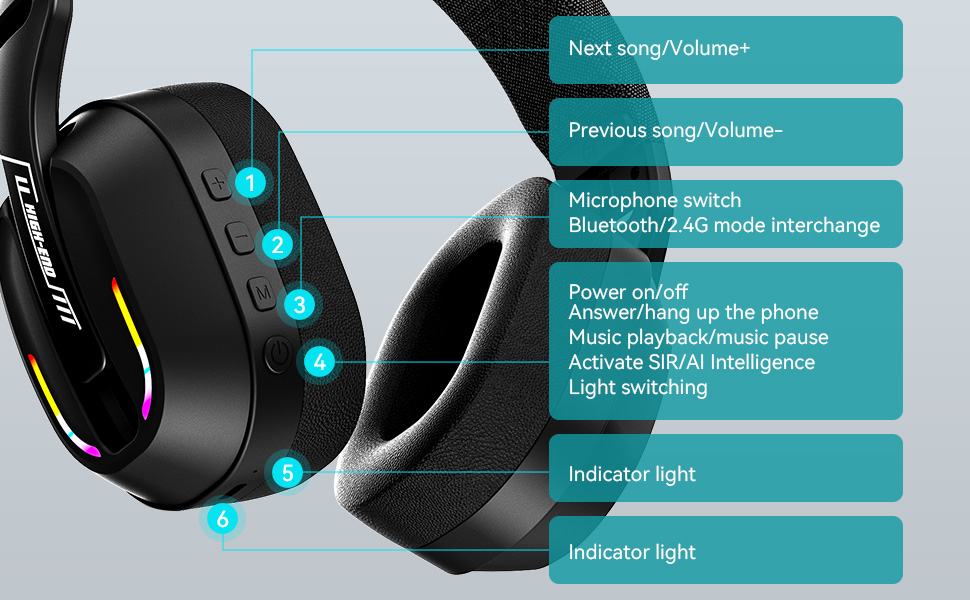
Image: The MZYMI GT100 headset highlighting its extended battery life, suggesting it can last for long gaming sessions.
Cumpatibilità
The MZYMI GT100 headset offers broad compatibility across various gaming platforms and devices:
- PC: Compatible via 2.4GHz USB receiver or wired connection.
- PlayStation 5 (PS5) / PlayStation 4 (PS4): Compatible via 2.4GHz USB receiver or wired connection.
- Nintendo Switch: Compatible via 2.4GHz USB receiver or wired connection. Note: Microphone functionality may be limited in Switch wired mode.
- Xbox Series (Wired Mode Only): Requires 3.5mm cable connection.
- Mobile Devices / Laptops: Compatible via Bluetooth 5.4 or wired connection.
Image: This image visually confirms the headset's versatility, showing connections to various gaming consoles and personal computing devices.
Specificazioni
| Feature | Detail |
|---|---|
| Nome di mudellu | GT100 |
| Tecnulugia di cunnessione | Wireless (2.4GHz, Bluetooth 5.4), Wired (3.5mm Jack) |
| Size Driver | 40 mm |
| Controlu di u rumore | Annullamentu di u Rumore Ambientale (ENC) |
| Versione Bluetooth | 5.4 |
| Tempu di carica | 2.5 Ore |
| Pesu di l'articulu | 4.6 once (130 grammi) |
| Dimensioni di u produttu | 6 x 3 x 6 inch |
Risoluzione di prublemi
Nisun sonu / Disconnessione
- Assicuratevi chì l'auriculare sia accesu è cumpletamente caricatu.
- For 2.4GHz mode, verify the USB receiver is properly inserted and the headset is in 2.4GHz mode (double-press 'M' button).
- For Bluetooth mode, ensure Bluetooth is enabled on your device and the headset is paired. Try re-pairing if necessary.
- For wired mode, check the 3.5mm cable connection at both ends.
- Confirm audio output settings on your device are configured to the headset.
If using with Xbox, remember only wired mode is supported.
Micrufonu Ùn Funziona
- Ensure the microphone is pulled down and not retracted.
- Verificate i paràmetri d'entrata di u microfonu nant'à u vostru dispusitivu.
- Note: Microphone may not be available when connected to Nintendo Switch via wired mode.
Poveru Qualità Sonu
- Ensure the headset is within range of the 2.4GHz receiver or Bluetooth device.
- Verificate l'interferenza da altri apparecchi wireless.
- Adjust volume levels on both the headset and your device.
Mantenimentu è Cura
- Keep the headset clean and free of ear wax to maintain optimal sound performance.
- Use a soft, dry cloth to clean the headset. Avoid using chemical cleaners.
- Do not apply excessive pressure to the earcups or headband.
- Mantene in un locu frescu è seccu quandu ùn hè micca in usu.
Garanzia è Supportu
For warranty information or technical support, please refer to the contact details provided with your purchase or visit the official MZYMI websitu.
Documenti cunnessi - GT100
 |
Bluetooth Watches User Manual User manual for Bluetooth watches, covering quick use instructions, charging, activation, connection, operation guide, sports information, sleep tracking, heart rate monitoring, blood pressure, blood oxygen, weather, message push, camera control, smart alarm clock, music control, and headset functions. Includes troubleshooting and FCC warnings. |
 |
Rivelatore di Protocolu OBDII GODIAG GT100 - Più diview è Guida Operativa Guida cumpleta à u GODIAG GT100, chì copre e so caratteristiche cum'è rilevatore di protocolu OBDII, strumentu di cunnessione ECU, convertitore OBD1 à OBD2 è alimentatore di batteria per auto. Include precauzioni di sicurezza, parametri è istruzioni d'usu. |
 |
Manuale d'usu di GODIAG GT100 PLUS GPT: Strumentu di diagnostica automobilistica Manuale d'usu cumpletu per u GODIAG GT100 PLUS GPT, una scatula di break-out OBD II avanzata è un connettore ECU per a diagnostica automobilistica, applicazioni ENET è DOIP. |
 |
Manuale d'usu di Smart Watch TWS Combo 2 in 1 User manual for the Smart Watch TWS Combo 2 in 1, detailing quick-use instructions, watch operation, charging, TWS headset functions, app connection, and troubleshooting. Includes information on sports tracking, sleep monitoring, heart rate, blood oxygen, weather, notifications, camera control, and music playback. |
 |
CODIAG GT100+ Operation Manual: OBDII Breakout Box ECU Connector Comprehensive operation manual for the CODIAG GT100+ OBDII Breakout Box ECU Connector. Learn about its features, functions, safety precautions, and usage for automotive diagnostics, programming, and coding. |
 |
Lenovo GT100 Bluetooth Earphones User Manual User manual for Lenovo GT100 Bluetooth Earphones, detailing safety warnings, operating instructions, product features, and frequently asked questions. |