
Introduzione
This manual provides instructions for the RENPHO MorphoScan Base Smart Body Composition Scale. This advanced scale utilizes eight-electrode dual-frequency and segmental Bioelectrical Impedance Analysis (BIA) technology to deliver comprehensive body composition data. It measures various metrics including body weight, body fat percentage, BMI, muscle mass, water ratio, and more, with high precision. The scale features a clear LED display and connects to the user-friendly RENPHO Health App for detailed health reports and progress tracking.
Video: Un overview of the RENPHO MorphoScan Base Smart Body Fat Scale, highlighting its features and benefits for body composition analysis.
Chì ci hè in u Box
- RENPHO MorphoScan Base Smart Body Composition Scale
- Manuale d'usu
- 4 batterie AAA
Istituisci
1. Installa e Batterie
Open the battery compartment on the underside of the scale. Insert the 4 AAA batteries, ensuring correct polarity. Close the compartment.
2. Download and Install the RENPHO Health App
Cerca "RENPHO Health" in your device's app store (Apple App Store or Google Play Store) and install the application.
Video: Step-by-step guide on how to download and install the Renpho Health App, register an account, and connect the scale via Bluetooth.
3. Register and Log In
Open the RENPHO Health App. Register for a new account or log in if you already have one.
4. Connect the Scale via Bluetooth
Ensure Bluetooth is enabled on your smartphone. In the RENPHO Health App, follow the prompts to add a new device and connect to your MorphoScan Base scale.
Istruzzioni di funziunamentu
1. Piazzamentu
Pone a bilancia nantu à una superficia dura è piana. Evitate tappeti o pavimenti irregulari per letture precise.
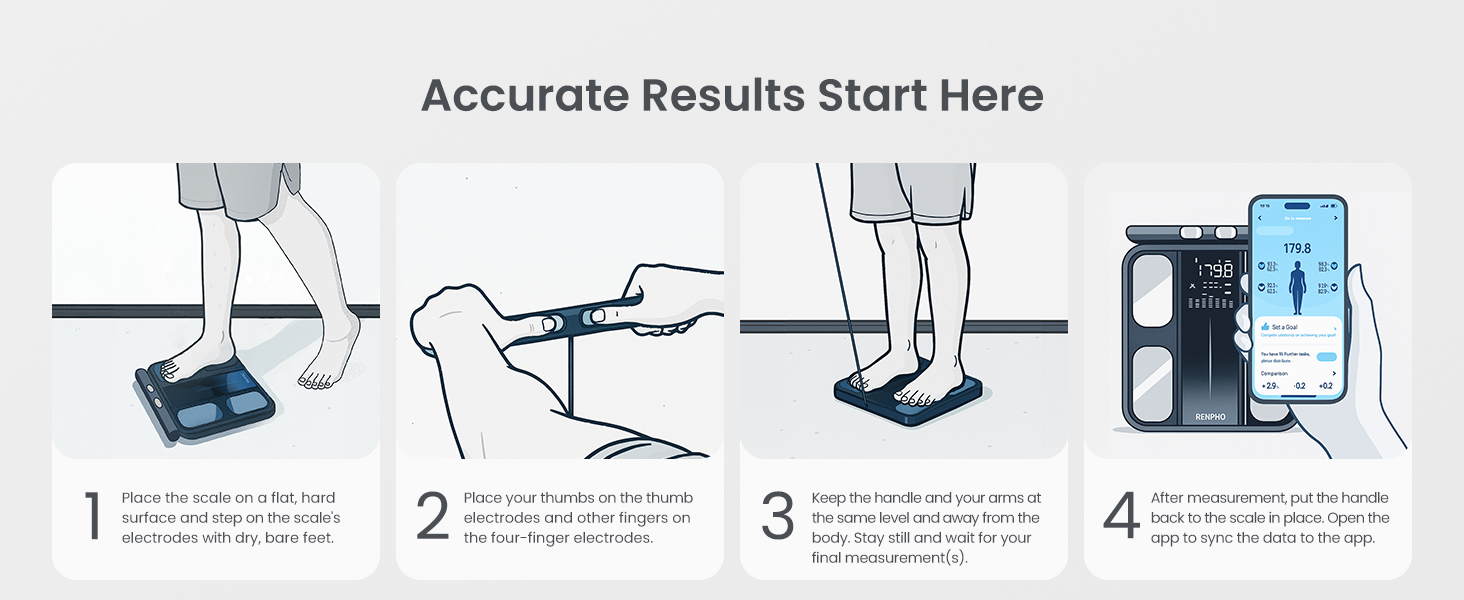
Image: A person placing the RENPHO scale on a flat, hard surface, emphasizing proper placement for accurate measurements.
2. Piglià una misura
Step onto the scale with bare, dry feet, ensuring your feet are positioned on the electrode pads.
Grasp the handle and pull it up, keeping your arms straight and held at a 30-45 degree angle away from your body. Ensure continuous contact with all eight electrode pads (four on the scale platform, four on the handle).

Image: A person standing on the RENPHO scale, holding the retractable handle with both hands, demonstrating the correct body position for a full body composition analysis.
Mantene sta pusizione finu à chì a misurazione sia cumpleta è u rapportu sia generatu in l'app.
After measurement, return the handle to its resting position and step off the scale.

Image: A visual guide illustrating the four steps for accurate measurement: placing the scale, placing thumbs on electrodes, keeping arms straight, and viewing results on the app.
Capisce i vostri dati
The RENPHO Health App provides a detailed body composition analysis report. This report includes metrics such as:
- Pesu
- IMC (indice de masse corporelle)
- Percentuale di grassu di corputage
- Percentuale di musculu scheletricutage
- Indice di grassu viscerale
- Percentuale di l'acqua di u corputage
- Massa ossea
- Percentuale di proteinetage
- BMR (Tassa Metabolica Basale)
- Età Metabulica
- Analisi di u grassu segmentale (bracciu sinistro, bracciu drittu, troncu, gamba sinistra, gamba diritta)
- Muscle Balance
The app also displays a seven-day weight trend and allows for tracking progress over time. You can generate and print comprehensive health reports for personal use or to share with fitness professionals.

Image: A smartphone screen showing the RENPHO Health App interface with detailed body composition analysis, including segmental fat and muscle data, and a comprehensive health report.

Image: An infographic listing over 15 body metrics measured by the RENPHO scale, such as Weight, BMI, Body Fat, and Muscle Mass, indicating the depth of analysis available through the app.
Mantenimentu
Pulizia
Per pulisce a bilancia, aduprate un pannu dolce è damp cloth. Avoid abrasive cleaners or harsh chemicals. Ensure the scale is dry before storage or next use.
Video: A user demonstrating how to clean the scale by spraying it and wiping it down with a cloth.
Sustituzione di batterie
The scale operates on 4 AAA batteries. When the battery indicator appears on the display, replace all four batteries with new ones.
Specificazioni
| Feature | Detail |
|---|---|
| Marca | RENFO |
| Mudellu | MorphoScan Base |
| Limitu di u Pesu | 180 Kilograms / 400 lbs |
| Tipu di visualizazione | LED |
| Elettrodi | 8 (Dual-frequency BIA) |
| Fonte d'energia | 4 batterie AAA (incluse) |
| A vita di a batteria | Finu à 130 ghjorni |
| Connettività | Bluetooth |
| Compatibilità App | RENPHO Health App, Apple Health, MyFitnessPal, Samsung Health |
Risoluzione di prublemi
Lettura imprecisa
- Assicuratevi chì a bilancia sia posta nantu à una superficia dura è piana.
- Make sure your feet are bare and dry, and in full contact with all electrode pads.
- Hold the handle correctly, ensuring continuous contact with all handle electrodes.
- Avoid taking measurements immediately after intense exercise, showering, or consuming large amounts of food/drink, as these can affect hydration levels and readings.
- Verificate i livelli di bateria è rimpiazzate se ne necessariu.
Problemi di cunnessione di l'app
- Assicuratevi chì Bluetooth hè attivatu nantu à u vostru smartphone.
- Restart the RENPHO Health App.
- Try re-pairing the scale with the app.
- Assicuratevi chì u sistema operativu di u vostru smartphone sia aggiornatu.
Scala ùn si accende
- Verificate se e batterie sò stallate currettamente.
- Sustituisce e batterie cù novi.
Garanzia è Supportu
Per infurmazioni nantu à a garanzia è l'assistenza à i clienti, vi pregu di cunsultà u situ ufficiale RENPHO. websitu o cuntattate direttamente u so serviziu clienti. Cunservate a vostra ricevuta d'acquistu cum'è prova d'acquistu.
Nota: The data results from this device are intended solely for athletic fitness and health monitoring purposes and are not a substitute for medical equipment. For any decisions regarding diagnosis and treatment, please consult a qualified medical professional.