1. Impurtante Information Safety
Leghjite attentamente tutte l'istruzzioni prima di utilizà l'apparechju. Cunservate stu manuale per riferimenti futuri.
- Do not use if you have a pacemaker, artificial joints, or electronic medical devices.
- Consult a physician before use if you have any pre-existing medical conditions, skin sensitivities, or are pregnant.
- Do not use on open wounds, swollen areas, or areas with skin irritation.
- Mantene fora di a portata di i zitelli.
- Ùn immergete micca u dispusitivu in acqua è ùn l'utilizate micca in ambienti eccessivamente umidi.
- Aduprate solu u cavu di carica è l'adattatore di alimentazione furniti.
- Smette subitu di usà si avete qualchì discomfort o dolore.
2. Produttu Finituview
The HX-601/603 Wireless Knee Massager is designed to provide therapeutic massage and integrated heating for your knees. Its ergonomic and portable design allows for comfortable use at home, in the office, or during travel.
2.1 Cumpunenti
- Main Massager Unit with Control Panel
- Cinturini ajustabili
- Magnetic Battery Compartment
- Cavu di carica USB
2.2 Features
- Operazione wireless: Enjoy massage without tangled cords.
- Integrated Heating: Therapeutic heat to improve circulation and relax muscles.
- 3 Livelli d'Intensità: Customize your massage experience.
- Timer 15-Minutu: Automatic shut-off for safety and optimal session duration.
- Pannellu di cuntrollu digitale: Easy adjustment of settings with LED display.
- Disegnu ergonomicu: Conforms to the knee for maximum comfort and effectiveness.
- Comfortable Fabrics: Made with breathable materials for extended use.

The image displays the wireless knee massager worn on a knee, illustrating the integrated heating function with red arrows indicating heat flow.
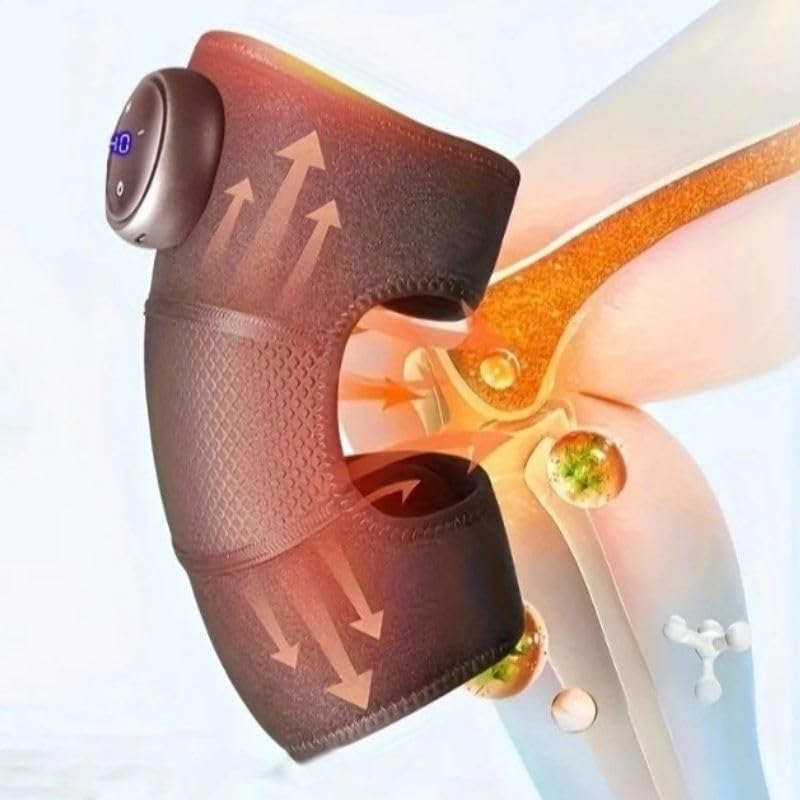
This image highlights the device's control panel with a digital display and buttons, along with the magnetic battery compartment for wireless operation.

Un detallatu view of the massager's fabric, emphasizing its comfortable, breathable, and non-stuffy texture.
3. Setup
3.1 Caricà u dispusitivu
- Locate the charging port on the massager unit.
- Connect the USB charging cable to the device and to a compatible USB power adapter (not included) or computer USB port.
- The LED indicator on the control panel will show charging status. A full charge typically takes several hours.
- Assicuratevi chì u dispusitivu sia cumpletamente caricatu prima di u primu usu per una durata ottimale di a batteria.
3.2 Attaching to the Knee
- Unfold the knee massager.
- Position the main unit over your knee, ensuring the massage elements are centered.
- Secure the massager using the adjustable straps, ensuring a snug but comfortable fit. Do not overtighten.
4. Operating Instructions
4.1 Power On/Off
- To turn on: Press and hold the Power button (usually marked with a circle or power symbol) on the control panel for 2-3 seconds. The LED display will illuminate.
- To turn off: Press and hold the Power button again for 2-3 seconds. The display will turn off.
4.2 Adjusting Massage Intensity
- Once powered on, press the Intensity button (usually marked with '+' or '-') to cycle through the 3 available intensity levels.
- The current intensity level will be indicated on the LED display.
4.3 Activating Heating Function
- Press the Heat button (usually marked with a wave or heat symbol) to activate or deactivate the integrated heating function.
- The heating indicator on the display will light up when active.
4.4 Cronometru automaticu
The device is equipped with an automatic 15-minute timer. After 15 minutes of continuous operation, the massager will automatically shut off. You can restart the device for another session if desired, but it is recommended to take breaks between sessions.
5. Mantenimentu
5.1 Pulizia
- Assicuratevi chì u dispusitivu hè spento è scollegatu prima di pulisce.
- Asciugate a superficia di u massaggiatore cù un pannu dolce èamp tela.
- Ùn aduprate micca detergenti abrasivi, solventi o prudutti chimichi aggressivi.
- Ùn immerse micca u dispusitivu in l'acqua.
5.2 Storage
- Conservate l'apparecchiu in un locu frescu è asciuttu, luntanu da a luce diretta di u sole è da temperature estreme.
- Tenitelu luntanu da oggetti taglienti chì puderanu dannà u tessutu o i cumpunenti interni.
6. Risoluzione di prublemi
| Prublemu | Causa Possibile | Soluzione |
|---|---|---|
| U dispositivu ùn accende micca. | Batteria bassa o dispusitivu micca caricatu. | Caricate cumpletamente u dispusitivu. Assicuratevi chì u buttone di accensione sia premutu è tenutu premutu per 2-3 secondi. |
| Nisun calore o calore debule. | A funzione di riscaldamentu ùn hè micca attivata o a batteria hè bassa. | Ensure the heat button is pressed. Charge the device. |
| L'intensità di u massaggio hè troppu debule/forte. | Impostazione di l'intensità incorretta. | Adjust the intensity using the '+' or '-' buttons. |
| L'apparechju si ferma inaspettatamente. | Automatic 15-minute timer activated or low battery. | This is normal operation due to the timer. Recharge the device if the battery is low. |
7. Specificazioni
| Numero di mudellu | HX-601/603 |
| Marca | Generic |
| Fonte d'energia | Alimentatu à batteria |
| Voltage | 5V |
| putenza | 7W |
| Dimensioni di u produttu | 25 x 14 x 8 cm |
| Pesu di u produttu | 100 grammi |
| Materiale | Electronic Components, Plastic, Fabric |
| Timer | 15 minuti (spegnimentu automaticu) |
| Livelli di intensità | 3 |
| Paese d'origine | Brasile |
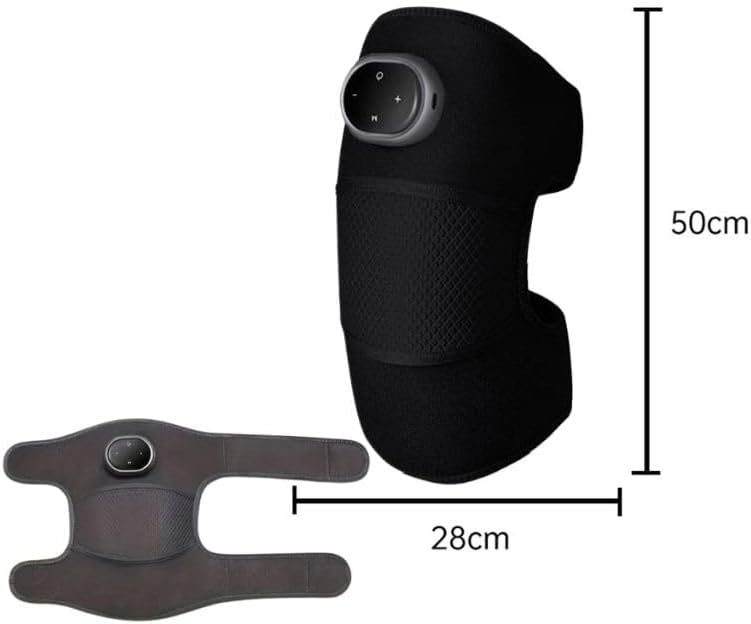
This image provides the physical dimensions of the knee massager, indicating a length of 50cm and a width of 28cm when laid flat.
8. Garanzia è Support
This product is manufactured by Knee. For warranty information or technical support, please contact your retailer or the manufacturer directly. Please retain your proof of purchase.
Nota: I termini di garanzia specifichi ponu varià secondu a regione è u rivenditore.


