1. Produttu Finituview
The Generic EM777 Wireless Rain Gauge is a multi-functional device designed to monitor rainfall, indoor and outdoor temperatures, and provide time-related functions. It features a self-emptying rain collector and a digital display with backlight for easy readability.

Image 1.1: The EM777 Wireless Rain Gauge system, showing the indoor display unit and the outdoor rain collector. The display shows rainfall, indoor/outdoor temperature, time, and a historical histogram.
Funzioni chjave:
- Trasmissione wireless: Up to 200 feet (60 meters) range between outdoor sensor and indoor display.
- Self-Emptying Rain Collector: Automatically empties collected rain, reducing maintenance.
- Display multifunzionale: Shows date, time, indoor/outdoor temperature, and various rainfall measurements.
- Rainfall Measurements: Event, hourly, daily, weekly, monthly, yearly, and total rainfall.
- Dati storichi: View historical rainfall values manually or via a bar graph.
- Retroilluminazione: 15-second backlight for low-light viewing.
- Doppiu sveglia: Includes alarm and calendar functions.
- WWVB Radio-Controlled Time: Sincronizazione automatica di u tempu.
2. Setup Instructions
2.1 Disimballaggio è installazione di a batteria
Carefully remove all components from the packaging. The package should include one indoor display unit and one outdoor rain collector sensor.

Image 2.1: Location of battery compartments for the indoor display (top right) and outdoor rain gauge (bottom right).
- Unità di visualizazione interna: Open the battery compartment cover on the back of the indoor display unit. Insert 2 x batterie AAA (not included), ensuring correct polarity (+/-). Replace the cover.
- Outdoor Rain Collector Sensor: Open the battery compartment cover on the outdoor sensor. Insert 2 x batterie AA (not included), ensuring correct polarity (+/-). Replace the cover.
Note: It is recommended to use high-quality alkaline batteries for optimal performance and longevity.
2.2 Piazzamentu di u Sensore Esternu
Proper placement of the outdoor sensor is crucial for accurate rainfall and temperature readings.

Image 2.2: Illustration of the 200ft/60m wireless transmission range and recommended placement for the outdoor sensor.
- Altezza: Place the outdoor sensor 1-2 meters (3-6 feet) sopra à a terra.
- Superficie di livellu: Ensure the rain collector is installed on a completely level surface to guarantee accurate rainfall measurement. The self-emptying mechanism relies on a balanced tilt.
- Spaziu Chjaru: Position the sensor in an open area, away from trees, buildings, or other obstructions that could block rain from entering the collector or interfere with wireless transmission.
- Gamma di trasmissione: The outdoor sensor should be within 60 metri (200 piedi) of the indoor display unit. Walls and other obstacles can reduce this range.
- Precisione di a temperatura: For the most accurate outdoor temperature readings, place the sensor in a shaded, well-ventilated location. However, this may conflict with optimal rain collection. Consider prioritizing rain collection accuracy if temperature is less critical, or find a compromise location.
2.3 Sincronizazione iniziale
After installing batteries in both units, they should automatically attempt to synchronize. Allow a few minutes for the indoor display to receive data from the outdoor sensor. If synchronization does not occur, try the following:
- Bring the outdoor sensor closer to the indoor display unit.
- Remove and reinsert batteries from both units to force a reset and re-synchronization attempt.
- Ensure no strong electromagnetic interference sources are nearby.
3. Operating Instructions
3.1 Funzioni di visualizazione
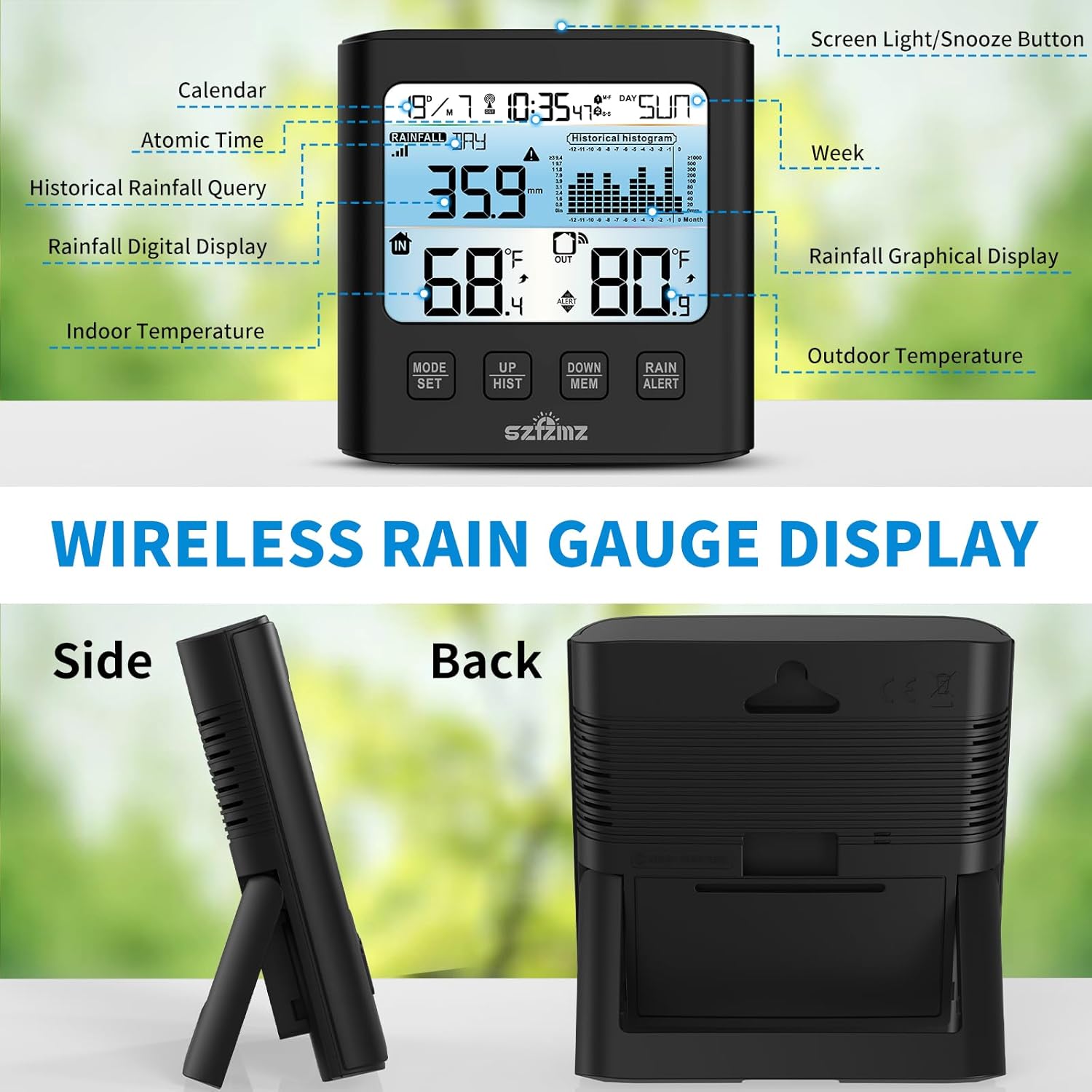
Imagine 3.1: Dettagliata view of the indoor display unit with labels for calendar, atomic time, rainfall digital display, indoor temperature, screen light/snooze button, week, rainfall graphical display, and outdoor temperature.
The LCD display provides various information:
- Ora è Data: Automatically synchronized via WWVB radio signal.
- Température intérieure : Current temperature measured by the indoor unit.
- Temperatura esterna: Temperatura attuale misurata da u sensore esterno.
- Rainfall Digital Display: Shows current rainfall data.
- Rainfall Graphical Display (Historical Histogram): Visual representation of historical rainfall.
- Indicatori di batteria: Icons indicating low battery for both indoor and outdoor units.
3.2 Viewing Rainfall Data
The rain gauge offers 7 different rainfall measurement modes:
- Event Rainfall
- Hourly Precipitazioni
- Daily Rainfall
- Weekly Rainfall
- Monthly Rainfall
- Yearly Rainfall
- Precipitazioni totali
Press u "RAIN/ALERT" button to cycle through these different rainfall data views. Historical rainfall values can be viewed manually on the display or via the bar graph.

Image 3.2: The display unit showing historical rainfall data, including a bar graph for trends.
3.3 Funzione di retroilluminazione

Image 3.3: Comparison of the display in normal lighting and with the backlight activated for 15 seconds.
Per attivà a retroilluminazione, appughjà u buttone "LUCE" or "SONNOZE/LUCE" button (depending on model variation) located on the top of the digital rain gauge. The backlight will illuminate for approximately 15 seconds, allowing you to view the display in low-light conditions.
3.4 Sveglia doppia

Image 3.4: The display unit showing alarm icons and examples of weekday/weekend alarm settings.
The indoor display unit includes a dual alarm clock function with snooze mode (5-60 minutes or off) and three alarm repeat modes: Weekdays (Mon-Fri), Weekends (Sat-Sun), and Daily (Mon-Sun). Refer to the detailed instructions in the full manual for setting specific alarm times and modes.
3.5 Selezzione di unità di temperatura
The display can show temperature in either Celsius (°C) or Fahrenheit (°F). A dedicated button (often labeled °C/°F or similar) or a setting within the MODE menu allows you to switch between these units.
4. Mantenimentu
4.1 Self-Emptying Mechanism

Imagine 4.1: Esplosa view of the outdoor rain gauge, highlighting the self-emptying tipping bucket mechanism and battery compartment.
The outdoor rain collector features a self-emptying tipping bucket design. This design significantly reduces the need for manual emptying. However, regular checks are recommended.
4.2 Pulizia di u cullettore di pioggia
Periodically inspect the rain collector funnel for leaves, debris, insects, or other obstructions that may clog the funnel and affect measurement accuracy. Gently clean the funnel and tipping bucket mechanism with a soft cloth and water if necessary. Avoid using abrasive cleaners or tools that could damage the sensor components.
4.3 Sustituzione di batterie
When the low battery indicator appears on the indoor display for either the indoor unit or the outdoor sensor, replace the batteries promptly to ensure continuous operation and accurate readings. Follow the battery installation steps in Section 2.1.
5. Risoluzione di prublemi
- Nisun Display/Alimentazione:
Ensure batteries are correctly installed with proper polarity. Replace with fresh batteries if needed. - No Outdoor Data (Rainfall/Temperature):
Check if the outdoor sensor is within the 60-meter (200-foot) transmission range of the indoor unit. Reduce obstacles between the units. Remove and reinsert batteries in both units to re-establish connection. - Letture imprecise di precipitazioni:
Verify the outdoor sensor is installed on a perfectly level surface. Check the rain collector funnel for any debris (leaves, dirt, spiderwebs) that might be blocking the opening or interfering with the tipping bucket mechanism. - Letture di temperatura imprecise:
The outdoor sensor's temperature reading can be affected by direct sunlight. For more accurate ambient temperature, ensure the sensor is placed in a shaded, well-ventilated area, while still allowing for unobstructed rain collection. - Screen Fading/Poor Contrast:
The LCD screen may have an optimal viewing angle. Adjust your viewing position. Ensure batteries are not low, as this can affect display clarity. - Difficulty Accessing Historical Data:
Refer to the operating instructions (Section 3.2) for using the "RAIN/ALERT" and "UP HIST" / "DOWN MEM" buttons to navigate historical data. If issues persist, a full reset (removing batteries) might be necessary, though this will clear historical data. - Alarm Sounds When Off:
Double-check the alarm settings to ensure all alarms are deactivated if not desired. If the issue persists after checking settings, a unit reset may be required.
If you encounter problems not listed here or require further assistance, please contact customer support.
6. Specificazioni
| Numero di mudellu | EM777 |
| Marca | Generic |
| Fonte d'energia | Battery Powered (Indoor: 2 x AAA, Outdoor: 2 x AA - not included) |
| Materiale | Plastica |
| Tecnulugia di cunnessione | Wireless (433 MHz or 868 MHz) |
| Gamma di trasmissione wireless | Finu à 60 metri (200 piedi) à l'aria aperta |
| Precisione di a temperatura | 0.5 °C |
| Tipu di visualizazione | LCD |
| Dimensioni di u produttu | Indoor Display: Approximately 4 x 3 x 4 inches (L x W x H) Outdoor Sensor: Dimensions not specified, but compact. |
| Pesu di l'articulu | 0.48 kilogrammi (1.06 liri) |
| U fabricatore | Fuzhou Emax Electronic Co., Ltd. |
7. Garanzia è Support
For warranty information or technical support, please refer to the documentation included with your purchase or contact the retailer/manufacturer directly. If the rain gauge does not meet your expectations or if there are any problems with the product, please contact customer service immediately for assistance.
