Introduzione
This manual provides detailed instructions for the proper use and care of your Audiovox CE-145G Personal CD Player. Please read this manual thoroughly before operating the device to ensure optimal performance and longevity.
Funzioni di u produttu
- 40-Second Anti-Skip Protection: Ensures continuous audio playback even during movement, utilizing a digital buffer.
- Multi-Directional Anti-Roll Sensors: Provides additional protection against playback interruption from various movements.
- 22-Track Programmable Memory: Allows customization of CD playback order.
- Bass Boost System: Migliora l'output audio à bassa frequenza.
- 3-Beam Laser Pickup: Designed for accurate CD tracking and clear sound reproduction.
- Modi di riproduzione multipli: Includes random play and various repeat functions.
- Mantene l'interruttore: Prevents accidental button presses and program changes.
- Spegnimentu automaticu: Conserves battery life by automatically shutting down the player when not in use.
- Line-Out Jack: For connecting to external audio systems or power adapters.
- Built-in Rechargeable Circuitry: Supports the use of rechargeable Ni-Cad batteries (not included).
- Stereo Headphones: Included for immediate listening.
Istituisci
1. Installazione di batterie
The Audiovox CE-145G operates on two (2) AA batteries (not included) or an optional AC/car adapter (not included) connected via the line-out jack. For rechargeable Ni-Cad batteries, the unit features built-in charging circuitry.
- Locate the battery compartment on the underside of the CD player.
- Apertura u coperchiu di u compartimentu di a batteria.
- Inserite duie (2) batterie AA, assicurendu a polarità curretta (+/-) cum'è indicata in l'internu di u compartimentu.
- Chiudere in modu sicuru u coperchiu di u compartimentu di a batteria.

Image: The Audiovox CE-145G Personal CD Player in translucent green, shown with included stereo headphones. This image illustrates the overall product design and the headphones that come with the unit.
2. Cunnessu Headphones
Insert the stereo headphone plug into the headphone jack located on the side of the CD player.

Image: A close-up of the stereo headphones included with the Audiovox CE-145G CD player, showing the earcups and the 3.5mm audio jack.
Istruzzioni di funziunamentu
1. Riproduzione di CD basica
- Open the CD compartment lid by pressing the "OPEN" button or sliding the latch.
- Pone un CD nantu à u fusu cintrali cù l'etichetta rivolta versu l'altu.
- Chiudete bè u coperchio di u compartimentu di u CD finu à chì si sente un clic.
- Press u PLAY/PAUSE buttone per inizià a riproduzione. U numeru di a traccia è u tempu trascorsu saranu visualizati.
- Per mette in pausa a riproduzione, preme PLAY/PAUSE di novu. Appughjatelu una volta di più per ripiglià.
- Per piantà a riproduzione, premete u STOP buttone.
- Per passà à a traccia successiva, appughjà u buttone SALTA AVANTI buttone (►►|).
- To return to the beginning of the current track or go to the previous track, press the SALTA IN RETRO buttone (|◄◄).
- Per avanzà o riavvolgere rapidamente in una traccia, tene premutu è tene premutu u buttone SALTA AVANTI or SALTA IN RETRO buttone, rispettivamente.
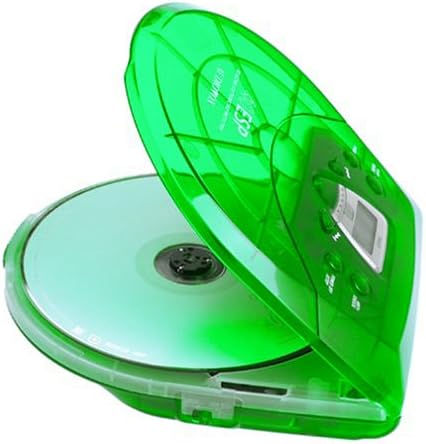
Image: The Audiovox CE-145G Personal CD Player with its translucent green lid open, revealing a compact disc placed inside the compartment.
2. Anti-Skip Protection (ESP)
The CE-145G features a 40-second Electronic Skip Protection (ESP) buffer. This system stores up to 40 seconds of audio data, allowing for uninterrupted playback even if the player experiences minor shocks or vibrations. This feature is automatically active during playback.
3. Programmable Memory (22 Tracks)
You can program up to 22 tracks to play in a specific order.
- In modu STOP, appughjà u buttone U prugramma button. The display will show "PROG" and "01".
- Aduprà u SALTA AVANTI or SALTA IN RETRO buttoni per selezziunà a prima traccia desiderata.
- Press U prugramma again to confirm the track. The display will show "02".
- Ripetite i passi 2 è 3 per aghjunghje finu à 22 tracce à u vostru prugramma.
- After programming the last track, press PLAY/PAUSE to start playback of your programmed sequence.
- To clear the program, press the STOP buttone duie volte.
4. Bass Boost
Per rinfurzà e frequenze basse, truvate u BASS BOOST switch (or button) on the unit and activate it. Deactivate it to return to standard audio output.
5. Funzione Hold
U HOLD switch prevents accidental button presses. Slide the HOLD switch to the "ON" position to disable all control buttons. Slide it to "OFF" to re-enable controls.
6. Spegnimentu automaticu
To conserve battery life, the CD player will automatically power off after a period of inactivity (e.g., when a CD finishes playing and no buttons are pressed). To restart, press the PLAY/PAUSE buttone.
Mantenimentu
- Pulizia di l'unità: Wipe the exterior of the player with a soft, damp tela. Ùn aduprate micca detergenti abrasivi o solventi.
- Pulizia di a lente di u CD: If playback issues occur due to a dirty lens, use a specialized CD lens cleaning kit. Do not touch the lens directly.
- CD Care: Maneghjate i CD per i so bordi. Manteneli puliti è senza graffi. Conservateli in e so custodie quandu ùn sò micca in usu.
- Cura di a batteria: Eliminate e batterie se l'unità ùn serà micca aduprata per un periodu prolongatu per impedisce perdite.
Risoluzione di prublemi
| Prublemu | Causa Possibile | Soluzione |
|---|---|---|
| Nisun putere | E batterie sò morte o inserite in modu incorrectu; l'adattatore CA ùn hè micca cunnessu o hè difettuosu. | Replace batteries, check polarity, or ensure AC adapter is properly connected and functional. |
| CD skips or stops | CD is dirty or scratched; unit is subjected to excessive shock; lens is dirty. | Clean CD, use a different CD, avoid strong impacts, clean the CD lens. |
| Nisun sonu | Headphones not connected properly; volume too low; headphones faulty. | Ensure headphones are fully plugged in, increase volume, try different headphones. |
| I buttoni ùn rispundenu | L'interruttore HOLD hè attivatu. | Slide the HOLD switch to the "OFF" position. |
Specificazioni
- Mudellu: CE-145G
- Marca: Audiovox
- Prutezzione Anti-Skip: 40 seconds (Electronic Skip Protection)
- Programmable Tracks: 22
- Fonte di energia: 2 x AA batteries (not included) or optional AC/car adapter
- Output audio: 3.5mm headphone jack, Line-out jack
- Dimensioni (circa): 11.8 x 8.3 x 2.6 inch (Dimensioni di u pacchettu)
- Peso (Circa): 1.35 liri (Pesu di l'articulu)
- Culore: Verde Traslucidu
Garanzia è Supportu
The Audiovox CE-145G Personal CD Player is backed by a 90-day parts-and-labor warranty da a data di compra. Per piacè cunservate a vostra prova di compra per e richieste di garanzia.
For technical support or warranty service, please refer to the contact information provided with your product packaging or visit the official Audiovox websitu.


