Introduzione
The Nikon SC-29 TTL Coiled Remote Cord is an essential accessory designed to extend the functionality of your Nikon Speedlight. It enables off-camera flash photography while maintaining full TTL (Through-The-Lens) metering capabilities and providing crucial autofocus (AF) assist in low-light conditions. This cord allows photographers to achieve more dynamic and creative lighting setups by positioning the flash away from the camera's hot shoe.
This manual provides detailed instructions for the proper setup, operation, and maintenance of your SC-29 cord, ensuring optimal performance and longevity.

Image: The Nikon SC-29 TTL Coiled Remote Cord, featuring its coiled design and the camera and flash connectors.
Istituisci
Follow these steps to correctly connect your Nikon SC-29 TTL Coiled Remote Cord to your camera and Speedlight unit.
- Attaccà à a Camera: Locate the hot shoe on your Nikon camera. Align the camera-end connector of the SC-29 cord (the end with the AF Illuminator window) with the camera's hot shoe. Slide the connector fully into the hot shoe until it clicks into place. Secure it by rotating the locking wheel (if present) clockwise until it is firm.
- Attaching to the Speedlight: Locate the hot shoe on your Nikon Speedlight (e.g., SB-800, SB-700). Align the flash-end connector of the SC-29 cord with the Speedlight's hot shoe. Slide the connector fully into the Speedlight's hot shoe. Secure it by rotating the locking wheel (if present) clockwise until it is firm.
- AF Illuminator Switch: The SC-29 features an AF Illuminator at the camera-end connector. This illuminator overrides the Speedlight's built-in AF illuminator when the cord is in use. A switch is present on the camera-end connector to enable or disable this feature. Ensure the switch is set to the desired position for AF assist functionality.

Image: Detail of the SC-29's camera and flash connectors, highlighting the hot shoe mounts and the AF illuminator switch.
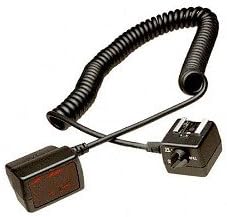
Image: The camera-side connector of the SC-29, clearly showing the red AF illuminator window.
Istruzzioni di funziunamentu
Once the SC-29 cord is securely connected, you can begin using your Speedlight off-camera.
- Flash fora di a camera: Position your Speedlight at the desired angle and distance from your subject. The coiled cord provides flexibility, allowing for various lighting angles and effects. The cord typically offers an arm's reach distance for handheld use, or can be mounted on a flash bracket or light stand.
- TTL Metering: The SC-29 maintains full TTL communication between your camera and Speedlight. This means the camera will automatically control the flash output for correct exposure, simplifying your lighting setup.
- Autofocus (AF) Assist: In low-light conditions, the AF illuminator on the camera-end of the SC-29 will project a pattern to assist your camera's autofocus system. This ensures accurate focusing even when the Speedlight is positioned away from the camera. Ensure the AF illuminator switch on the cord is enabled if you require this feature.
- Multi-Flash Setups: When used with compatible Speedlights like the SB-800, the SC-29 can facilitate multi-flash setups by allowing the off-camera Speedlight to act as a master controller, triggering other remote flash units. Refer to your Speedlight's manual for specific instructions on multi-flash operation.
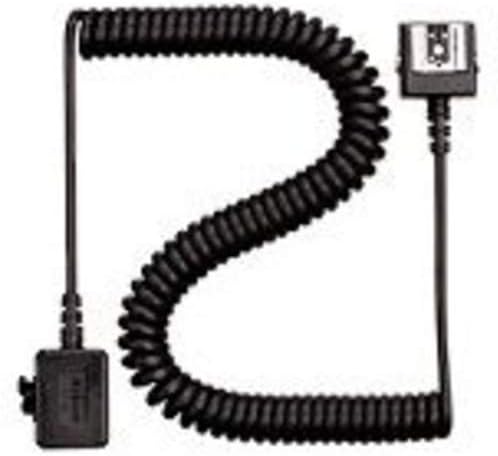
Image: The SC-29 cord extended, demonstrating its flexible length for off-camera flash positioning.
Mantenimentu
Proper care will ensure the longevity and reliable performance of your SC-29 cord.
- Pulizia: Keep the electrical contacts on both ends of the cord clean and free from dust or debris. Use a clean, dry, lint-free cloth. Avoid using abrasive cleaners or solvents.
- Conservazione: When not in use, store the cord in a dry, cool place, away from direct sunlight and extreme temperatures. Avoid tightly coiling or stretching the cord excessively during storage to prevent damage to the internal wiring.
- Trattamentu: Always handle the cord by its connectors, not by the cable itself, when attaching or detaching. Avoid pulling or tugging on the cord forcefully, as this can damage the internal connections.
Risoluzione di prublemi
If you encounter issues while using your SC-29 cord, consider the following common solutions:
- U flash ùn si accende micca:
- Ensure both ends of the cord are securely attached to the camera and Speedlight.
- Check that the Speedlight is powered on and has sufficient battery life.
- Verify camera and flash settings are appropriate for flash photography.
- Autofocus Assist Not Working:
- Confirm the AF Illuminator switch on the camera-end connector of the SC-29 is in the 'ON' position.
- Ensure your camera's autofocus mode is set to a mode that utilizes AF assist (e.g., AF-S).
- Cunnessione intermittente:
- Inspect the hot shoe contacts on both the cord, camera, and Speedlight for dirt or damage. Clean gently if necessary.
- Ensure the locking mechanisms on both connectors are fully tightened.
- Malfunzionamentu generale: If issues persist after checking the above, ensure you are using a genuine Nikon product. If the product is defective, contact Nikon support or your retailer.
Specificazioni
- Mudellu: SC-29
- Numero di parte: 4766
- Marca: Nikon
- Dimensioni di u pruduttu: Approximately 27.56 x 0.79 x 0.79 inches (when extended)
- Pesu di l'articulu: Circa 3.52 ounces
- Muntaggi compatibili: Nikon Speedlights (e.g., SB-700, SB-800) and Nikon cameras with a hot shoe.
- Velocità di sincronizazione flash: Up to 1/200 (dependent on camera model)
- Features: Dedicated TTL communication, AF assist illuminator.
Infurmazioni di Garanzia
For detailed warranty information regarding your Nikon SC-29 TTL Coiled Remote Cord, please refer to the official warranty documentation provided with your purchase or visit the official Nikon websitu. I termini è e cundizioni di garanzia ponu varià secondu a regione è a data di compra.
Supportu
Should you require further assistance or have questions not covered in this manual, please contact Nikon customer support. You can find contact information and additional resources on the official Nikon websitu:


