1. Introduzione
Welcome to the user manual for your new Singing Machine SMVG-620 CD+G Karaoke System. This system is designed to provide hours of entertainment with its CD+G playback capabilities, built-in camera, 5.5-inch monitor, and AM/FM radio. Please read this manual thoroughly before operating your unit to ensure proper use and to maximize your enjoyment.
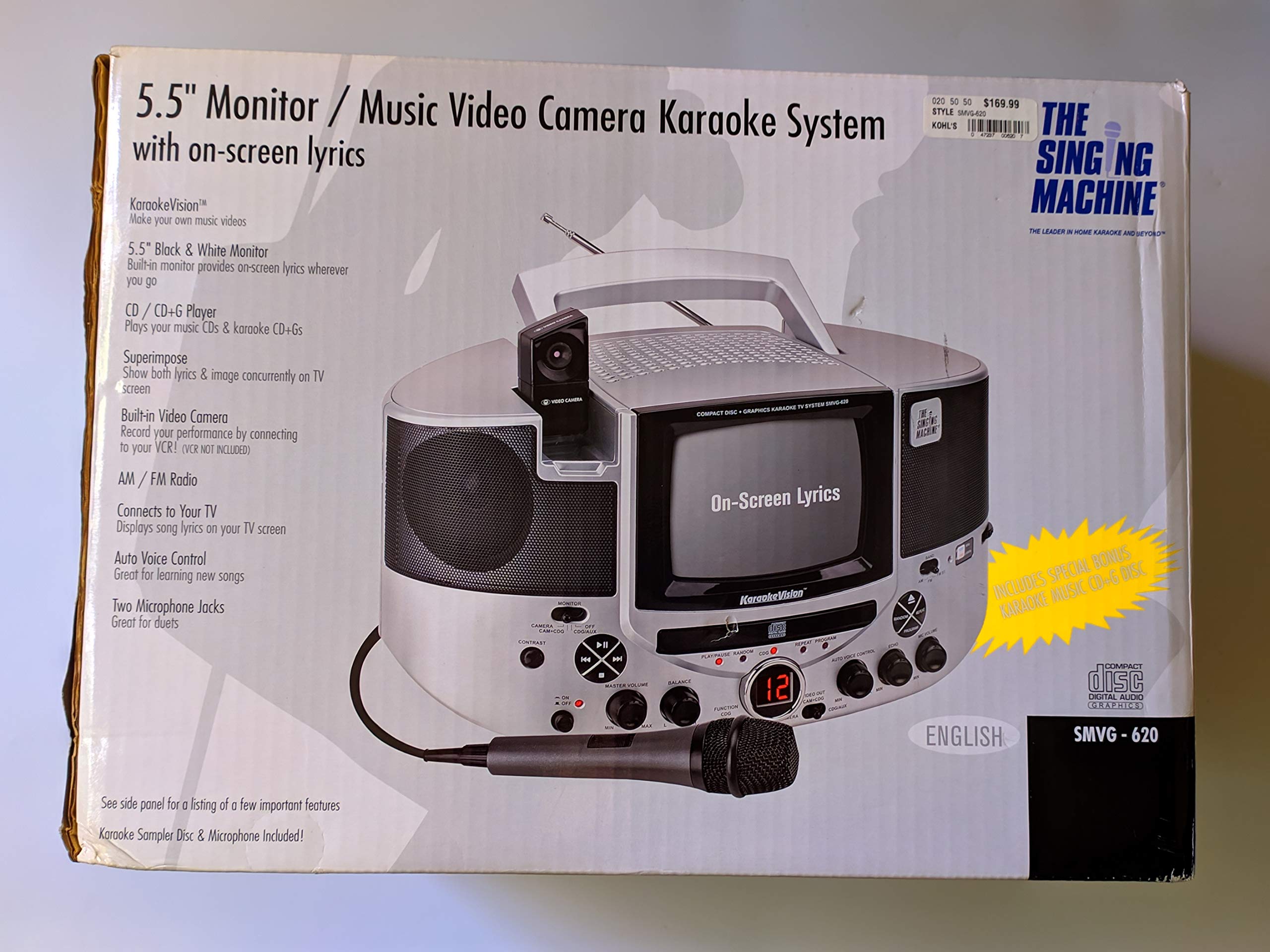
Figura 1.1: The Singing Machine SMVG-620 CD+G Karaoke System.
For optimal performance and safety, always follow the instructions and warnings provided.
2. Impurtante Information Safety
- Leghjite l'Istruzzioni: Tutte l'istruzzioni di sicurezza è di funziunamentu deve esse leghjite prima chì l'apparechju hè operatu.
- Istruzzioni di mantene: L'istruzzioni di sicurezza è di funziunamentu deve esse ritenute per riferimentu futuru.
- Fate attenzione à l'avvertimenti: Tutti l'avvertimenti nantu à l'apparechju è in e istruzioni di u funziunamentu deve esse rispettati.
- Segui Istruzzioni: Tutte e struzzioni di u funziunamentu è l'usu deve esse seguitu.
- L'acqua è l'umidità: Ùn aduprate micca stu apparatu vicinu à l'acqua.
- Pulizia: Pulite solu cù un pannu seccu.
- Ventilazione: Ùn bluccate micca alcuna apertura di ventilazione. Installate secondu l'istruzzioni di u fabricatore.
- Calore: Ùn installate micca vicinu à fonti di calore cum'è radiatori, registri di calore, stufe, o altri apparecchi (cumpresu amplifiers) chì producenu calore.
- Prutezzione Power-Cord: Prutegge u cordone di alimentazione da esse camminatu o pinzatu, in particulare in i tappi, i recipienti di cunvenzione, è u puntu induve esce da l'apparechju.
- Attachments/Accessori: Aduprate solu accessori / accessori specificati da u fabricatore.
- Lightning: Scollegate stu apparatu durante e tempeste di fulmini o quandu ùn hè micca utilizatu per longu periodi di tempu.
- Service : Riferite tutte l'assistenza à u persunale di serviziu qualificatu. U serviziu hè necessariu quandu l'apparechju hè statu danatu in ogni modu.
3. Cuntenutu di u pacchettu
Carefully unpack your Singing Machine SMVG-620 system and ensure all items listed below are present and in good condition.
- SMVG-620 CD+G Karaoke System
- One (1) Microphone
- Sampler CD+G Disc
- Audio/Video RCA Cables
- Adattatore di alimentazione AC
- Manuale d'istruzzioni

Figura 3.1: Contents of the box, including the microphone, RCA cables, and the instruction manual.
4. Produttu Finituview
Familiarize yourself with the various parts and controls of your SMVG-620 Karaoke System.

Figura 4.1: daretu view of the product packaging highlighting key features and components of the SMVG-620 system.
Funzioni chjave:
- 5.5" Black & White Monitor: For on-screen lyrics from CD+G discs.
- Built-in Color Camera: Allows you to see yourself on the monitor or connected TV.
- Dual Microphone Jacks: Connect two microphones for duets (one microphone included).
- Radio AM/FM: Sintonizate e vostre stazioni radio preferite.
- Lettore CD + G: Plays standard audio CDs and CD+Graphics discs.
- Controlu di a voce automatica (AVC): Helps maintain vocal balance by automatically reducing the main vocal track when you sing.
- Echo Control: Adds depth and resonance to your voice.
- Professional Style Microphone: For clear vocal pickup.
- Output Audio/Video: Connects to your TV for larger screen display and enhanced audio.
5. Setup
5.1 Cunnessione di putenza
- Assicuratevi chì l'unità sia posta nantu à una superficia stabile è piana.
- Connect the AC power adapter to the DC IN jack on the back of the SMVG-620 unit.
- Inserite l'altra estremità di l'adattatore di corrente CA in una presa di corrente standard (CA 120V ~ 60Hz).
5.2 Cunnessione à un televisore
À view lyrics on a larger screen and enhance audio, connect the SMVG-620 to your television using the supplied Audio/Video RCA cables.
- Locate the AUDIO OUT (white and red) and VIDEO OUT (yellow) jacks on the back of the SMVG-620.
- Connect the white plug of the RCA cable to the white AUDIO OUT jack on the karaoke system and to the white AUDIO IN jack on your TV.
- Connect the red plug of the RCA cable to the red AUDIO OUT jack on the karaoke system and to the red AUDIO IN jack on your TV.
- Connect the yellow plug of the RCA cable to the yellow VIDEO OUT jack on the karaoke system and to the yellow VIDEO IN jack on your TV.
- Turn on your TV and select the correct A/V input source (e.g., AV1, Video 1) that corresponds to the jacks you used.
5.3 Cunnessione microfonu
Plug the microphone into either the MIC 1 or MIC 2 jack on the front of the SMVG-620 unit.
6. Operazione
6.1 Accensione / spegnimentu
Press u POWER button located on the front panel to turn the unit ON or OFF.
6.2 CD+G Playback
- Open the CD compartment door and carefully place a CD+G disc (or standard audio CD) onto the spindle with the label side facing up. Close the door.
- Selezziunà CD+G mode using the FUNCTION selector.
- Press u PLAY/PAUSE buttone per inizià a riproduzione.
- Aghjustate u VOLUME MAESTRO a manuvra à u livellu d'ascolta desideratu.
- Aduprà u SKIP buttoni (<< or >>) per navigà trà e tracce.
- Per mette in pausa, appughjà PLAY/PAUSE di novu. Appughjà torna per ripiglià.
- Per piantà a riproduzione, premete u STOP buttone.
6.3 Usu di u microfonu
- Ensure the microphone is connected to a MIC jack.
- Aghjustate u VOLUME MIC manubriu per cuntrullà u livellu di uscita di u microfonu.
- Gira u ECO buttone per aghjunghje un effettu d'eco à a vostra voce.
- U AUTO VOICE CONTROL (AVC) switch can be toggled ON/OFF. When ON, the original vocal track on a CD+G disc will be reduced when you sing into the microphone.
Radio 6.4 AM/FM
- Selezziunà AM or FM mode using the FUNCTION selector.
- Stende l'antenna FM per una migliore ricezione.
- Gira u TUNING u buttone per selezziunà a stazione radio desiderata.
- Aghjustate u VOLUME MAESTRO pomu.
6.5 Funzione di a camera
The built-in camera allows you to display your image on the 5.5-inch monitor or a connected TV.
- Ensure the unit is powered on and connected to a TV if you wish to use an external display.
- The camera feed will automatically display when the unit is in CD+G or Video mode, or when no other video source is active.
7. Mantenimentu
7.1 Pulizia di l'unità
- Scollegate sempre l'unità da a presa di corrente prima di pulisce.
- Aduprate un pannu dolce è asciuttu per pulisce e superfici esterne.
- Ùn aduprate micca detergenti abrasivi, cere o solventi perchè puderanu dannighjà a finitura.
- Per a lente di u CD, aduprate un discu di pulizia per lenti di CD specializatu.
7.2 Cura di i CD
- Maneghjà i CD per i so bordi per evità impronte digitali nantu à a superficia di lettura.
- Keep discs in their cases when not in use to prevent scratches.
- Pulite i dischi cù un pannu dolce è senza pelu, asciugandu da u centru versu l'esternu.
8. Risoluzione di prublemi
If you encounter any issues with your SMVG-620, please refer to the following common problems and solutions.
| Prublemu | Causa Possibile | Soluzione |
|---|---|---|
| Nisun putere | U cordone di alimentazione ùn hè micca cunnessu bè. | Assicuratevi chì l'adattatore CA sia ben cunnessu à l'unità è à una presa murale funzionale. |
| Nisun sonu da i diffusori | Master Volume is too low. Modu di funzione incorrectu sceltu. | Increase the MASTER VOLUME. Select the correct FUNCTION (CD+G, AM, FM). |
| Nisun sonu da u microfonu | Microphone not connected. MIC VOLUME is too low. Microphone switch is OFF. | Plug microphone into MIC 1 or MIC 2 jack. Increase the MIC VOLUME. Ensure microphone switch is ON. |
| No video on TV / No lyrics | RCA cables not connected correctly. Ingressu TV sbagliatu sceltu. Not a CD+G disc. | Check all RCA cable connections (yellow for video). Select the correct A/V input on your TV. Ensure you are playing a CD+G disc for lyrics. |
| CD skipping | U discu hè bruttu o graffiatu. L'unità hè nantu à una superficia instabile. | Pulite u discu o pruvate un altru discu. Place the unit on a stable, vibration-free surface. |
9. Specificazioni
| Numero di mudellu | SMVG-620 (SIN SMVG620) |
| Fonte d'energia | AC 120V ~ 60Hz (via AC Adapter) |
| Monitor | 5.5-inch Black & White |
| Conte di parlante | 2 |
| Dispositivi compatibles | Televisione |
| Tipu di media | CD, CD+G |
| Dimensioni di u produttu (LxWxH) | 35.8 x 20.8 x 19.3 cm (14.1 x 8.2 x 7.6 inch) |
| Pesu di l'articulu | 3.9 kg (8.6 lbs) |
10. Garanzia è Support
For warranty information and customer support, please refer to the warranty card included with your product or contact The Singing Machine directly. You may also consult your retailer for details regarding their return and warranty policies.
Produttore: A MACHINA DI CANTU


