Introduzione
Grazie per l'acquistuasing the Technics SL-PD807 MASH 5 Disc CD Player. This manual provides detailed instructions for the proper setup, operation, and maintenance of your new audio component. Please read this manual thoroughly before using the unit to ensure optimal performance and longevity.
The SL-PD807 features a 5-disc carousel changer, allowing for extended playback without interruption, and incorporates MASH (Multi-stage Noise Shaping) D/A conversion for high-quality audio reproduction.
Importante infurmazione di sicurezza
- Fonte di energia: Ensure the unit is connected to an AC 120V, 60Hz power supply.
- Ventilazione: Ùn bluccate micca l'aperture di ventilazione. Lasciate un spaziu adeguatu intornu à l'unità per un flussu d'aria currettu per impedisce u surriscaldamentu.
- umidità: Ùn espone micca l'unità à a pioggia o à l'umidità. Ùn mette micca oggetti pieni di liquidi, cum'è vasi, nantu à l'unità.
- Pulizia: Scollegate l'unità da a presa murale prima di pulisce. Aduprate un pannu asciuttu per a pulizia.
- Service : Ùn pruvate micca di fà a riparazione di sta unità da per voi. Affidate tutta a manutenzione à u persunale di serviziu qualificatu.
Cuntenutu di u pacchettu
Verificate chì tutti l'articuli sò presenti in u pacchettu:
- Technics SL-PD807 MASH 5 Disc CD Player
- Cordone d'alimentazione
- Cavi audio RCA
Note: A remote control is not included with this unit.
Istituisci
1. Unpacking
Carefully remove the CD player and all accessories from the packaging. Retain the packaging materials for future transport or storage.
2. Piazzamentu
Place the CD player on a stable, level surface away from direct sunlight, heat sources, and excessive dust or vibrations. Ensure there is sufficient space around the unit for proper ventilation.

Figura 1: Fronte view of the Technics SL-PD807 CD Player with included RCA cables.
3. Cunnessioni
Cunnette u lettore CD à u vostru amplifier or receiver using the supplied RCA audio cables.
- Connect one end of the RCA audio cables (red and white plugs) to the 'LINE OUT' jacks on the rear of the SL-PD807.
- Connect the other end of the RCA audio cables to an available 'CD IN' or 'AUX IN' input on your amplifier/receiver. Match the red plug to the 'R' (right) input and the white plug to the 'L' (left) input.
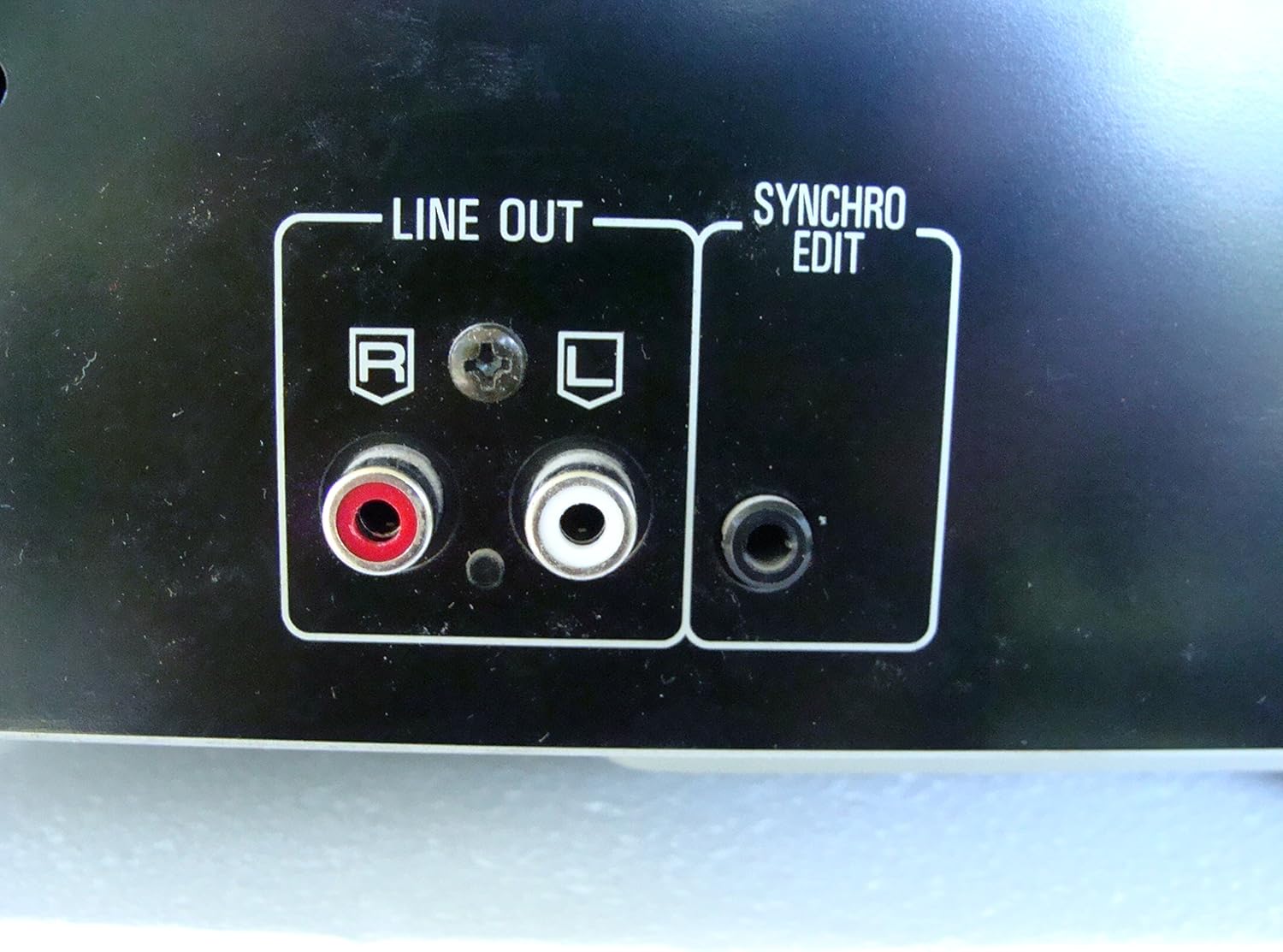
Figura 2: Rear panel connections, highlighting the 'LINE OUT' (RCA) and 'SYNCHRO EDIT' ports.
- Plug the power cord into the AC inlet on the rear of the CD player, then plug the other end into a standard AC wall outlet.
Istruzzioni di funziunamentu
1. Power On / Off
Press u POWER button located on the front left of the unit to turn the CD player on or off.
2. Caricamentu di i dischi
The SL-PD807 features a 5-disc carousel. Press the APERTURA / CHIUSURA button to open the disc tray. Place up to five CDs onto the numbered disc slots with the label side facing up. Press APERTURA / CHIUSURA di novu per chjude u vasu.

Figura 3: Front panel controls including disc tray, display, and playback buttons.
3. Riproduzione basica
- Ghjucà: Press u PLAY button (►) to start playback.
- Pausa: Press u PAUSA button (⏸) to temporarily stop playback. Press again to resume.
- Stop : Press u STOP buttone (■) per fermà a riproduzione.
- Skip Tracks: Press u SKIP buttons (⏭︎ / ⏮︎) to skip to the next or previous track.
- Ricerca: Mantene premutu RICERCA buttons (⏪︎ / ⏩︎) to fast forward or rewind within a track.
4. Disc Exchange
You can exchange discs while another disc is playing. Press the SALTA DISCU button to rotate the carousel to an empty slot or a disc you wish to remove/replace. The currently playing disc will continue to play until you select a new disc to play.
5. Modi di riproduzione
- Ghjucà casuale: Press u RANDOM button to play tracks on the current disc or all loaded discs in a random order.
- Prugramma di ghjocu: Aduprà u U prugramma button to create a custom playback sequence of tracks from the loaded discs. Refer to the on-screen display for programming steps.
- Ripetizione di u ghjocu: Press u REPETI button to repeat the current track, current disc, or all discs.
Mantenimentu
1. Pulizia di l'unità
Wipe the exterior of the unit with a soft, dry cloth. For stubborn stains, slightly dampen the cloth with water and a mild detergent, then wipe dry. Do not use abrasive cleaners, benzene, thinner, or alcohol, as these can damage the finish.

Figura 4: Top surface of the unit, illustrating areas that may require cleaning or show wear.
2. Cura di u discu
- Maneghjà i dischi per i so bordi per evità impronte digitali nantu à a superficia di ghjocu.
- Keep discs clean. Wipe from the center outwards with a soft, lint-free cloth if necessary.
- Conservate i dischi in e so custodie per prutegeli da a polvere è i graffi.
Risoluzione di prublemi
If you experience problems with your CD player, please consult the following table before seeking service.
| Prublemu | Causa Possibile | Soluzione |
|---|---|---|
| Nisun putere | U cavu d'alimentazione ùn hè micca cunnessu currettamente. | Verificate a cunnessione di u cavu di alimentazione à l'unità è à a presa murale. |
| Nisun sonu | RCA audio cables not connected correctly. Amplifier/receiver input not selected. | Ensure RCA cables are securely connected to both the CD player and amplifier. Select the correct input on your amplificatore/ricevitore. |
| U discu ùn ghjoca micca / Salta | Disc is dirty or scratched. Disc is inserted incorrectly. | Clean the disc with a soft, lint-free cloth. Ensure the disc is placed label-side up in the tray. Try another disc. |
| Carousel does not rotate | Obstruction in the disc tray. | Ensure no foreign objects are obstructing the carousel mechanism. |
Specificazioni
The following are the technical specifications for the Technics SL-PD807 MASH 5 Disc CD Player:
| Feature | Specificazione |
|---|---|
| Nome di mudellu | SL-PD807 |
| U fabricatore | Tecnica |
| Capacità di discu | 5 dischi |
| Requisiti di putenza | AC 120V, 60Hz, 13W |
| Dimensioni di u pacchettu | 17 x 17 x 5 inch |
| Pesu di l'articulu | 15.02 liri |
| Tecnulugia di cunnessione | Auxiliary, Infrared |
| Funzione speciale | Prutezzione Anti-Skip |

Figura 5: Product label displaying model number and power specifications.
Garanzia è Supportu
For information regarding warranty coverage and customer support for your Technics SL-PD807 CD Player, please refer to the warranty card included with your purchase or visit the official Technics website. If you require further assistance, please contact Technics customer service.


