1. Introduzione
This manual provides instructions for the installation, operation, and maintenance of your StarTech.com 8 Outlet Horizontal 1U Rack Mount PDU Power Strip (Model RKPW081915). This Power Distribution Unit (PDU) is designed to provide reliable power distribution and surge protection for equipment within network server racks and cabinets.
2. Informazioni di sicurezza
ATTENZIONE: A mancanza di seguitu di queste istruzioni di sicurezza pò causà incendi, scosse elettriche o altre ferite o danni.
- Leghjite tutte e struzzioni prima di uperà u pruduttu.
- Stu pruduttu hè destinatu solu à l'usu interni.
- Ensure the PDU is properly grounded. Do not use with ungrounded outlets.
- Do not exceed the maximum electrical rating of 120V/15A. Overloading the PDU can cause damage and fire hazards.
- Do not disassemble or modify the PDU. Refer all servicing to qualified personnel.
- Keep away from water or excessive humidity.
- Do not plug one PDU into another.
3. Cuntenutu di u pacchettu
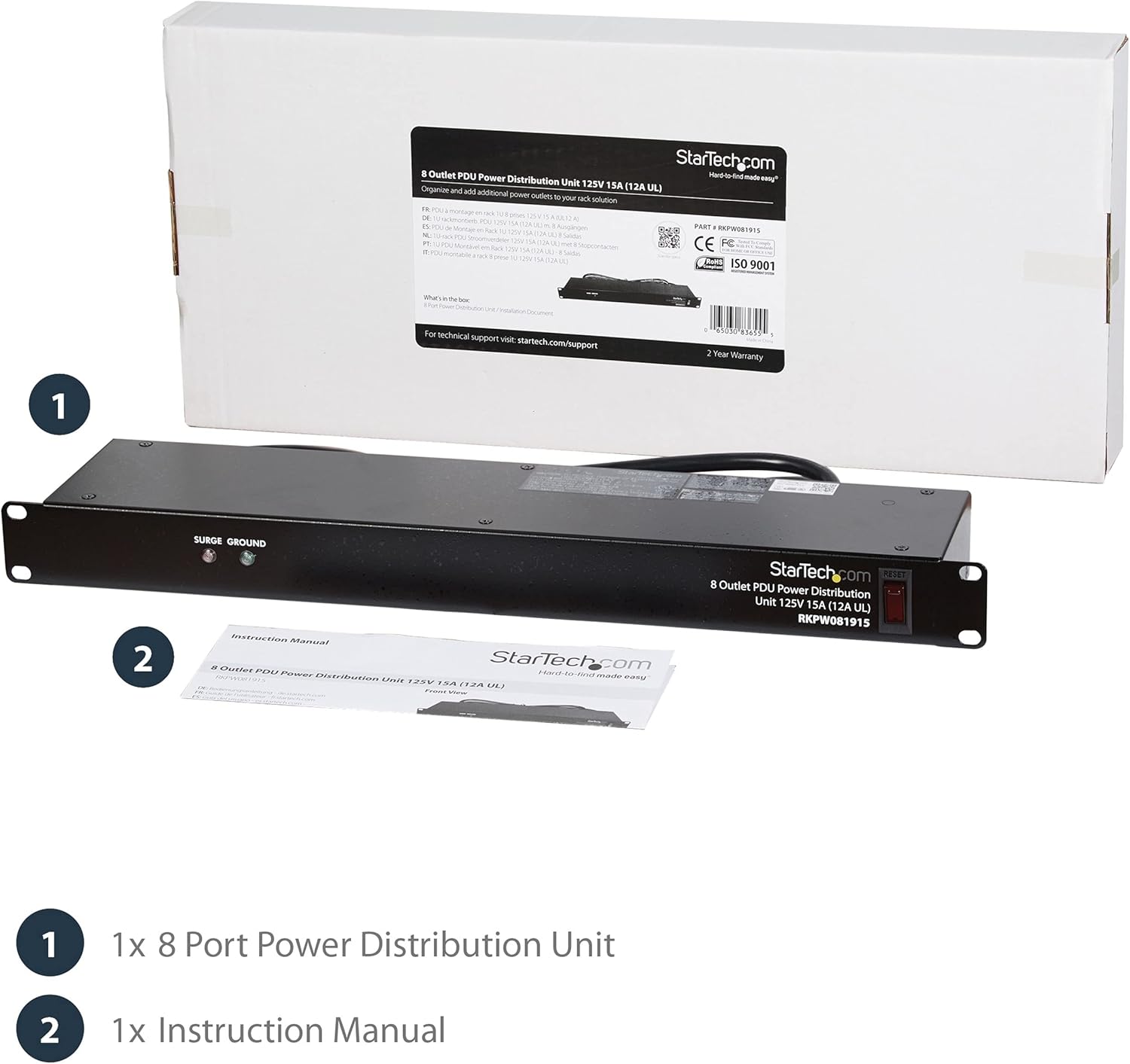
Image: The StarTech.com PDU and its instruction manual, as typically found in the product packaging.
- 1x 8 Outlet Horizontal 1U Rack Mount PDU Power Strip (RKPW081915)
- 1x Manuale d'istruzzioni
4. Produttu Finituview
The StarTech.com RKPW081915 is a 1U horizontal rack-mountable PDU designed for efficient power distribution in server environments. It features 8 NEMA 5-15R outlets, a 6-foot power cord, and built-in surge protection.
Funzioni di u pannellu frontale

Imagine: Dettagliata view of the PDU's front and back, highlighting the LED indicators, power switch, and outlets.
- LED Surge Indicator: Illuminates when surge protection is active.
- LED Ground Indicator: Illuminates when the PDU is properly grounded.
- Power/Reset Switch: Controls power to all outlets and acts as a circuit breaker reset.
Funzioni di u pannellu posteriore
- 8 x NEMA 5-15R Outlets: Provides power connections for your equipment.
- Integrated 6ft Power Cord: Connects the PDU to a power source.

Image: Close-up of the rear of the PDU, displaying the eight power outlets and the attached power cord.
5. Setup
5.1 Unpacking
Carefully remove the PDU and all components from the packaging. Inspect for any damage during shipping. If any damage is found, contact your vendor immediately.
5.2 Rack Mounting
The RKPW081915 PDU is designed for horizontal mounting in any standard 19-inch server rack that is 4 inches (10.16 cm) deep or greater. It occupies 1U of rack space.
- Align the mounting ears of the PDU with the desired rack unit (U) on your server rack.
- Secure the PDU to the rack using appropriate rack screws (not included). Ensure both sides are firmly attached.

Image: The PDU mounted horizontally within a server rack, demonstrating its 1U form factor and integration with other equipment.

Image: A visual representation of the PDU's height (1U) and cable length (6ft), confirming its compatibility with standard 19-inch racks.
5.3 Dispositivi di cunnessione
- Ensure the PDU's power/reset switch is in the OFF position.
- Plug the power cords of your network and server equipment into the 8 NEMA 5-15R outlets on the rear of the PDU.
- Connect the integrated 6-foot power cord of the PDU to a grounded 120V/15A power source.
Video: Demonstrates the installation of a rack-mounted power strip, showing how it integrates into a server rack and connects to devices.
Video: An official product video from StarTech.com showcasing the 8 Outlet Horizontal 1U Rack Mount PDU Power Strip for network server racks, highlighting its surge protection features.
Video: A demonstration of the StarTech 8 Outlet Horizontal 1U Rack Mount PDU, showing its physical attributes and how it fits into a rack setup.
Video: Un overview of an 8 Outlet Rack-Mount PDU, detailing its features and benefits for organizing power in a rack system.
Video: A demonstration of a PDU Outlet Horizontal, highlighting its design and functionality for power distribution.
6. Operating Instructions
6.1 Accensione / spegnimentu
To power on the connected equipment, press the Power/Reset switch on the front panel to the ON position. To power off, press the switch to the OFF position.
6.2 Indicatori LED
- Surge LED (Green): When illuminated, it indicates that the surge protection feature is active and functioning. If this LED is off, the surge protection has been compromised, and the unit should be replaced.
- Ground LED (Green): When illuminated, it indicates that the PDU is properly grounded. If this LED is off, there may be a grounding issue with your power source or the PDU itself.
6.3 Circuit Breaker
The Power/Reset switch also functions as a circuit breaker. If an overload occurs, the switch will trip to the OFF position, cutting power to all connected devices to prevent damage. To reset the circuit breaker, reduce the load on the PDU and then press the switch back to the ON position.
7. Mantenimentu
7.1 Pulizia
To clean the PDU, ensure it is powered off and disconnected from the main power source. Use a soft, dry cloth to wipe the exterior. Do not use liquid cleaners or aerosols.
7.2 Cuntrolli regulari
- Periodically check the Surge and Ground LEDs to ensure they are illuminated, indicating proper function and grounding.
- Inspect the power cord and connected device cords for any signs of damage or wear.
- Assicuratevi chì tutte e cunnessione sò sicure.
8. Risoluzione di prublemi
| Prublemu | Causa Possibile | Soluzione |
|---|---|---|
| Nisuna alimentazione à i dispusitivi cunnessi. | PDU is off or circuit breaker tripped. | Ensure the Power/Reset switch is ON. If it tripped, reduce the load and reset the switch. |
| Ground LED is off. | Messa à terra impropria. | Ensure the PDU is plugged into a properly grounded outlet. Check the building's electrical wiring. |
| Surge LED is off. | Surge protection has been compromised. | The PDU's surge protection may no longer be active. Replace the unit to ensure continued protection. |
| Devices are not receiving enough power. | PDU is overloaded. | Reduce the total power draw of connected devices to stay within the 15A limit. |
9. Specificazioni
| Feature | Detail |
|---|---|
| Numero di mudellu | RKPW081915 |
| Marca | StarTech.com |
| Prise di putenza tutali | 8 x NEMA 5-15R |
| Input Voltage | 120 Volts AC |
| Valutazione attuale | 15 Amps |
| Lunghezza di u cordone di alimentazione | 6 piedi (1.8 metri) |
| Rack Unit (RU) | 1U |
| Muntà | Horizontal 19-inch Rack Mount |
| Dimensioni (LxPxH) | 19 x 3.76 x 1.68 inch (48.26 x 9.55 x 4.27 cm) |
| Pesu di l'articulu | 4.85 liri (2.2 kg) |
| Funzioni spiciali | Mountable, On/Off Switch, Surge Protection, Built-in Circuit Breaker |
| CasinMateriale g | Rugged Steel |
10. Garanzia è Support
This StarTech.com product is backed by a lifetime warranty, ensuring long-term reliability and peace of mind. In addition, free lifetime 24/5 multi-lingual technical assistance is available to help you with any questions or issues you may encounter.
For technical support or warranty claims, please visit the official StarTech.com websitu o cuntattate direttamente u so serviziu clienti. Cunservate a vostra ricevuta d'acquistu per a validazione di a garanzia.


