1. Introduzione
The Antec TruePower TPQ-1200 is a high-performance 1200-watt power supply designed for demanding computer systems. It features an 80 PLUS Silver certification, indicating high energy efficiency, and provides stable power delivery through its six +12V rails. This manual provides essential information for the safe installation, operation, and maintenance of your TPQ-1200 power supply.
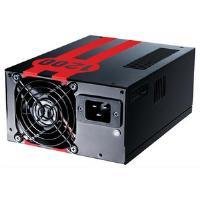
Image 1.1: The Antec TruePower TPQ-1200 Power Supply unit, showcasing its design and modular connectors.
2. Informazioni di sicurezza
Please read and understand all safety instructions before installing or operating the power supply. Failure to do so may result in personal injury or damage to your equipment.
- Scollegate sempre u cavu di alimentazione da a presa murale prima di installà, rimuovere o pulisce l'alimentatore.
- Questu alimentatore hè cuncipitu per esse adupratu solu in urdinatori persunali. Ùn l'utilizate micca per altri scopi.
- Ùn aprite micca l'alimentatore casing. Altu vulumetagI dispositivi sò prisenti dentru, è ùn ci sò micca pezzi riparabili da l'utente. Apertura di u casing annullerà a garanzia.
- Assicuratevi una messa à terra curretta di u vostru sistema informaticu.
- Avoid operating the power supply in high humidity or extreme temperature environments.
- Keep the power supply away from liquids and sources of heat.
3. Cuntenutu di u pacchettu
Verificate chì u vostru pacchettu cuntene i seguenti elementi:
- Antec TruePower TPQ-1200 Power Supply Unit
- Modular Cable Set (PCIe, SATA, Molex, Floppy)
- Cordu di alimentazione AC
- Viti di montaggio
- Manuale d'uso (stu documentu)
If any items are missing or damaged, please contact your retailer or Antec customer support.
4. Features
The Antec TruePower TPQ-1200 power supply offers advanced features for reliable and efficient performance:
- 1200 Watts Continuous Power: Fornisce ample power for high-end gaming and workstation systems.
- 80 PLUS Silver Certified: Achieves up to 88% efficiency, reducing heat generation and operating costs.
- Six +12V Rails: Delivers stable and clean power to critical components.
- Gestione Avanzata di i Cavi: Semi-modular design allows for cleaner builds and improved airflow.
- PowerCache High Performance Capacitors: Enhances stability and transient response.
- Ultra-Quiet Pulse Width Modulation (PWM) Fan: Provides efficient cooling with minimal noise.
- Industrial Grade Protection Circuitry: Includes Over Current Protection (OCP), Over Voltage Prutezzione (OVP), Under Voltage Protection (UVP), Short Circuit Protection (SCP), Over Power Protection (OPP), and Over Temperature Protection (OTP).
5. Setup è Installazione
Follow these steps carefully to install your Antec TruePower TPQ-1200 power supply.
5.1 Lista di Verificazione di Preinstallazione
- Ensure your computer case supports an ATX power supply.
- Raccoglie l'arnesi necessarii: cacciavite Phillips.
- Unplug your computer from the wall outlet and discharge any residual power by pressing the power button.
5.2 Muntamentu di u Power Supply
- Carefully place the power supply into the designated PSU bay in your computer case. Ensure the fan is oriented correctly (typically facing down for bottom-mounted PSUs, or according to case design for top-mounted).
- Align the screw holes on the power supply with those on the case.
- Secure the power supply using the provided mounting screws. Do not overtighten.
5.3 Cunnessu i Cavi di Alimentazione
Connect the necessary cables to your motherboard and components. The TPQ-1200 features both fixed and modular cables.
- 24-Pin ATX Motherboard Power: Connect the main 24-pin connector to the corresponding port on your motherboard. Ensure it clicks into place.
- 8-Pin EPS12V (CPU) Power: Connect the 8-pin (or 4+4 pin) EPS12V connector to the CPU power port on your motherboard.
- PCIe (Graphics Card) Power: For graphics cards requiring additional power, connect the appropriate 6-pin or 6+2 pin PCIe modular cables from the power supply to your graphics card(s).
- Alimentazione SATA: Connect SATA modular cables to your SATA hard drives, SSDs, and optical drives.
- Molex (Peripheral) Power: Use Molex modular cables for older peripherals or case fans that require this connector type.
- Gestione di Cable: Fate percorre i cavi ordinatamente daretu à u cassettu di a scheda madre o in altre zone designate di u vostru chassis per migliurà u flussu d'aria è l'estetica.
5.4 Power-On iniziale
- Assicuratevi chì tutte e cunnessione sò sicure.
- Connect the AC power cord to the power supply and then to a grounded wall outlet.
- Flip the power switch on the back of the power supply to the 'ON' (I) position.
- Accende u vostru urdinatore.
6. Operating Instructions
The Antec TruePower TPQ-1200 is designed for continuous operation within its specified limits. Ensure adequate ventilation around your computer case to prevent overheating. The intelligent PWM fan will adjust its speed based on the power supply's temperature to maintain optimal cooling and noise levels.
Always shut down your computer properly through the operating system before turning off the power supply switch or unplugging the AC cord.
7. Mantenimentu
Una manutenzione regulare aiuta à assicurà a longevità è e prestazioni ottimali di a vostra alimentazione elettrica.
- Pulizia di a polvere: Periodically (e.g., every 6-12 months), disconnect the power supply from the wall outlet and use compressed air to gently clean dust from the fan grille and ventilation openings. Do not open the power supply casing.
- Ispezione di u cable: Verificate di tantu in tantu tutte e cunnessione di i cavi di alimentazione per assicurassi ch'elli sianu sicuri è senza danni.
8. Risoluzione di prublemi
If you encounter issues with your power supply, refer to the following troubleshooting guide:
| Prublemu | Causa Possibile | Soluzione |
|---|---|---|
| L'urdinatore ùn s'accende micca. | AC power cord not connected or loose. Power supply switch is OFF. Faulty power supply. | Ensure AC cord is firmly connected. Flip PSU switch to 'ON' (I). Test with another power supply if possible. |
| U sistema s'accende ma si spegne subitu. | Overload, short circuit, or overheating. | Check for short circuits (e.g., loose screws). Ensure adequate ventilation. Disconnect non-essential components to check for overload. |
| Instabilità di u sistema o riavvii aleatorii. | Insufficient power, faulty component, or power supply issue. | Verify all power connectors are secure. Ensure total system wattage does not exceed PSU capacity. Test components individually if possible. |
| Forte rumore di ventilatore da l'alimentatore. | Dust accumulation, fan malfunction, or high load. | Clean dust from the fan grille. If noise persists and is excessive, contact support. |
If troubleshooting steps do not resolve the issue, contact Antec customer support for further assistance.
9. Specificazioni
Detailed technical specifications for the Antec TruePower TPQ-1200 power supply:
- Nome di mudellu: TruePower TPQ-1200
- Output Wattage: 1200 Watt
- Fattore di forma: ATX12V
- Tipu di cunnessu: ATX
- efficienza: 80 PLUS Silver Certified
- Metudu di rinfrescante: Air (PWM Fan)
- Conte di fan: 1
- Dispositivi cumpatibili: Computer persunale
- Pesu di l'articulu: 4.96 liri (2.25 kg)
- Dimensioni di u pacchettu: 12.91 x 9.84 x 5.59 inch (32.8 x 25 x 14.2 cm)
- Data prima dispunibule: 17 d'aprile di u 2012
10. Garanzia è Support
Per infurmazioni nantu à a garanzia è l'assistenza tecnica, vi pregu di cunsultà u situ ufficiale Antec. websitu o cuntattate direttamente u so serviziu clienti. I termini è e cundizioni di garanzia ponu varià secondu a regione è a data di compra.
Antec Ufficiale Websitu: www.antec.com


