1. Introduzione
The Altronix PD4 is a power distribution module designed to efficiently manage power delivery. It converts a single AC or DC input into four (4) individually fuse-protected outputs. This module is suitable for various low-voltage applications requiring reliable power distribution and circuit protection.
2. Informazioni di sicurezza
Please read and understand all instructions before installing or operating the Altronix PD4. Failure to follow these instructions may result in injury or damage to the device.
- Periculu elettricu: Disconnect all power sources before installation or servicing.
- Fusione curretta: Always use fuses of the specified type and rating. Never bypass a fuse.
- Ventilazione: Ensure adequate ventilation around the module to prevent overheating.
- Personale qualificatu: L'installazione è u serviziu deve esse realizatu solu da u persunale qualificatu.
- Usu à l'internu: This device is intended for indoor use in a controlled environment.
3. Features
- Four (4) individually fuse-protected outputs.
- Supports 12-24VDC input voltage.
- Total current output up to 10A.
- LED indicators for power status.
- Compact design for easy integration.
4. Specificazioni
| Specificazione | Valore |
|---|---|
| Input Voltage | 12-24 VDC |
| Corrente Totale di Risultatu | 10A (massimu) |
| Numero di Outputs | 4 (individually fused) |
| Dimensioni di u produttu | 3.4 x 1.75 x 5.9 inch |
| Pesu di l'articulu | 1 libbra |
| Numero di mudellu | PD4 |
| U fabricatore | Altronix Corporation |
5. Setup è Installazione
Before proceeding, ensure all power is disconnected from the input source.
5.1. Muntà
The PD4 module can be mounted using screws through the designated mounting holes on the board. Choose a secure, dry location with adequate ventilation.
5.2. Wiring Connections
- Potenza di input: Connect the 12-24VDC power source to the input terminals labeled 'MAIN FUSE' or similar input terminals. Observe correct polarity (positive to positive, negative to negative).
- Dispositivi di output: Connect your devices requiring power to the four (4) output terminal pairs (1P/1N, 2P/2N, 3P/3N, 4P/4N). Each output is individually protected by a fuse. Ensure the total current draw for all connected devices does not exceed 10A.
- Installazione di fusible: Insert the appropriate fuses into the designated fuse holders for each output. Refer to the markings on the board for recommended fuse ratings.
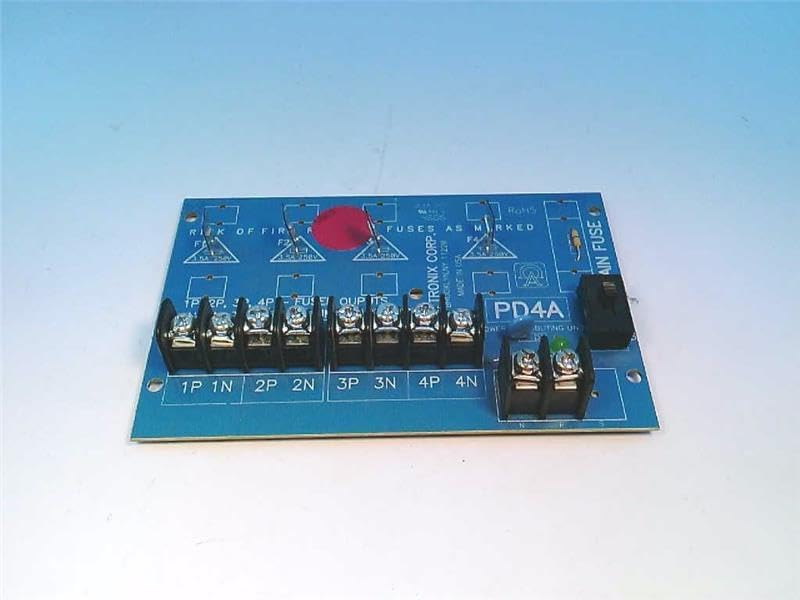
Figure 1: Altronix PD4 Power Distribution Module board, top view. Shows the main fuse holder, four sets of output terminals, and fuse locations for each output.

Figure 2: Altronix PD4 Power Distribution Module board, angled view. Highlights the terminal blocks for input and output connections, along with the fuse holders.
5.3. Power Up
Once all connections are secure and fuses are in place, apply power to the input terminals. The power indicator LED (if present) on the board should illuminate, indicating proper power input.
6. Operating Instructions
The Altronix PD4 operates automatically once power is supplied. It distributes the input power to the four connected output devices, with each output protected by its respective fuse. There are no user-adjustable settings or controls on the module itself beyond the initial wiring and fuse selection.
- Assicuratevi l'input voltage is within the specified 12-24VDC range.
- Monitor the power indicator LED to confirm the module is receiving power.
- If an output device is not receiving power, check its corresponding fuse.
7. Mantenimentu
The Altronix PD4 requires minimal maintenance. Regular checks can help ensure continued reliable operation.
- Ispezione di fusible: Periodically inspect fuses for any signs of damage or blowing. Replace blown fuses with the correct type and rating.
- Cunnessioni Terminal: Ensure all terminal connections remain tight and secure. Loose connections can lead to intermittent power or overheating.
- Pulizia: Mantene u modulu senza polvere è detriti. Aduprate un pannu dolce è asciuttu per a pulizia. Ùn aduprate micca detergenti liquidi.
- Cuntrolla ambientale: Verificate chì l'ambiente operativu resti in i limiti di temperatura è umidità specificati.
8. Risoluzione di prublemi
| Prublemu | Causa Possibile | Soluzione |
|---|---|---|
| No power to any output, power LED off. | No input power, incorrect input voltage, main fuse blown. | Check input power source. Verify input voltage. Replace main fuse if blown (ensure correct rating). |
| No power to a specific output, other outputs working. | Blown fuse for that specific output, faulty wiring to the device. | Identify and replace the blown output fuse. Check wiring to the affected device. |
| Fuses blow frequently. | Overcurrent draw from connected device, short circuit in wiring or device. | Reduce load on the output. Inspect wiring and connected device for short circuits. Ensure correct fuse rating. |
| Module feels excessively hot. | Overload, insufficient ventilation, loose connections. | Reduce total load. Ensure adequate airflow. Tighten all terminal connections. |
9. Garanzia è Support
For warranty information and technical support, please refer to the official Altronix website or contact Altronix customer service directly. Keep your purchase receipt for warranty claims.
Altronix Corporation
Websitu: www.altronix.com
L'infurmazioni di cuntattu si ponu truvà di solitu nantu à i so websitu.


