Introduzione
Thank you for choosing the Casio AW-90H-2BVDF Wristwatch. This manual provides essential information regarding the setup, operation, and maintenance of your watch. Please read it carefully to ensure proper use and to maximize the lifespan of your timepiece.

Image: Front view of the Casio AW-90H-2BVDF Wristwatch, displaying its analog and digital time displays.
Guida generale
Your Casio AW-90H-2BVDF watch features both analog hands and a digital display. It typically includes multiple buttons for various functions. While specific button labels may vary, common functions are usually assigned to buttons located on the sides of the watch case.
- Pulsante di modu: Cycles through different modes (Timekeeping, Alarm, Stopwatch, Dual Time).
- Pulsante di aghjustà: Used to select items for setting in various modes.
- Pulsante Start / Stop: Used to start/stop stopwatch, or change values during setting.
- Pulsante di luce: Activates the backlight for illumination.
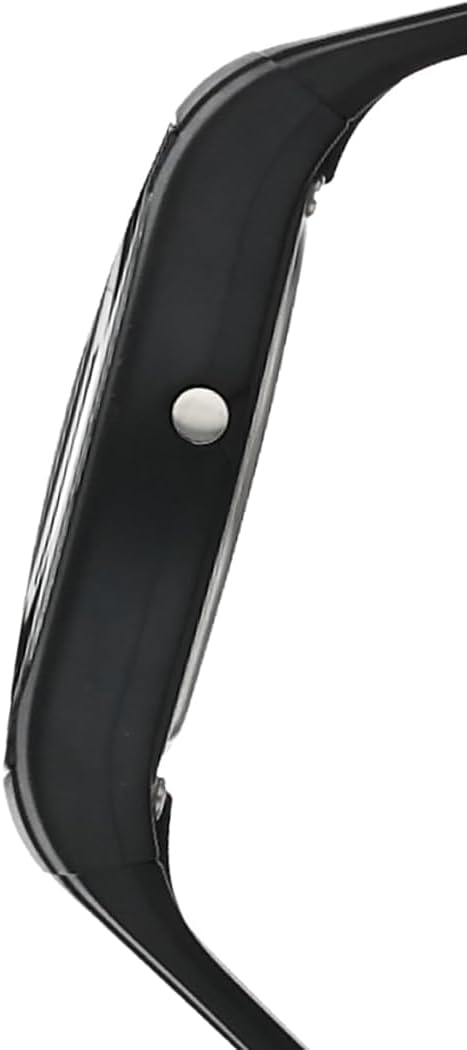
Imagine: Latu view of the Casio AW-90H-2BVDF Wristwatch, highlighting one of the control buttons.
Setup and Timekeeping
Impostazione di l'ora è a data digitale
- In u modu di indicazione di l'ora, appughjà u buttone Aghjustate finu à chì e cifre di i secondi cumincianu à lampeggià, indicendu a schermata di impostazione.
- Press u Modu button to cycle through the setting options: Seconds → Hour → Minutes → Year → Month → Day.
- Aduprà u Start / Stop button to increase the flashing value. Hold down to change rapidly.
- Una volta chì tutti i paràmetri sò curretti, appughjà u buttone Aghjustate buttone per sorte da a schermata di paràmetri.
Adjusting Analog Hands
The analog hands are typically synchronized with the digital time. If they are out of alignment, refer to the specific hand adjustment procedure in the full module manual (available on the Casio website by searching your model number). Generally, this involves entering a hand setting mode and using buttons to move the hands.
Modi di funziunamentu
Press u Modu buttone per passà da una funzione à l'altra di l'orologio:
- Modu di indicazione di l'ora: Mostra l'ora è a data attuale.
- Modu Alarma: Imposta è attiva l'allarmi di ogni ghjornu.
- Modu cronometru: Misura u tempu passatu.
- Modu Dual Time: View the time in a different time zone.
Utilizà l'Alarm
- Enter the Alarm Mode using the Modu buttone.
- Press u Aghjustate button to enable setting the alarm time. The hour digits will flash.
- Aduprà u Start / Stop button to change the hour. Press Modu to switch to minutes and adjust.
- Press Aghjustate per cunfirmà l'ora di a sveglia.
- Per accende/spegne l'allarme, appughjà u buttone Start / Stop button while in Alarm Mode (not in setting mode).
Usendu u Cronometru
- Enter the Stopwatch Mode using the Modu buttone.
- Press u Start / Stop buttone per inizià u cronometru.
- Press Start / Stop torna à piantà lu.
- Press u Aghjustate buttone per resettà u cronometru à zeru.
Illuminazione
Press u Luce button (if available) to illuminate the digital display for a few seconds in low-light conditions.
Cura è Mantenimentu
Resistenza à l'acqua
Your watch is marked with "WATER RESIST" on the case back, indicating it is suitable for everyday use and can withstand splashes or brief immersion in water. However, it is not designed for diving or prolonged water exposure. Do not operate buttons while the watch is wet or submerged.

Imagine: Daretu view of the Casio AW-90H-2BVDF Wristwatch, showing the stainless steel case back with "WATER RESIST" engraving.
Pulizia
Asciugate l'orologio cù un pannu dolce è asciuttu per caccià a sporcizia è l'umidità. Per a sporcizia ostinata, aduprate un pannu dolce.ampened with water and a mild neutral detergent, then wipe dry. Avoid using volatile agents like thinner or benzine, which may damage the resin components.
Informazioni batterie
This watch uses one CR123A battery (included). When the display becomes dim or functions become erratic, it is time to replace the battery. Battery replacement should ideally be performed by a qualified watch technician to ensure proper sealing and water resistance.
Storage
When not in use for extended periods, store your watch in a dry place away from direct sunlight, extreme temperatures, and strong magnetic fields.
Risoluzione di prublemi
- Ora sbagliata: Ensure you have correctly set both the digital and analog times. If the analog hands are misaligned, refer to the hand adjustment procedure.
- Schermu biancu o scuru: A batteria pò esse bassa o scarica. Rimpiazzà a batteria.
- Buttons chì ùn rispundenu micca: Ensure the watch is not in a locked mode (if applicable) or that it is not wet. If the issue persists after drying, the battery may be low.
- Vigilanza di l'acqua in l'internu: If you notice condensation or water droplets inside the watch, have it inspected immediately by a qualified technician to prevent further damage.
Specificazioni
| Numero di mudellu | AW-90H-2BVDF |
| U fabricatore | Casio |
| Dimensioni di u produttu | 2.44 x 4.09 x 3.7 inch |
| Pesu di l'articulu | 2.08 once |
| Tipu di batterie | 1 CR123A (incluse) |
| Resistenza à l'acqua | Water Resistant (suitable for splashes, not diving) |
| Lingua | Inglese |
Infurmazioni di Garanzia
U vostru orologio Casio hè cupertu da una garanzia di u fabricatore contr'à i difetti di materiali è di fabricazione. I termini specifici è a durata di a garanzia ponu varià secondu a regione. Per piacè riferitevi à a carta di garanzia inclusa cù u vostru acquistu o visitate u situ ufficiale Casio. websitu per infurmazioni dettagliate di garanzia.
Assistenza Clienti
For further assistance, technical support, or service inquiries, please contact Casio customer support. You can find contact information and frequently asked questions on the official Casio website. When contacting support, please have your watch model number (AW-90H-2BVDF) readily available.


