1. Introduzione
This manual provides comprehensive instructions for the Nikon COOLPIX P7100 digital camera. Designed for photographers seeking advanced control and portability, the P7100 delivers high-quality images and HD video. Familiarize yourself with the camera's features and functions to maximize your photographic experience.

Figura 1.1: Fronte view of the Nikon COOLPIX P7100 Digital Camera.
2. Setup
2.1 Accessori Inclusi
Verify that the following items are included with your Nikon COOLPIX P7100:
- Cinghia AN-CP21
- Cavo USB UC-E6
- Cavu Audio/Video EG-CP16
- Batteria Li-ion ricaricabile EN-EL14
- Caricatore di batterie MH-24
- NikonView CD-ROM NX 2
- Reference Manual CD
2.2 Caricà a Batteria
Before initial use, fully charge the EN-EL14 Li-ion Battery using the MH-24 Battery Charger. Connect the charger to a power outlet and insert the battery. The charging indicator will blink during charging and glow steadily when complete.
2.3 Inserimentu di a batteria è di a carta di memoria
Open the battery/memory card compartment cover. Insert the charged EN-EL14 battery as shown, ensuring correct orientation. Insert an SD/SDHC/SDXC memory card into the designated slot until it clicks into place. Close the compartment cover securely.

Figura 2.1: Posteriore view of the camera, showing the battery and memory card compartment area.
3. Operazione
3.1 Power On/Off
Press u ON/OFF button located on the top panel to power the camera on or off. The camera features a fast startup time for quick readiness.

Figura 3.1: Top view of the camera, highlighting the ON/OFF button and mode dial.
3.2 Shooting Modes and Controls
The mode dial on the top of the camera allows selection of various shooting modes, including Programmed auto (P), Shutter-priority auto (S), Aperture-priority auto (A), and Manual (M) modes for full creative control. Dedicated dials and buttons provide quick access to settings like ISO, white balance, and exposure compensation.
- PSAM Modes: Offer advanced control over exposure settings.
- Modi di scena: Pre-set modes for specific shooting conditions (e.g., Portrait, Landscape, Night Landscape, Food, Sunset).
- Modi di effetti: Apply in-camera special effects like Cross Process or HDR.
3.3 Image Quality and Lens Features
The P7100 is equipped with a large 10.1 MP, 1/1.7-inch CCD sensor for detailed images with reduced noise and a wide tonal range. The 7.1x optical Zoom-NIKKOR ED glass lens (28-200mm equivalent) provides versatile focal lengths, complemented by VR (Vibration Reduction) image stabilization to minimize blur.
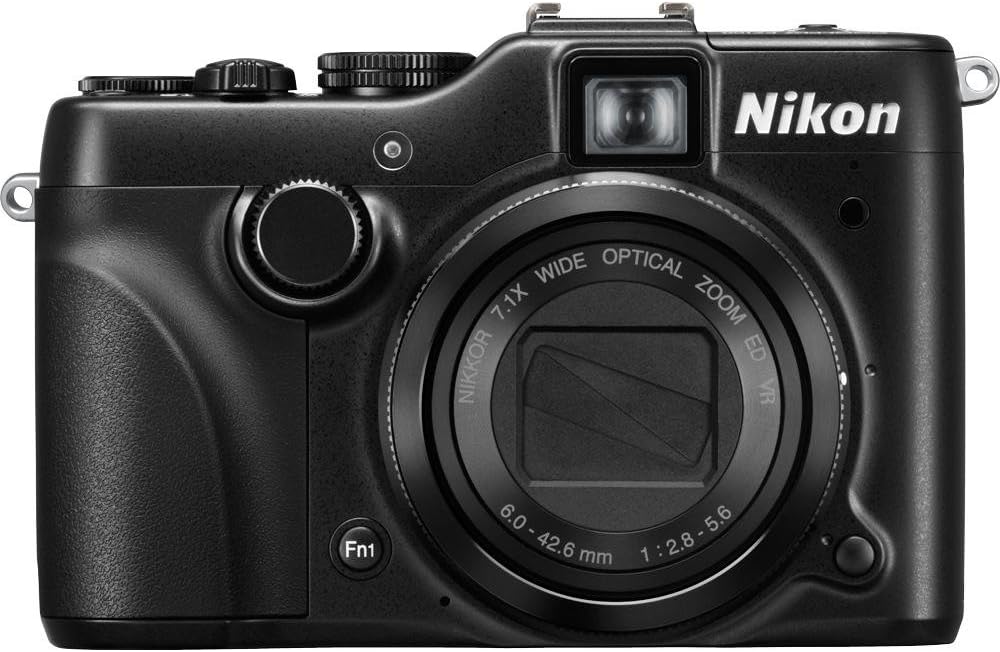
Figura 3.2: Fronte view of the camera, highlighting the NIKKOR lens.
The camera supports shooting in NRW (RAW) file format, preserving original image data for extensive post-processing flexibility.
3.4 Vari-Angle LCD Monitor and Viewfinder
The 3-inch Vari-Angle LCD monitor (921,000-dot) can be tilted up and down, offering flexibility for shooting from various angles. Its Clear Color Display and anti-reflection coating ensure clear viewing even in bright conditions. An optical viewfinder is also provided for traditional framing.
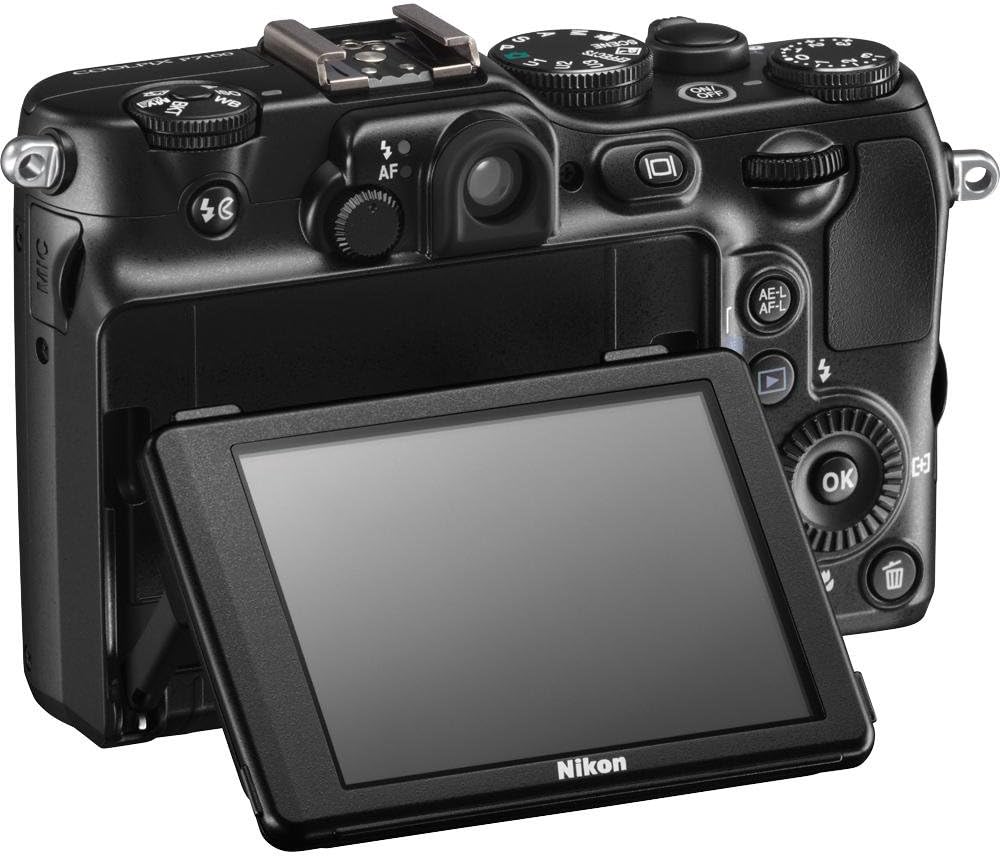
Figura 3.3: Posteriore view of the camera with the Vari-Angle LCD monitor tilted for flexible viewing.
3.5 HD Video Recording
Record HD (720p) movies with stereo sound. The optical zoom function is available during video recording, allowing for dynamic framing. Connect the camera to an HDTV via the built-in HDMI port to view i vostri video.
Video 3.1: An official product video demonstrating features of the Nikon COOLPIX P7100, including its HD movie mode and vari-angle display.
4. Mantenimentu
4.1 Pulizia di a Camera
Use a soft, lint-free cloth to clean the camera body. For the lens and LCD screen, use a specialized lens cleaning cloth and solution. Avoid harsh chemicals or abrasive materials.
4.2 Cura di a batteria
Store the battery in a cool, dry place when not in use. Avoid fully discharging the battery for extended periods. If the camera will not be used for a long time, remove the battery.
5. Risoluzione di prublemi
If you encounter issues with your Nikon COOLPIX P7100, refer to the following common solutions:
- A camera ùn s'accende micca: Assicuratevi chì a batteria sia cumpletamente carica è inserita currettamente.
- L'imagine sò sfocate: Check if VR (Vibration Reduction) is enabled. Ensure proper focus and sufficient lighting.
- Errore di a carta di memoria: Reinsert the memory card. If the error persists, try a different compatible SD/SDHC/SDXC card.
- U schermu LCD ùn si mostra micca: Check if the Vari-Angle monitor is properly extended and rotated. Ensure the camera is powered on.
- U flash ùn si accende micca: Verify flash mode settings. Ensure the flash is not obstructed.
For more detailed troubleshooting, consult the Reference Manual CD included with your camera.
6. Specificazioni
| Feature | Detail |
|---|---|
| Nome di mudellu | Nikon COOLPIX P7100 |
| Risoluzione Still Efficace | 10.1 MP |
| Dimensione sensoru di foto | 1/1.7-inch |
| Photo Sensor Technology | CCD |
| Zoom otticu | 7.1x |
| Tipu di lente | Zoom-NIKKOR ED Glass Lens |
| Lunghezza focale (equivalente à 35 mm) | 28-200 mm |
| Stabilizazione di l'Image | Otticu (VR) |
| Tipu di visualizazione | 3-inch Vari-Angle LCD |
| Risoluzione di visualizazione | 921,000 punti |
| Risoluzione Video | HD 720p |
| Supportatu File Format | RAW (NRW), JPEG |
| Tipu di memoria flash | SD/SDHC/SDXC |
| Tecnulugia di cunnessione | HDMI, USB |
| Pesu di l'articulu | 14 Ounces |
| Culore | Neru |
7. Garanzia è Support
7.1 Garanzia infurmazione
This product comes with a 90-day parts and labor warranty. Please retain your proof of purchase for warranty claims.
7.2 Assistenza Clienti
For technical assistance, service, or additional information, please refer to the official Nikon support channels or the detailed Reference Manual CD provided with your camera.