1. Introduzione
The AAXA P300 Pico Projector is a compact, high-definition projector designed for portability and versatility. It features a native 1280x800 HD resolution, 500 LED lumens, and a rechargeable battery, making it suitable for various applications including business presentations, home entertainment, and travel. This manual provides essential information for the proper setup, operation, and maintenance of your P300 projector.
2. Cuntenutu di u pacchettu
Verificate chì tutti l'articuli elencati quì sottu sò inclusi in u vostru pacchettu:
- AAXA P300 Pico Projector
- Adattatore di putenza
- Control remoto
- Mini tripode
- Manuale d'usu
3. Produttu Finituview
Familiarize yourself with the physical components and ports of your P300 projector.

Figura 3.1: Davanti è cima view of the AAXA P300 Pico Projector, illustrating its compact size and dimensions (5.9 x 3.8 x 1.5 inches).
3.1 Pannelli posteriori è laterali
The projector features various input and output ports for connectivity.

Figura 3.2: Posteriore / Latu view of the projector, showing the USB port for media playback and the Mini VGA port for computer connections.
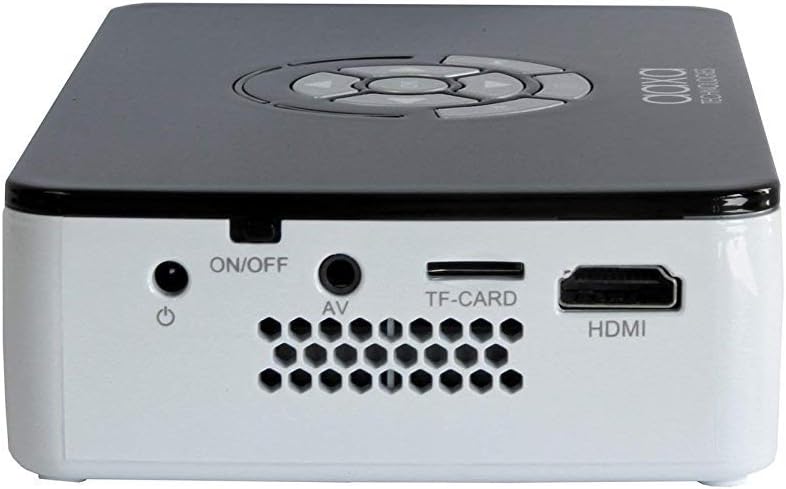
Figura 3.3: Right side panel, featuring the HDMI input, AV (composite) input, TF-CARD slot, and the power ON/OFF button.

Figura 3.4: Left side panel, highlighting the focus adjustment wheel for image clarity.
4. Setup
4.1 Accensione / spegnimentu
- Connect the power adapter to the projector's DC input and then to a power outlet.
- Appughjà è tene premutu ON/OFF button located on the side panel until the projector powers on.
- Per spegne, tene premutu u ON/OFF button again until the projector shuts down.
4.2 Dispositivi di cunnessione
The P300 supports multiple input sources:
- HDMI: Connect an HDMI cable from your device (laptop, gaming console, streaming stick) to the projector's HDMI port.
- Mini VGA: Use a Mini VGA to VGA cable (sold separately) to connect to a computer's VGA output.
- Composite A/V: Use a 3.5mm to RCA composite A/V cable (sold separately) to connect to devices with RCA outputs.
- USB: Inserite una unità flash USB in u portu USB per a riproduzione multimediale diretta.
- CARTA TF: Insert a MicroSD card into the TF-CARD slot for direct media playback.
4.3 Ajustamentu di Focus
To achieve a clear image, adjust the focus wheel on the side of the projector until the projected image is sharp.
4.4 Positioning and Projection Size
Place the projector on a stable, flat surface. The included mini tripod can be used for angle adjustments. The P300 can project an image up to 120 inches diagonally in low-light conditions.

Figura 4.1: The AAXA P300 projector mounted on its mini tripod, demonstrating flexible positioning options.
5. Operating Instructions
5.1 Navigazione Menu
Use the directional buttons on the projector or the remote control to navigate through the on-screen menu. Press the OK / Entra buttone per selezziunà l'opzioni.
5.2 Riproduzione multimediale
When a USB drive or TF-CARD is inserted, the projector's onboard media player can be accessed through the main menu. Select the desired file type (video, photo, music, text) and navigate to your content for playback.
5.3 Usu di a batteria
The P300 features a built-in rechargeable lithium-ion battery providing approximately 60 minutes of operation. The battery charges automatically when the projector is connected to the power adapter. For optimal battery life, fully charge the projector before first use and avoid completely draining the battery frequently.
6. Mantenimentu
6.1 Pulizia
- Lenti: Use a soft, lint-free cloth or lens cleaning wipes specifically designed for optical surfaces. Avoid abrasive materials.
- Casing: Wipe the projector's exterior with a soft, dry cloth. Do not use liquid cleaners or solvents.
- Ventilazioni: Ensure the ventilation openings are clear of dust and debris to prevent overheating. Use compressed air if necessary.
6.2 Cura di a batteria
- Mantene u projector in un locu frescu è seccu quandu ùn hè micca in usu.
- If storing for extended periods, charge the battery to approximately 50% every few months to maintain battery health.
7. Risoluzione di prublemi
-
Nisuna imagine/signale:
Ensure the correct input source is selected in the projector's menu. Verify all cables are securely connected. Test with a different source device or cable if possible. -
Immagine sfocata:
Adjust the focus wheel on the side of the projector. Ensure the projection surface is flat and the projector is at an appropriate distance. -
Nisun sonu:
Check the volume settings on both the projector and the source device. Ensure external speakers are connected correctly if used. The internal speaker may have limited output. -
Surriscaldamentu di u pruiettore:
Ensure ventilation vents are not blocked. Operate the projector in a well-ventilated area. -
Batteria micca carica:
Verify the power adapter is correctly connected and the power outlet is functional.
8. Specificazioni
| Feature | Specificazione |
|---|---|
| Risoluzione di visualizazione | 1280 x 800 (Nativu) |
| Luminosità | 500 LED Lumens |
| Tecnulugia di cunnessione | HDMI, Mini VGA, Composite A/V (3.5mm Jack), 5 Pin Mini USB 2.0 |
| Dimensioni di u produttu | 5.9 x 3.8 x 1.5 inch |
| Pesu di l'articulu | 15.5 once |
| Batterie | 2 Lithium Ion batteries (included, internal) |
| U fabricatore | AAXA |
| Numero di mudellu | KP-600-01 |
9. Garanzia è Support
For warranty information, technical support, or service inquiries, please refer to the official AAXA Technologies websitu o cuntattate direttamente u so serviziu clienti. Conservate a vostra ricevuta d'acquistu cum'è prova d'acquistu per e richieste di garanzia.
AAXA Technologies Contact Information:
Per piacè visitate www.aaxatech.com per e risorse di supportu è i dettagli di cuntattu più recenti.


