1. Introduction to Your Variable ND Filter
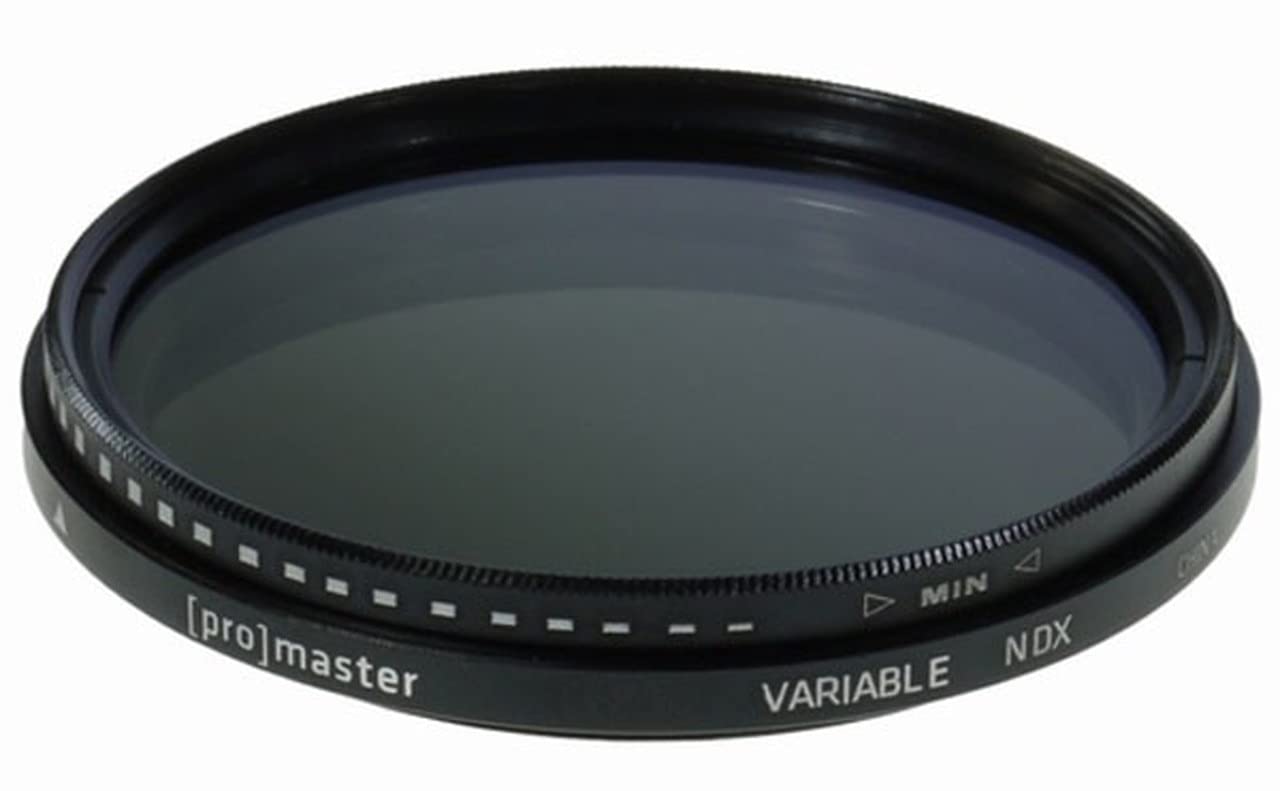
The ProMaster 72mm Digital HGX Variable Neutral Density (ND) Filter is designed to provide precise control over the amount of light entering your camera lens. This filter allows for light reduction ranging from approximately 1.3 to 8.6 stops, effectively an ND3 to ND400 density. By darkening the entire image, you can achieve creative photographic effects such as using wider apertures in bright conditions or employing slower shutter speeds to capture motion blur, without overexposing your photographs.
This HGX series filter incorporates advanced optical technologies for superior performance in digital photography:
- Next Generation Digital Anti-Reflection Multi Coating: Minimizes internal reflections caused by digital camera sensors, enhancing image clarity and contrast.
- REPELLAMAX™ Element Resistant Coating: An exclusive coating that repels moisture, fingerprints, dust, dirt, and grime, ensuring the filter remains clean for sharp images.
- Hardened Optical Glass: Provides durability and resistance to surface scratching for intensive use.
- Bassa Profile Anti-Reflective Frame: An ultra-thin frame designed to help prevent vignetting, especially with super wide-angle lenses. The satin finish reduces reflected light.
- Black Rimmed Glass: The outer edge of the filter glass is treated with a special black ink to further minimize internal reflections.
2. Setup è Installazione
To install your ProMaster 72mm Digital HGX Variable ND Filter:
- Ensure your camera lens has a 72mm filter thread. This information is typically printed on the front of your lens or on its lens cap.
- Carefully align the filter's threads with the threads on the front of your lens.
- Gently rotate the filter clockwise until it is securely attached. Avoid overtightening, as this can make removal difficult.
- To remove the filter, rotate it counter-clockwise until it detaches from the lens.
Nota: Always handle the filter by its edges to avoid touching the glass surface, which can leave fingerprints or smudges.
3. Operating Instructions
The variable neutral density feature of this filter allows you to adjust the light reduction by rotating the outer ring. This adjustment is continuous, providing flexibility in various lighting conditions.
- Adjusting Density: With the filter attached to your lens, rotate the outer ring of the filter. You will observe the glass darkening or lightening as you turn it.
- Minimum Density (MIN): Rotate the ring towards the 'MIN' marking for the least amount of light reduction (approximately 1.3 stops).
- Maximum Density (NDX): Rotate the ring towards the 'NDX' marking for the maximum light reduction (approximately 8.6 stops).
- Cuntrollu di l'Esposizione: Use the variable density to achieve desired exposure settings. For example, in bright sunlight, you can open your aperture for shallow depth of field or slow down your shutter speed for motion blur effects without overexposing the image.
Impurtante: When rotating the filter to its maximum density, some variable ND filters may exhibit a cross-polarization effect, appearing as an "X" pattern or uneven darkening in the image. This is a characteristic of variable ND filter design at extreme settings. To avoid this, operate the filter within its recommended range, typically before reaching the absolute maximum 'NDX' marking.
4. Mantenimentu
Proper care will extend the life and performance of your filter:
- Pulizia: The REPELLAMAX™ coating helps resist smudges and dirt. For cleaning, use a clean microfiber cloth specifically designed for optical surfaces. Gently wipe the glass in a circular motion. For stubborn spots, a small amount of lens cleaning solution applied to the cloth (not directly to the filter) can be used.
- Conservazione: When not in use, store the filter in its protective case to prevent dust accumulation and scratches. Avoid storing it in extreme temperatures or high humidity.
- Trattamentu: Always handle the filter by its metal frame to avoid touching the glass.
5. Risoluzione di prublemi
- "X" Pattern or Uneven Darkening: This is a common phenomenon with variable ND filters when set to their highest density. Try reducing the density slightly by rotating the ring away from the 'NDX' marking.
- Vignettatura (Angoli Scuri): While the low-profile frame is designed to minimize this, vignetting can still occur, especially with very wide-angle lenses or when stacking multiple filters. If present, try zooming in slightly or removing other filters.
- Filtru bluccatu nantu à l'obiettivo: If the filter is difficult to remove, try using a rubber filter wrench or a rubber band wrapped around the filter's edge to get a better grip. Avoid using excessive force.
- Image Softness/Loss of Sharpness: Ensure the filter glass is clean and free of smudges. Also, verify that the filter is securely attached and not cross-threaded.
6. Specificazioni
| Feature | Detail |
|---|---|
| Marca | ProMaster |
| Numero di mudellu | 9343 |
| Tipu di filtru | Variable Neutral Density (ND) |
| Fattore di filtru | ND3 to ND400 (approx. 1.3 to 8.6 stops) |
| Dimensione di filu | 72 mm |
| Materiale | Hardened Optical Glass |
| Rivestimentu | Next Generation Digital Anti-Reflection Multi Coating, REPELLAMAX™ Element Resistant Coating |
| Frame | Bassa Profile Anti-Reflective Frame, Black Rimmed Glass |
| Dimensioni di u produttu | 2.83"L x 2.83"W (72mm diameter) |
| Pesu di l'articulu | 1.44 once |
| UPC | 029144093433 |
7. Garanzia è Support
ProMaster products are manufactured to high-quality standards. For specific warranty information regarding your ProMaster 72mm Digital HGX Variable ND Filter, please refer to the documentation included with your purchase or visit the official ProMaster website. For technical support, service, or inquiries, please contact ProMaster customer service directly.
Disclaimer: This manual provides general instructions for the use and care of your ProMaster filter. ProMaster is not responsible for any damage to equipment or injury caused by improper use of this product.


