1. Introduzione
This manual provides detailed instructions for the setup, operation, and maintenance of your Vibe Axcess 5-in-1 Universal Remote. Please read this manual thoroughly before using the remote control to ensure proper functionality and to maximize your user experience. This remote is designed to control up to five different audio/video devices.
2. Produttu Finituview
The Vibe Axcess 5-in-1 Universal Remote is designed to consolidate control of multiple home entertainment devices into a single unit. It features dedicated buttons for various functions and device types.
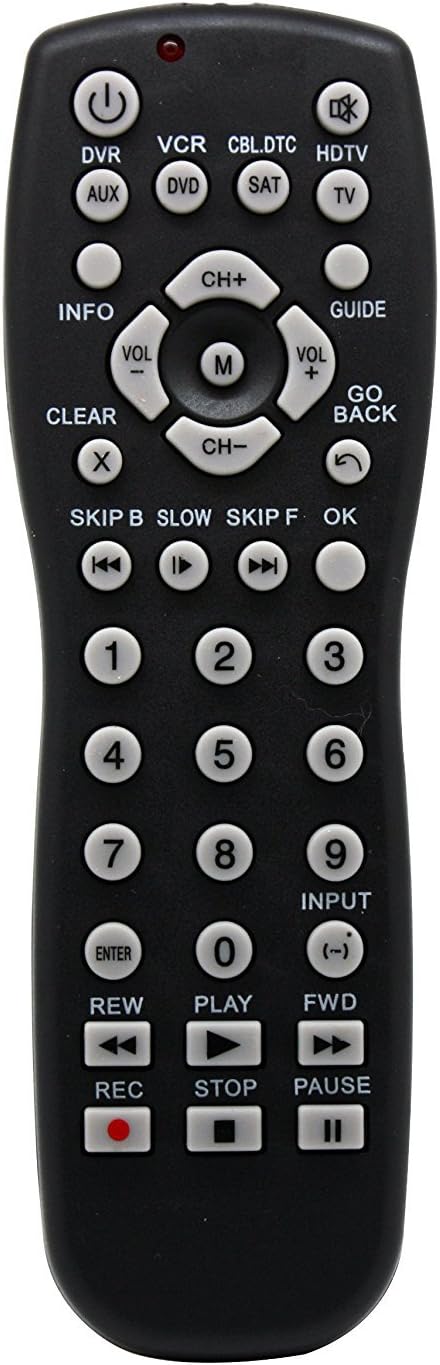
Figura 1: Fronte view of the Vibe Axcess 5-in-1 Universal Remote. This image displays the remote's layout, including device selection buttons (DVR, VCR, CBL.DTC, HDTV, AUX, DVD, SAT, TV), navigation pad, number keys, and media control buttons (REW, PLAY, FWD, REC, STOP, PAUSE).

Figura 2: Packaging of the Vibe Axcess 5-in-1 Universal Remote. The packaging highlights the remote's 5-in-1 capability and compatibility with various device types such as DVD/VCR, HDTV, DVD, AUX, and CBL/SAT/CABLE.
3. Setup
3.1 Installazione di batterie
- Truvate u coperchiu di u compartmentu di a batteria in u spinu di u telecomando.
- Fate scorrere u coperchio in giù o appughjà u chiavistellu è alzate per apre.
- Inserite duie (2) batterie AAA, assicurendu chì i terminali pusitivi (+) è negativi (-) currispondenu à i diagrammi in l'internu di u compartimentu.
- Rimette u coperchiu di u compartimentu di a batteria, scorrendulu in u so postu finu à chì si sente un clic sicuru.
Nota: Always use fresh batteries and replace both batteries at the same time. Do not mix old and new batteries or different types of batteries.
3.2 Programming the Remote
To control your devices, the universal remote must be programmed with the correct codes for each device. There are typically two methods for programming:
3.2.1 Entrata di Codice Direttu
This method involves entering a specific code from a code list (usually provided with the remote or available online) for your device's brand.
- Accendete l'apparecchiu chì vulete cuntrullà (per esempiu, TV, lettore DVD).
- Press and hold the desired device button on the remote (e.g., TV, DVD) for approximately 3 seconds until the indicator light (usually red) illuminates and stays on.
- While the indicator light is on, enter the 3-digit or 4-digit code for your device's brand using the number keys.
- If the code is valid, the indicator light will turn off. If the light flashes and remains on, the code was invalid; re-enter the code.
- Pruvate u telecomandu appughjendu u buttone POWER button. If the device turns off, the code is correct. If not, try the next code listed for your brand.
3.2.2 Ricerca di Codice Auto
If you cannot find a code or direct code entry fails, use the auto code search method.
- Accende u dispositivu chì vulete cuntrullà.
- Appughjà è tene premutu u buttone di u dispusitivu desideratu (per esempiu, TV) for approximately 3 seconds until the indicator light illuminates and stays on.
- Mentre tene premutu u buttone di u dispusitivu, appughjà u POWER button once. The indicator light will start flashing, indicating it is searching for a code.
- Point the remote at the device and wait for the device to turn off. This may take several minutes as the remote cycles through codes.
- Una volta chì u dispusitivu si spegne, appughjà subitu u buttone ENTRA buttone per salvà u codice. A luce indicatrice si spegnerà.
- Test the remote's functions. If some functions do not work, repeat the auto search process to find a more compatible code.
4. Operating Instructions
Once programmed, operating your Vibe Axcess 5-in-1 Universal Remote is straightforward.
- Selezziunà u dispusitivu: Press the corresponding device button (e.g., TV, DVD, CBL.DTC) for the device you wish to control. The indicator light will briefly illuminate to confirm selection.
- Accensione / spegnimentu: Press u POWER buttone per accende o spegne u dispusitivu sceltu.
- Controlu di u voluminu: Aduprà u VOL + è VOL- buttoni per aghjustà u voluminu.
- Cuntrolu di u canali: Aduprà u CH+ è CH- buttone per cambià i canali.
- Numeri Chjave: Use the number keys (0-9) to directly enter channel numbers or other numerical inputs.
- Navigazione: Use the directional pad (up, down, left, right) and OK button for menu navigation.
- Cuntrolli Media: Aduprà PLAY, PAUSA, STOP, REW, FWD, è REC for controlling media playback on compatible devices.
5. Mantenimentu
5.1 Pulizia
To clean your remote, gently wipe it with a soft, dry cloth. Do not use abrasive cleaners, solvents, or harsh chemicals, as these can damage the remote's finish or internal components.
5.2 Sustituzione di batterie
When the remote's performance degrades or the indicator light fails to illuminate, it is time to replace the batteries. Follow the battery installation steps in Section 3.1. Dispose of used batteries responsibly according to local regulations.
6. Risoluzione di prublemi
- A distanza ùn funziona:
- Verificate s'è e batterie sò inserite currettamente è ùn sò micca esaurite. Rimpiazzatele s'ellu hè necessariu.
- Ensure you have selected the correct device button (e.g., TV per a vostra televisione).
- Verify that the remote is programmed with the correct code for your device. Re-program if unsure.
- Assicuratevi chì ùn ci sia micca ostaculi trà u telecomandu è u sensore infrarossu di u dispusitivu.
- Certe funzioni ùn funzionanu micca:
- Some universal remote codes may not support all original remote functions. Try another code for your device brand using the programming steps.
- Ensure the device you are trying to control supports the specific function (e.g., not all TVs have a dedicated 'INFO' button function).
- L'indicatore luminosu ùn s'illumina micca:
- Verificate è rimpiazzà e batterie.
- If the issue persists after battery replacement, the remote may be faulty.
7. Specificazioni
- Mudellu: OT795-KO
- Marca: Vibe
- Dimensioni di u pruduttu: 10.7 x 4 x 0.8 inch
- Pesu di l'articulu: 4 once
- Batterie: 2 batterie AAA necessarie (micca incluse)
- Numaru Massimu di Dispositivi Supportati: 5
- Tecnulugia di cunnessione: infrarouge
- Caratteristica speciale: Universale
8. Garanzia è Support
For information regarding warranty coverage or technical support, please refer to the documentation included with your purchase or contact the retailer where the product was acquired. Specific warranty terms may vary.


