1. Introduzione
This manual provides detailed instructions for the proper use and maintenance of your TFA 38.2028.02 Digital Timer and Stopwatch. This device is designed for precise timekeeping in various applications, featuring a reversible display, touch-sensitive buttons, and magnetic mounting options. Please read this manual thoroughly before operating the device.
2. Caratteristiche di u produttu
- Reversible Display: Permette facili viewda diverse anguli.
- Touch-Sensitive Buttons: For intuitive operation.
- Retroilluminazione: Offre una visibilità chjara in cundizioni di poca luce.
- Montaggio magneticu: Securely attaches to metallic surfaces.
- Wall or Tabletop Mounting: Opzioni di piazzamentu versatili.
- Gamma di timer: Counts up to 99 minutes and 59 seconds.
- Disegnu compactu: Dimensioni di 76 x 25 x 76 mm.
3. Cuntenutu di u pacchettu
- TFA 38.2028.02 Digital Timer and Stopwatch Unit
- Manuale d'uso (stu documentu)
Note: 2 x 1.5V AAA batteries are required and not included in the package.
4. Setup
4.1 Installazione di batterie
- Truvate u coperchiu di u compartimentu di a batteria nant'à u spinu di l'unità.
- Fate scorrere o alzate delicatamente u coperchio per apre u scompartimentu.
- Insert two (2) 1.5V AAA batteries, ensuring correct polarity (+/-) as indicated inside the compartment.
- Rimette u coperchiu di u compartimentu di a batteria, assicurendusi ch'ellu sia incastratu bè in u so postu.
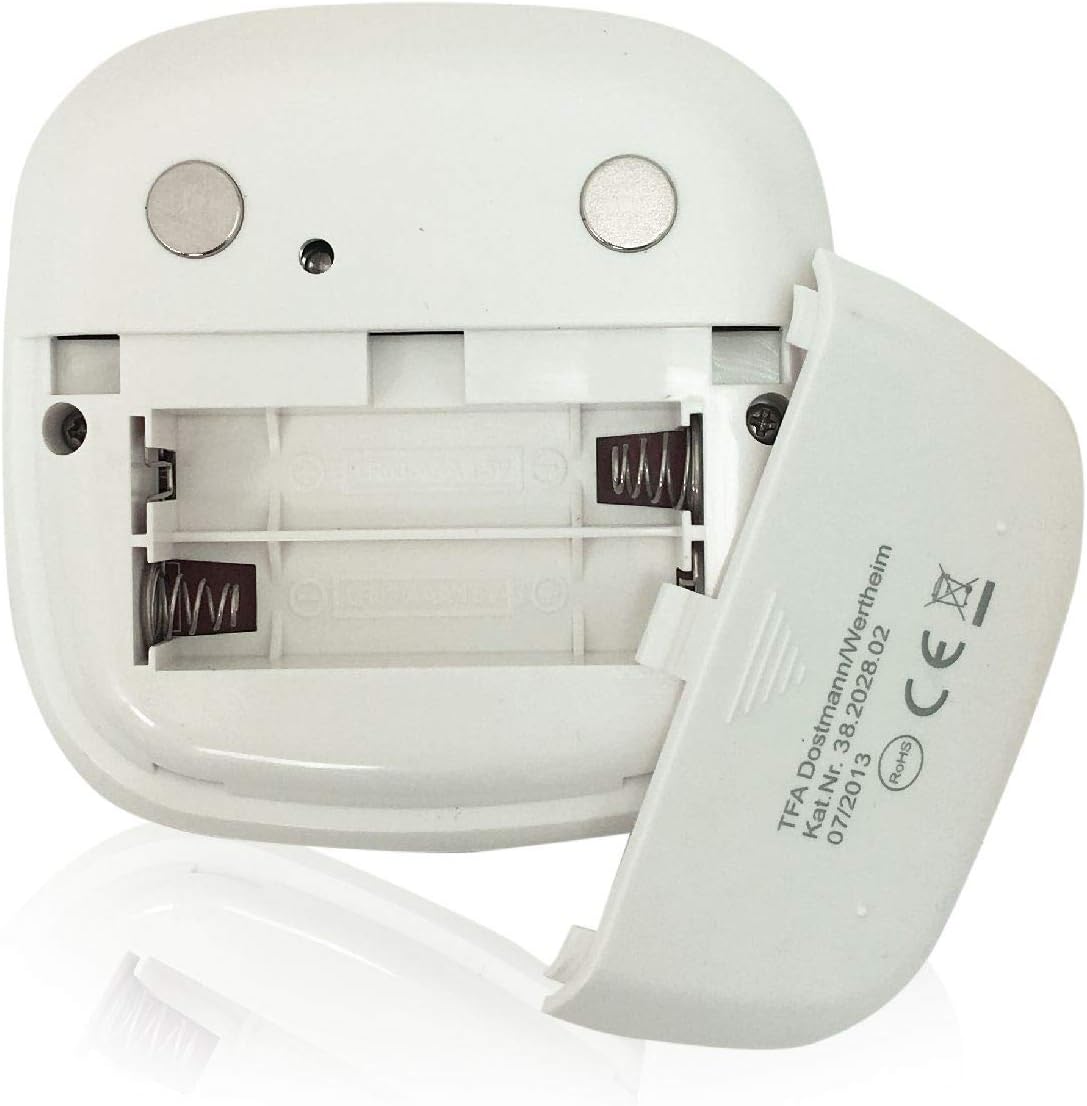
Imagine: Daretu view of the timer with the battery compartment open, illustrating where to insert the two AAA batteries.
4.2 Accensione iniziale
Once batteries are installed, the display will illuminate, and the device will be ready for use. The default display shows "00:00".
5. Operating Instructions

Image: Front view of the TFA 38.2028.02 timer, highlighting the digital display and the three touch-sensitive buttons: 'M' for minutes, 'S' for seconds, and 'S/S' for Start/Stop.
5.1 Funzioni di u buttone
- M (Minutes): Press to increase minutes. Hold to rapidly increase minutes.
- S (Seconds): Press to increase seconds. Hold to rapidly increase seconds.
- S/S (Start/Stop): Press to start or stop the timer/stopwatch.
5.2 Setting the Timer (Countdown)
- Ensure the display shows "00:00". If not, press M è S simultaneously to reset.
- Press u M button to set the desired minutes (up to 99 minutes).
- Press u S button to set the desired seconds (up to 59 seconds).
- Una volta chì u tempu desideratu hè impostu, appughjà u buttone S/S buttone per inizià u countdown.
- To pause the countdown, press S/S di novu. Press S/S per ripiglià.
- When the timer reaches "00:00", an alarm will sound. Press any button to stop the alarm.
5.3 Using the Stopwatch (Count-up)
- Ensure the display shows "00:00". If not, press M è S simultaneously to reset.
- Press u S/S button to start the count-up. The display will begin counting from "00:00".
- Per mette in pausa u cronometru, preme S/S di novu. Press S/S per ripiglià.
- To reset the stopwatch to "00:00", pause the stopwatch, then press M è S simultaneamente.
5.4 Funzione di retroilluminazione
The display features a backlight for improved visibility. The backlight activates automatically when buttons are pressed and typically remains on for approximately 30-40 seconds before dimming to conserve battery life.
6. Opzioni di muntatura
The TFA 38.2028.02 timer offers flexible mounting solutions:
- Attaccu Magneticu: The back of the timer is equipped with magnets, allowing it to be securely attached to refrigerators, oven hoods, or any other metallic surface.
- Posizionamentu di u tavulinu: The timer's design allows it to stand upright on a flat surface, such as a kitchen counter or desk.
- Montatura à u muru: The unit can also be mounted on a wall using a small hook or screw (not included) through the designated hole on the back.

Imagine: Daretu view of the timer, showing the integrated magnets for secure attachment to metallic surfaces and the model number.
7. Mantenimentu
7.1 Pulizia
Per pulisce u timer, asciugatelu cù un pannu dolce èamp cloth. Do not use abrasive cleaners or immerse the device in water. Avoid getting moisture into the battery compartment or display area.
7.2 Sustituzione di batterie
When the display becomes dim or the device stops responding, it is time to replace the batteries. Follow the battery installation steps in Section 4.1. Always use fresh 1.5V AAA batteries and dispose of old batteries responsibly.
8. Risoluzione di prublemi
| Prublemu | Causa Possibile | Soluzione |
|---|---|---|
| U dispusitivu ùn accende micca. | E batterie sò morte o installate incorrectamente. | Verificate a polarità di a batteria o rimpiazzatela cù batterie AAA nove. |
| U display hè scuru o sfarfalla. | Bassu putere di bateria. | Sustituite batterie. |
| I buttoni ùn rispundenu. | Low battery power or temporary software glitch. | Replace batteries. If problem persists, remove batteries for 1 minute and reinsert. |
| Timer alarm is too quiet. | Alarm volume is fixed and cannot be adjusted. | Ensure the timer is placed in a location where the alarm can be heard. |
9. Specificazioni
| Feature | Detail |
|---|---|
| Numero di mudellu | 38.2028.02 |
| Marca | TFA |
| Dimensioni (L x W x H) | 76 x 25 x 76 mm (approximately 2.5P x 7.6l x 7.6H cm) |
| Pesu | 92 grammi |
| Materiale | Plastic with integrated magnets |
| Alimentazione elettrica | 2 batterie AAA da 1.5 V (micca incluse) |
| Gamma di timer | Finu à 99 minuti, 59 secondi |
| Mostra | Digitale cù retroilluminazione |
| Opzioni di muntatura | Magnetic, Tabletop, Wall-mountable |

Image: The timer held in a hand, visually demonstrating its compact size and indicating its dimensions (7.6 cm x 7.6 cm x 2.5 cm).
10. Garanzia è Support
TFA products are manufactured with quality and precision. For specific warranty information, please refer to the documentation provided with your purchase or visit the official TFA website. For technical support or inquiries, please contact TFA customer service through their official channels.
Mantene stu manuale per riferimentu futuru.


