1. Introduzione
This manual provides comprehensive instructions for the installation, operation, and maintenance of the Supermicro X10SLM+-LN4F motherboard. Designed for server applications, this motherboard features an LGA1150 socket, Intel C224 PCH, DDR3 memory support, and multiple Gigabit Ethernet ports. Please read this manual thoroughly before proceeding with installation to ensure proper setup and optimal performance.
2. Produttu Finituview
The Supermicro X10SLM+-LN4F is a microATX server motherboard built for reliability and performance. Key features include:
- LGA1150 Socket for Intel Xeon E3-1200 v3/v4 and 4th Gen Core i3 processors.
- Intel C224 PCH chipset.
- Four DDR3 DIMM slots supporting up to 64GB ECC/non-ECC UDIMM.
- Multiple SATA3 (6Gbps) ports.
- Integrated quad Gigabit Ethernet ports.
- USB 3.0 and USB 2.0 support.
- VGA output for integrated graphics.
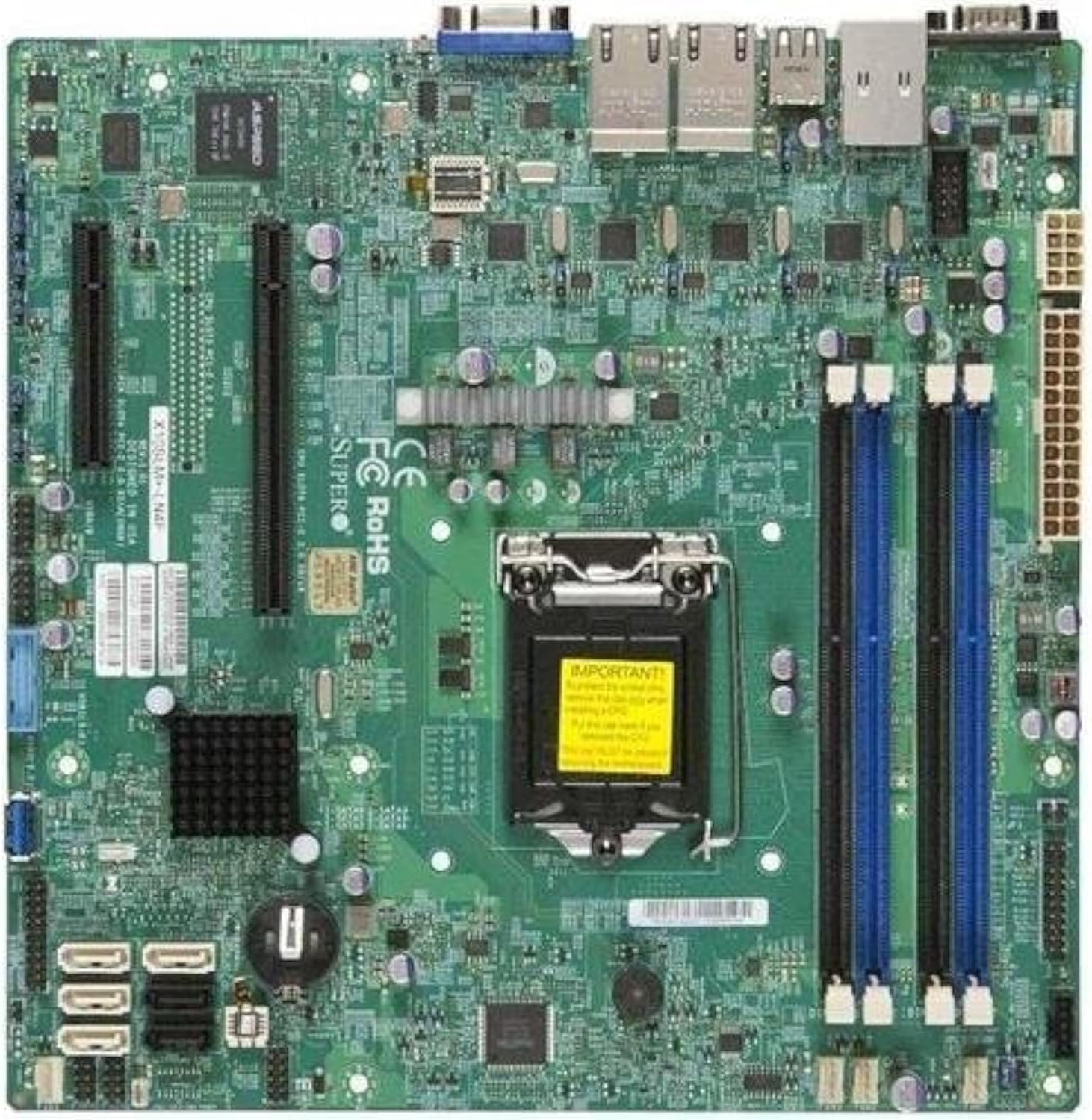
Figura 2.1: Top-down view of the Supermicro X10SLM+-LN4F motherboard, showing the CPU socket, DIMM slots, PCIe slots, and various connectors.

Figura 2.2: Angulu view of the motherboard, highlighting the layout of components and expansion slots.
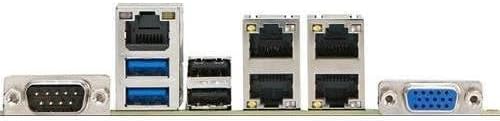
Figura 2.3: Rear I/O panel of the Supermicro X10SLM+-LN4F motherboard, featuring multiple LAN ports, USB ports, and serial ports.
3. Setup è Installazione
Prima di principià l'installazione, assicuratevi chì u vostru sistema sia spento è scollegatu da a fonte di alimentazione. Portate un braccialettu antistaticu per impedisce danni da scarica elettrostatica (ESD) à i cumpunenti.
3.1. Installazione di a CPU
- Truvate u socket di a CPU LGA1150 nantu à a scheda madre.
- Spinghje delicatamente a leva di carica è tiralla di latu per apre u quadru di ritenzione di u socket di a CPU.
- Allineate cù cura a marca triangulare nantu à a CPU cù a marca currispundente nantu à u socket.
- Pone a CPU in u socket senza furzà la.
- Chiudete u quadru di ritenzione è fissatelu cù a leva di carica.
- Apply a thin, even layer of thermal paste to the CPU's integrated heat spreader (IHS).
- Installate u raffreddatore di CPU secondu l'istruzzioni di u fabricatore.
3.2. Installazione di memoria (RAM)
- Locate the four DDR3 DIMM slots. For optimal performance, refer to the motherboard's specific memory population guidelines, typically starting with slots closest to the CPU or specific colored slots for dual-channel configurations.
- Aprite i clip di ritenzione à e duie estremità di u slot DIMM.
- Allineate a tacca di u modulu di memoria DDR3 cù a chjave in u slot DIMM.
- Insert the memory module firmly into the slot until the retention clips snap into place.
- Ensure both clips are fully closed and the module is seated correctly.
3.3. Installazione di u dispusitivu di almacenamentu
Connect SATA storage devices (HDDs/SSDs) to the SATA ports on the motherboard using SATA data cables. Connect the power cables from your power supply unit (PSU) to the storage devices.
3.4. Installazione di a carta d'espansione
This motherboard features PCI Express (PCIe) slots. To install an expansion card:
- Remove the corresponding slot cover from your chassis.
- Allineate a carta d'espansione cù u slot PCIe.
- Appughjà fermamente finu à chì a carta sia cumpletamente inserita in u slot.
- Secure the card with a screw or retention clip from your chassis.
3.5. Cunnessioni di Potenza
- Connettore di alimentazione ATX à 24 pin: Connect the main 24-pin power cable from your PSU to the ATX power connector on the motherboard.
- 8-pin EPS/CPU Power Connector: Connect the 8-pin (or 4+4 pin) CPU power cable from your PSU to the EPS connector near the CPU socket.
3.6. Cunnessione I/O di u pannellu frontale è posteriore
- Connettori di u pannellu frontale: Connect the power switch, reset switch, power LED, and HDD activity LED cables from your chassis to the corresponding pins on the motherboard's front panel header. Refer to the motherboard's silkscreen labels for correct orientation.
- Intestazioni USB: Connect front panel USB ports to the onboard USB headers.
- Audio Headers: Connect front panel audio jacks to the onboard audio header.
- Panneau I/O à l'arrière : Connect peripherals such as keyboard, mouse, monitor (via VGA), and network cables (to the Gigabit Ethernet ports) to the rear I/O panel.
4. Operating Instructions
4.1. Initial Power On and BIOS/UEFI Setup
- After all components are installed and connected, connect the power cord to the PSU and turn on the power switch on the PSU.
- Press the power button on your chassis.
- During the Power-On Self-Test (POST), repeatedly press the DEL or F2 chjave (o cum'è indicatu nantu à u screnu) per entre in l'utilità di cunfigurazione BIOS/UEFI.
- In the BIOS/UEFI, configure essential settings such as date and time, boot order, and enable/disable specific features as required for your operating system and hardware.
- Salvà i cambiamenti è esce da u BIOS/UEFI. U sistema si riavvierà.
4.2. Installazione di u Sistema Operativu
To install an operating system (e.g., Windows, Linux, VMware ESXi):
- Insert the operating system installation media (USB drive or DVD) into the system.
- Boot from the installation media (you may need to adjust the boot order in BIOS/UEFI).
- Follow the on-screen prompts to install the operating system on your chosen storage device.
- After installation, install all necessary drivers for the motherboard components (chipset, LAN, VGA, etc.) from the Supermicro websitu o u discu di u driver furnitu.
5. Mantenimentu
A manutenzione regulare aiuta à assicurà a longevità è u funziunamentu stabile di a vostra scheda madre è di u vostru sistema.
5.1. Pulizia
- Periodically clean dust from the motherboard and system components using compressed air. Ensure the system is powered off and unplugged before cleaning.
- Evitate l'usu di detergenti liquidi direttamente nantu à i cumpunenti.
- Ensure proper airflow within the chassis by keeping fan vents clear.
5.2. Aghjurnamenti di Firmware è Driver
- Verificate u Supermicro website periodically for updated BIOS/UEFI firmware and drivers for your motherboard model.
- Follow the provided instructions carefully when updating firmware to avoid system instability.
5.3. Cunsiderazioni Ambientali
- Operate the motherboard within recommended temperature and humidity ranges to prevent damage.
- Ensure adequate ventilation in the server chassis.
6. Risoluzione di prublemi
Questa sezione furnisce suluzioni à i prublemi cumuni chì pudete scuntrà.
6.1. No Power / No POST (Power-On Self-Test)
- Verify that the power supply unit (PSU) is connected correctly to the motherboard (24-pin ATX and 8-pin EPS connectors).
- Ensure the PSU is switched on and receiving power from the wall outlet.
- Verificate chì u cavu di l'interruttore di alimentazione di u pannellu frontale sia cunnessu currettamente à u connettore di a scheda madre.
- Reseat the CPU, RAM modules, and any expansion cards.
- Pruvate à avvià solu cù i cumpunenti essenziali (CPU, una chiavetta RAM, un raffreddatore di CPU) per isolà u prublema.
- Listen for beep codes from the system speaker, which can indicate specific hardware failures. Refer to the Supermicro website for beep code interpretations.
6.2. Prublemi di visualizazione
- Ensure the monitor is properly connected to the motherboard's VGA port.
- Verificate chì u monitor sia acceso è cunfiguratu nantu à a fonte d'entrata curretta.
- If using a discrete graphics card, ensure it is properly seated and connected to power (if required).
6.3. Operating System Not Booting
- Check the boot order in the BIOS/UEFI to ensure the correct storage device is prioritized.
- Verify that the operating system is installed correctly on the storage device.
- Ensure SATA data and power cables are securely connected to the storage device and motherboard.
7. Specificazioni
Below are the technical specifications for the Supermicro X10SLM+-LN4F motherboard:
| Feature | Detail |
|---|---|
| Marca | Supermicro |
| Nome di mudellu | X10SLM+-LN4F-B |
| Socket CPU | LGA 1150 |
| Tipu di chipset | Intel C224 |
| Tecnulugia di memoria RAM | SDRAM DDR3 |
| Velocità di memoria | 1600 MHz |
| Capacità di almacenamiento di memoria | Finu à 64 GB |
| Numero di porti USB 2.0 | 2 (I/O posteriore) |
| Interfaccia di a carta grafica | Integrated, PCI |
| Dispositivi compatibles | Servitore |
| Piattaforma | Windows 10 |
| Pesu di l'articulu | 5.8 liri |
| Dimensioni di u produttu (LxWxH) | 10 x 10 x 2 inch |
| Data Prima Disponibile | 4 di ghjugnu 2013 |
Note: Specifications are subject to change without notice. For the most current information, please refer to the official Supermicro product page.
8. Garanzia è Support
For detailed warranty information, please refer to the warranty card included with your product or visit the official Supermicro website. Technical support is available through Supermicro's customer service channels, including their support portal, email, and phone. Please have your product model number (X10SLM+-LN4F) and serial number ready when contacting support.
For the latest drivers, BIOS updates, and additional documentation, please visit: www.supermicro.com


