1. Introduzione
Thank you for choosing the Antec HCG-850M 850W Power Supply. This manual provides essential information for the safe and efficient installation, operation, and maintenance of your power supply unit. Please read this manual thoroughly before installation and retain it for future reference.
2. Informazioni di sicurezza
Osservate sempre e seguenti precauzioni di sicurezza per prevene ferite o danni à u vostru sistema:
- Ùn open the power supply casing. Altu vulumetagI circuiti sò prisenti dentru, ancu quandu l'unità hè scollegata.
- Ùn insert any objects into the power supply's ventilation openings.
- Assicuratevi chì l'alimentatore sia installatu in un locu ben ventilatu.
- Use only the modular cables provided with this power supply. Using incompatible cables can cause damage.
- Disconnect the AC power cord from the wall outlet before installing or removing the power supply.
- This product is designed for use in personal computers only.
3. Cuntenutu di u pacchettu
Verificate chì tutti l'articuli sò presenti in u vostru pacchettu:
- Antec HCG-850M 850W Power Supply
- Modular Cable Set (PCI-E, SATA, Peripheral, CPU)
- Cordu di alimentazione AC
- Viti di montaggio
- Manuale d'uso (stu documentu)
4. Produttu Finituview
The Antec HCG-850M is an 850-watt, 80 PLUS Bronze certified, semi-modular power supply designed for high-performance personal computers. It features a quiet 135mm fan for efficient cooling and robust protection circuits to ensure stable power delivery.
4.1 Funzioni chjave
- 850 Watts Continuous Power
- 80 PLUS Bronze Certified Efficiency
- Semi-Modular Cable Management
- Fan Silent 135mm
- Fattore di forma ATX
- Multiple Protection Circuits (OCP, OVP, UVP, SCP, OPP, OTP)
4.2 Unità di alimentazione
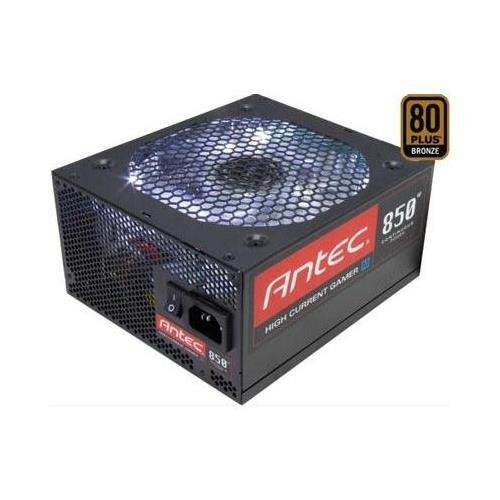
Image 1: Front view of the Antec HCG-850M 850W Power Supply, showing the fan grille and modular cable connectors. This unit provides stable power to your computer components.
5. Setup è Installazione
Follow these steps to install your Antec HCG-850M power supply:
- Preparate u vostru sistema: Assicuratevi chì u vostru urdinatore sia cumpletamente spento è scollegatu da a presa murale. Aprite u chassis di u vostru urdinatore.
- Eliminate u vechju alimentatore (s'ellu hè applicabile): Disconnect all cables from your old power supply. Unscrew and remove the old PSU from the case.
- Muntate u novu alimentatore: Carefully place the Antec HCG-850M into the power supply bay of your computer case. Secure it with the provided mounting screws. Ensure the fan is oriented correctly for optimal airflow (typically facing down if there's a bottom vent, or up if not).
- Cunnette i cavi essenziali:
- Cunnette u cavu di alimentazione di a scheda madre ATX à 24 pin.
- Connect the 4+4-pin or 8-pin EPS/CPU power cable to your motherboard.
- Cunnette i cavi modulari: Attach the necessary modular cables for your components (e.g., PCI-E for graphics cards, SATA for hard drives/SSDs, Peripheral for fans/accessories). Connect them securely to both the power supply and the respective components.
- Gestione di Cable: Percorrete i cavi in modu ordinatu per migliurà u flussu d'aria è l'estetica.
- Chiudi a scatula è accende: Close your computer case. Connect the AC power cord to the power supply and then to a wall outlet. Flip the power switch on the PSU to the 'ON' position. Power on your computer.
6. Operating Instructions
Once installed, the Antec HCG-850M operates automatically. Here are some general operating guidelines:
- Accensione / spegnimentu: Use your computer's power button to turn the system on or off. The switch on the power supply itself should generally remain in the 'ON' position during normal operation.
- Stabilità di u sistema: Ensure your system is stable. If you experience unexpected shutdowns or reboots, refer to the troubleshooting section.
- Ventilazione: Maintain good airflow around your computer case to prevent overheating of components, including the power supply.
7. Mantenimentu
Proper maintenance can extend the lifespan of your power supply:
- Pulizia di a polvere: Periodically clean dust from the power supply's fan grille and the interior of your computer case using compressed air. Always disconnect the AC power cord before cleaning.
- Verificazione di u cable: Occasionally check that all power cables are securely connected to the power supply and components.
- Ambiente: Operate the power supply in a clean, dry environment with stable temperatures.
8. Risoluzione di prublemi
If you encounter issues with your power supply, try the following steps:
8.1 No Power to System
- Ensure the AC power cord is securely plugged into both the wall outlet and the power supply.
- Check that the power supply's ON/OFF switch is in the 'ON' position.
- Verify all internal power cables (24-pin ATX, CPU, PCI-E) are correctly and firmly connected.
- Pruvate a presa murale cù un altru apparechju per assicurà chì hà putenza.
- If possible, test the power supply in another known working system or with a PSU tester.
8.2 System Instability or Random Shutdowns
- Assicuratevi chì i requisiti di putenza di u vostru sistema ùn superinu micca a capacità di 850W di l'alimentatore.
- Check for overheating components. Ensure proper case ventilation and clean any dust buildup.
- Verify all power connections are secure. Loose connections can cause intermittent power delivery.
- If the issue persists, it may indicate a fault with the power supply or another component. Consider professional diagnosis.
9. Specificazioni
| Feature | Detail |
|---|---|
| Numero di mudellu | HCG-850M |
| Output Wattage | 850 Watt |
| Certificazione di efficienza | 80 PLUS Bronze |
| Fattore di forma | ATX |
| Metudu di rinfrescante | Aria (Ventilatore 135mm) |
| Tipu modulari | Semi-Modulare |
| Dispositivi compatibles | Computer persunale |
| Pesu di l'articulu | 9 libbre (circa 4.08 kg) |
| ASIN | B00ESAI3M0 |
10. Garanzia è Support
Antec products are backed by a manufacturer's warranty. For specific warranty terms and conditions, please refer to the warranty card included with your product or visit the official Antec website. For technical support or customer service, please contact Antec directly through their official support channels.
Official Antec Websitu: www.antec.com


