Manuale d'usu di l'orologio sveglia digitale LCD Eurotime Modellu 23708-00
Modellu: 23708-00
Introduzione
This manual provides instructions for the setup, operation, and maintenance of your Eurotime LCD Digital Alarm Clock, Model 23708-00. Please read this manual thoroughly before using the product to ensure proper function and longevity.
The Eurotime LCD Digital Alarm Clock features an LCD display, 7-color changing LED lighting, multiple natural alarm tones, and displays time, date, day of the week, and indoor temperature. It also includes a snooze function and a countdown feature.
Informazioni di sicurezza
- Mantene u dispusitivu luntanu da l'acqua è alta umidità.
- Ne pas exposer l'appareil à la lumière directe du soleil ou à des températures extrêmes.
- Use only the specified battery type (3 x 1.5V AAA batteries).
- Ùn mischjà pile vechji è novi, o sfarenti tippi di batterie.
- Eliminate e batterie usate in modu responsibile secondu e regulazioni lucali.
- Ùn pruvate micca di smuntà o riparà u dispusitivu da per voi. Cuntattate u persunale qualificatu per l'assistenza.
Cuntenutu di u pacchettu
- Eurotime LCD Digital Alarm Clock (Model 23708-00)
- 3 batterie AAA da 1.5 V
- Manuale d'uso (stu documentu)
Product Overview
Familiarizatevi cù i cumpunenti è i cuntrolli di a vostra sveglia.
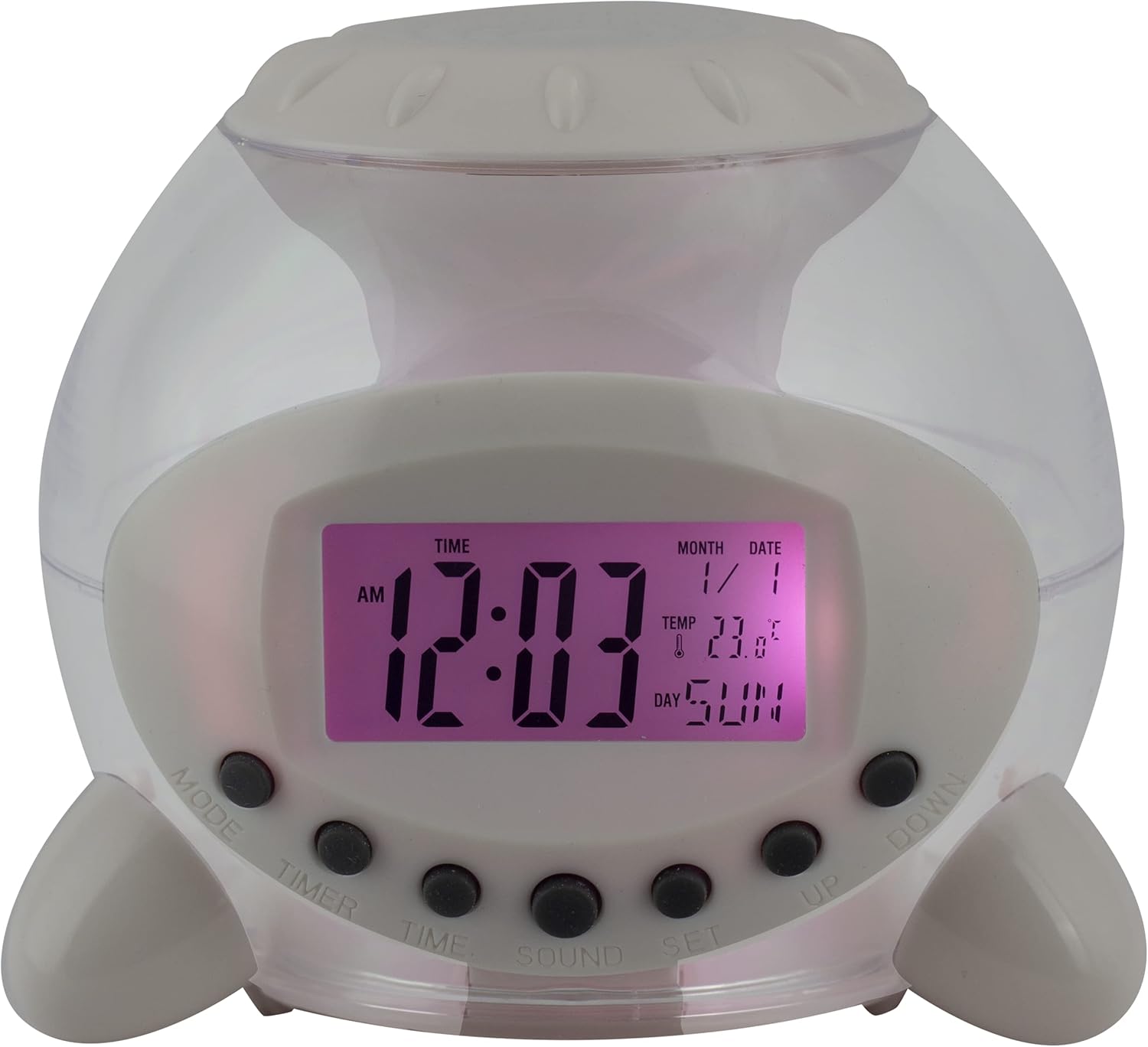
Figura 1: Fronte View of the Alarm Clock. This image displays the front of the Eurotime LCD Digital Alarm Clock, highlighting its transparent plastic housing and the central LCD screen. The screen shows the time (12:03 AM), month (1), date (1), temperature (23.8°C), and day (SUN). Below the screen are control buttons labeled MODE, TIMER, TIME, SOUND, and SET, along with UP and DOWN buttons.

Figura 2: Side View cù i buttoni di cuntrollu. This image shows a side perspective of the alarm clock, emphasizing the array of control buttons located on the front-bottom edge. The transparent housing allows a glimpse of the internal structure and the LED lighting effect. The buttons are clearly visible for user interaction.

Figura 3: Side View with Internal Lighting. This image provides another side view, illustrating the transparent housing and the internal LED lighting. The light emanates from the base, creating a soft glow within the clock's structure, demonstrating its color-changing feature.
Buttuni di cuntrollu:
- MODE: Switches between time display, alarm setting, and countdown timer.
- TIMER: Activates and sets the countdown timer.
- TIME: Used to set the current time and date.
- SONORE: Selects alarm tones or natural sounds.
- SET: Confirms settings or enters setting mode.
- SU / GIÙ: Adjusts values during setting modes.
Istituisci
1. Installazione di batterie
- Truvate u compartimentu di a batteria in fondu à a sveglia.
- Aprite a tappa di u compartimentu di a batteria.
- Inserite trè (3) batterie AAA di 1.5 V, assicurendu a polarità curretta (+/-).
- Chiudere in modu sicuru u coperchiu di u compartimentu di a batteria.
Nota: The clock will automatically power on after battery installation. The display may flash, indicating it's ready for time setting.
Istruzzioni di funziunamentu
1. Setting Time and Date
- In u modu di visualizazione di u tempu normale, appughjà u buttone TEMPU buttone una volta. I cifri di l'ore lampeggeranu.
- Aduprà u UP or GIÙ buttoni per aghjustà l'ora.
- Press TEMPU torna per passà à l'impostazione di i minuti. Ajustate cù UP or GIÙ.
- Cuntinuà pressendu TEMPU to cycle through year, month, and date settings, adjusting each with UP or GIÙ.
- After setting the date, press TEMPU one last time or wait a few seconds for the settings to be saved and return to normal display.
2. Piazzà l'alarma
- Press u MODE button until "ALARM" appears on the display (or an alarm icon).
- Press u SET buttone. I cifri di l'ora di a sveglia lampeggeranu.
- Aduprà u UP or GIÙ buttone per aghjustà l'ora di l'alarma.
- Press SET torna per passà à l'impostazione di i minuti. Ajustate cù UP or GIÙ.
- Press SET one last time to confirm the alarm time.
- Per attivà/disattivà l'allarme, appughjà u buttone UP button in alarm display mode. An alarm icon will appear/disappear.
3. Funzione Snooze
When the alarm sounds, press any button (except SET or MODE) to activate the snooze function. The alarm will pause and sound again after a few minutes (duration is adjustable, refer to advanced settings if available).
Per spegne cumpletamente l'alarma, appughjà u buttone SET buttone quandu sona.
4. Color Changing LED Lighting
The alarm clock features a 7-color changing LED light. This function typically activates automatically when the alarm sounds or can be manually toggled. Refer to the MODE or SET button for specific controls related to the lighting, if available.
5. Natural Alarm Tones
To select an alarm tone:
- In alarm setting mode (after pressing MODE to display alarm time), press the SOUND buttone.
- Aduprà u UP or GIÙ buttons to cycle through the available natural alarm tones.
- Press SET per cunfirmà a vostra scelta.
6. Countdown Feature
Per utilizà u timer di countdown:
- Press u MODE button until "TIMER" appears on the display.
- Press u TIMER buttone. I numeri di l'ora lampanu.
- Aduprà UP or GIÙ to set the desired countdown hour.
- Press TIMER again to set minutes, then seconds.
- Press SET per inizià u countdown.
- To pause or resume, press SET. Per resettate, appughjà MODE.
Mantenimentu
Pulizia
- Asciugate l'orologio cù un pannu dolce è asciuttu.
- Do not use abrasive cleaners or solvents, as they may damage the plastic housing or display.
Sustituzione di batterie
When the display dims or functions become erratic, it is time to replace the batteries. Follow the "Battery Installation" steps in the Setup section.
Risoluzione di prublemi
| Prublemu | Causa Possibile | Soluzione |
|---|---|---|
| U display hè viotu o scuru. | Low or depleted batteries. Incorrect battery installation. | Replace batteries with new 1.5V AAA batteries. Ensure correct polarity. |
| L'alarma ùn sona micca. | Alarm is not activated. Alarm volume is too low (if adjustable). | Ensure the alarm icon is displayed. Check alarm settings. |
| L'ora/data hè sbagliata. | Not set correctly after battery installation or power interruption. | Follow "Setting Time and Date" instructions to reset. |
| Color changing light not working. | Feature not activated or malfunction. | Check operating instructions for light activation. If problem persists, contact support. |
Specificazioni
- Marca: Eurotime
- Numero di mudellu: 23708-00
- Dimensioni di u pruduttu: 8.99 x 8.99 x 8 cm
- Pesu: 120 g
- Materiale: Plastica
- Tipu di visualizazione: LCD digitale
- Funzioni speciali: Calendar display, Snooze, Alarm, 7-Color Changing LED, Natural Alarm Tones, Countdown Feature, Indoor Temperature Display
- Fonte di energia: 3 batterie AAA da 1.5 V (incluse)
Garanzia è Supportu
For warranty information or technical support, please refer to the retailer where the product was purchased or visit the official Eurotime websitu. Conservate a vostra ricevuta di compra cum'è prova di compra.


