1. Introduzione
This manual provides detailed instructions for the installation, operation, and maintenance of your Axis P1355 Surveillance/Network Camera. The Axis P13 series offers high-performance fixed cameras designed for both indoor and outdoor surveillance, delivering superb image quality with H.264 compression. These models support HDTV 720p/1080p video and are equipped with features like Wide Dynamic Range and Day/Night functionality for clear imaging in various lighting conditions. Specific models within the P13 series, including HDTV 720p, incorporate Axis Lightfinder technology for enhanced low-light sensitivity, while HDTV 1080p and 5-megapixel cameras feature P-iris control for optimized depth of field and lens resolution.
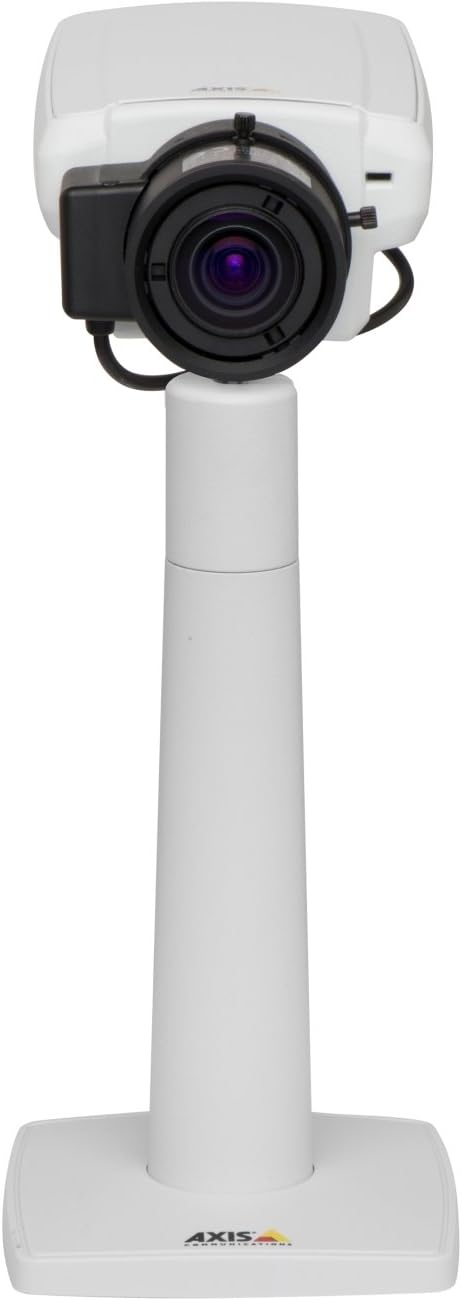
Figura 1: The Axis P1355 Surveillance Camera shown mounted on its stand. This image illustrates the camera's physical appearance and typical mounting configuration.
2. Informazioni di sicurezza
Please read all safety instructions before installing or operating the camera.
- Ensure the power source matches the camera's requirements to prevent electrical hazards.
- L'installazione deve esse effettuata da persunale qualificatu in cunfurmità cù i codici elettrici lucali.
- Ùn espone micca a camera à temperature estreme, umidità o ambienti corrosivi.
- Evitate l'esposizione diretta di l'obiettivo à fonti di luce forti, cum'è u sole, perchè questu puderia dannà u sensore d'immagine.
- Scollegate l'alimentazione prima di pulisce o di fà a manutenzione di a camera.
3. Setup è Installazione
The Axis P1355 camera is designed for both indoor and outdoor use and supports various mounting options.
3.1 Muntamentu
The camera is typically designed for wall mount installation. Ensure the mounting surface is strong enough to support the camera's weight (approximately 2 pounds). Use appropriate screws and anchors for the chosen surface.
- Select a suitable location for optimal surveillance coverage.
- Attaccate saldamente a staffa di muntatura à u muru.
- Mount the camera onto the bracket, ensuring it is firmly in place.
- Adjust the camera's angle for the desired field of view.
3.2 Cunnessioni
The Axis P1355 camera primarily uses wired connectivity for reliable data transmission and power.
- Cunnessione di putenza: Connect the provided power adapter to the camera's power input and then to a suitable electrical outlet. The camera operates on a corded electric power source.
- Cunnessione di Rete: Connect an Ethernet cable from the camera's network port to your network switch or router. This provides wired connectivity for video streaming and control.
- Wireless Connectivity (Optional/Configuration): While primarily wired, the camera supports Wi-Fi for certain configurations. Refer to the Axis product documentation for specific wireless setup instructions if applicable to your model variant.
4. Operating Instructions
Once installed and connected, the Axis P1355 camera can be configured and operated via a network interface.
4.1 Accessu iniziale è cunfigurazione
- Use the Axis IP Utility or a similar network discovery tool to find the camera's IP address on your network.
- apre a web navigatore è inserite l'indirizzu IP di a camera per accede à a so web interfaccia.
- Log in using the default credentials (refer to Axis documentation for default username/password, typically 'root' and 'pass' or similar, which should be changed immediately).
- Follow the on-screen prompts to set up basic network settings, date/time, and user accounts.
4.2 Video Monitoring and Features
- Live View: Access the live video feed through the web interface or compatible video management software.
- Risoluzione: The camera supports video capture resolutions up to 720p and effective video resolutions of 1080 pixels, with effective still resolution of 2 MP.
- Color and Monochrome Modes: The camera can operate in both color and monochrome (black and white) modes, automatically switching based on light conditions or configured manually.
- Visione notturna: Utilize the integrated night vision capabilities for surveillance in low-light or complete darkness.
- Zoom otticu: Adjust the optical zoom for detailed views of specific areas.
- P-Iris Control: For models equipped with P-iris, this feature allows precise control over the iris position to optimize depth of field and lens resolution, enhancing image sharpness. This can be configured via the web interfaccia.
- Formatu Video: Video is typically captured in MP4 format.
- Control remoto: The camera supports remote control for various settings and adjustments.
5. Mantenimentu
Regular maintenance ensures optimal performance and longevity of your Axis P1355 camera.
- Pulizia: Gently clean the camera lens and housing with a soft, damp pannu. Evitate detergenti abrasivi o solventi.
- Actualizazioni di firmware: Verificate periodicamente l'Axis Communications websitu per l'aghjurnamenti di u firmware. Mantene u firmware aggiornatu garantisce l'accessu à e funzioni più recenti, patch di sicurezza è miglioramenti di e prestazioni.
- Ispezione di u cable: Regularly inspect all cables for signs of wear or damage, especially for outdoor installations.
- Cuntrolla ambientale: Assicuratevi chì l'ambiente operativu di a camera resti in i limiti di temperatura è umidità specificati.
6. Risoluzione di prublemi
This section addresses common issues you might encounter with your Axis P1355 camera.
- Nisun putere:
- Verify the power adapter is securely connected to both the camera and a working power outlet.
- Verificate u cable d'alimentazione per eventuali danni.
- Nisuna cunnessione di rete:
- Ensure the Ethernet cable is properly connected to the camera and the network switch/router.
- Check network switch/router status.
- Confirm the camera has a valid IP address and is on the same network segment as your viewu dispusitivu.
- Qualità di l'imaghjini scarsa:
- Pulite a lente di a camera.
- Ajustate i paràmetri di focu è di zoom via u web interfaccia.
- Check lighting conditions; enable night vision or adjust exposure settings if necessary.
- Ensure P-iris control is correctly configured for optimal sharpness (if applicable).
- Ùn possu accede Web Interfaccia:
- Verify the camera's IP address.
- Ensure your computer is on the same network as the camera.
- Try restarting the camera and your network equipment.
7. Specificazioni
| Feature | Detail |
|---|---|
| Marca | Assi cumunicazioni |
| Numero di mudellu | AXIS P1355 |
| Usu Indoor / Outdoor | Internu, Esternu |
| Tecnulugia di cunnessione | Wired (Wi-Fi capable for certain configurations) |
| Funzione speciale | Visione notturna |
| Fonte d'energia | Elettricu cù filu (7.1 watt) |
| Risoluzione Video Capture | 720 p |
| Risoluzione Video efficace | 1080 Pixel |
| Risoluzione Still Efficace | 2 MP |
| Tipu di zoom | Zoom otticu (2.9x otticu) |
| Tipu di cuntrollu | Iris (P-iris control) |
| Tipu di muntatura | Muntu à u muru |
| Dimensioni di u produttu (L x W x H) | 3.07 x 5.94 x 1.69 inch |
| Pesu di l'articulu | 2 liri |
| Classificazione di Prutezzione Internaziunale | IP54 |
| Format Video Capture | MP4 |
8. Garanzia è Support
For detailed warranty information and technical support, please refer to the official Axis Communications websitu o cuntattate direttamente u so serviziu clienti.
Produttore: AXIS COMMUNICATION INC.
Websitu: www.assisi.com (Per piacè visitate l'ufficiale website for the most current support resources, drivers, and documentation.)


