Introduzione
This manual provides essential instructions for the safe and efficient operation of your Muse M-28 VF Portable CD/MP3 Radio with USB Player. Please read this manual thoroughly before using the device and retain it for future reference.
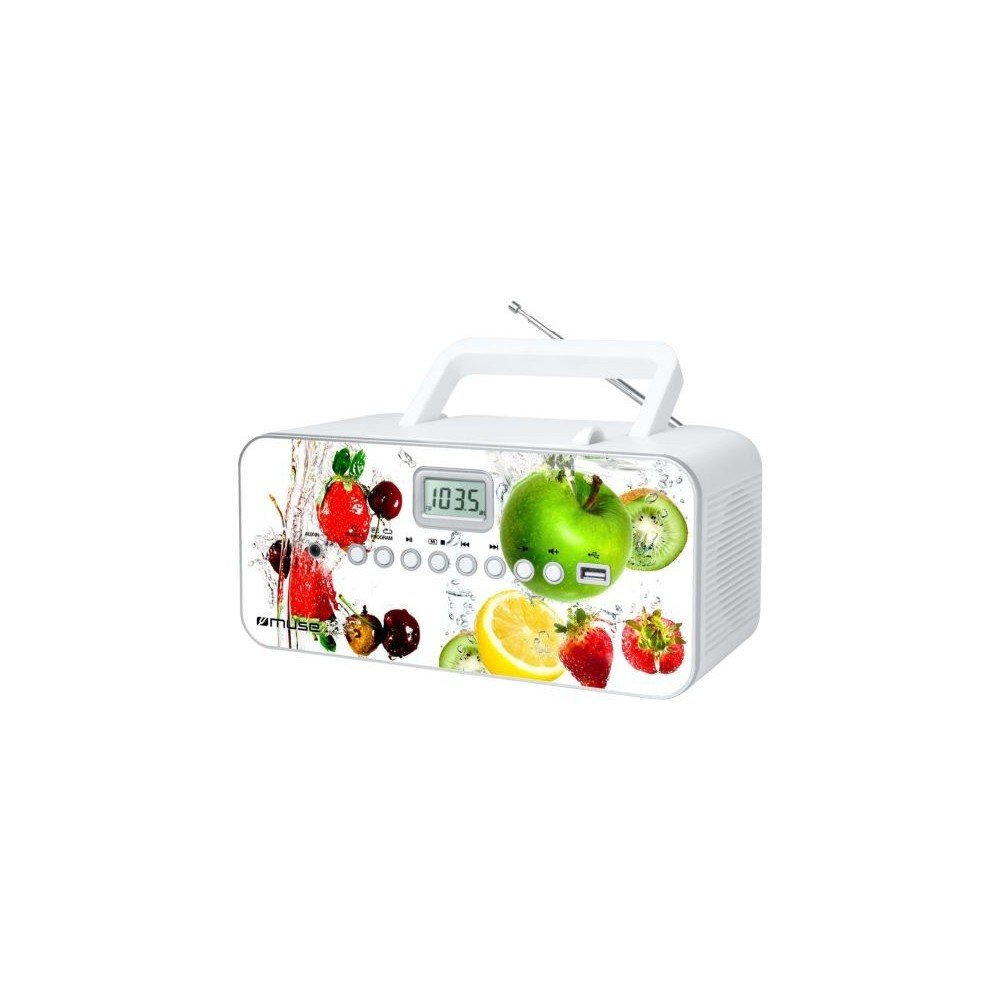
Fronte view of the Muse M-28 VF portable CD/MP3 radio, showing the CD compartment, display, and control buttons.
Informazioni di sicurezza
- Ùn espone micca l'unità à a pioggia o l'umidità.
- Ùn bluccà ogni apertura di ventilazione.
- Assicuratevi una ventilazione curretta intornu à l'unità.
- Aduprate solu accessori / accessori specificati da u fabricatore.
- Scollegate l'unità durante e tempeste di fulmini o quandu ùn hè micca utilizatu per longu periodi.
- Riferite tutte l'assistenza à u persunale di serviziu qualificatu.
Istituisci
1. Connection Power
- Truvate u cavu di alimentazione CA.
- Insert the small end of the power cord into the AC IN jack on the back of the unit.
- Inserite l'altra estremità di u cavu di alimentazione in una presa di corrente standard.
2. Ajustamentu di l'antenna
For optimal FM radio reception, fully extend the telescopic antenna. For MW (AM) reception, the unit has a built-in antenna; rotate the unit for best reception.
Istruzzioni di funziunamentu
1. Power On / Off
Press u POWER buttone per accende o spegne l'unità.
2. Selezzione di Modu
Press u MODE button repeatedly to switch between CD, USB, FM Radio, MW Radio, and AUX modes.
3. Riproduzione CD
- Apri a porta di u compartimentu di CD.
- Place a CD (CD/CD-R/CD-RW/MP3 compatible) with the label side facing up.
- Chiudite a porta di u compartimentu CD.
- Selezziunate u modu CD cù u buttone MODE buttone.
- Press u PLAY/PAUSE buttone per inizià a riproduzione.
- Aduprà u SKIP buttoni (<< / >>) per navigà in e tracce.
- Press u STOP buttone per finisce a riproduzione.
- The unit features a full or partial repeat function. Refer to the display for repeat mode indicators.
4. Riproduzione USB
- Inserite una chiavetta USB in u portu USB.
- Selezziunate a modalità USB cù u buttone MODE buttone.
- Playback will start automatically or by pressing the PLAY/PAUSE buttone.
- Aduprà u SKIP buttoni (<< / >>) per navigà in e tracce.
5. FM/MW Radio Operation
- Select FM or MW mode using the MODE buttone.
- Appughjà è tene premutu TUNE +/- i buttoni per scansà automaticamente a prossima stazione dispunibile.
- Press u TUNE +/- i buttoni brevemente per sintonizà a frequenza.
- Per almacenà una stazione: Sintonizate a stazione desiderata, dopu tene premutu u buttone U prugramma buttone. Aduprà SKIP i buttoni per selezziunà un numeru preset, dopu appughjà U prugramma again to confirm. The unit supports 20 FM and 10 MW storable stations.
- To recall a stored station: Press the MEMORIA or PRESET buttone, dopu aduprà SKIP buttons to select the desired preset.
6. Auxiliary Input (AUX IN)
- Cunnette un dispusitivu audio esternu (per esempiu, smartphone, lettore MP3) à a presa AUX IN cù un cavu audio di 3.5 mm (micca furnitu).
- Selezziunate a modalità AUX cù u buttone MODE buttone.
- Control playback from the connected external device.
7. Control Volume
Girate u VOLUME manubriu per aghjustà u livellu di u sonu.
Mantenimentu
1. Pulizia di l'unità
- Before cleaning, ensure the unit is powered off and unplugged from the wall outlet.
- Aduprate un pannu dolce è asciuttu per asciugà e superfici esterne.
- Per macchie ostinate, ligeramente dampen the cloth with water. Do not use abrasive cleaners, waxes, or solvents.
- Clean the CD lens periodically with a specialized CD lens cleaner disc (not supplied).
2. Storage
Quandu ùn hè micca adupratu per periodi prolungati, cunservate l'unità in un locu frescu è asciuttu, luntanu da a luce diretta di u sole è da temperature estreme.
Risoluzione di prublemi
| Prublemu | Causa Possibile | Soluzione |
|---|---|---|
| Nisun putere | U cordone di alimentazione ùn hè micca cunnessu bè. | Verificate s'ellu u cavu di alimentazione hè bè inseritu in l'unità è in a presa di corrente. |
| Nisun sonu | U vulume hè troppu bassu o silenziatu. A modalità scelta hè stata sbagliata. | Increase the volume. Ensure the correct playback mode (CD, USB, Radio, AUX) is selected. |
| U CD ùn hè micca in riproduzione | CD inserted incorrectly. CD is dirty or scratched. Incorrect mode. | Insert CD with label side up. Clean or replace the CD. Select CD mode. |
| U USB ùn ghjoca micca | USB drive not inserted correctly. Incompatible file furmatu. | Ensure USB drive is fully inserted. Check if files are MP3 format. |
| Pessima ricezione radio | Antenna micca stesa/pusizionata currettamente. Interferenza. | Fully extend and adjust the FM telescopic antenna. Rotate the unit for MW reception. Move away from other electronic devices. |
Specificazioni
- Mudellu: M-28 VF
- Marca: MUSA
- Tipi di discu compatibili: CD, CD-R, CD-RW, MP3
- Tuner radio: PLL FM/MW
- Stazioni preset: 20 FM, 10 MW
- Connettività: USB Port (1), Auxiliary Input (3.5mm)
- Tipu di parlante: Stereo
- Fonte di energia: Cavu AC
- Potenza di output: 14 Watt
- Dimensioni (L x W x H): 17 x 26 x 13 cm (circa 6.7 x 10.2 x 5.1 pollici)
- Pesu: 1.4 kilogrammi (circa 3.1 lbs)
- Compatibile Bluetooth: Innò
Infurmazioni di Garanzia
This product comes with a manufacturer's warranty of 1 annu from the date of purchase. Please retain your proof of purchase for warranty claims. The warranty covers defects in materials and workmanship under normal use. It does not cover damage caused by misuse, accident, unauthorized modification, or external causes.
Assistenza Clienti
For further assistance, technical support, or warranty inquiries, please refer to the contact information provided with your product packaging or visit the official MUSE websitu. Ùn pruvate micca di riparà l'unità voi stessu.


