1. Introduzione
Thank you for choosing the Donner Wireless DMX512 System. This system provides a reliable and efficient wireless solution for DMX512 stage lighting control, eliminating the need for extensive DMX cabling. It is designed for professional stage, DJ, disco, party, and bar lighting applications. This manual will guide you through the setup, operation, and maintenance of your wireless DMX system.
The system includes one DMX512 wireless transmitter and seven DMX512 wireless receivers, operating on a 2.4G frequency band with automatic frequency hopping for stable signal transmission.
2. Informazioni di sicurezza
- Ensure the power adapters used are compatible with the device's voltage esigenze.
- Do not expose the devices to rain, moisture, or extreme temperatures.
- Avoid placing the devices near strong electromagnetic fields, which may interfere with wireless signal transmission.
- Do not attempt to disassemble or modify the devices. Refer all servicing to qualified personnel.
- Mantene i dispusitivi luntanu da i zitelli.
- Only use the system with DMX512 compatible lighting equipment.
3. Cuntenutu di u pacchettu
Verificate u pacchettu per assicurà chì tutti l'articuli sianu presenti è in bonu statu:
- 1 x Donner DMX512 Wireless Transmitter
- 7 x Donner DMX512 Wireless Receivers
- 8 x Power Adapters (Note: Devices require external power and do not have built-in batteries.)
4. Produttu Finituview
The Donner Wireless DMX512 System consists of a transmitter and multiple receivers, designed for seamless wireless DMX signal transmission.

Image 4.1: Overview of the Donner Wireless DMX512 System components.
4.1. Identificazione di cumpunenti
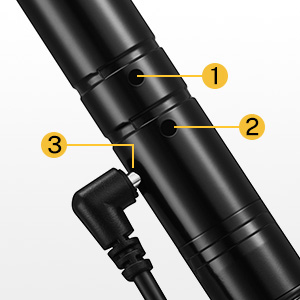
Imagine 4.2: Dettagliata view of a single DMX unit.
- Antenna: Per a trasmissione è a ricezione di signali senza filu.
- Connettore DMX: 3-pin XLR connector for DMX input (transmitter) or output (receiver).
- Input di putenza: DC 5V power jack for connecting the power adapter.
- ID Code Button/Indicator: Used to set the ID code and displays the current ID code via LED color.
4.2. Funzioni chjave
- Wireless DMX512 Protocol: Transmits standard DMX512 data wirelessly.
- 2.4G ISM Frequency Band: Operates in the 2.4GHz band, license-free worldwide.
- 126 Channels Automatic Frequency Hopping: Enhances anti-jamming capability and ensures reliable data transmission.
- 7 Group ID Codes: Allows multiple independent wireless networks in the same area without interference.
- Effective Communication Distance: Up to 500 meters (visible distance).
- No Time Delay: Ensures real-time DMX signal transmission.
5. Setup
5.1. Connection Power
Connect the provided power adapters to each transmitter and receiver unit. Plug the adapters into a standard AC power outlet. The units will power on automatically.
5.2. Setting ID Codes and Pairing
The wireless DMX system uses ID codes to establish independent wireless networks. For successful communication, the transmitter and all intended receivers must be set to the same ID code.
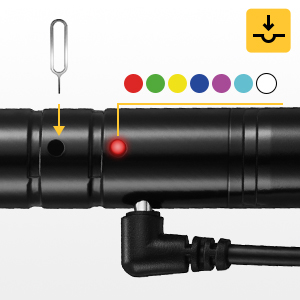
Image 5.1: ID Code Button and LED Indicator.
- Power On: Ensure all transmitter and receiver units are powered on.
- Select ID Code: Press the ID code button (often recessed, may require a small tool like a SIM ejector pin) on the transmitter. Each press will cycle through the 7 available ID codes, indicated by a different LED color.
- Match Receivers: For each receiver you wish to pair with this transmitter, press its ID code button until its LED color matches the transmitter's LED color.
- Cunfirmazione: Once the ID codes match, the LED indicators on both the transmitter and receivers will flash rapidly, then settle into a slower, synchronized flash, indicating a successful connection.
ID Code Color Chart:
- 1: ROSSU
- 2 : VERDE
- 3 : GIALLU
- 4 : BLU
- 5 : VIOLA
- 6: CYAN
- 7 : BIANCA
5.3. Schema di cunnessione
The following diagrams illustrate typical connection scenarios for the wireless DMX system.

Image 5.2: Easy Connection - DMX console to transmitter, then wireless to receivers and lights.

Image 5.3: Advanced Connection - Utilizing multiple transmitters and receivers for complex setups.
- Connect the DMX output of your lighting console to the 3-pin XLR input of the wireless transmitter.
- Connect the 3-pin XLR output of each wireless receiver to the DMX input of your stage apparecchi di illuminazione.
- For multiple lights in a chain, connect the DMX output of the first light to the DMX input of the next, and so on.
6. Operating Instructions
6.1. Funzionamentu Basic
Once the transmitter and receivers are powered on and successfully paired with the same ID code:
- Ensure your DMX lighting console is sending DMX signals to the transmitter.
- The transmitter will convert the wired DMX signal into a wireless signal.
- The receivers will pick up the wireless signal and convert it back into a wired DMX signal for your lighting fixtures.
- Control your lights as usual from your DMX console. The wireless system acts as a transparent bridge for DMX data.
6.2. Multiple Wireless Networks
The 7 group ID codes allow you to create multiple independent wireless DMX networks in the same location without interference. This is useful for controlling different sets of lights or for complex stage setups.
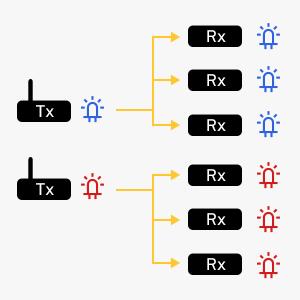
Image 6.1: Two independent wireless DMX networks (e.g., Blue ID and Red ID).
- To create a second network, use a separate transmitter and set it to a different ID code (e.g., GREEN).
- Pair the desired receivers with this second transmitter by setting them to the same GREEN ID code.
- Each network will operate independently, allowing for flexible control over various lighting zones.
7. Risoluzione di prublemi
- No Signal / Lights Not Responding:
- Ensure all units are powered on and their power adapters are securely connected.
- Verify that the transmitter and all receivers are set to the exact same ID code (matching LED color).
- Check DMX cable connections between the console and transmitter, and between receivers and lights.
- Confirm the DMX console is outputting a signal.
- Reduce the distance between the transmitter and receivers, or clear any obstructions.
- Intermittent Signal / Lag:
- Try changing the ID code to a different color to avoid potential interference from other 2.4G devices.
- Ensure the transmitter is receiving a strong, stable DMX signal from the console. A weak input signal can affect wireless performance.
- Check for physical obstructions or sources of electromagnetic interference.
- Ensure the units are within the effective communication range (up to 500m visible distance).
- L'indicatore LED ùn s'allume micca:
- Check the power adapter and power outlet.
- Ensure the power cable is fully inserted into the unit's power input.
8. Specificazioni
| Feature | Specificazione |
|---|---|
| Numero di mudellu | US-EC803+EC804*7-DR-1 |
| Frequenza operativa | 2.4G ISM band (2.400-2.525GHz) |
| Metudu di modulazione | GFSK |
| Canali DMX | 512 |
| ID Codes | 7 groups (color-coded) |
| Distanza di cumunicazione | Up to 500 meters (visible distance) |
| Sensibilità | -94 dBm |
| Max Trasmissione Potenza | 20dBm |
| Connettore DMX | 3-pin XLR male (transmitter), 3-pin XLR female (receiver) |
| Alimentazione elettrica | DC 5V (via adattatore di alimentazione inclusu) |
| Materiale | Metallu |
| Dimensioni (circa) | 4.7 inches (11.9 cm) length, 3.5 inches (8.9 cm) antenna height |
| Pesu di l'articulu (circa) | 2.48 libbre (pacchettu tutale) |

Image 8.1: Approximate dimensions of a single DMX unit.
9. Mantenimentu
- Pulizia: Aduprate un pannu dolce è asciuttu per pulisce l'esternu di l'unità. Ùn aduprate micca detergenti abrasivi o solventi.
- Conservazione: Conservate i dispositivi in un locu frescu è asciuttu, luntanu da a luce diretta di u sole è da temperature estreme quandu ùn sò micca in usu.
- Cura di u cable: Regularly inspect power adapters and DMX cables for any signs of damage. Replace damaged cables immediately.
- Antenna: Ensure the antennas are securely attached and not bent or damaged.
10. Garanzia è Support
I prudutti Donner sò cuncipiti per esse affidabili è performanti. Per infurmazioni nantu à a garanzia, l'assistenza tecnica o e dumande di serviziu, vi pregu di cunsultà u situ ufficiale Donner. website or contact your authorized dealer. Please retain your proof of purchase for warranty claims.


