1. Introduzione
Thank you for choosing the TFA 35.1133.01 Sun Funk Weather Station. This device provides accurate indoor and outdoor temperature readings, along with a weather forecast based on atmospheric pressure changes. This manual will guide you through the setup, operation, and maintenance of your weather station to ensure optimal performance and longevity.
2. Informazioni di sicurezza
- Read this instruction manual carefully before using the device.
- Mantene stu manuale per riferimentu futuru.
- Ùn espone micca u dispusitivu à temperature, vibrazioni o scossa estreme.
- Evite u sole direttu è l'umidità.
- Ùn immerse micca u dispusitivu in l'acqua.
- Use only specified batteries. Ensure correct polarity.
- Eliminate subitu e batterie scariche per impedisce perdite.
- Ùn pruvate micca di riparà l'apparechju da per voi. Cuntattate u persunale qualificatu per l'assistenza.
- Mantene u dispusitivu è e batterie fora di a portata di i zitelli.
3. Cuntenutu di u pacchettu
Verificate chì tutti i cumpunenti sianu presenti è intatti:
- TFA 35.1133.01 Main Weather Station Unit
- Sensor Outdoor Wireless
- Manuale d'istruzzioni
- Note: Batteries (4 x AAA) are typically required and may not be included.
4. Produttu Finituview
The TFA 35.1133.01 Sun Funk Weather Station consists of a main display unit and a wireless outdoor sensor. The main unit displays indoor temperature, outdoor temperature, and a weather forecast. The outdoor sensor transmits temperature data wirelessly to the main unit.
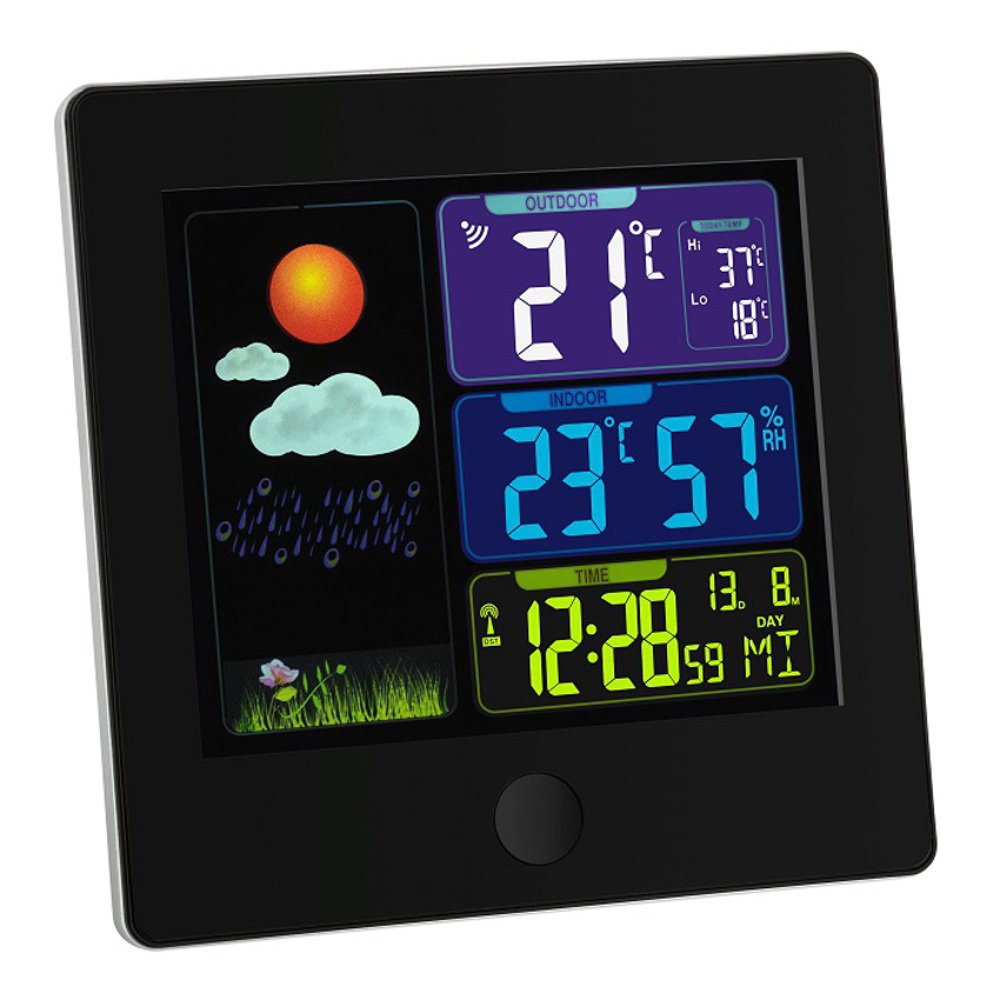
Image 1: TFA 35.1133.01 Sun Funk Weather Station. This image shows the main display unit and the compact wireless outdoor sensor. The main unit features a clear digital display, while the outdoor sensor is designed for external placement.
Caratteristiche di l'unità principale:
- Large LCD display for easy reading.
- Indoor temperature display.
- Outdoor temperature display (from wireless sensor).
- Icone di previsioni meteo (assulanatu, parzialmente nuvolosu, nuvolosu, piovosu).
- Radio-controlled clock (DCF77 signal for automatic time synchronization).
- Compartimentu di batterie.
Caratteristiche di u sensore esterno:
- Sensore di temperatura.
- Wireless transmission to the main unit.
- Compartimentu di batterie.
- Wall mounting option.
5. Setup
5.1 Installazione di batterie
- Sensore esterno: Open the battery compartment cover on the back of the outdoor sensor. Insert 2 x AAA batteries, observing the correct polarity (+/-). Close the cover securely.
- Unità principale: Open the battery compartment cover on the back of the main unit. Insert 2 x AAA batteries, observing the correct polarity (+/-). Close the cover securely.
- Important: Always insert batteries into the outdoor sensor first, then into the main unit. This ensures proper synchronization.
5.2 Sensor Placement
- Place the outdoor sensor in a shaded, dry location, protected from direct sunlight and rain, to ensure accurate temperature readings.
- Ensure the sensor is within the wireless range of the main unit (typically up to 30 meters in open air). Walls and other obstacles can reduce this range.
- Avoid placing the sensor near heat sources (e.g., vents, windows) or cold sources (e.g., refrigerators).
5.3 Sincronizazione iniziale è impostazione di l'ora
- After inserting batteries, the main unit will automatically search for the outdoor sensor signal. This may take a few minutes. The outdoor temperature will appear on the display once connected.
- The main unit will also attempt to receive the DCF77 radio time signal. This signal automatically sets the correct time and date. Place the main unit near a window for better reception. This process can take several minutes or even hours, depending on your location and signal strength.
- If the DCF77 signal is not received, you may need to manually set the time and date. Refer to the specific button functions on your device (e.g., MODE, SET buttons) for manual adjustment.
6. Operating Instructions
6.1 Display Information
The main unit's display typically shows the following information:
- Ora è Data: Automatically set by the DCF77 radio signal.
- Température intérieure : Current temperature measured by the main unit.
- Temperatura esterna: Current temperature transmitted from the wireless sensor.
- Previsioni Meteo: Represented by icons (e.g., sun, clouds, rain) indicating predicted weather changes based on atmospheric pressure trends.
- Indicatore di forza di u segnu: For both the outdoor sensor and the DCF77 time signal.
6.2 Button Functions (Example)
While specific button labels may vary, common functions include:
- MODE/SET: Used to switch between display modes (e.g., time, alarm) or to enter setting mode.
- +/ADJ: Used to increase values during setting or to manually adjust time/date.
- -/MEM: Used to decrease values during setting or to view minimum/maximum temperature records.
- CANALE: If multiple outdoor sensors are supported, this button cycles through channels.
Refer to the specific button layout on your device for precise functions.
7. Mantenimentu
7.1 Sustituzione di batterie
- When the battery indicator appears on the display, replace the batteries in the respective unit (main unit or outdoor sensor).
- Rimpiazzate sempre tutte e batterie in un apparecchiu à u listessu tempu cù batterie nove di u listessu tipu.
- Eliminate e batterie scariche in cunfurmità cù e regulazioni lucali.
7.2 Pulizia
- Pulite u dispusitivu cun un soft, damp tela. Ùn aduprate micca detergenti abrasivi o solventi.
- Ensure no moisture enters the device's interior.
7.3 Storage
- If the device will not be used for an extended period, remove all batteries to prevent leakage.
- Mantene u dispusitivu in un locu frescu è seccu.
8. Risoluzione di prublemi
| Prublemu | Causa Possibile | Soluzione |
|---|---|---|
| Nisuna visualizazione nant'à l'unità principale. | Depleted or incorrectly inserted batteries. | Rimpiazzà e batterie, assicurendu a polarità curretta. |
| Outdoor temperature not displayed or flashing. | Outdoor sensor out of range, depleted batteries, or interference. |
|
| Incorrect outdoor temperature reading. | Sensore espostu à a luce diretta di u sole o à una fonte di calore. | Relocate the outdoor sensor to a shaded, well-ventilated area. |
| Time not automatically set (DCF77 signal). | Ricezione di signali debule per via di a situazione geografica o di interferenze. |
|
9. Specificazioni
| Feature | Detail |
|---|---|
| Numero di mudellu | 35.1133.01 |
| Marca | TFA-Dostmann |
| Dimensioni di u produttu | Main Unit: 2.5 x 12 x 12 cm; 168 g |
| Alimentazione (Unità Principale) | 2 x batterie AAA (micca incluse) |
| Power (Outdoor Sensor) | 2 x batterie AAA (micca incluse) |
| Materiale | Plastica |
| Funzione speciale | Lightweight, Radio-controlled time (DCF77) |
| Usu cunsigliatu | Indoor/Outdoor temperature monitoring |
| Range Wireless | Up to 30 meters (open air, may vary with obstacles) |
10. Garanzia è Support
10.1 Garanzia infurmazione
This product is typically covered by a Garanzia cummerciale di 1 anni from the date of purchase. This warranty covers manufacturing defects and material faults. It does not cover damage caused by improper use, accidents, unauthorized repairs, or normal wear and tear. Please retain your proof of purchase for warranty claims.
10.2 Assistenza Clienti
For technical assistance, warranty claims, or further information, please contact your retailer or the manufacturer's customer service department. Contact details can usually be found on the product packaging or the manufacturer's official websitu.
Produttore: TFA-Dostmann


