1. Introduzione
The PowerDrive PD3000 is a 3000 Watt power inverter designed to convert 12V DC power from your vehicle's battery into 115V AC household power. This unit provides 3000 Watts of continuous AC power and has a high surge capacity of up to 6000 Watts to accommodate devices with high starting power requirements. It features integrated Bluetooth wireless technology for remote monitoring and control via a mobile application, along with a removable control panel for flexible placement. This manual provides essential information for the safe and efficient operation of your PowerDrive PD3000 inverter.
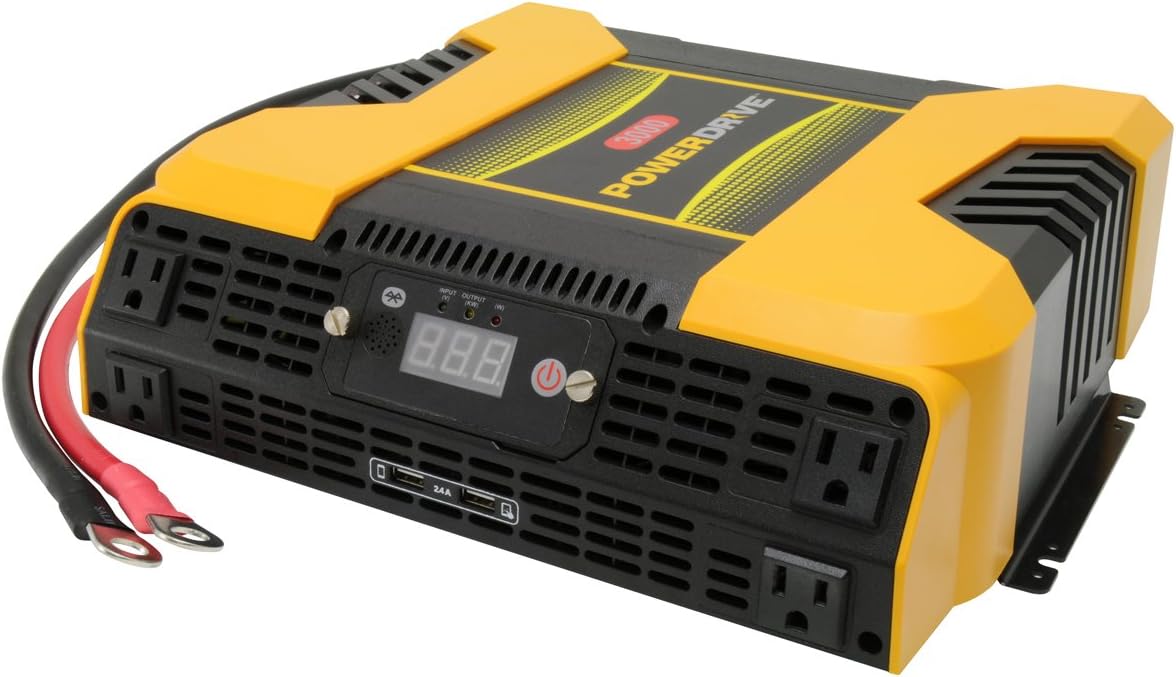
Figure 1.1: PowerDrive PD3000 3000 Watt Power Inverter, front view with outlets and display.
2. Informazioni di sicurezza
Please read and understand all safety instructions before installing or operating the inverter. Failure to follow these instructions may result in electrical shock, fire, serious injury, or property damage.
- Periculu di scossa elettrica: Ùn aprite micca l'inverter casing. Ùn ci sò micca pezzi riparabili da l'utente à l'internu. Cuntattate u persunale di serviziu qualificatu per tutta a manutenzione.
- Periculu d'incendiu: Do not operate the inverter near flammable materials, gases, or vapors. Ensure adequate ventilation around the inverter.
- Sicurezza di a batteria: Connect the inverter only to a 12V DC battery system. Ensure battery terminals are clean and connections are secure. Wear eye protection and gloves when working with batteries.
- Ventilazione: Assicuratevi chì l'inverter sia installatu in una zona ben ventilata. Ùn bluccate micca l'aperture di ventilazione.
- Prutezzione di sovraccarichi: Do not exceed the inverter's continuous power rating of 3000 Watts. Overloading can damage the inverter and connected devices.
- umidità: Do not expose the inverter to rain, moisture, or spray.
3. Cuntenutu di u pacchettu
Verificate chì tutti l'articuli sò presenti à u mumentu di u disimballaggio:
- PowerDrive PD3000 Power Inverter Unit
- Manuale d'istruzzioni
- Cavi di batteria (rossu è neru)
- Removable Control Panel with Cable
4. Caratteristiche di u produttu
The PowerDrive PD3000 inverter offers a range of features for versatile power conversion:
- Forza d'alta putenza: Delivers 3000 Watts of continuous AC power with a 6000 Watt surge capacity.
- Parechje prese di corrente alternata: Equipped with four (4) 3-prong AC outlets to support various devices.
- Porti di Ricarica USB: Includes two (2) USB power ports (shared 2400mA total output) for charging mobile devices.
- Connettività Bluetooth: Allows remote access to features and settings via a free downloadable mobile application.
- Removable Control Panel: Detachable control panel enables remote monitoring and testing, offering installation flexibility.
- Custruzzione durabile: Features a robust ABS PVC composite housing designed to protect internal electronic components.
- Prutezzioni di Sicurezza: Incorporates audible alarms and automatic shut-off triggers for low battery, high battery, and overload conditions.

Figure 4.1: Front panel of the PowerDrive PD3000 showing AC outlets, USB ports, and digital display.
5. Setup è Installazione
Proper installation is crucial for the safe and efficient operation of your inverter.
5.1 Muntà l'inverter
- Sceglite un locu asciuttu è ben ventilatu, luntanu da a luce diretta di u sole, da fonti di calore è da materiali inflammabili.
- Assicuratevi chì ci sia abbastanza spaziu intornu à l'inverter per a circulazione di l'aria, in particulare intornu à i ventilatori di raffreddamentu.
- Mount the inverter securely using appropriate hardware (not included) to prevent movement during operation.
5.2 Cunnessione à una fonte di alimentazione 12V CC
Impurtante: Ensure the inverter is turned OFF before making any connections.
- Cunnette u ROSSU (positive) battery cable to the ROSSU (positive) terminal on the inverter. Tighten securely.
- Cunnette l'altra estremità di u ROSSU (positive) battery cable to the pusitivu (+) terminal of your 12V DC battery. Tighten securely.
- Cunnette u NERU (negative) battery cable to the NERU (negative) terminal on the inverter. Tighten securely.
- Cunnette l'altra estremità di u NERU (negative) battery cable to the negativu (-) terminal of your 12V DC battery. Tighten securely.
- Verify all connections are tight and free from corrosion. Loose connections can cause overheating and damage.

Figure 5.1: PowerDrive PD3000 Inverter showing battery cable connections.

Figura 5.2: Posteriore view of the PowerDrive PD3000 showing cooling fans and battery terminals.
5.3 Removable Control Panel Installation
The control panel can be used directly on the inverter or detached for remote operation.
- To use remotely, gently pull the control panel from the inverter.
- Connect the provided cable to the port on the back of the detached control panel and to the corresponding port on the inverter.
- Mount the control panel in a convenient location for monitoring and control.

Figure 5.3: PowerDrive PD3000 Inverter with its control panel detached for remote use.
6. Operating Instructions
6.1 Accensione / spegnimentu
- After ensuring all battery connections are secure, press and hold the power button on the inverter or the remote control panel for approximately 1-2 seconds.
- The digital display will illuminate, and the inverter will begin providing AC power.
- Per spegne, tene premutu di novu u buttone di accensione finu à chì u display si spegne.
6.2 Cunnessione di dispositivi CA
- Plug your 115V AC devices into the 3-prong AC outlets on the front of the inverter.
- Assicurà u wat tutaletage of all connected devices does not exceed 3000 Watts.
- For devices with high starting loads (e.g., motors, compressors), ensure their surge wattage is within the inverter's 6000 Watt surge capacity.
6.3 Usu di i porti di carica USB
- Connect your USB-powered devices (e.g., smartphones, tablets) to the USB ports.
- The two USB ports share a total output of 2400mA (2.4A).
6.4 Understanding the Digital Display and Indicators
The digital display shows real-time information such as input voltage or output wattage. Indicator lights provide status feedback:
- LED di input: Indicates the status of the DC input power.
- LED d'uscita: Indicates the status of the AC output power.
- LED d'errore: Illuminates to indicate an error condition (e.g., overload, low/high voltagè).
7. Connectivity Bluetooth
The PowerDrive PD3000 features Bluetooth wireless technology, allowing you to monitor and control the inverter using a compatible smartphone application.
7.1 Downloading the Mobile App
- Cerca the official PowerDrive inverter app on your smartphone's app store (e.g., Apple App Store, Google Play Store).
- Scaricate è stallà l'applicazione.
7.2 Pairing with Your Inverter
- Assicuratevi chì Bluetooth hè attivatu nantu à u vostru smartphone.
- Turn on the PowerDrive PD3000 inverter.
- Open the PowerDrive mobile app. The app should automatically detect nearby PowerDrive inverters.
- Follow the on-screen prompts within the app to pair with your PD3000 inverter.
7.3 Funzioni di l'app
Once paired, the app allows you to:
- Monitor input voltage è output wattage.
- View inverter status and fault codes.
- Remotely turn the inverter on or off.
- Adjust certain settings (refer to the app's help section for details).

Figure 7.1: Smartphone displaying the PowerDrive mobile application interface.
8. Mantenimentu
Una manutenzione regulare assicura prestazioni ottimali è longevità di u vostru inverter.
- Pulizia: Pulite periodicamente l'esternu di l'inverter cù un pannu asciuttu è dolce. Ùn aduprate micca detergenti liquidi o solventi.
- Ventilazione: Ensure the cooling fans and ventilation openings are free from dust and debris. Use compressed air to clear blockages if necessary.
- Cunnessioni: Regularly check battery cable connections for tightness and corrosion. Clean terminals with a wire brush if corrosion is present.
- Conservazione: Sè vo almacenate l'inverter per un periodu prolongatu, scollegatelu da a batteria è almacenatelu in un locu frescu è asciuttu.
9. Risoluzione di prublemi
This section addresses common issues you might encounter with your PowerDrive PD3000 inverter.
9.1 Problemi cumuni è Soluzioni
- L'inverter ùn si accende micca:
- Check battery connections for tightness and proper polarity.
- Assicuratevi chì a bateria voltage is above 10.5V DC (Low Battery Shut Down Point).
- Verificate chì u buttone di accensione sia premutu è tenutu premutu per a durata necessaria.
- Nisuna uscita CA:
- Check if the inverter is powered on and the Output LED is illuminated.
- Ensure the connected AC device is functioning correctly.
- Check for an overload condition (Fault LED illuminated). Reduce the load.
- Audible Alarm / Fault LED On:
- Alarma di batteria bassa: Activates at 11 ± 0.3V DC. Recharge or replace the battery. The inverter will shut down at 10.5 ± 0.3V DC.
- High Battery Shut Down: Occurs at 15.5 ± 0.5V DC. Check the charging system of your vehicle.
- Overload: U wat tutaletage of connected devices exceeds 3000 Watts. Disconnect some devices.
- Sopra Temperatura: Inverter is overheating. Ensure proper ventilation and reduce load.
- Problemi di cunnessione Bluetooth:
- Ensure Bluetooth is enabled on your smartphone and the inverter is powered on.
- Restart the mobile app and try pairing again.
- Ensure your smartphone is within range of the inverter.
10. Specificazioni
| Specificazione | Valore |
|---|---|
| Mudellu | PD3000 |
| Continuous AC Power Output | 3000 Watt |
| Piccu Surge Power | 6000 Watt |
| Input DC Voltage | 12.8V |
| Uscita AC Voltage | 115V |
| Frequenza di output AC | 58 Hz-62 Hz |
| Uscita USB | 5V / 2 (Shared 2400mA) |
| Efficienza (massimu) | > 88% |
| Efficienza (Carica piena) | > 84% |
| Battery Drain (No AC Load) | <0.6A |
| Low Battery Alarm Trigger | 11 ± 0.3V DC |
| Low Battery Shut Down Point | 10.5 ± 0.3V DC |
| High Battery Shut Down Point | 15.5 ± 0.5V DC |
| Recovering Voltage after Under Voltage Turn-off | 12 ± 0.3V DC |
| Pesu di l'articulu | 12.14 liri |
| Dimensioni di u produttu | 16.2 x 16.3 x 7.6 inch |
11. Garanzia è Support
For warranty information or technical support, please refer to the documentation included with your purchase or visit the official PowerDrive websitu. Conservate a vostra prova d'acquistu per qualsiasi reclamazione di garanzia.


