Introduzione
Thank you for choosing the Technoline WT 745 Radio Controlled Alarm Clock. This digital alarm clock features precise timekeeping, dual alarms with snooze, date and weekday display, and indoor temperature monitoring. Please read this manual carefully to ensure proper setup and operation.
Cuntenutu di u pacchettu
- Technoline WT 745 Radio Controlled Alarm Clock
- Manuale d'usu
Note: 2x AAA batteries are required and not included.
Product Overview
Familiarize yourself with the main components of your WT 745 alarm clock.
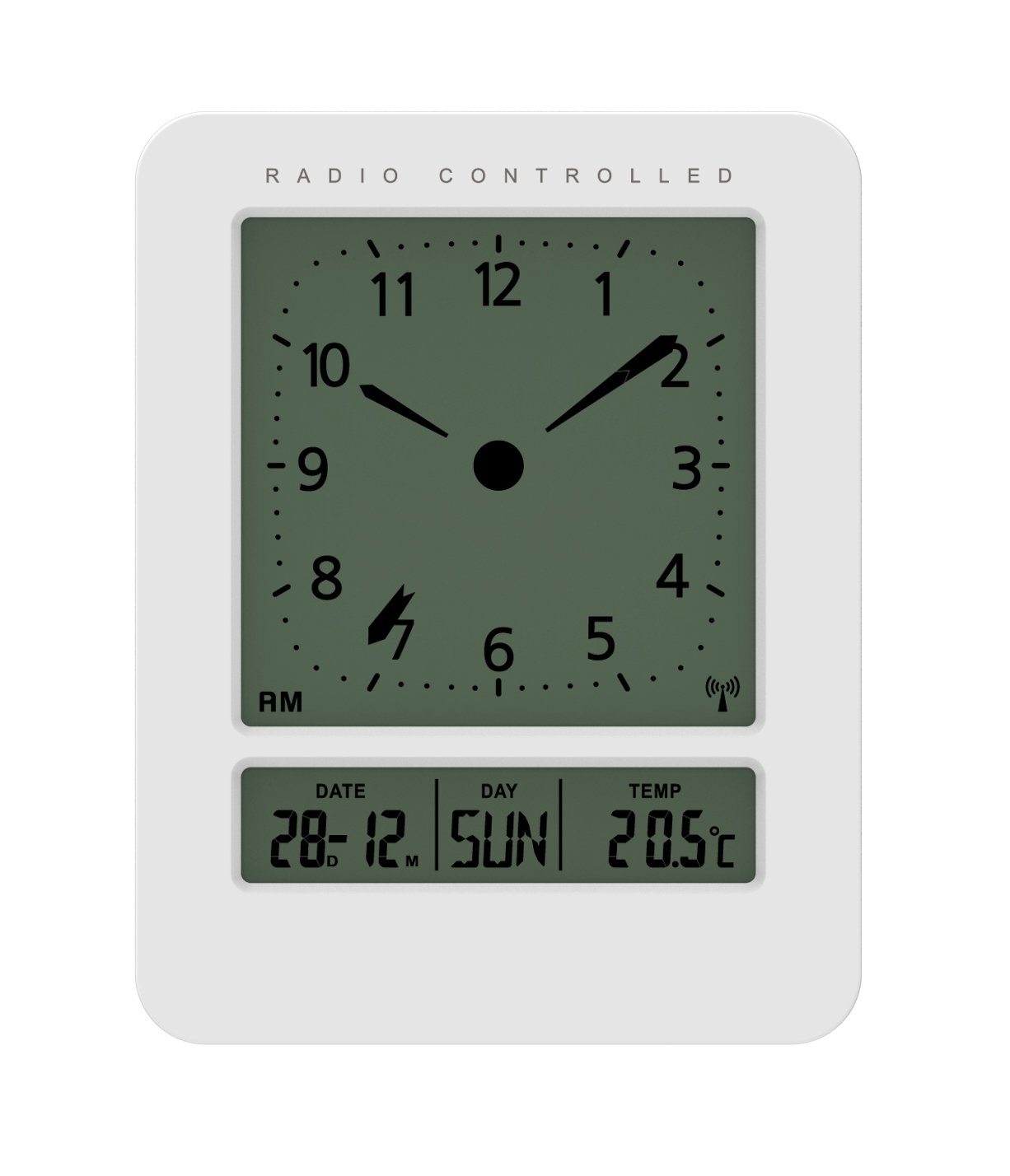
Imagine: Fronte è latu view of the Technoline WT 745 Radio Controlled Alarm Clock, showing the digital display with time, date, day, and temperature, and the analog clock face. The clock is white with a light grey display.
- Analog Clock Face: Displays current time with hour, minute, and second hands.
- Display Digitale: Shows date, day of the week, and indoor temperature.
- Radio Controlled Indicator: Symbol indicating successful radio signal reception.
- Buttuni di cuntrollu: Buttons for setting time, alarm, and other functions, typically located on the back or side.
- Compartimentu di batterie: Located on the back for 2x AAA batteries.
Istituisci
1. Inserting Batteries
- Aprite u coperchiu di u compartimentu di e batterie situatu daretu à a sveglia.
- Insert 2 new AAA batteries, observing the correct polarity (+/-).
- Chiudere in modu sicuru u coperchiu di u compartimentu di a batteria.
Note: The clock will automatically start searching for the radio time signal after battery insertion. This process may take several minutes.
2. Initial Radio Signal Reception
- Pone l'orologio vicinu à una finestra per una ricezione ottimale di u signale.
- Evitate di mettelu vicinu à dispositivi elettronichi chì puderanu causà interferenze.
- Once the signal is received, the time, date, and day will be automatically set. The radio controlled indicator will appear on the display.
If the signal is not received within 10 minutes, try repositioning the clock or manually setting the time (see "Manual Time Setting").
Istruzzioni di funziunamentu
Stabbilimentu di l'Alarma
- Press u SET D'ALARMA button (location not specified, assume standard placement). The alarm time will flash.
- Aduprà u UP or GIÙ buttoni per aghjustà l'ora.
- Press SET D'ALARMA torna per cunfirmà l'ora è passà à i minuti.
- Aduprà u UP or GIÙ buttone per aghjustà i minuti.
- Press SET D'ALARMA per salvà l'ora di a sveglia.
- Per attivà/disattivà l'allarme, appughjà u buttone ALARM ON / OFF buttone. Un'icona d'alarma apparirà/sparirà nant'à u display.
The WT 745 supports two independent alarms. Repeat the steps above to set the second alarm.
Funzione Snooze
- Quandu sona l'alarma, preme u SNOOZE button (usually a large button on top). The alarm will pause for approximately 5 minutes and then sound again.
- To stop the alarm completely, press any other button (e.g., ALARM ON/OFF) or let it ring for its full duration.
Attivazione di a retroilluminazione
- Press u LUCE or SNOOZE button to temporarily illuminate the display for easy viewing in cundizioni di poca luminosità.
Viewing Date, Day, and Temperature
- The digital display continuously shows the current date, day of the week, and indoor temperature. No specific action is required to view questi.
Manual Time Setting (if radio signal is unavailable)
- Appughjà è tene premutu TEMPU SET button for a few seconds until the hour digits flash.
- Aduprà u UP or GIÙ buttoni per aghjustà l'ora.
- Press TEMPU SET torna per cunfirmà l'ora è passà à i minuti.
- Aduprà u UP or GIÙ buttone per aghjustà i minuti.
- Cuntinuà pressendu TEMPU SET to cycle through and adjust year, month, and day as needed.
- Press TEMPU SET one last time to exit manual setting mode.
Mantenimentu
- Pulizia: Asciugate l'orologio cù un pannu dolce è asciuttu. Ùn aduprate micca detergenti abrasivi o solventi.
- Sustituzione di batterie: Replace batteries when the display dims or functions become erratic. Always replace both batteries simultaneously with new ones.
- Conservazione: Sè vo conservate l'orologio per un periodu prolongatu, cacciate e batterie per impedisce perdite.
- Ambiente: Mantene l'orologio luntanu da a luce diretta di u sole, temperature estreme è alta umidità.
Risoluzione di prublemi
| Prublemu | Causa Possibile | Soluzione |
|---|---|---|
| U display hè viotu o scuru. | E batterie sò scariche o inserite in modu incorrectu. | Rimpiazzà e batterie cù batterie AAA nove, assicurendu a polarità curretta. |
| Clock does not receive radio signal. | Interference, poor location, or signal too weak. | Move the clock closer to a window, away from electronic devices. Try manual time setting. |
| L'alarma ùn sona micca. | L'alarma ùn hè micca attivata o hè impostata in modu incorrectu. | Ensure the alarm icon is visible on the display. Recheck alarm time settings. |
| Ora visualizzata incorretta. | Radio signal lost or manual time set incorrectly. | Allow the clock to resynchronize with the radio signal. If persistent, manually set the time. |
Specificazioni
- Mudellu: WT 745
- Marca: Tecnoline
- Dimensioni: 7.1 x 4.5 x 9.2 cm (L x W x H)
- Pesu: 150 g
- Materiale: Plastica
- Tipu di visualizazione: Digital with Analog Clock Face
- Fonte di energia: 2 x Batterie AAA (micca incluse)
- Funzioni speciali: Radio Controlled Time, Dual Alarms, Snooze Function, Date Display, Day of Week Display, Indoor Temperature Display, Backlight.
- usu: Internu
Garanzia è Supportu
For warranty information or technical support, please refer to the warranty card included with your product or visit the official Technoline websitu. Conservate a vostra ricevuta di compra cum'è prova di compra.
Ufficiale Websitu: www.technoline.eu


