Introduzione
Grazie per l'acquistuasing the SENTRY HPXBT150 Bluetooth Flat Cord Earbuds. This manual provides detailed instructions on how to set up, operate, and maintain your new wireless earbuds. Please read this manual thoroughly before use to ensure optimal performance and longevity of your device.
Cuntenutu di u pacchettu
- SENTRY HPXBT150 Bluetooth Flat Cord Earbuds
- Casu protettivu
- USB Charging Cable (Micro-USB)
- Removable Ear Hooks
- Manuale d'usu
Product Overview
The SENTRY HPXBT150 earbuds feature Bluetooth wireless technology, allowing for a cord-free listening experience. They include an in-line microphone for hands-free calls and media control buttons for easy operation. Removable ear hooks provide a secure fit, especially during physical activity.
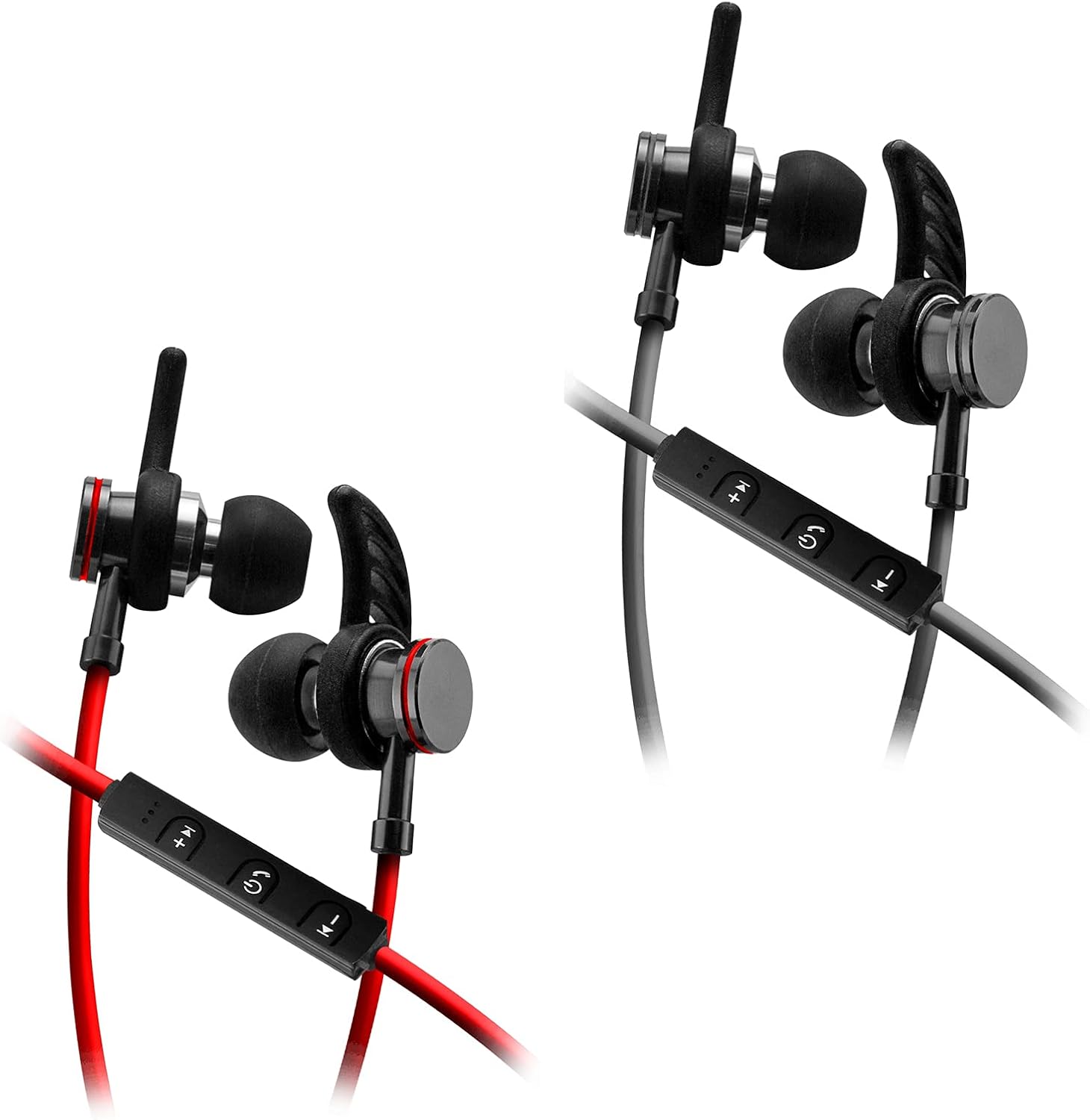
Image: SENTRY HPXBT150 Bluetooth Earbuds showing the in-line control panel and ear hooks. The control panel features volume up/next track, power/multifunction, and volume down/previous track buttons.
Istituisci
1. Caricà l'Earbuds
- Locate the Micro-USB charging port on the in-line control unit.
- Connect the provided USB charging cable to the earbuds' charging port.
- Inserite l'altra estremità di u cavu USB in una fonte di alimentazione USB cumpatibile (per esempiu, una porta USB di l'urdinatore, un adattatore USB da parete).
- The LED indicator light will illuminate during charging. It will change color or turn off once charging is complete. A full charge typically takes approximately 1-2 hours.
2. Abbinamentu Bluetooth
- Assicuratevi chì l'auricolari sianu cumpletamente carichi prima di l'accoppiamentu iniziale.
- Press and hold the multi-function button (usually the center button on the in-line control) for approximately 5-7 seconds until the LED indicator light flashes red and blue alternately. This indicates the earbuds are in pairing mode.
- Nant'à u vostru dispusitivu cumpatibile cù Bluetooth (smartphone, tableta, urdinatore), andate à u menu di i paràmetri Bluetooth.
- Attivate Bluetooth è cercate i dispositi dispunibili.
- Select "HPXBT150" or a similar name from the list of found devices.
- Once successfully paired, the LED indicator on the earbuds will typically flash blue slowly or turn off, and you will hear an audible confirmation.
- Sè vi hè dumandatu una password, inserite "0000".
Istruzzioni di funziunamentu
Power On/Off
- Power On: Press and hold the multi-function button for approximately 3 seconds until the LED indicator flashes blue and you hear a power-on tone.
- Spegnimentu: Press and hold the multi-function button for approximately 3-5 seconds until the LED indicator flashes red and you hear a power-off tone.
Riproduzione musicale
- Play/Pause: Pulsà u buttone multifunzione una volta.
- Aument du volume : Appughjà u buttone "+".
- Volume Imbruglia: Appughjà u buttone '-'.
- Prussima pista: Appughjà è tene premutu u buttone '+'.
- Pista Precedente: Appughjà è tene premutu u buttone '-'.
Gestione di Chjamate
- Rispondi / Finisce a chjama: Pulsà u buttone multifunzione una volta.
- Reject Call: Appughjà è tene premutu u buttone multifunzione per circa 2 secondi.
- Ripeti l'ultimu numeru: Appughjà duie volte u buttone multifunzione.
Mantenimentu
- Pulizia: Use a soft, dry cloth to clean the earbuds. Do not use harsh chemicals or abrasive materials.
- Conservazione: When not in use, store the earbuds in the provided protective case to prevent damage.
- Cura di a batteria: Per priservà a durata di a batteria, evitate di scaricà cumpletamente l'auricolari spessu. Caricateli regularmente, ancu s'elli ùn sò micca aduprati per periodi prolungati.
- Evita l'umidità: Keep the earbuds away from water and excessive moisture.
Risoluzione di prublemi
| Prublemu | Soluzione Possibile |
|---|---|
| L'auricolari ùn s'accendenu micca. | Ensure the earbuds are fully charged. Connect to a power source and allow time to charge. |
| Ùn si pò micca accoppià cù u dispusitivu. | Ensure earbuds are in pairing mode (flashing red/blue). Turn off and on Bluetooth on your device. Move earbuds closer to your device. Forget previous pairings on your device and try again. |
| Nisun sonu o un vulume bassu. | Check volume levels on both the earbuds and your connected device. Ensure earbuds are properly paired. Try re-pairing the earbuds. |
| Cunnessione intermittente. | Assicuratevi chì ùn ci sia micca ostaculi trà l'auricolari è u vostru dispositivu. Avvicinatevi à u vostru dispositivu. Evitate ambienti cù Wi-Fi forte o altre interferenze wireless. |
Specificazioni
- Mudellu: HPXBT150
- Tecnulugia di cunnessione: Wireless (Bluetooth)
- Unità Driver: 10 mm
- Impedenza: 32+/-3 Ohms
- Sensibilità: 103 dB +/-3 dB
- Risposta di Frequency: 20Hz - 20kHz
- Dispositivi cumpatibili: Phones, Tablets, MP3 Players, Computers, Gaming Consoles
- Tipu di cuntrollu: Cuntrollu Media
- Funzioni speciali: Microphone Included, USB Connectivity, Removable Ear Hooks
- Pesu di l'articulu: 2.08 once
Informazioni di sicurezza
- Do not expose the earbuds to extreme temperatures, direct sunlight, or fire.
- Do not disassemble or modify the earbuds. This may void the warranty and cause damage.
- Evitate l'ascolta à livelli di volumi elevati per periodi estesi per prevene danni à l'udito.
- Mantene fora di a portata di i zitelli è di l'animali.
- Eliminate u pruduttu in modu responsibile secondu a regulazione lucali.
Garanzia è Supportu
For warranty information and technical support, please refer to the documentation included with your purchase or contact SENTRY customer service directly. Keep your proof of purchase for warranty claims.


