Introduzione
This manual provides comprehensive instructions for the operation and maintenance of your ONN X5 HiFi Music Player. Please read this manual thoroughly before using the device to ensure proper functionality and to maximize your listening experience. The ONN X5 is designed to deliver high-fidelity audio playback in a compact and user-friendly format.
Product Overview
The ONN X5 is a portable HiFi music player featuring a 2.0-inch TFT screen and an aluminum alloy shell. It supports a wide range of audio formats, including lossless files, and offers expandable storage via a MicroSD card.
Funzioni chjave:
- Audio d'alta fedeltà: Supports WAV, FLAC, ALAC, APE, OGG lossless formats, and high-definition music up to 24Bit/192 KHz.
- Display: 2.0-inch TFT screen (176x220 pixels) for clear navigation and information display.
- Conservazione: 8GB internal memory, expandable up to 32GB with a MicroSD/TF card.
- Disegnu durable: Lightweight aluminum alloy body (60g) for enhanced durability and reduced external interference noise.
- Interfaccia d'utilizatore: Intuitive key-based operation.
- Funzioni supplementari: FM Radio support.
- Batteria: High-capacity rechargeable lithium polymer battery.
- Supportu multilingue: English, Russian, Korean, German, Japanese, Polish, Indonesian, Chinese.
Disposizione di u dispusitivu:

Image: Front view of the ONN X5 HiFi Music Player, showing its display and control buttons. The screen displays track information, audio quality (e.g., 24BIT, 88HHZ), and playback status.

Imagine: Latu view of the ONN X5 HiFi Music Player, illustrating the location of the MicroSD card slot on the right side of the device.

Imagine: Davanti è daretu view of the ONN X5 HiFi Music Player. The back panel shows the model number "X5" and branding information.
Istituisci
1. Caricà u dispusitivu:
- Connect the ONN X5 to a power source using the provided USB cable.
- L'indicatore di batteria nant'à u screnu mostrerà u statu di carica.
- A full charge is recommended before first use. The device uses a high-capacity rechargeable lithium polymer battery.
2. Inserting a MicroSD/TF Card:
- Locate the MicroSD/TF card slot on the side of the player.
- Gently insert a compatible MicroSD/TF card (up to 32GB) into the slot until it clicks into place.
- Ensure the card is inserted correctly to avoid damage.

Image: Contents of the ONN X5 package, showing the player, USB charging cable, and other accessories. This illustrates the components available for setup.
3. Trasferimentu di musica Files:
- Connect the ONN X5 to your computer using the USB cable.
- The device will appear as a removable storage drive.
- Trascinate è lasciate cascà l'audio desideratu files (MP3, WMA, APE, FLAC, WAV, ALAC, OGG) into the player's internal storage or the MicroSD card.
- Espulsate in modu sicuru u dispusitivu da u vostru urdinatore prima di scollegà u cavu USB.
Istruzzioni di funziunamentu
Accensione / spegnimentu:
- To power on, press and hold the power button (usually marked with a universal power symbol) until the screen illuminates.
- Per spegne, appughjà è mantene u buttone di putenza finu à chì u dispusitivu si ferma.
Navigazione:
The ONN X5 uses physical buttons for navigation. Refer to the device layout for button identification.
- VOL: Ajuste u voluminu.
- M (Menù): Accesses menus and confirms selections.
- Arrow Buttons (< / >): Navigate through menus, select tracks, or fast forward/rewind during playback.
- Pulsante di putenza: Also functions as a play/pause button during music playback.
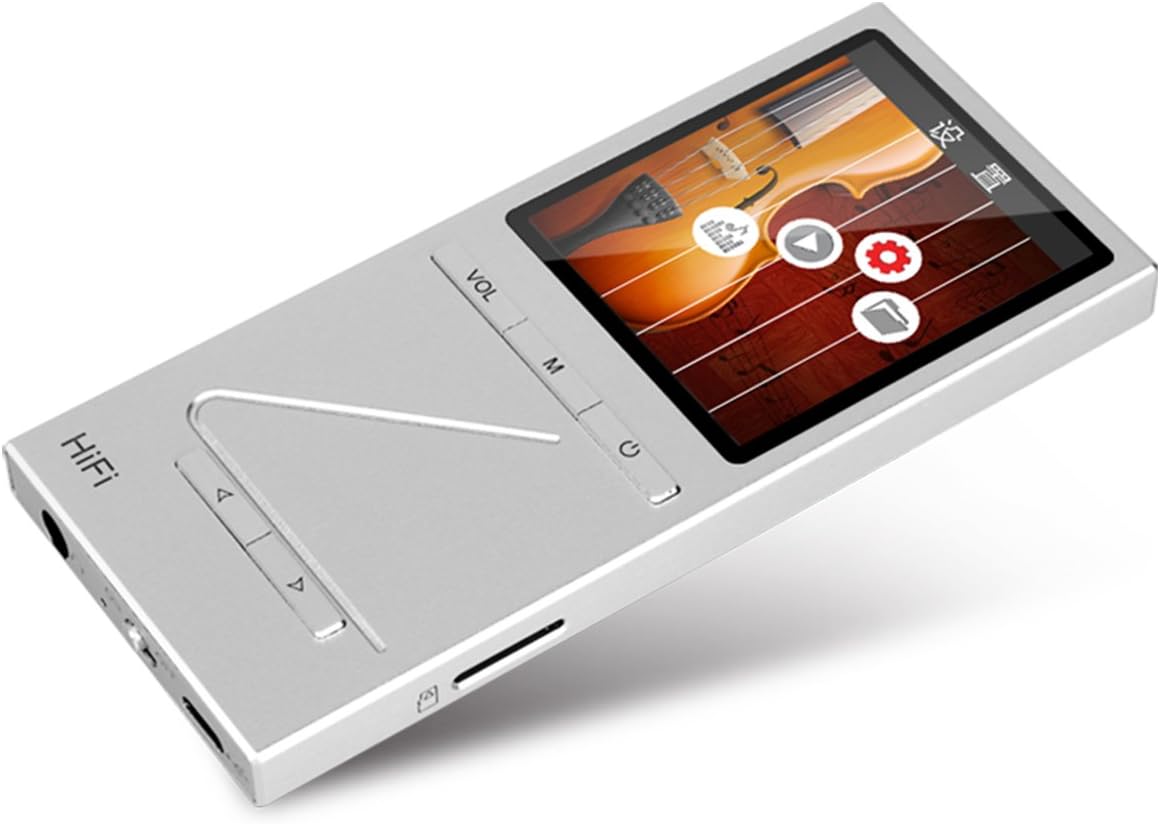
Imagine: Angulata view of the ONN X5 HiFi Music Player, showing the screen with various menu icons, indicating the user interface for navigation.
Riproduzione di musica:
- From the main menu, navigate to "Music" or "Files".
- Browse through your folders and select a track to play.
- Press the Power/Play button to start or pause playback.
- Use the arrow buttons to skip tracks or fast forward/rewind.
- Adjust volume using the VOL button.
Radio FM:
- Navigate to the "FM Radio" option from the main menu.
- Use the navigation buttons to scan for stations or manually tune to a frequency.
- Ensure headphones are connected as they often act as the antenna for FM radio.
Impostazioni di lingua:
L'apparechju supporta parechje lingue. Per cambià a lingua:
- Andate à "Impostazioni" da u menu principale.
- Select "Language" and choose your preferred language from the list (English, Russian, Korean, German, Japanese, Polish, Indonesian, Chinese).
Mantenimentu
- Pulizia: Aduprate un pannu dolce è asciuttu per pulisce l'apparechju. Evitate i detergenti liquidi o i materiali abrasivi.
- Conservazione: Conservate u lettore in un locu frescu è asciuttu, luntanu da a luce diretta di u sole è da temperature estreme.
- Cura di a batteria: Per prulungà a durata di a batteria, evitate di scaricà cumpletamente a batteria spessu. Caricate u dispusitivu regularmente, ancu s'ellu ùn hè micca adupratu per periodi prolungati.
- Evite l'impattu: The aluminum alloy shell provides durability, but avoid dropping the device or subjecting it to strong impacts.
- Esposizione à l'acqua: Stu dispusitivu ùn hè micca impermeabile. Evitate l'esposizione à l'acqua o à l'umidità elevata.
Risoluzione di prublemi
L'apparechju ùn si accende micca:
- Ensure the battery is charged. Connect the device to a power source and allow it to charge for at least 30 minutes before attempting to power on again.
- Try performing a hard reset (if applicable, refer to manufacturer's specific instructions for hard reset, usually involves holding power button for an extended period).
Nisun sonu:
- Check the volume level and ensure it is not muted.
- Verify that headphones or external speakers are properly connected.
- Test with different headphones or audio output devices.
- Assicuratevi l'audio file ùn hè micca curruttu o in un furmatu micca supportatu.
Ùn si pò micca trasferisce Files:
- Assicuratevi chì u cavu USB sia cunnessu currettamente à u lettore è à l'urdinatore.
- Pruvate una porta USB diversa nant'à u vostru urdinatore o un cavu USB differente.
- Verify that the device is recognized by your computer as a removable drive.
- Check if the MicroSD card is properly inserted and not full.
Schermu chì ùn risponde micca / Bloccatu:
- Appughjà è tene premutu u buttone di accensione per circa 10-15 secondi per furzà un riavviu.
- If the issue persists, ensure the battery is charged.
Specificazioni
| Feature | Detail |
|---|---|
| Numero di mudellu | X5 |
| Marca | ONN |
| Size Screen | 2.0 Inches TFT (176x220 PIXEL) |
| Memoria interna | 8 GB |
| Storage espansibile | MicroSD/TF card up to 32 GB |
| Formati audio supportati | APE, FLAC, ALAC, WAV, WMA, OGG, MP3 (up to 24Bit/192 KHz) |
| Tecnulugia di cunnessione | Aux, USB |
| Funzione speciale | Radio FM |
| Batteria | 1 Lithium Ion battery required (High-capacity rechargeable lithium polymer) |
| Pesu di l'articulu | 7 once (circa 0.2 chilogrammi) |
| Dimensioni di u pacchettu | 6.21 x 4.7 x 1.2 inch |
| U fabricatore | SZTZWY |
Garanzia è Supportu
For detailed warranty information, please refer to the warranty card included with your purchase or visit the official ONN product support website. For technical assistance or further inquiries, please contact ONN customer support through their official channels.


