Introduzione
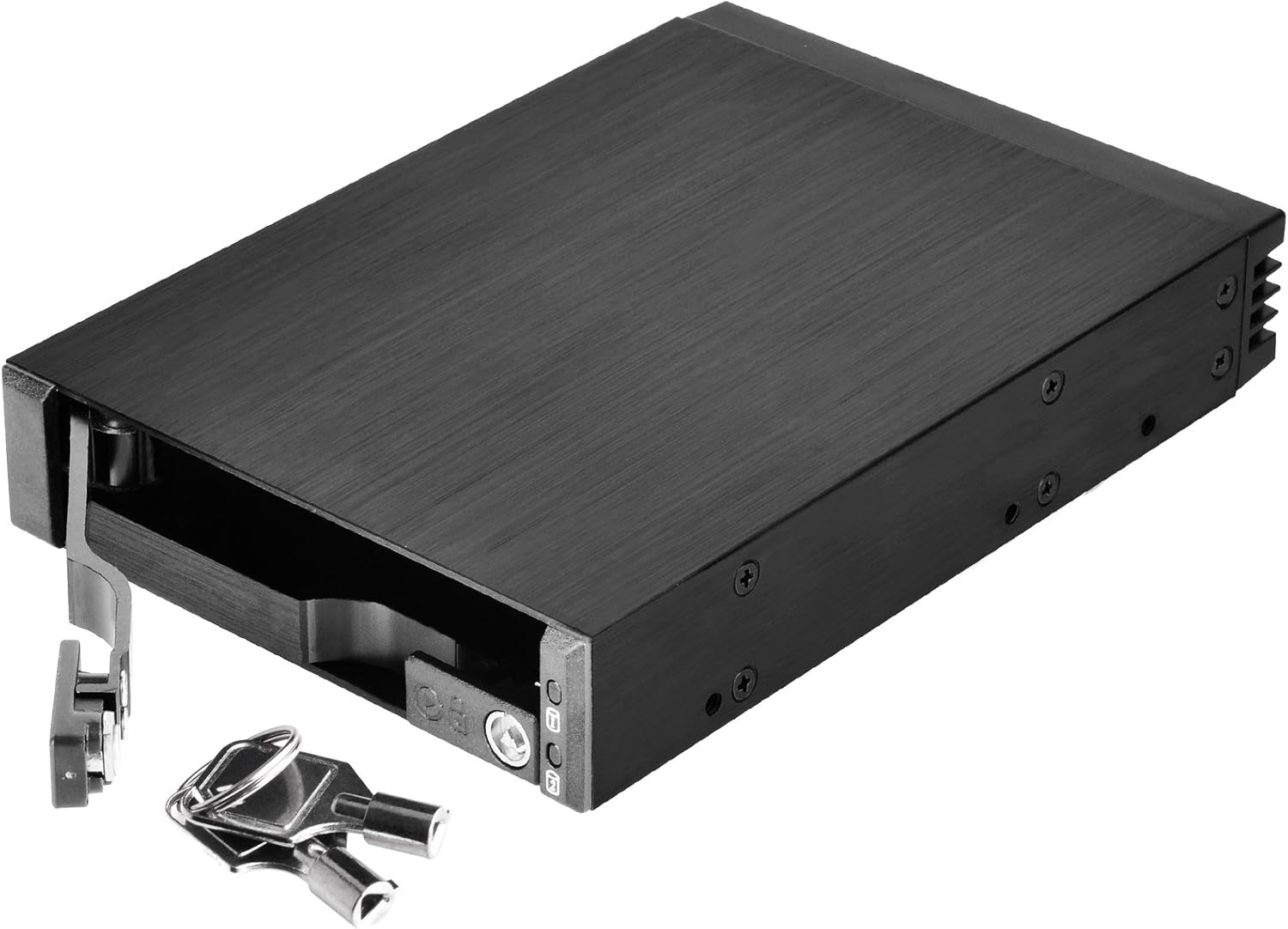
The SilverStone SST-FS202 is a versatile removable case designed to optimize space and convenience for computer users. This 3.5" device bay solution allows for the installation of two 2.5" SAS/SATA hard disk drives or solid-state drives. Featuring a durable aluminum construction and a hot-swap design, it provides easy drive management and enhanced data security with individual key locks for each drive.
Funzioni di u produttu
- Dual Drive Support: Accommodates two 2.5" SAS/SATA drives (HDD or SSD) within a single 3.5" device bay.
- Sicurezza rinfurzata: Features individual metal key locks for each drive bay, providing extra security for your data.
- Premium Construction: Constructed with an all-aluminum body and a refined hairline brushed finish for durability and aesthetics.
- Funzionalità di scambiu à caldu: Fully supports SATA hot-swap, allowing drives to be inserted or removed without system shutdown.
- Trayless & Screwless Design: Simplifies drive installation and removal, eliminating the need for trays or screws.
- Independent Drive Status LED: Each drive bay includes an independent LED indicator to show power and access status.
- Alta Velocità di Trasferimentu di Dati: Supports data transfer rates up to 6 Gbit/s (dependent on drive speed).
Cuntenutu di u pacchettu
- 1x SilverStone SST-FS202 Removable Case
- 2x Keys for drive locks
- Viti di muntatura
- Manuale d'usu
Setup & Installazione
1. Physical Installation into PC Case
- Identify an available 3.5" device bay in your computer case.
- Slide the SST-FS202 into the 3.5" bay until it is flush with the front panel.
- Secure the case using the provided mounting screws through the side screw holes into the drive bay.



2. Drive Installation (2.5" SAS/SATA HDD/SSD)
- Unlock the drive bay lever using the provided key and pull the lever outwards to open the bay.
- Gently slide your 2.5" SAS or SATA HDD/SSD into the open bay. Ensure the drive is oriented correctly so the connectors align with the backplane.
- Push the drive firmly until it seats completely into the connectors.
- Close the drive bay lever and lock it with the key for security.


3. Cunnessioni Cable
- Connect the SATA data cables from the SST-FS202's rear ports to your motherboard's SATA ports.
- Connect the SATA power cable from your power supply unit (PSU) to the SST-FS202's rear power port.

Video 1: Demonstrates how to install and connect the SilverStone SST-FS202, including power and data cables.
Operazione
- Power On: Once connected, power on your computer. The drive status LEDs on the front panel will illuminate (blue for power, blinking blue for access).
- Hot-Swap: The SST-FS202 supports hot-swapping. To remove a drive, ensure it is safely ejected or unmounted from your operating system first. Then, unlock the bay with the key, pull the lever, and carefully slide the drive out.
- Inserting Drives: To insert a new drive, follow the drive installation steps outlined above. The system should detect the new drive automatically.

Mantenimentu
- Keep the unit clean and free from dust to ensure optimal airflow and prevent overheating.
- Verificate regularmente e cunnessione di i cavi per assicurassi ch'elli sianu sicuri.
- Evite di espose l'unità à temperature estreme o umidità.
Risoluzione di prublemi
| Prublemu | Causa Possibile | Soluzione |
|---|---|---|
| Unità micca rilevata. | Loose SATA data/power cables, drive not fully seated, BIOS/OS settings. | Ensure all cables are securely connected. Re-insert the drive firmly. Check your motherboard's BIOS settings for SATA port enablement and hot-swap support. Verify drive functionality in another system if possible. |
| L'indicatori LED ùn s'illuminanu micca. | No power to the unit, faulty drive. | Check the SATA power connection from the PSU. Ensure the drive is properly inserted and functional. |
| Drive not securely locked. | Lever not fully closed, key not turned. | Ensure the drive lever is pushed all the way in and the key is turned to the locked position. |
Specificazioni
| Feature | Detail |
|---|---|
| Numero di mudellu | SST-FS202 |
| Materiale | Aluminum body, plastic front bezel |
| Supportu di Drive | 2 x 2.5" SAS/SATA HDD or SSD |
| Baia di Dispositivi | 1 x 3.5" device bay |
| Interfaccia di Host | 7-Pin SATA connector x 2 (for data) |
| Connettore di putenza | SATA 15-Pin x 1 |
| Rate di trasferimentu di dati | Up to 6 Gbit/s (dependent on drive speed) |
| Drive Door Security | Individual metal key lock design |
| Indicatore LED | Power On: Blue, Accessing: Blinking Blue |
| Pesu Net | 0.22 kg (7.7 ounces) |
| Dimensioni (LxPxH) | 146mm (D) x 101.5mm (W) x 25.4mm (H) / 5.75" x 4" x 1" |
| UPC | 04710007222492 |
For more detailed information, please visit the official product page: SilverStone SST-FS202 Product Page
Garanzia è Supportu
SilverStone products are designed for reliability and performance. For warranty information, technical support, or to register your product, please visit the official SilverStone websitu o cuntattate u so dipartimentu di serviziu di u cliente.
You can also find more products and information at the SilverStone Amazon Store.


