1. Introduzione
This manual provides detailed instructions for the safe and effective operation of the Extech EX355 True RMS Multimeter. The EX355 is a professional digital multimeter designed for a wide range of electrical measurements, including AC/DC voltage, current, resistance, capacitance, frequency, duty cycle, and temperature. It features True RMS for accurate readings of non-sinusoidal waveforms, Non-Contact Voltage (NCV) detection for enhanced safety, Low Impedance (LoZ) mode to prevent ghost voltage readings, and a Low Pass Filter (LPF) for noise reduction in electrical environments.
Please read this manual thoroughly before using the device to ensure proper function and to prevent potential hazards.
2. Informazioni di sicurezza
Always adhere to the following safety precautions to avoid personal injury or damage to the multimeter:
- Leghjite tutte l'istruzzioni: Familiarizatevi cù u funziunamentu è e caratteristiche di sicurezza prima di l'usu.
- Observe all warnings: Pay close attention to all warnings and cautions marked on the meter and in this manual.
- Use proper range: Always select the correct function and range for your measurement.
- Inspect test leads: Before each use, check test leads for damaged insulation or exposed metal. Replace if damaged.
- Do not exceed maximum input limits: Ùn mai applicate voltage or current that exceeds the specified maximum limits for the meter.
- Avoid live circuits: Do not measure resistance, continuity, or diode on live circuits.
- Aduprate cun prudenza cù un altu voltages: Be extremely careful when working with voltagsopra à 60V DC o 30V AC RMS, postu chì questi presentanu un periculu di scossa elettrica.
- Do not operate if damaged: If the meter appears damaged or is not operating properly, discontinue use immediately.
- Sostituzione di batterie: Replace batteries as soon as the low battery indicator appears to ensure accurate readings.
- CAT III 600V: This meter is designed for measurements in CAT III 600V environments.
3. Produttu Finituview
The Extech EX355 is a versatile True RMS Multimeter equipped with several advanced features for accurate and safe electrical testing.
Funzioni chjave:
- 12 Measurement Functions: Includes AC/DC voltage, currente, resistenza, capacità, frequenza, ciclu di travagliu è temperatura.
- True RMS Accuracy: Ensures precise readings for both standard and distorted electrical waveforms.
- Senza cuntattu Voltage (NCV) Rilevazione: Allows for quick and safe detection of AC voltage senza cuntattu direttu.
- Modu à bassa impedenza (LoZ): Prevents false readings caused by ghost voltages in circuits.
- Filtru passa-bassu (LPF): Reduces high-frequency noise for stable and accurate measurements in noisy environments.
- Display: 4000 count LCD display with backlight.
- Data Hold, Min/Max, Relative Mode: For capturing and analyzing measurements.
- Spegnimentu automaticu: Cunserva a durata di a batteria.
- Continuity and Diode Test: Essential for circuit diagnostics.

Figure 1: The Extech EX355 True RMS Multimeter. This image shows the front view of the multimeter, highlighting its display, rotary dial, function buttons, and input jacks.
4. Setup
4.1 Installazione di batterie
The Extech EX355 requires two (2) AA batteries for operation. These are typically included with the device.
- Assicuratevi chì u multimetru sia spento.
- Locate the battery compartment cover on the rear of the unit.
- Unscrew the retaining screw(s) and carefully remove the cover.
- Insert two AA batteries, observing the correct polarity (+ and -) as indicated inside the compartment.
- Rimpiazzate u coperchiu di u compartimentu di a batteria è fissatelu cù a(e) vite(i).
Nota: Replace batteries immediately when the low battery indicator appears on the display to maintain measurement accuracy.
4.2 Cunnessione di i cavi di prova
Always connect the test leads correctly for the desired measurement function.
- Per a maiò parte di u vulumetage, resistance, continuity, diode, capacitance, and frequency measurements, insert the red test lead into the VΩHzCAP jack è u cavu di prova neru in u COM jack.
- For current measurements up to 10A, insert the red test lead into the 10A jack è u cavu di prova neru in u COM jack.
- Per e misure di corrente finu à 400 mA, inserite u cavu di prova rossu in u mAµA jack è u cavu di prova neru in u COM jack.
- Ensure test leads are fully inserted into the jacks.
5. Operating Instructions
This section details how to perform various measurements using the Extech EX355 multimeter.
5.1 AC/DC Voltage misurazione
- Pone u quadrante rotativu à u V~ (Volume ACtage) o V- (DC Voltage) posizione.
- Cunnette vi u cavu di prova rossu à u VΩHzCAP jack è u puntale neru di prova à u COM jack.
- Toccate e sonde di prova à i punti di u circuitu induve u vulumetage hè da esse misurata.
- Leghjite u voltagU valore nantu à a visualizazione.
5.2 Misurazione di a corrente AC/DC
Attenzione: Ùn cunnette mai u multimetru in parallelu cù un vulume.taga fonte quandu si misura a corrente. Cunnette sempre in serie cù u caricu.
- Set the rotary dial to the appropriate A~ (Corrente AC) o A- (DC Current) range (e.g., 10A or mAµA).
- Cunnette vi u cavu di prova rossu à u 10A or mAµA jack è u puntale neru di prova à u COM jack.
- Open the circuit where current is to be measured and connect the test probes in series.
- Leghjite u valore attuale nant'à u display.
5.3 Misurazione di resistenza
Attenzione: Assicuratevi chì u circuitu sia disenergizatu prima di misurà a resistenza.
- Pone u quadrante rotativu à u Ω Posizione (di resistenza).
- Cunnette vi u cavu di prova rossu à u VΩHzCAP jack è u puntale neru di prova à u COM jack.
- Touch the test probes across the component or circuit segment to be measured.
- Leghjite u valore di resistenza nantu à u display.
5.4 Misurazione di a Capacità
Attenzione: Discharge capacitors before measuring to prevent damage to the meter.
- Pone u quadrante rotativu à u CAP (Capacitance) position.
- Cunnette vi u cavu di prova rossu à u VΩHzCAP jack è u puntale neru di prova à u COM jack.
- Toccate e sonde di prova attraversu i terminali di u condensatore.
- Leghjite u valore di capacità nantu à u display.
5.5 Misurazione di frequenza è di ciclu di travagliu
- Pone u quadrante rotativu à u Hz /% Posizione (Frequenza/Ciclu di travagliu).
- Cunnette vi u cavu di prova rossu à u VΩHzCAP jack è u puntale neru di prova à u COM jack.
- Toccate e sonde di prova à a fonte di signale.
- Press u Hz /% buttone per cambià trà e letture di frequenza è di u ciclu di travagliu.
5.6 Misurazione di a Temperatura
The EX355 includes a general purpose bead wire temperature probe.
- Pone u quadrante rotativu à u Temp (Temperature) position.
- Insert the temperature probe into the VΩHzCAP (positive) and COM (negative) jacks, observing polarity.
- Place the tip of the temperature probe on or in the object to be measured.
- Read the temperature value on the display. The unit can display in Celsius or Fahrenheit.

Figure 2: Using the Extech EX355 to measure temperature in an HVAC vent. The image shows a person holding the multimeter and inserting the temperature probe into an air conditioning vent.
5.7 Non-Contact Voltage (NCV) Detection
NCV mode allows for quick detection of AC voltage senza cuntattu direttu, aumentendu a sicurezza.
- Pone u quadrante rotativu à u NCV pusizioni.
- Move the top of the multimeter near a conductor or outlet.
- The NCV indicator light will illuminate and an audible beep will sound if AC voltage is detected. The intensity of the beep and light may increase with stronger fields.
5.8 Modu à bassa impedenza (LoZ)
LoZ mode helps eliminate false readings caused by ghost voltages.
- Pone u quadrante rotativu à u LoZ V pusizioni.
- Connect the test leads as for standard voltage misurazione.
- The meter will present a low impedance load to the circuit, dissipating ghost voltages and providing a more accurate reading of actual voltage.
5.9 Filtru passa-bassu (LPF)
The LPF function is used to filter out high-frequency noise, providing stable readings in variable frequency drive (VFD) applications or other noisy electrical environments.
- Set the rotary dial to an AC Voltage (V~) or AC Current (A~) gamma.
- Press u LPF button to activate the low pass filter. The LPF icon will appear on the display.
- Perform your measurement as usual. The meter will now display readings with high-frequency noise attenuated.
- Press u LPF button again to deactivate the filter.
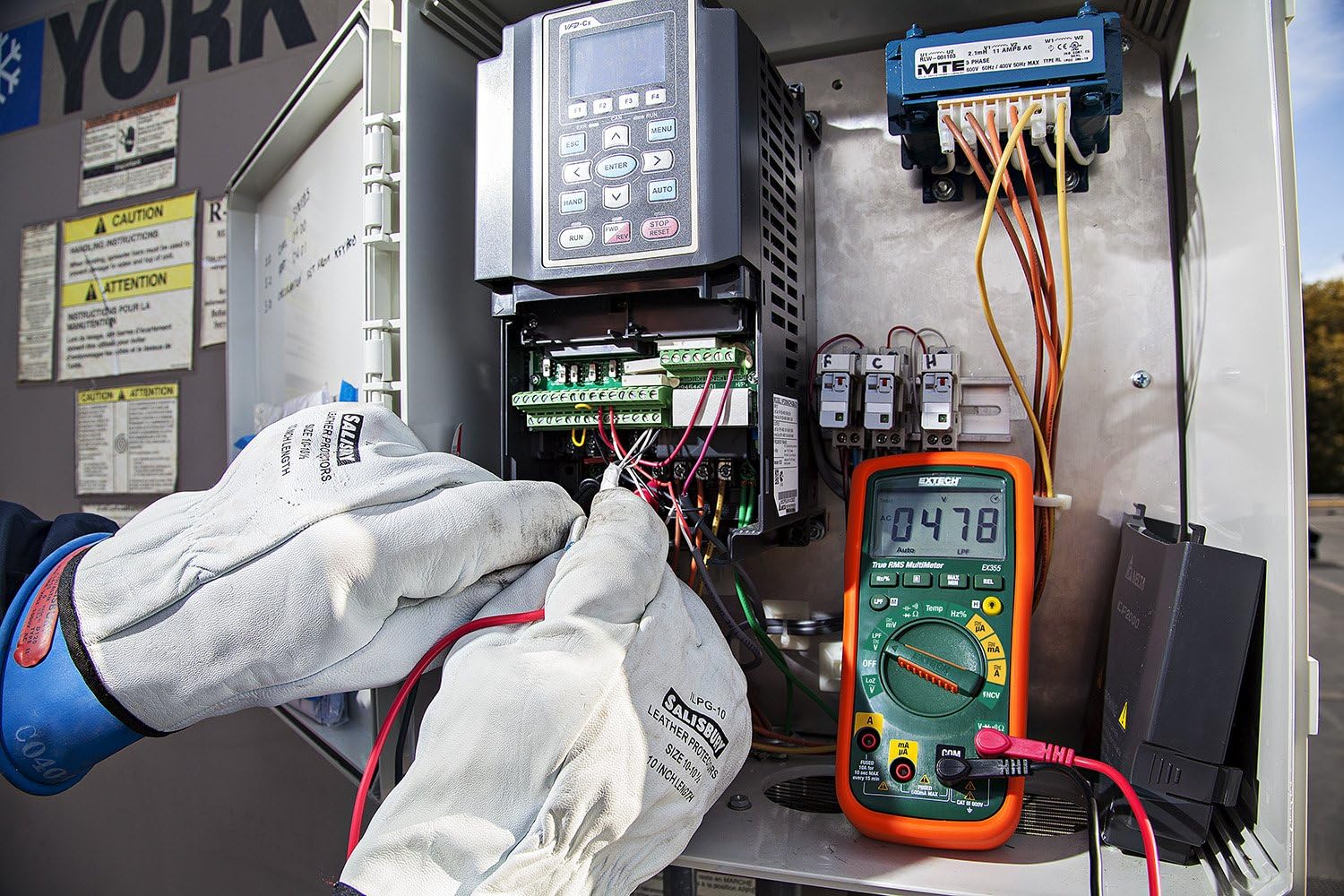
Figure 3: The Extech EX355 Multimeter in use, connected to an electrical control panel. This image demonstrates the multimeter's application in industrial or commercial electrical diagnostics.

Figure 4: The Extech EX355 Multimeter connected to a fuse box. This image illustrates the multimeter being used for testing within a residential or commercial electrical distribution system.
5.10 Data Hold, Min/Max, Relative Mode
- Mantene di dati: Press u HOLD buttone per bluccà a lettura attuale nantu à u display. Appughjà torna per liberà.
- Min/Max: Press u MIN / MAX button to enter Min/Max recording mode. The meter will display the maximum reading. Press again to cycle through minimum and average readings. Hold the button to exit.
- Modu Relativu: Press u REL button to store the current reading as a reference value. Subsequent measurements will be displayed as a difference from this reference. Press again to exit.
5.11 Continuity and Diode Test
Attenzione: Ensure the circuit is de-energized before performing continuity or diode tests.
- Cuntinuità: Pone u quadrante rotativu à u Ω (Resistance) position and press the SELEZIONA button until the continuity symbol (♫) appears. A continuous beep indicates a low resistance path (continuity).
- Test diode: Pone u quadrante rotativu à u Ω (Resistance) position and press the SELEZIONA button until the diode symbol (→|) appears. Connect the red lead to the anode and black lead to the cathode for forward bias voltage drop. Reverse leads for reverse bias.
6. Mantenimentu
6.1 Sustituzione di batterie
Refer to section 4.1 for detailed instructions on replacing the two AA batteries. Always use fresh, high-quality AA batteries.
6.2 Sustituzione di Fuse
If the current measurement functions cease to work, the fuse may need replacement. This procedure should only be performed by qualified personnel.
- Ensure the multimeter is powered off and all test leads are disconnected.
- Eliminate u coperchio di u compartimentu di e batterie è e batterie.
- Unscrew the case screws and carefully separate the two halves of the meter casing.
- Locate the blown fuse(s). The EX355 typically uses two fuses: a 0.5A/600V fast-blow fuse for the mA/µA input and a 10A/600V fast-blow fuse for the 10A input.
- Replace the fuse(s) with fuses of the exact same type and rating. Never use a fuse with a different rating.
- Carefully reassemble the meter casing, ensuring all screws are tightened. Reinstall batteries and the battery cover.
6.3 Pulizia è Conservazione
- Clean the meter regularly with a damp tela è detergente dolce. Ùn aduprate micca abrasivi o solventi.
- Assicuratevi chì u misuratore sia cumpletamente asciuttu prima di l'usu.
- When storing the meter for extended periods, remove the batteries to prevent leakage.
- Conservate u misuratore in un locu frescu è asciuttu, luntanu da a luce diretta di u sole è da temperature estreme.
7. Risoluzione di prublemi
| Prublemu | Causa Possibile | Soluzione |
|---|---|---|
| Nisuna visualizazione o visualizazione debule | Batterie morte o scarse | Rimpiazzà e batterie (vede a Sezione 4.1). |
| Letture sbagliate | Incorrect function/range selected; Damaged test leads; External interference; Blown fuse (for current) | Verify function/range; Inspect/replace test leads; Move away from strong electromagnetic fields; Check/replace fuses (refer to Section 6.2). |
| Nisun bip di continuità | Open circuit; High resistance; Incorrect mode | Ensure circuit is closed; Check for high resistance; Verify continuity mode is selected. |
| A misurazione di corrente ùn funziona micca | Fusibile bruciatu; Cunnessione di u cavu incorretta | Check and replace appropriate fuse (refer to Section 6.2); Ensure leads are in the correct current jacks. |
| NCV ùn rileva micca u vulumetage | No AC voltage present; Weak field; Incorrect mode | Verificate u vulume di l'ACtage with direct contact method; Ensure NCV mode is selected; Move closer to the conductor. |
8. Specificazioni
The following table outlines the key specifications for the Extech EX355 True RMS Multimeter:
| Parametru | Valore |
|---|---|
| Numero di mudellu | EX355 |
| Funzioni di Misurazione | AC / DC Voltage, AC/DC Current, Resistance, Capacitance, Frequency, Duty Cycle, Temperature, Diode, Continuity |
| True RMS | Iè |
| Senza cuntattu Voltage (NCV) | Iè |
| Bassa Impedenza (LoZ) | Iè |
| Filtru Low Pass (LPF) | Iè |
| Volu Operativu Massimutage | 600 Volts |
| Precisione di misurazione | +/-0.5% (typical, varies by function/range) |
| Mostra | 4000 Count LCD |
| Fonte d'energia | 2 x batterie AA (incluse) |
| Dimensioni (L x W x H) | 8.1 x 4.8 x 17 cm (3.2 x 1.9 x 6.7 inch) |
| Pesu di l'articulu | 372 g (0.82 lbs) |
| Materiale | ABS |
| Certificazione | IEC 61010-1, CE, CAT III 600V |
| Cumpunenti inclusi | Test leads, two AA batteries, general purpose bead wire temperature probe |
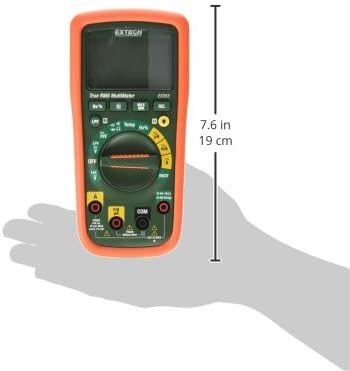
Figure 5: Extech EX355 Multimeter with approximate dimensions shown in inches and centimeters. This image provides a visual reference for the physical size of the device.
9. Garanzia infurmazione
Extech provides a warranty for its products. Specific warranty terms and conditions, including duration and coverage, may vary by region and product. For detailed warranty information, please refer to the warranty card included with your product or visit the official Extech websitu. Conservate a vostra ricevuta d'acquistu cum'è prova d'acquistu per qualsiasi reclamu di garanzia.
10. Assistenza Clienti
For technical assistance, troubleshooting, or service inquiries regarding your Extech EX355 Multimeter, please contact Extech customer support. You can typically find contact information, including phone numbers and email addresses, on the official Extech websitu o in a ducumentazione furnita cù u vostru pruduttu.
Risorse in linea: Visit the official Extech website for FAQs, product downloads, and additional support resources.


