1. Introduzione
This manual provides instructions for the RadioShack Wired Indoor/Outdoor Thermometer and Hygrometer, Model FBA_14145452. This device is designed to simultaneously display indoor temperature, outdoor temperature, and indoor relative humidity. It features a large LCD display for easy reading and a durable outdoor sensor for accurate external measurements.
Funzioni chjave:
- Simultaneous display of indoor temperature, outdoor temperature, and indoor humidity.
- Water-resistant outdoor sensor with a 9.8-foot (3-meter) cable.
- Records and displays minimum and maximum temperature and humidity readings.
- Selectable temperature units: Fahrenheit (°F) or Celsius (°C).
- Versatile placement: integrated stand for flat surfaces or wall-mountable.
2. Cuntenutu di u pacchettu
- RadioShack Indoor/Outdoor Thermometer and Hygrometer Unit
- Wired Outdoor Sensor (attached)
- Manuale d'uso (stu documentu)
3. Setup
3.1 Installazione di batterie
- Truvate u coperchiu di u compartimentu di a batteria nant'à u spinu di l'unità principale.
- Fate scorrere u coperchio.
- Inserite una (1) batteria AAA, assicurendu a polarità curretta (+ è -) cum'è indicata in l'internu di u compartimentu.
- Replace the battery compartment cover. The display should now activate.
3.2 Sensor Placement
The outdoor sensor is attached to the main unit via a 9.8-foot (3-meter) cable. For accurate outdoor temperature readings:
- Route the cable through a window or door frame, ensuring it is not pinched or damaged.
- Place the outdoor sensor in a shaded area, away from direct sunlight, rain, or other heat sources (e.g., vents, walls that absorb heat). Direct sunlight will cause inaccurate high readings.
- Ensure the sensor is positioned where it can accurately measure ambient outdoor temperature.
3.3 Opzioni di muntatura
The main unit offers two placement options:
- Stand: Extend the integrated stand on the back of the unit to place it on any flat surface, such as a desk or shelf.
- Supportu à Parete: Use a screw (not included) to hang the unit on a wall via the keyhole slot on its back.
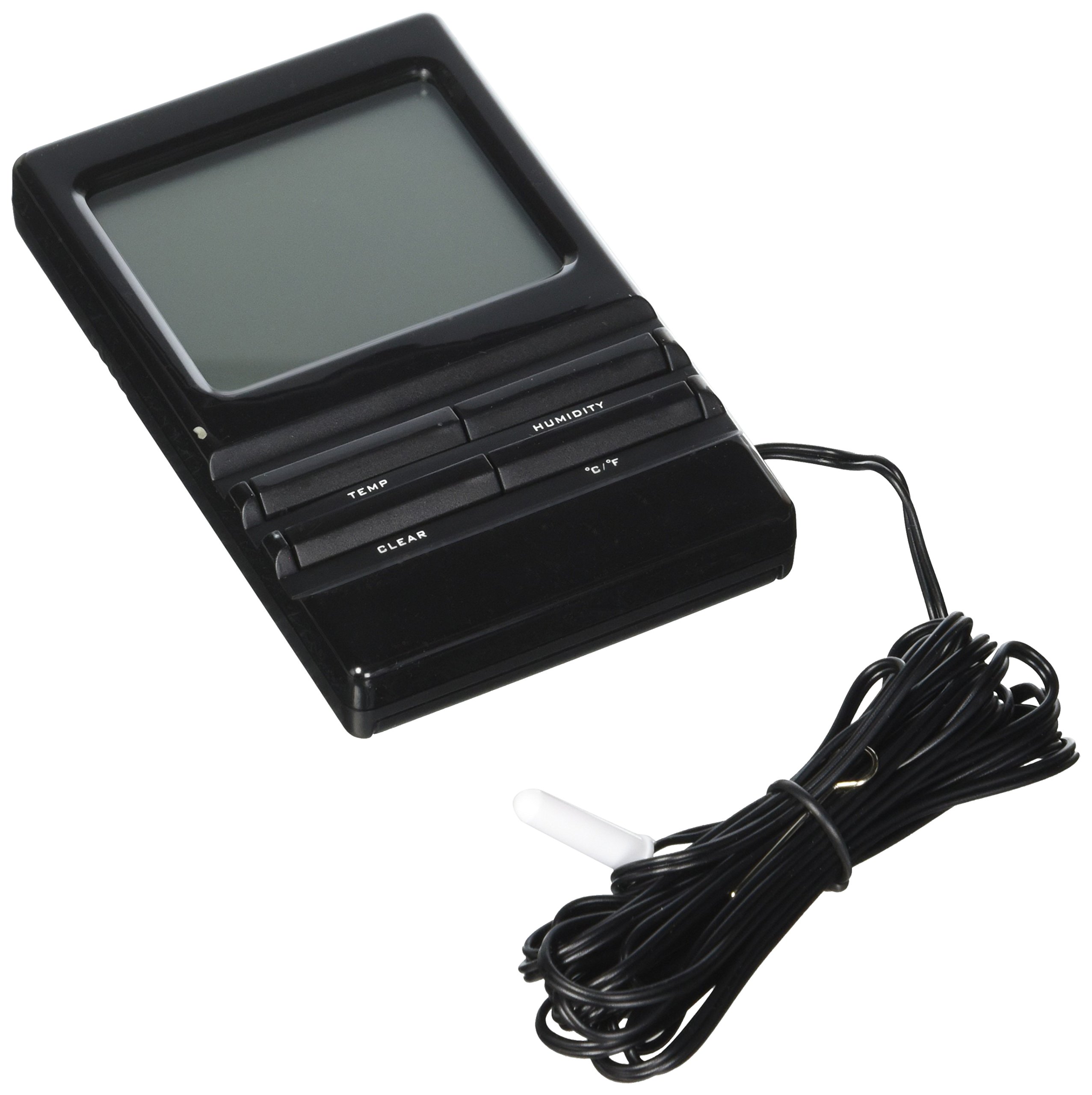
Image: The RadioShack Wired Indoor/Outdoor Thermometer and Hygrometer unit, showing its display and the attached outdoor sensor cable.
4. Operating Instructions
4.1 Mustrà Overview
The large LCD display shows three main readings:
- Température intérieure : Typically displayed at the top or a prominent section.
- Temperatura esterna: Displayed separately, usually below the indoor temperature.
- Indoor Relative Humidity: Displayed alongside the indoor temperature or in its own section.
4.2 Selezzione di l'unità di temperatura (°F/°C)
To switch between Fahrenheit (°F) and Celsius (°C):
- Locate the °F/°C button, usually on the back or side of the unit.
- Press the button to toggle between the two temperature scales. The display will update accordingly.
4.3 Viewing Minimum/Maximum Readings
The unit automatically records the minimum and maximum temperature and humidity values over a period. To view questi:
- Locate the MIN/MAX button, usually on the front or side of the unit.
- Press the MIN/MAX button once to display the maximum recorded values (MAX).
- Press the MIN/MAX button again to display the minimum recorded values (MIN).
- Press it a third time to return to current readings.
4.4 Resetting Minimum/Maximum Readings
To clear the recorded minimum and maximum values and start a new recording cycle:
- Mentre viewing the MIN or MAX readings, press and hold the MIN/MAX button for approximately 3 seconds.
- The display will reset, and new minimum/maximum values will begin to be recorded from the current readings.
5. Mantenimentu
5.1 Pulizia di l'unità
To clean the main unit and sensor:
- Asciugà e superfici cù un soffiu, damp tela.
- Do not use abrasive cleaners, solvents, or harsh chemicals, as these can damage the display or casing.
- Ensure no moisture enters the battery compartment or internal components.
5.2 Sustituzione di batterie
When the display becomes dim or the unit stops functioning, it is time to replace the battery:
- Segui i passi d'installazione di a batteria in a Sezione 3.1.
- Aduprate sempre una batteria AAA nova.
- Eliminate e pile vechji in modu rispunsevuli secondu e regulazioni lucali.
5.3 Cura di i sensori
While the outdoor sensor is water-resistant, prolonged exposure to extreme weather conditions (heavy rain, snow, direct ice) can affect its lifespan. Periodically check the sensor and its cable for any signs of damage or wear.
6. Risoluzione di prublemi
If you encounter issues with your thermometer and hygrometer, please refer to the following common problems and solutions:
| Prublemu | Causa Possibile | Soluzione |
|---|---|---|
| U display hè viotu o scuru. | Batteria bassa o morta; installazione incorretta di a batteria. | Replace the AAA battery with a fresh one, ensuring correct polarity. |
| Outdoor temperature reading is inaccurate or not displayed. | Outdoor sensor exposed to direct sunlight or heat source; sensor cable damaged; sensor malfunction. | Relocate the outdoor sensor to a shaded area. Check the sensor cable for kinks or damage. If the issue persists, the sensor may be faulty. |
| Indoor temperature/humidity reading is inaccurate. | Unit placed near a heat source (e.g., window, appliance) or in an area with poor air circulation. | Move the main unit to a location with stable ambient temperature and good air circulation, away from direct heat or cold sources. |
| Unit not responding to button presses. | Problema di software tempurale; batteria bassa. | Remove and reinsert the battery to perform a soft reset. Replace the battery if it's low. |
7. Specificazioni
- Numero di mudellu: FBA_14145452
- Marca: RadioShack
- Gamma di temperatura interna: 0 ° C à 50 ° C (32 ° F à 122 ° F)
- Gamma di temperatura esterna: -50 °C à 70 °C (-58 °F à 158 °F)
- Gamma di umidità relativa: 20% à 95%
- Lunghezza di u cable: 9.8 piedi (3 metri)
- Fonte di energia: 1 x AAA Battery (not included)
- Culore: Neru
- Dimensioni di u pacchettu: 21.59 x 11.18 x 1.78 cm (8.5 x 4.4 x 0.7 inch)
- Pesu: 45.35 g (1.6 once)
- UPC: 040293027162
8. Garanzia è Support
RadioShack products are manufactured to high-quality standards. For specific warranty information, please refer to the warranty card included with your purchase or contact RadioShack customer support. Keep your purchase receipt as proof of purchase.
For technical assistance or further inquiries, please visit the official RadioShack websitu o cuntattate u so dipartimentu di serviziu di u cliente.


