Introduzione
This manual provides detailed instructions for the setup, operation, and maintenance of your Hyperkin Knight Premium Controller. Designed for use with PlayStation 3 (PS3), PC, and Mac systems, this controller offers a versatile gaming experience with its ergonomic design and responsive controls. Please read this manual thoroughly before using the product to ensure optimal performance and longevity.
Funzioni di u produttu
- Joystick analogichi doppi: Two wide-spectrum analog joysticks for precise control.
- Pressure-Sensitive D-Pad: An eight-way directional pad with pressure sensitivity.
- Buttoni sensibili à a pressione: Four shoulder buttons and four face buttons with pressure sensitivity for nuanced input.
- Feedback di forza: Integrated force feedback for immersive gaming experiences.
- Pulsante Home: Dedicated button for system menu access.
- Cavu longu: A 6-foot (1.8 meter) cable for flexible positioning.
- Compatibilità multipiattaforma: Compatible with all PS3 models, as well as PC and Mac via USB.
Cuntenutu di u pacchettu
- Hyperkin Knight Premium Controller (White)
- Integrated USB Cable (6 ft.)
Istruzzioni di stallazione
Cunnessione à PlayStation 3 (PS3)
- Ensure your PS3 console is powered off or in standby mode.
- Locate an available USB port on your PS3 console.
- Plug the USB connector of the Hyperkin Knight Controller into the USB port on your PS3.
- Power on your PS3 console. The controller should be automatically recognized and assigned a player number.
- If the controller does not respond, try a different USB port or restart the console.
Cunnessione à PC / Mac
- Locate an available USB port on your PC or Mac computer.
- Plug the USB connector of the Hyperkin Knight Controller into the USB port.
- Your operating system (Windows, macOS) should automatically detect and install the necessary drivers. This process may take a few moments.
- Once installed, the controller will be ready for use with compatible games and applications. You may need to configure controller settings within individual games or system preferences.
- Nota: Functionality may vary depending on the operating system and specific game titles.
Istruzzioni di funziunamentu
The Hyperkin Knight Premium Controller features a standard layout for intuitive gameplay.
Disposizione di u Controller

Imagine: In cima view of the Hyperkin Knight Premium Controller, showing the D-pad, analog sticks, face buttons, and central buttons.
- D-Pad (Pad Direzionale): Located on the left, used for directional input.
- Stick analogicu sinistro: Below the D-Pad, for precise movement and camera control.
- Stick analogicu drittu: On the right side, typically for camera control or aiming.
- Buttuni di a faccia (Triangulu, Cerchju, Croce, Quadratu): On the right, used for actions within games.
- Buttoni di spalla (L1, L2, R1, R2): Located on the top edge of the controller, used for various in-game functions.
- Pulsante SELECT: Typically used for menu access or specific game functions.
- Pulsante START: Tipicamente adupratu per mette in pausa i ghjochi o cunfirmà e selezioni.
- Pulsante HOME: Central button to access the PS3 XMB (CrossMediaBar) or system menus on PC/Mac.
Force Feedback
The controller features force feedback (rumble) functionality, which provides tactile sensations during gameplay, enhancing immersion. This feature is automatically enabled when supported by the game and system. If you wish to disable it, check your game's or system's controller settings.
Mantenimentu
- Pulizia: Aduprate un pannu dolce è asciuttu per asciugà u controller. Per a sporcizia ostinata, asciugate leggermente.ampSciacquate u pannu cù acqua. Evitate l'usu di prudutti chimichi aggressivi o di detergenti abrasivi.
- Conservazione: Conservate u controller in un locu frescu è asciuttu, luntanu da a luce diretta di u sole è da e temperature estreme. Evitate di imbulighjà u cavu troppu strettu per impedisce danni.
- Cura di u cable: Do not pull the controller by its cable. Always grasp the USB connector when plugging or unplugging.
Risoluzione di prublemi
Controller ùn risponde micca
- Verificate a cunnessione: Ensure the USB cable is securely plugged into both the controller and the console/computer.
- Pruvate una porta USB diversa: Connect the controller to another USB port on your system.
- Riavvia u Sistema: Power cycle your PS3, PC, or Mac.
- Driver Check (PC/Mac): On PC, check Device Manager to see if the controller is recognized and if there are any driver issues. On Mac, check System Information > USB.
Incorrect Button Mapping or Limited Functionality
- Impostazioni di ghjocu: Many games allow for custom controller mapping. Check the in-game settings for controller configuration.
- System Settings (PC/Mac): For PC, some games or emulators may require specific controller configurations or third-party software. For Mac, check System Preferences > Game Controllers (if available) or specific application settings.
- Compatibilità PS3: While compatible with all PS3 models, some older games or specific PS3 system software versions might have unique controller handling. Ensure your PS3 system software is up to date.
Force Feedback Not Working
- Supportu di ghjocu: Verify that the game you are playing supports force feedback.
- Impostazioni in ghjocu: Check the game's options menu to ensure force feedback (rumble) is enabled.
- Impostazioni di u sistema: On PC, ensure rumble is enabled in your controller settings.
Specificazioni
| Numero di mudellu | M07213-WH |
| Cumpatibilità | PlayStation 3, PC, Mac (via USB) |
| Lunghezza di u cable | 6 piedi (circa 1.8 metri) |
| Tipu di input | Pressure-sensitive buttons and D-pad, dual analog joysticks |
| Feedback | Force Feedback (Rumble) |
| Dimensioni | 2.99 x 7.99 x 7.01 pollici (circa 7.6 x 20.3 x 17.8 cm) |
| Pesu | 12.5 ounces (circa 354 grammi) |
| U fabricatore | Hyperkin Inc |
Garanzia è Supportu
For warranty information and technical support, please refer to the official Hyperkin websitu o cuntattate direttamente u so serviziu clienti. Cunservate a vostra ricevuta d'acquistu cum'è prova d'acquistu per qualsiasi reclamu di garanzia.
Produttore: Hyperkin Inc
Websitu: www.hyperkin.com (Per piacè visitate l'ufficiale website for the most current support information.)
Product Overview Images
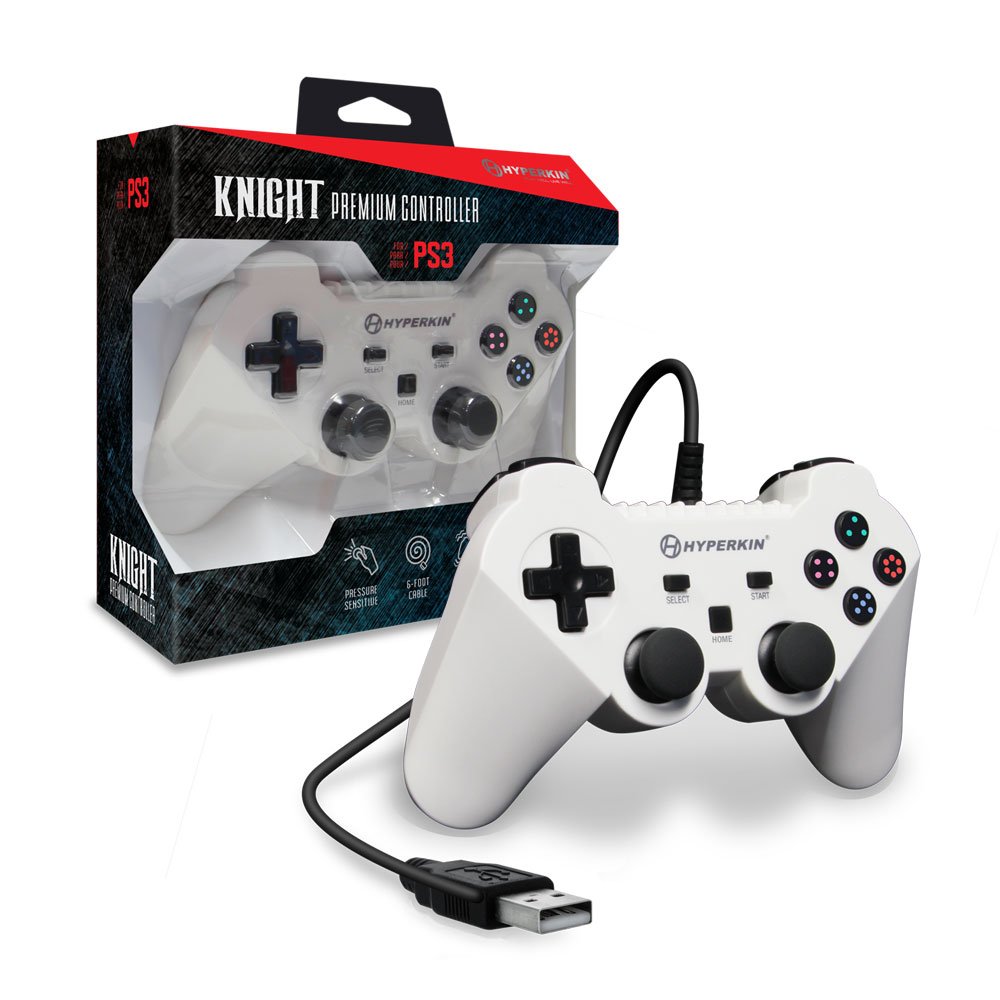
Image: The Hyperkin Knight Premium Controller displayed alongside its retail packaging, highlighting the product's design and branding.

Imagine: Un primu pianu view of the Hyperkin Knight Premium Controller's retail box, showcasing key features and design elements.

Imagine: Un angulatu view of the Hyperkin Knight Premium Controller, emphasizing its ergonomic shape and button placement.


