1. Introduzione
Thank you for choosing the HTC USB Type-C Hi-Res Earphones, Model 99H20317-00. These earphones are designed to provide a high-quality audio experience with their advanced features and ergonomic design. This manual provides essential information for the proper setup, operation, maintenance, and troubleshooting of your new earphones.
E caratteristiche chjave includenu:
- Concert hall design for unparalleled sound.
- Larger 13mm speakers for a fuller sound profile.
- Enhanced port optimization for improved bass reproduction.
- Lighter and thinner aerospace polymer diaphragm to increase sound frequency response.
- Ergonomic design for maximum comfort during extended use.
2. Informazioni di sicurezza
Please read and follow these safety guidelines to ensure safe and optimal use of your earphones:
- Prutezzione di l'udito: Evitate d'ascultà à livelli di vulume elevati per periodi prolungati per prevene danni à l'uditu.
- Cuscenza ambientale: Do not use earphones in situations where the inability to hear ambient sounds could be dangerous, such as while driving, cycling, or walking in traffic.
- Pulizia: Clean the earphones regularly with a soft, dry cloth. Do not use liquid cleaners or solvents.
- Esposizione à l'acqua: These earphones are not waterproof. Avoid exposure to water or excessive moisture.
- I zitelli: Tenite fora di a portata di i zitelli per via di e piccule parte chì puderanu presentà un periculu di suffocazione.
3. Cuntenutu di u pacchettu
Verificate chì tutti l'articuli sò presenti in u vostru pacchettu:
- HTC USB Type-C Hi-Res Earphones (Model: 99H20317-00)
- Additional ear tips (if included)
- Manuale d'uso (stu documentu)
4. Setup
These earphones are designed for simple plug-and-play operation.
- Cunnette: Insert the USB Type-C connector of the earphones into the USB Type-C port of your compatible device (Smartphone, Laptop, Tablet).
- Ricunniscenza di u dispusitivu: Your device should automatically recognize the earphones. If prompted, select the earphones as the audio output device.
- Ajuste u voluminu: Begin playback at a low volume and gradually increase to a comfortable listening level.
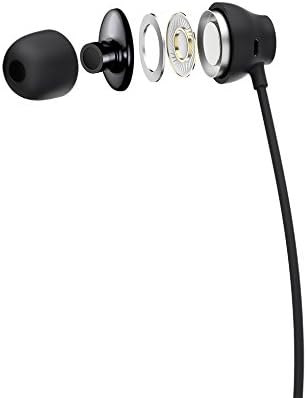
Figure 1: HTC USB Type-C Hi-Res Earphones connected to a device.
5. Operating Instructions
Once connected, your earphones are ready for use.
- Riproduzione audio: Play audio from your connected device. The sound will be routed through the earphones.
- Gestione di chjamate: For devices supporting call functions, you can typically answer/end calls using the device's interface.
- App Control: This model supports control via an application. Refer to your device's app store for any official HTC audio control applications that may offer additional features or sound customization.
6. Mantenimentu è Cura
Proper care extends the lifespan of your earphones:
- Cunsiglii per a pulizia di l'arechje: Gently remove ear tips and clean them with a mild soap solution and water. Ensure they are completely dry before reattaching.
- Pulizia di u corpu di l'auricolari: Wipe the earphone body and cable with a soft, dry, lint-free cloth. Do not use abrasive materials or harsh chemicals.
- Conservazione: When not in use, store the earphones in a clean, dry place, preferably in a protective pouch to prevent tangling and damage.
- Gestione di Cable: Avoid tightly winding the cable or subjecting it to sharp bends, which can damage internal wires.
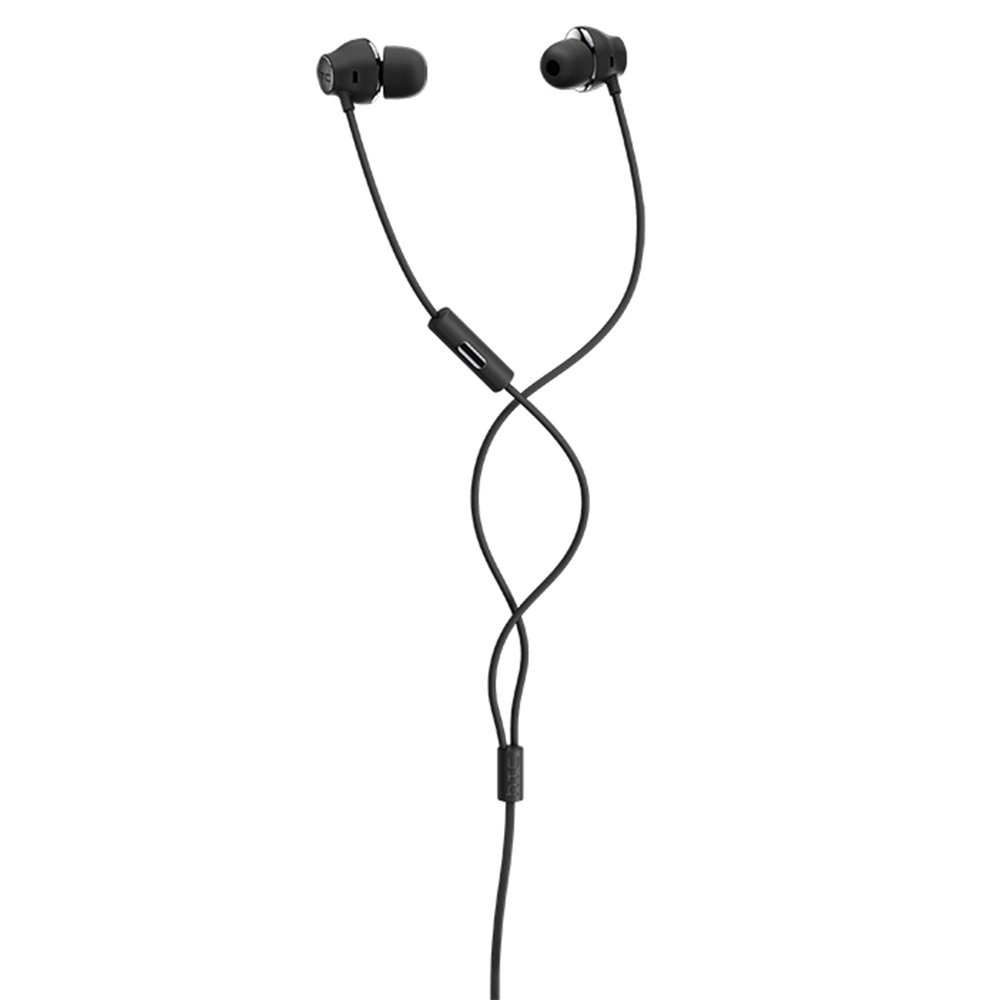
Figura 2: Exploded view of earphone components, highlighting the 13mm speaker and aerospace polymer diaphragm.
7. Risoluzione di prublemi
Sè avete prublemi, riferitevi à i seguenti prublemi cumuni è suluzioni:
| Prublemu | Causa Possibile | Soluzione |
|---|---|---|
| Nisun sonu | Earphones not properly connected; device volume too low; incorrect audio output selected on device. | Ensure the USB Type-C connector is fully inserted. Increase device volume. Check device audio settings to confirm earphones are selected as output. |
| Poveru qualità di sonu | Dirty ear tips; damaged cable; low-quality audio source. | Clean ear tips. Inspect the cable for visible damage. Try a different audio source or file. |
| Earphones uncomfortable or fall out | Dimensione incorretta di a punta di l'arechja. | Try different sized ear tips (if provided) to find the best fit for your ears. |
8. Specificazioni
| Feature | Detail |
|---|---|
| Marca | HTC |
| Numero di mudellu | 99H20317-00 |
| Tecnulugia di cunnessione | Wired (USB Type-C) |
| Size Speaker | 13 mm |
| Materiale | Synthetic leather (ear tips/housing accents) |
| Pesu | 50 grammi |
| Dimensioni di u produttu | 0.1 x 0.1 x 0.1 cm (packaging/shipping dimensions, actual earphone size is compact) |
| Metudu di cuntrollu | App |
| Supportu Bluetooth | Innò |
| Batterie necessarie | Innò |
| Dispositivi compatibles | Smartphone, Laptop, Tablet with USB Type-C audio output |
| Culore | Grisgiu scuru |
| Posizionamentu di l'arechja | In l'orechja |
9. Garanzia è Support
For warranty information and technical support, please refer to the documentation provided with your purchase or visit the official HTC support websitu. Conservate a vostra prova d'acquistu per e richieste di garanzia.