Introduzione
The GameSir M2 MFi Wireless Gamepad is an Apple MFi certified gaming controller designed for an enhanced gaming experience across various Apple devices. This controller is compatible with Apple TV, iPhone, iPad, iPod touch, and Mac, requiring iOS 7 or later, or Mac OS 10.6 or later. It offers a professional gaming experience for various game genres including shooting, fighting, action, and sports. The M2 controller features Bluetooth 4.0 connectivity for lag-free performance and pressure-sensitive buttons for precise control.
This manual provides detailed instructions for setting up, operating, maintaining, and troubleshooting your GameSir M2 gamepad.

Istituisci
Chì ci hè in u Box
- GameSir M2 MFi Wireless Gamepad
Please note that a charging cable is not included in the box. The controller uses a Lightning cable for charging.
Caricà u Controller
Before initial use, ensure the GameSir M2 controller is fully charged. The controller is powered by a Lithium Polymer battery (included).
- Locate the Apple Lightning charging port on the controller.
- Connect a standard Apple Lightning cable (not included) to the controller's charging port and a power source.
- The LED indicator on the controller will show charging status. Refer to the LED indicator section for details.

Abbinamentu cù u vostru Dispositivu
The GameSir M2 uses Bluetooth 4.0 for wireless connectivity. Follow these steps to pair it with your Apple device:
- Ensure your Apple device (iPhone, iPad, Apple TV, Mac) has Bluetooth enabled.
- Turn on the GameSir M2 controller.
- On your Apple device, navigate to the Bluetooth settings.
- Select the GameSir M2 from the list of available devices to pair.
- Once paired, the controller's indicator light will confirm the connection.

Operazione di u Controller
Disposizione è Funzioni di u Controller
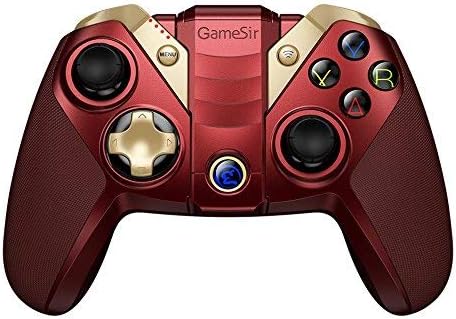
The GameSir M2 features a standard gamepad layout with dual analog sticks, a D-pad, action buttons (A, B, X, Y), and shoulder buttons (L1, L2, R1, R2). The controller also includes an overmolding LED crystal logo button.

Using the Built-in Smartphone Holder
The GameSir M2 includes a built-in adjustable bracket to securely hold your smartphone, allowing for portable gaming.
- Gently extend the adjustable bracket located on the top of the controller.
- Carefully place your smartphone into the bracket, ensuring it is securely held without obstructing the screen or buttons.
- Aghjustate l'angolo per ottimali viewing during gameplay.

Cumpatibilità di u ghjocu
The GameSir M2 is compatible with games that are MFi (Made for iPhone/iPad/iPod) gamepad-supported and certified by Apple. It fully supports games like Fortnite. However, it does not support games such as PUBG.
The controller also supports Tello Drones, enhancing the control experience for drone operation.

Video ufficiale di u produttu
Watch the official product video for a visual guide on the GameSir M2 controller's features and usage.
Mantenimentu
To ensure the longevity and optimal performance of your GameSir M2 controller, follow these maintenance guidelines:
- Pulizia: Aduprate un pannu dolce è asciuttu per pulisce u controller. Evitate l'usu di prudutti chimichi aggressivi o materiali abrasivi chì puderanu dannà a superficia.
- Conservazione: Conservate u controller in un locu frescu è asciuttu, luntanu da a luce diretta di u sole è da temperature estreme.
- Cura di a batteria: For extended storage, charge the battery to approximately 50% to prevent deep discharge. Avoid fully discharging the battery frequently.
- Trattamentu: Evitate di lascià cascà u controller o di sottumettelu à forti impatti, postu chì questu pò dannà i cumpunenti interni.
Risoluzione di prublemi
If you encounter issues with your GameSir M2 controller, refer to the following common troubleshooting steps:
- U cuntrollore ùn si cunnetta micca:
- Assicuratevi chì u controller hè carricu.
- Verificate chì Bluetooth sia attivatu nant'à u vostru dispositivu Apple.
- Try unpairing and re-pairing the controller in your device's Bluetooth settings.
- Restart both the controller and your Apple device.
- Buttons Unresponsive or Laggy:
- Ensure the controller is within range of your device and there are no significant obstructions.
- Check for any firmware updates for the controller (refer to GameSir's official website for information).
- Confirm the game you are playing supports MFi controllers.
- Shoulder Buttons (L1/R1, L2/R2) Issues:
- Some users report that shoulder buttons may require pressing closer to the bottom edge to register input. Adjust your grip if necessary.
- Analog Stick Drift/Incorrect Input:
- If an analog stick consistently registers input in one direction (e.g., down-left), this may indicate stick drift. Try recalibrating the controller if an option is available through GameSir software, or contact support if the issue persists.
- Nisun feedback di vibrazione:
- The GameSir M2 controller does not feature vibration feedback. This is a design characteristic, not a malfunction.
Specificazioni
| Marca | Ghjocu Signore |
| Serie | M2-RD |
| Numero di mudellu | M2-RD |
| Piattaforma Hardware | Mac |
| Cumpatibilità di u Sistema Operativu | iOS 7 or later, Mac OS 10.6 or later |
| Pesu di l'articulu | 0.528 once |
| Dimensioni di u produttu (LxWxH) | 0.31 x 0.2 x 0.51 inch |
| Culore | M2 controller (Red) |
| Fonte d'energia | Alimentatu à batteria |
| Batterie | 1 Batteria Lithium Polymer (inclusa) |
| Tecnulugia di cunnessione | Bluetooth |
| Dispositivi compatibles | Smartphone, TV, Tablet (Apple devices) |
Garanzia è Supportu
For warranty information, product registration, or technical support, please visit the official GameSir websitu o cuntattate u so serviziu clienti. Cunservate a vostra ricevuta d'acquistu cum'è prova d'acquistu per qualsiasi reclamu di garanzia.
GameSir Official Websitu: www.gamesir.hk


