1. Introduzione
This user manual provides detailed instructions for the installation, operation, and troubleshooting of the SIIG HDMI 2.0 Audio Extractor (Model: CE-H24F11-S1). This device is designed to split an incoming HDMI audio signal into stereo analog audio and Toslink optical outputs, enabling connection to various audio systems that may lack HDMI input.
The extractor supports high-resolution video up to 4K/60Hz with HDR and is compliant with HDCP 2.2. It also features ARC (Audio Return Channel) support via Toslink and CEC bypass, ensuring compatibility with modern home theater setups. Please read this manual thoroughly before use to ensure proper setup and optimal performance.
2. Caratteristiche di u produttu
- HDMI 2.0a and HDCP 2.2 compliant.
- Supports HDCP 2.2, HDR, and CEC bypass.
- Video resolutions up to 4Kx2K@60Hz YUV 4:4:4 8-bit and 4K HDR YUV 4:2:0 10-bit.
- Supports 480p, 720p, 1080i, 1080p resolutions.
- Video bandwidth: 18Gbps (600MHz per channel).
- Audio extraction via 3.5mm stereo jack and Toslink optical output.
- ARC audio extraction via Toslink (S/PDIF).
- Supports audio embedded via stereo and S/PDIF (Toslink).
- Formati audio supportati:
- HDMI: PCM 2/5.1/7.1, Dolby 5.1/7.1, DTS 5.1/7.1
- Toslink (S/PDIF): PCM 2, Dolby 5.1, DTS 5.1
- 3.5mm Stereo: PCM 2
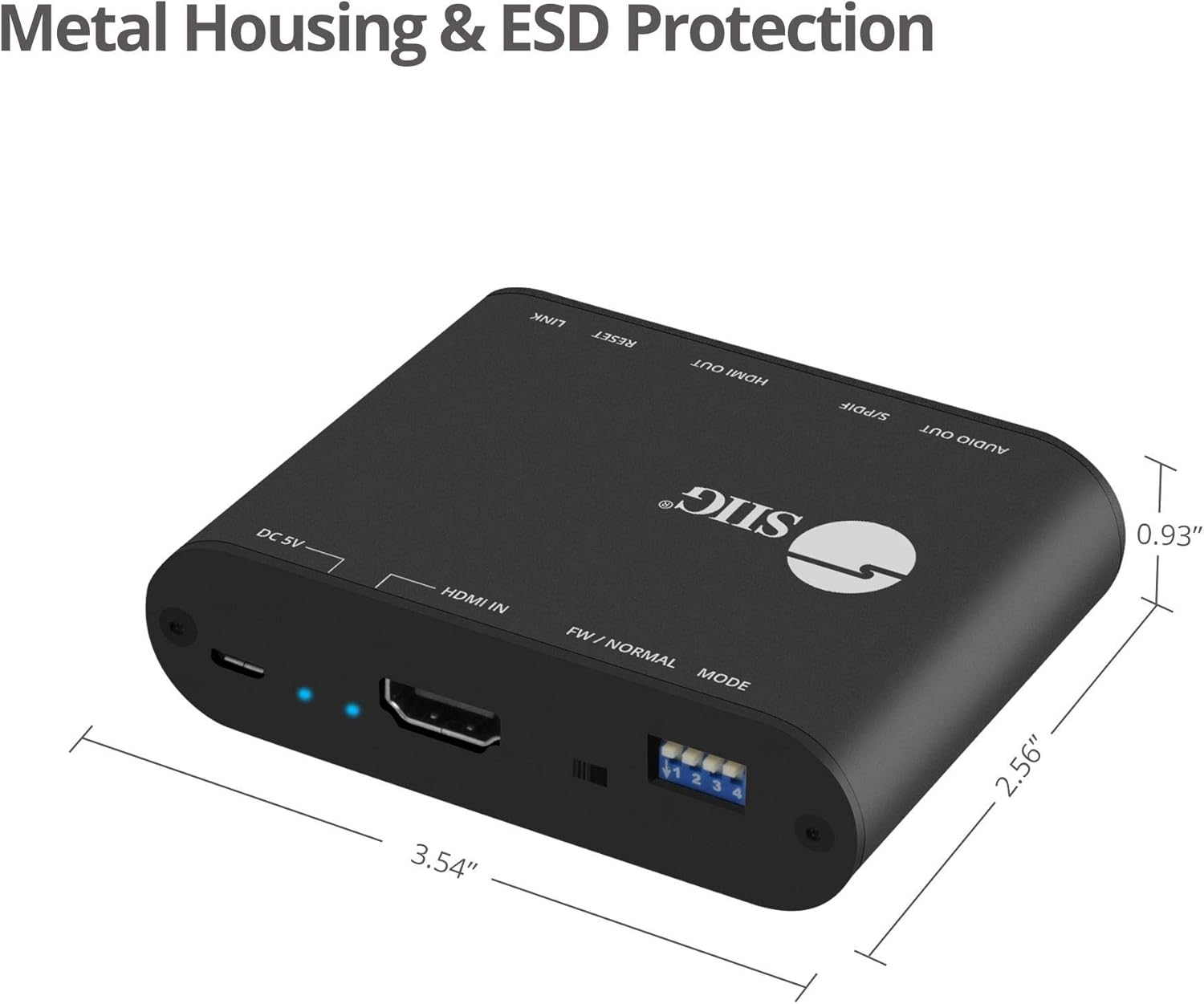
- Sturdy metal enclosure for durability and EMI/RFI noise interference minimization.
- ESD protection: ±15kV Air & ±8kV Contact.
- Country of origin: Taiwan.
- Regulatory approvals: FCC, CE, RoHS.

3. Cuntenutu di u pacchettu
Please verify that all items are present and in good condition. If any items are missing or damaged, contact your vendor for assistance.
- 1x HDMI 2.0 Audio Extractor/Embedder (CE-H24F11-S1)
- 1x USB Type-A to Micro B Cable (for power)
- 1x Installation Guide (this document)
4. Produttu Finituview and Port Descriptions


Pannellu frontale:
- 3.5mm Stereo Output: Connect to analog audio devices (e.g., headphones, stereo speakers).
- S/PDIF (Toslink) Output: Connect to digital optical audio receivers or soundbars.
- Uscita HDMI: Connect to an HDMI display (e.g., TV, monitor, projector).
- Output Signal LED Indicator: Illuminates when an HDMI output signal is detected.
- Pulsante di reset: Adupratu per resettate u dispusitivu.
- Slide Switch (FW/NORMAL Mode):
- Left (FW): Firmware update mode.
- Right (NORMAL): Normal operating mode. Ensure this is set to NORMAL for regular use.
Pannellu di daretu:
- Micro-USB Port (DC 5V): Connect the provided USB power cable for device power. Also used for firmware updates.
- Indicatore LED di Potenza: S'illumina quandu u dispusitivu hè accesu.
- Input Signal LED Indicator: Illuminates when an HDMI input signal is detected.
- Input HDMI: Connect to an HDMI source device (e.g., Blu-ray player, game console, streaming device).
- 4-pin DIP Switch: Used to configure EDID settings and enable/disable ARC and audio extraction functions.
5. Setup Instructions
Follow these steps to set up your SIIG HDMI 2.0 Audio Extractor:
- Dispositivi spenti: Ensure all source devices, displays, and audio systems are powered off before making any connections.
- Cunnette l'entrata HDMI: Connect an HDMI cable from your source device (e.g., Blu-ray player, game console) to the HDMI IN port on the audio extractor.
- Cunnette l'uscita HDMI: Cunnette un cavu HDMI da u HDMI OUT port on the audio extractor to your display device (e.g., TV, monitor, projector).
- Connect Audio Output (Digital): For digital audio, connect a Toslink (optical) cable from the S/PDIF (Toslink) Output port on the extractor to your audio receiver, soundbar, or amppiù vivu.
- Connect Audio Output (Analog): For analog stereo audio, connect a 3.5mm audio cable from the Uscita stereo da 3.5 mm port on the extractor to your headphones or stereo speakers.
- Connect Power: Connect the provided USB Type-A to Micro B cable to the Portu Micro-USB (DC 5V) on the extractor and the other end to a USB power source (e.g., USB wall adapter, TV USB port). The Power LED Indicator will illuminate.
- Verify Slide Switch: Ensure the slide switch on the front panel is set to the NORMAL position (right).
- Power On Dispositivi: Power on your display, audio system, and source device in that order.

6. Operating Instructions
6.1 EDID and Function Configuration (DIP Switch)
The 4-pin DIP switch on the back panel allows you to configure the EDID (Extended Display Identification Data) settings and control the ARC and audio extraction functions. Adjust these settings based on your connected devices and desired audio output.

| Posizione di l'interruttore DIP | Descrizzione |
|---|---|
| PIN1: OFF, PIN2: OFF | Derivazione EDID |
| PIN1: OFF, PIN2: ON | Ultra HD (4K2K@60Hz) – 8/10/12bit, 3D, HDR video & 5.1ch audio |
| PIN1: ON, PIN2: OFF | Ultra HD (4K2K@60Hz) – 8/10/12bit, 3D, HDR video & 2ch audio |
| PIN1: ON, PIN2: ON | Learning EDID from Output |
| PIN3: OFF | Disable ARC Function |
| PIN3: ON | Enable ARC Function |
| PIN4: OFF | Disable Audio Extractor Function |
| PIN4: ON | Enable Audio Extractor Function (via Toslink & 3.5mm) |
Nota: After changing DIP switch settings, it is recommended to power cycle the audio extractor and all connected devices to ensure the new settings are applied correctly.
6.2 ARC (Audio Return Channel) Function
When ARC is enabled (PIN3 ON) and your display supports ARC, audio from your TV's internal tuner or smart apps can be sent back to the audio extractor via the HDMI cable and then output through the Toslink (S/PDIF) port to your audio system.

6.3 CEC Bypass
The device supports CEC (Consumer Electronics Control) bypass, allowing CEC commands to pass through the extractor to control connected HDMI devices. This means you can use a single remote to control multiple CEC-enabled devices in your setup.
7. Risoluzione di prublemi
If you encounter issues with the SIIG HDMI 2.0 Audio Extractor, please refer to the following common troubleshooting steps:
- Nisuna uscita video:
- Assicuratevi chì tutti i cavi HDMI sianu cunnessi currettamente.
- Verify the input source is selected correctly on your display.
- Check the power connection to the extractor; the Power LED should be illuminated.
- Pruvate un altru cavu HDMI.
- Adjust DIP switch settings for EDID (PIN1 & PIN2) to match your display's capabilities or try "EDID bypass".
- Power cycle all connected devices (source, extractor, display).
- No Audio Output (Toslink/3.5mm):
- Ensure audio cables (Toslink or 3.5mm) are securely connected to the correct output ports on the extractor and input ports on your audio system.
- Verify the audio input is selected correctly on your audio receiver/soundbar.
- Check DIP switch PIN4 is set to ON to enable audio extraction.
- If using ARC, ensure DIP switch PIN3 is set to ON and your TV's ARC function is enabled.
- Confirm the audio format from your source is supported by your audio system and the extractor (refer to "Product Features" for supported formats). Some audio systems may not support certain multi-channel formats.
- Try setting DIP switch PIN1: ON, PIN2: OFF for 2ch audio output if your audio system only supports stereo.
- Power cycle all connected devices.
- Video/Audio intermittenti:
- Verificate per e cunnessione di cable loose.
- Assicuratevi chì l'alimentazione hè stabile.
- Riduce a lunghezza di i cavi se pussibule, in particulare per l'HDMI.
- Verify that the slide switch is in the NORMAL pusizioni.
- Pruvate cù diversi cavi HDMI.
- HDR/4K Issues:
- Ensure all connected HDMI cables are rated for HDMI 2.0 or higher and support 18Gbps bandwidth.
- Verify your source and display devices both support 4K/60Hz and HDR.
- Adjust EDID settings (PIN1 & PIN2) to ensure the correct video mode is selected.
8. Specificazioni
| Feature | Detail |
|---|---|
| Numero di mudellu | CE-H24F11-S1 |
| Conformità HDMI | HDMI 2.0a |
| Conformità HDCP | HDCP 2.2 |
| Video Larghezza di banda | 18Gbps (600MHz per channel) |
| Risoluzioni supportate | Up to 4Kx2K@60Hz (YUV 4:4:4 8-bit), 4K HDR (YUV 4:2:0 10-bit), 1080p, 1080i, 720p, 480p |
| Supportu HDR | Yes (4K@60Hz YUV 4:2:0 10-bit) |
| Uscite Audio | 1x Toslink (S/PDIF), 1x 3.5mm Stereo |
| Supportu ARC | Yes (via Toslink) |
| Support CEC | Bypass |
| Prutezzione ESD | ±15kV Air & ±8kV Contact |
| Materiale | Recintu metallicu |
| Dimensioni di u produttu (L x L) | 4.56" x 0.78" (11.58 cm x 1.98 cm) |
| Pesu di l'articulu | 6.4 ounces (181.4 grammi) |
| Alimentazione elettrica | DC 5V (via Micro-USB) |
| Temperature di funziunamentu | Finu à 104 ° F (40 ° C) |
| Certificazioni | FCC, CE, RoHS, TAA compliant |
| Paese d'origine | Taiwan |
9. Mantenimentu
The SIIG HDMI 2.0 Audio Extractor is designed for reliable operation with minimal maintenance.
- Pulizia: Use a soft, dry cloth to clean the device. Avoid using liquid or aerosol cleaners, as they may damage the unit.
- Ventilazione: Assicuratevi chì u dispusitivu sia piazzatu in un locu ben ventilatu per impedisce u surriscaldamentu. Ùn bluccate micca alcuna apertura di ventilazione.
- Conservazione: Quandu ùn hè micca adupratu per periodi prolungati, cunservate u dispusitivu in un locu frescu è asciuttu, luntanu da a luce diretta di u sole è da temperature estreme.
- Actualizazioni di firmware: Periodically check the SIIG website for any available firmware updates for your model. Follow the instructions provided with the firmware update carefully.
10. Informazioni di sicurezza
Please observe the following safety guidelines to prevent damage to the device and ensure user safety:
- Ùn espone micca u dispusitivu à l'acqua o à l'umidità eccessiva.
- Ùn pruvate micca d'apre o di mudificà l'apparechju. Ùn ci sò micca pezzi riparabili da l'utente à l'internu.
- Use only the provided power cable or a certified 5V USB power adapter.
- Mantene l'apparecchiu luntanu da fonti di calore, luce solare diretta è materiali inflammabili.
- Ensure proper grounding for all connected electrical equipment.
11. Garanzia è Support Tecnicu
11.1 Garanzia infurmazione
The SIIG HDMI 2.0 Audio Extractor (CE-H24F11-S1) comes with a 3 anni di garanzia. This warranty covers defects in materials and workmanship under normal use. For specific terms and conditions, please refer to the warranty documentation provided with your purchase or visit the official SIIG websitu.
11.2 Assistenza tecnica
For technical assistance, product inquiries, or troubleshooting beyond the scope of this manual, please contact SIIG customer support.
- Websitu: Visit the official SIIG websitu per risorse di supportu, FAQ è informazioni di cuntattu.
- Cuntattu: Refer to your product packaging or the SIIG website for the most current contact details for technical support.


